react-native-background-geolocation
Version:
The most sophisticated cross-platform background location-tracking & geofencing module with battery-conscious motion-detection intelligence
1,120 lines (1,056 loc) • 126 kB
TypeScript
/// <reference path="../types.d.ts" />
/// <reference path="./LocationAuthorizationAlert.d.ts" />
/// <reference path="./PermissionRationale.d.ts" />
///
///
declare module "react-native-background-geolocation" {
/**
* ## 🔧 Configuration API.
*
* The following configuration options are used to configure the SDK via the methods [[BackgroundGeolocation.ready]] and [[BackgroundGeolocation.setConfig]].
*
* @example
* ```typescript
* BackgroundGeolocation.ready({
* desiredAccuracy: BackgroundGeolocation.DESIRED_ACCURACY_HIGH,
* distanceFilter: 10,
* stopOnTerminate: false,
* startOnBoot: true,
* url: "http://my.server.com",
* params: {
* "user_id": 123
* },
* headers: {
* "my-auth-token":"secret-key"
* }
* }).then((state) => {
* console.log("[ready] BackgroundGeolocation is configured and ready to use");
*
* BackgroundGeolocation.start();
* })
*
* // Or with #setConfig
* BackgroundGeolocation.setConfig({
* extras: {route_id: 1234},
* url: "https://my.new.server.com"
* })
* ```
*
## Geolocation Options
### [Geolocation] Common Options
| Option | Type | Note |
|-------------|-----------|-----------------------------------|
| [[desiredAccuracy]] | [[LocationAccuracy]] | __Default: [[BackgroundGeolocation.DESIRED_ACCURACY_HIGH]]__. Specify the desired-accuracy of the geolocation system. |
| [[distanceFilter]] | `Integer` | __Default: `10`__. The minimum distance (measured in meters) a device must move horizontally before an update event is generated. |
| [[disableElasticity]] | `Boolean` | __Default: `false`__. Set true to disable automatic speed-based [[distanceFilter]] elasticity. eg: When device is moving at highway speeds, locations are returned at ~ 1 / km. |
| [[elasticityMultiplier]] | `Float` | __Default: `1`__. Controls the scale of automatic speed-based `distanceFilter` elasticity. Increasing `elasticityMultiplier` will result in few location samples as speed increases. |
| [[stopAfterElapsedMinutes]] | `Integer` | __Default: `0`__. The plugin can optionally automatically stop tracking after some number of minutes elapses after the [[BackgroundGeolocation.start]] method was called. |
| [[stopOnStationary]] | `Boolean` | __Default: `false`__. The plugin can optionally automatically stop tracking when the `stopTimeout` timer elapses. |
| [[desiredOdometerAccuracy]] | `Integer` | __Default: `100`__. Location accuracy threshold in **meters** for odometer calculations. |
| [[useSignificantChangesOnly]] | `Boolean` | __Default: `false`__. Defaults to `false`. Set `true` in order to disable constant background-tracking. A location will be recorded only several times / hour. |
| [[disableLocationAuthorizationAlert]] | `Boolean` | __Default: `false`__. Disables automatic authorization alert when plugin detects the user has disabled location authorization. You will be responsible for handling disabled location authorization by listening to the `providerchange` event.|
| [[locationAuthorizationRequest]] | [[LocationAuthorizationRequest]] | __Default: `Always`__. The desired location-authorization request, either `Always`, `WhenInUse` or `Any`. |
### [Geolocation] iOS Options
| Option | Type | Note |
|-------------|-----------|-----------------------------------|
| [[stationaryRadius]] | `Integer` | __Default: `25`__. When stopped, the minimum distance the device must move beyond the stationary location for aggressive background-tracking to engage. |
| [[locationAuthorizationAlert]] | `Object` | When you configure the plugin [[locationAuthorizationRequest]] `Always` or `WhenInUse` and the user *changes* that value in the app's location-services settings or *disables* location-services, the plugin will display an Alert directing the user to the **Settings** screen. |
| [[showsBackgroundLocationIndicator]] | `Boolean` | A `boolean` indicating whether the status bar changes its appearance when an app uses location services in the background with `Always` authorization. |
### [Geolocation] Android Options
| Option | Type | Note |
|-------------|-----------|-----------------------------------|
| [[locationUpdateInterval]] | `Integer` | __Default: `1000`__. With [[distanceFilter]]: 0, Sets the desired interval for location updates, in milliseconds. ⚠️ This setting will be ignored when **`distanceFilter > 0`** |
| [[fastestLocationUpdateInterval]] | `Integer` | __Default: `10000`__. Explicitly set the fastest interval for location updates, in milliseconds. |
| [[deferTime]] | `Integer` | __Default: `0`__. Sets the maximum wait time in milliseconds for location updates to be delivered to your callback, when they will all be delivered in a batch.|
| [[allowIdenticalLocations]] | `Boolean` | __Default: `false`__. The Android plugin will ignore a received location when it is identical to the last location. Set `true` to override this behaviour and record every location, regardless if it is identical to the last location.|
## Activity Recognition Options
### [Activity Recognition] Common Options
| Option | Type | Note |
|-------------|-----------|-----------------------------------|
| [[stopTimeout]] | `Integer` | __Default: `5`__. The number of **minutes** to wait before turning off location-services after the ActivityRecognition System (ARS) detects the device is `STILL` |
| [[stopDetectionDelay]] | `Integer` | __Default: `0`__. Number of **minutes** to delay the stop-detection system from being activated.|
| [[disableStopDetection]] | `Boolean` | __Default: `false`__. Disable accelerometer-based **Stop-detection System**. ⚠️ Not recommended|
| [[disableMotionActivityUpdates]] | `Boolean` | __Default: `false`__. Disable motion-activity updates (eg: "walking", "in_vehicle"). Requires permission from the user. ⚠️ The plugin is **HIGHLY** optimized to use the Motion API for improved battery performance. You are **STRONLY** recommended to **NOT** disable this. |
### [Activity Recognition] iOS Options
| Option | Type | Note |
|-------------|-----------|-----------------------------------|
| [[activityType]] | [[ActivityType]] | __Default: [[BackgroundGeolocation.ACTIVITY_TYPE_OTHER]]__. Presumably, this affects ios GPS algorithm. See [Apple docs](https://developer.apple.com/library/ios/documentation/CoreLocation/Reference/CLLocationManager_Class/CLLocationManager/CLLocationManager.html#//apple_ref/occ/instp/CLLocationManager/activityType) for more information |
## HTTP & Persistence Options
- 📘 [[HttpEvent | HTTP Guide]]
| Option | Type | Note |
|-------------|-----------|-----------------------------------|
| [[url]] | `String` | __Default: `undefined`__. Your server url where you wish to HTTP POST locations to |
| [[httpTimeout]] | `Integer` | __Default: `60000`__. HTTP request timeout in milliseconds. |
| [[params]] | `Object` | __Default: `undefined`__. Optional HTTP params sent along in HTTP request to above [[url]] |
| [[extras]] | `Object` | __Default: `undefined`__. Optional meta-data to attach to *each* recorded location |
| [[headers]] | `Object` | __Default: `undefined`__. Optional HTTP headers sent along in HTTP request to above [[url]] |
| [[method]] | `String` | __Default: `POST`__. The HTTP method. Defaults to `POST`. Some servers require `PUT`.|
| [[httpRootProperty]] | `String` | __Default: `location`__. The root property of the JSON data where location-data will be appended. |
| [[locationTemplate]] | `String` | __Default: `undefined`__. Optional custom location data schema (eg: `{ "lat:<%= latitude %>, "lng":<%= longitude %> }`|
| [[geofenceTemplate]] | `String` | __Default: `undefined`__. Optional custom geofence data schema (eg: `{ "lat:<%= latitude %>, "lng":<%= longitude %>, "geofence":"<%= geofence.identifier %>:<%= geofence.action %>" }`|
| [[autoSync]] | `Boolean` | __Default: `true`__. If you've enabled HTTP feature by configuring an [[url]], the plugin will attempt to upload each location to your server **as it is recorded**.|
| [[autoSyncThreshold]] | `Integer` | __Default: `0`__. The minimum number of persisted records to trigger an [[autoSync]] action. |
| [[batchSync]] | `Boolean` | __Default: `false`__. If you've enabled HTTP feature by configuring an [[url]], [[batchSync]]: true will POST all the locations currently stored in native SQLite datbase to your server in a single HTTP POST request.|
| [[maxBatchSize]] | `Integer` | __Default: `-1`__. If you've enabled HTTP feature by configuring an [[url]] and [[batchSync]]: true, this parameter will limit the number of records attached to each batch.|
| [[maxDaysToPersist]] | `Integer` | __Default: `1`__. Maximum number of days to store a geolocation in plugin's SQLite database.|
| [[maxRecordsToPersist]] | `Integer` | __Default: `-1`__. Maximum number of records to persist in plugin's SQLite database. Defaults to `-1` (no limit). To disable persisting locations, set this to `0`|
| [[locationsOrderDirection]] | `String` | __Default: `ASC`__. Controls the order that locations are selected from the database (and synced to your server). Defaults to ascending (`ASC`), where oldest locations are synced first. Descending (`DESC`) syncs latest locations first.|
## Application Options
### [Application] Common Options
| Option | Type | Note |
|-------------|-----------|-----------------------------------|
| [[stopOnTerminate]] | `Boolean` | __Default: `true`__. Set `false` to continue tracking after user terminates the app. |
| [[startOnBoot]] | `Boolean` | __Default: `false`__. Set to `true` to enable background-tracking after the device reboots. |
| [[heartbeatInterval]] | `Integer` | __Default: `60`__. Rate in **seconds** to fire [[BackgroundGeolocation.onHeartbeat]] events. |
| [[schedule]] | `Array` | __Default: `undefined`__. Defines a schedule to automatically start/stop tracking at configured times |
### [Application] iOS Options
| Option | Type | Note |
|-------------|-----------|-----------------------------------|
| [[preventSuspend]] | `Boolean` | __Default: `false`__. Enable this to prevent **iOS** from suspending your app in the background while in the **stationary state**. Must be used in conjunction with a [[heartbeatInterval]].|
### [Application] Android Options
| Option | Type | Note |
|-------------|-----------|------------------------------------|
| [[foregroundService]] | `Boolean` | __Default: `false`__. Set `true` to make the plugin *mostly* immune to OS termination due to memory pressure from other apps. |
| [[enableHeadless]] | `Boolean` | __Default: `false`__. Set to `true` to enable "Headless" mode when the user terminates the application. In this mode, you can respond to all the plugin's events in the native Android environment. For more information, see the wiki for [Android Headless Mode](github:wiki/Android-Headless-Mode) |
| [[notification]] | [[Notification]] | Configures the required persistent [[Notification]] of the foreground service. |
## Geofencing Options
- 📘 [[Geofence | Geofencing Guide]].
| Option | Type | Note |
|-------------|-----------|-----------------------------------|
| [[geofenceProximityRadius]] | `Integer` | __Default: `1000`__. Radius in **meters** to query for geofences within proximity. |
| [[geofenceInitialTriggerEntry]] | `Boolean` | __Default: `true`__. Set `false` to disable triggering a geofence immediately if device is already inside it.|
### [Geofencing] Android Options
| Option | Type | Note |
|-------------|-----------|-----------------------------------|
| [[geofenceModeHighAccuracy]] | `Boolean` | __Default: `false`__. Runs [[startGeofences]] with a *foreground service* (along with its corresponding persitent [[Notification]]). This will make geofence triggering **far more consistent** at the expense of higher power usage. |
## Logging & Debug Options
- [Logging & Debugging Guide](github:wiki/Debugging)
| Option | Type | Note |
|-------------|-----------|-----------------------------------|
| [[debug]] | `Boolean` | __Default: `false`__. When enabled, the plugin will emit sounds & notifications for life-cycle events of background-geolocation |
| [[logLevel]] | `Integer` | __Default: `LOG_LEVEL_VERBOSE`__. Sets the verbosity of the plugin's logs from `LOG_LEVEL_OFF` to `LOG_LEVEL_VERBOSE` |
| [[logMaxDays]] | `Integer` | __Default: `3`__. Maximum days to persist a log-entry in database. |
*
*/
interface Config {
/**
* *Convenience* option to automatically configures the SDK to upload locations to the Transistor Software demo server at http://tracker.transistorsoft.com (or your own local instance of [background-geolocation-console](https://github.com/transistorsoft/background-geolocation-console))
*
* See [[TransistorAuthorizationToken]]. This option will **automatically configures** the [[url]] to point at the Demo server as well as well as the required [[Authorization]] configuration.
*
* @example
* ```typescript
* let token = await
* BackgroundGeolocation.findOrCreateTransistorAuthorizationToken("my-company-name", "my-username");
*
* BackgroundGeolocation.ready({
* transistorAuthorizationToken: token
* });
* ```
*
* This *convenience* option merely performs the following [[Authorization]] configuration *automatically* for you:
*
* @example
* ```typescript
* // Base url to Transistor Demo Server.
* const url = "http://tracker.transistorsoft.com";
*
* // Register for an authorization token from server.
* let token = await
* BackgroundGeolocation.findOrCreateTransistorAuthorizationToken("my-company-name", "my-username");
*
* BackgroundGeolocation.ready({
* url: url + "/api/locations",
* authorization: {
* strategy: "JWT",
* accessToken: token.accessToken,
* refreshToken: token.refreshToken,
* refreshUrl: url + "/v2/refresh_token",
* refreshPayload: {
* refresh_token: "{refreshToken}"
* },
* expires: token.expires
* }
* });
* ```
*
*/
transistorAuthorizationToken?: TransistorAuthorizationToken;
/**
* Specify the desired-accuracy of the geolocation system.
*
* The following constants are defined upon the [[BackgroundGeolocation]] class:
*
* | Name | Location Providers | Description |
* |-------------------------------------------------------|--------------------------------------|---------------------------------|
* | [[BackgroundGeolocation.DESIRED_ACCURACY_NAVIGATION]] | (**iOS only**) GPS + Wifi + Cellular | Highest power; highest accuracy |
* | [[BackgroundGeolocation.DESIRED_ACCURACY_HIGH]] | GPS + Wifi + Cellular | Highest power; highest accuracy |
* | [[BackgroundGeolocation.DESIRED_ACCURACY_MEDIUM]] | Wifi + Cellular | Medium power; Medium accuracy; |
* | [[BackgroundGeolocation.DESIRED_ACCURACY_LOW]] | Wifi (low power) + Cellular | Lower power; No GPS |
* | [[BackgroundGeolocation.DESIRED_ACCURACY_VERY_LOW]] | Cellular only | Lowest power; lowest accuracy |
* | [[BackgroundGeolocation.DESIRED_ACCURACY_LOWEST]] | (**iOS only**) | Lowest power; lowest accuracy |
*
* ### ⚠️ Note:
* - Only **`DESIRED_ACCURACY_HIGH`** uses GPS. `speed`, `heading` and `altitude` are available only from GPS.
*
* @example
* ```typescript
* BackgroundGeoloction.ready({
* desiredAccuracy: BackgroundGeolocation.DESIRED_ACCURACY_HIGH
* });
*```
* For platform-specific information about location accuracy, see the corresponding API docs:
* - [Android](https://developer.android.com/reference/com/google/android/gms/location/LocationRequest.html#PRIORITY_BALANCED_POWER_ACCURACY)
* - [iOS](https://developer.apple.com/reference/corelocation/cllocationmanager/1423836-desiredaccuracy?language=objc)
*/
desiredAccuracy?: LocationAccuracy;
/**
* The minimum distance (measured in meters) a device must move horizontally before an update event is generated.
*
* However, by default, **`distanceFilter`** is elastically auto-calculated by the plugin: When speed increases, **`distanceFilter`** increases; when speed decreases, so too does **`distanceFilter`**.
* @break
*
* ### ℹ️ Note:
* - To disable this behavior, configure [[disableElasticity]] __`true`__.
* - To control the scale of the automatic `distanceFilter` calculation, see [[elasticityMultiplier]]
*
* `distanceFilter` is auto-scaled by rounding speed to the nearest `5 m/s` and adding `distanceFilter` meters for each `5 m/s` increment.
*
* For example, at biking speed of 7.7 m/s with a configured `distanceFilter: 30`:
* @example
* ```
* rounded_speed = round(7.7, 5)
* => 10
* multiplier = rounded_speed / 5
* => 10 / 5 = 2
* adjusted_distance_filter = multiplier * distanceFilter
* => 2 * 30 = 60 meters
* ```
*
* At highway speed of `27 m/s` with a configured `distanceFilter: 50`:
* @example
* ```
* rounded_speed = round(27, 5)
* => 30
* multiplier = rounded_speed / 5
* => 30 / 5 = 6
* adjusted_distance_filter = multiplier * distanceFilter * elasticityMultipiler
* => 6 * 50 = 300 meters
* ```
*
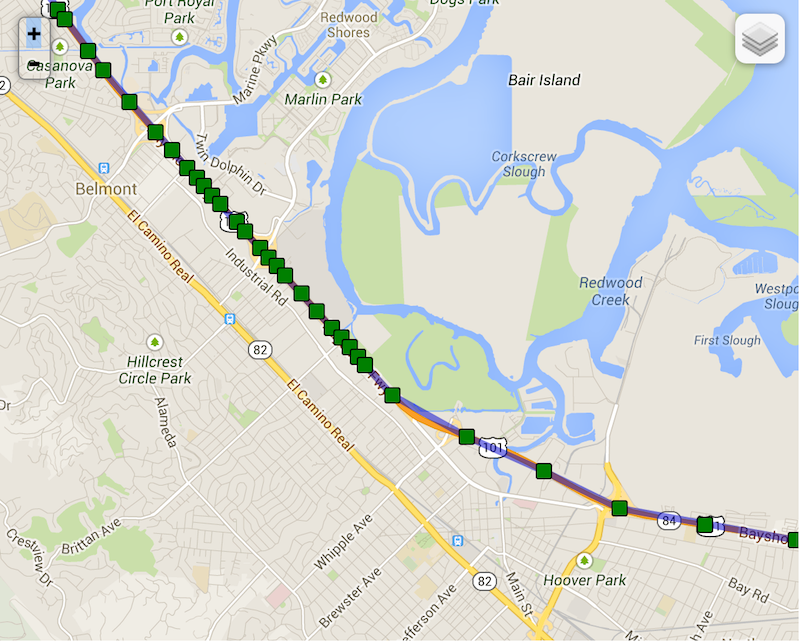
* Note the following real example of "elasticity" on highway 101 towards San Francisco as the driver slows down while running into
* slower traffic — locations become compressed as [[distanceFilter]] decreases.
*
* 
*
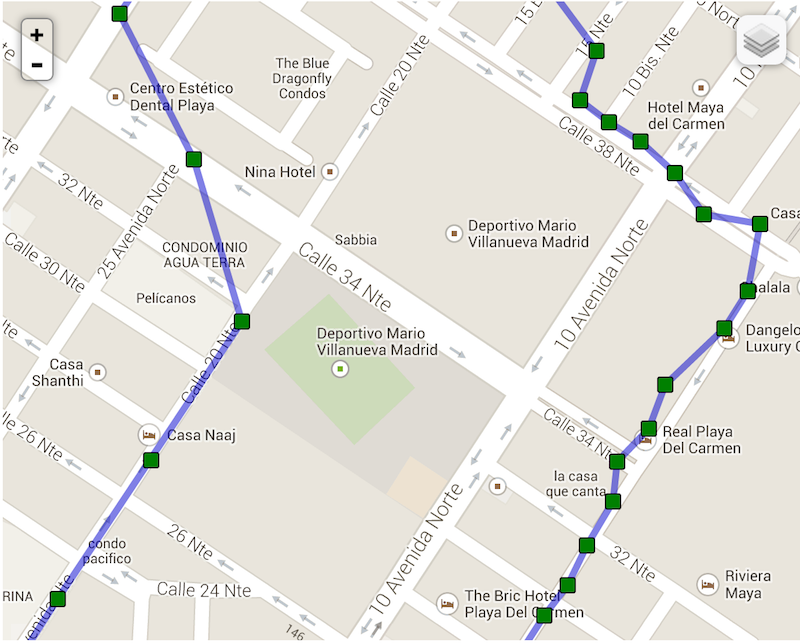
* Compare now background-geolocation in the scope of a city. In this image, the left-hand track is from a cab-ride, while the right-hand
* track is walking speed.
*
* 
*/
distanceFilter?: number;
/**
* __`[iOS only]`__ The minimum distance the device must move beyond the stationary location for aggressive background-tracking to engage.
*
* ### ⚠️ Note: iOS will not detect the exact moment the device moves out of the stationary-radius. In normal conditions, it will typically
* take **~200 meters** of movement before the plugin begins tracking.
* @break
*
* Configuring **`stationaryRadius: 0`** has **NO EFFECT**. In fact the plugin enforces a minimum **`stationaryRadius`** of `25` and
* in-practice, the native API won't respond for at least 200 meters.
*
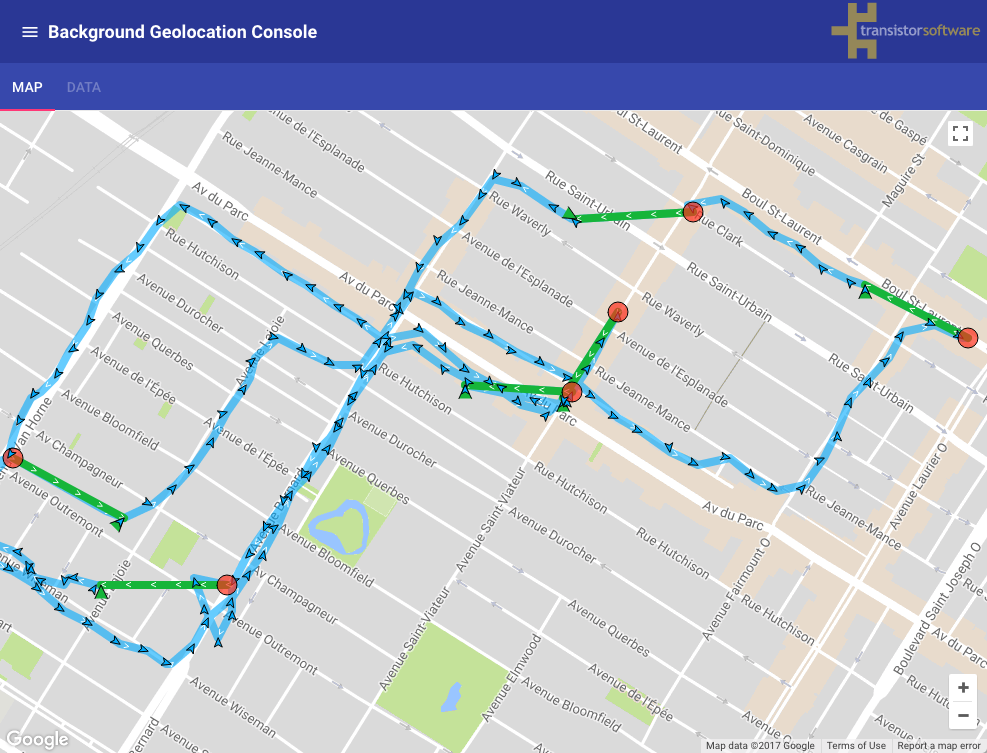
* The following image shows the typical distance iOS requires to detect exit of the **`stationaryRadius`**:
* - *Green polylines*: represent a transition from **stationary** state to **moving** (__~200 meters__).
* - *Red circles*: locations where the plugin entered the **stationary** state.
*
* 
*
* ### ℹ️ See also:
* - 📘 [Philosophy of Operation](github:wiki/Philosophy-of-Operation)
*
*/
stationaryRadius?: number;
/**
* The default timeout in _seconds_ when requesting a location before the SDK gives up and fires a [[LocationError]].
*
* Defaults to `60` seconds.
*
* @example
* ```typescript
* // With onLocation event
* BackgroundGeolocation.onLocation((Location location) => {
* console.log('[onLocation] success:', location);
* }, ((error) => {
* if (error.code == 408) {
* console.log("[onLocation] error: LOCATION TIMEOUT", error);
* }
* });
*
* // With getCurrentPosition:
* try {
* let location = await BackgroundGeolocation.getCurrentPosition({samples: 3});
* } catch((error) => {
* if (error.code == 408) {
* console.log("[getCurrentPosition] error: LOCATION TIMEOUT", error);
* }
* });
* ```
*
* ## See Also:
* - [[BackgroundGeolocation.getCurrentPosition]]
* - [[BackgroundGeolocation.onLocation]]
*
*/
locationTimeout?: number;
/**
* Defaults to **`false`**. Set **`true`** to disable automatic, speed-based [[distanceFilter]] auto-scaling. By default, the SDK automatically
* increases [[distanceFilter]] as speed increases (and decreases it as speed *decreases*) in order to record fewer locations and conserve energy.
* @break
*
* Note the following real example of "elasticity" on highway 101 towards San Francisco as the driver slows down while running into slower
* traffic — locations become compressed as [[distanceFilter]] decreases.
*
* 
*
* ### ℹ️ See also:
* - [[elasticityMultiplier]]
* - [[distanceFilter]]
*/
disableElasticity?: boolean;
/**
* Controls the scale of automatic speed-based [[distanceFilter]] elasticity.
*
* Increasing `elasticityMultiplier` will result in fewer location samples as speed increases. A value of `0` has the same effect as
* [[disableElasticity]] __`true`__.
*/
elasticityMultiplier?: number;
/**
* Automatically [[stop]] tracking after *x* minutes.
*
* The plugin can optionally automatically [[stop]] after some number of minutes elapses after the [[start]] method was called.
*
* @example
* ```typescript
* BackgroundGeolocation.ready({
* stopAfterElapsedMinutes: 30
* }).then((state) => {
* BackgroundGeolocation.start(); // <-- plugin will automatically #stop in 30 minutes
* });
* ```
*/
stopAfterElapsedMinutes?: number;
/**
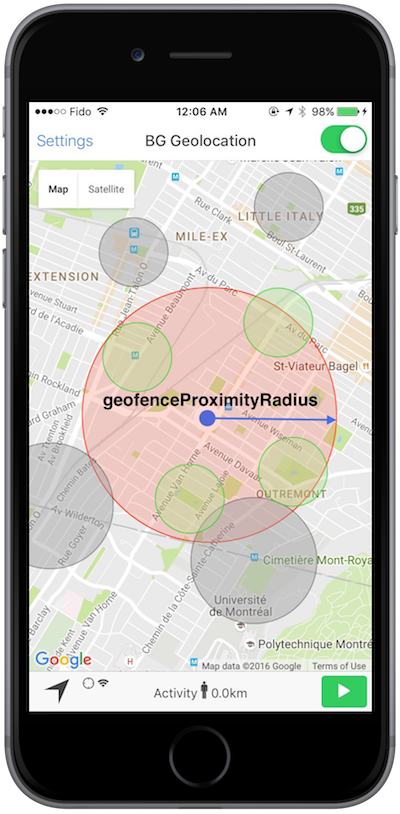
* The radius around current location to query for geofences to activate monitoring upon.
*
* The default and *minimum* is `1000` meters. See related event [[BackgroundGeolocation.onGeofencesChange]]. When using Geofences, the
* plugin activates only those in proximity (the maximum geofences allowed to be simultaneously monitored is limited by the platform,
* where **iOS** allows only 20 and **Android**. However, the plugin allows you to create as many geofences as you wish (thousands even).
* It stores these in its database and uses spatial queries to determine which **20** or **100** geofences to activate.
*
* @break
*
* ### ℹ️ See also:
* - 📘 [[Geofence | Geofencing Guide]].
* - [View animation of this behavior](https://www.transistorsoft.com/shop/products/assets/images/background-geolocation-infinite-geofencing.gif)
*
* 
*/
geofenceProximityRadius?: number;
/**
* When a device is already within a just-created geofence, fire the **enter** transition immediately.
*
* Defaults to `true`. Set `false` to disable triggering a geofence immediately if device is already inside it.
* @break
*
* ### ℹ️ See also:
* - 📘 [[Geofence | Geofencing Guide]].
*/
geofenceInitialTriggerEntry?: boolean;
/**
* __`[Android only]`__ Enable high-accuracy for **geofence-only** mode (See [[BackgroundGeolocation.startGeofences]]).
*
* ### ⚠️ Warning: Will consume more power.
* Defaults to `false`. Runs Android's [[BackgroundGeolocation.startGeofences]] with a *foreground service* (along with its corresponding persistent [[Notification]].
*
* Configuring `geofenceModeHighAccuracy: true` will make Android geofence triggering **far more responsive**. In this mode, the usual config options to control location-services will be applied:
*
* - [[desiredAccuracy]] ([[BackgroundGeolocation.DESIRED_ACCURACY_MEDIUM]] works well).
* - [[locationUpdateInterval]]
* - [[distanceFilter]]
* - [[deferTime]]
*
* With the default `geofenceModeHighAccuracy: false`, a device will have to move farther *into* a geofence before the *ENTER* event fires and farther *out of* a geofence before
* the *EXIT* event fires.
*
* The more aggressive you configure the location-update params above (at the cost of power consumption), the more responsive will be your geofence-triggering.
*
* @example
* ```typescript
* BackgroundGeolocation.ready({
* geofenceModeHighAccuracy: true,
* desiredAccuracy: BackgroundGeolocation.DESIRED_ACCURACY_MEDIUM,
* locationUpdateInterval: 5000,
* distanceFilter: 50
* }).then((state) => {
* BackgroundGeolocation.startGeofences();
* });
* ```
*
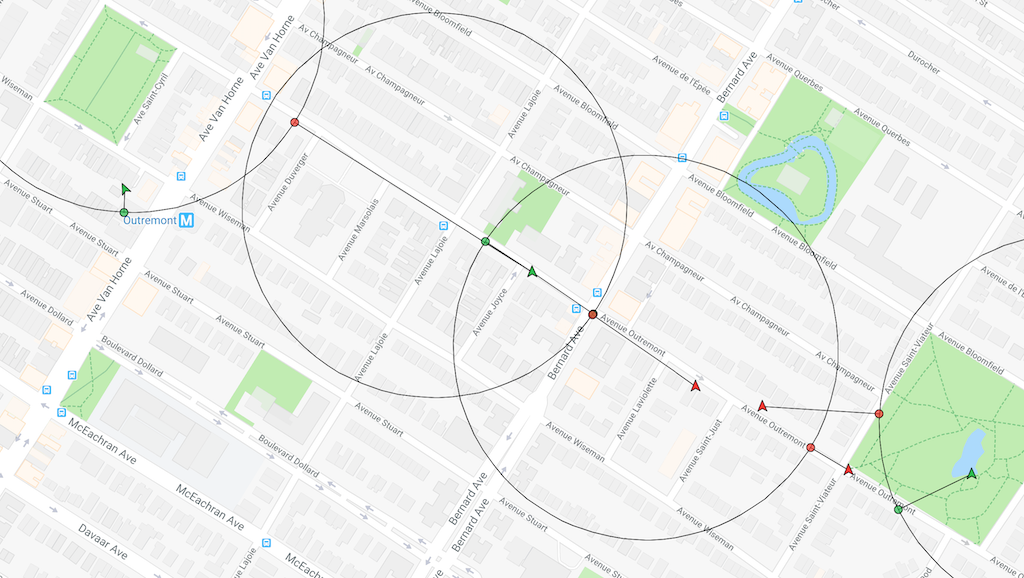
* @example **`geofenceModeHighAccuracy: false`** (Default) — Transition events **are delayed**.
* 
*
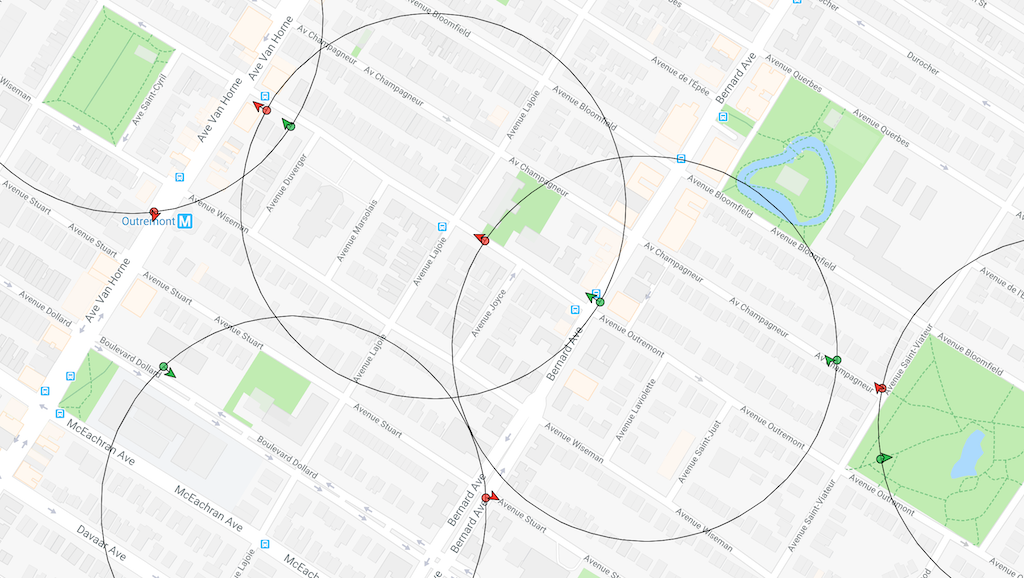
* @example **`geofenceModeHighAccuracy: true`** — Transition events are **nearly instantaneous**.
* 
*
*
*/
geofenceModeHighAccuracy?: boolean;
/**
* The maximum location accuracy allowed for a location to be used for [[Location.odometer]] calculations.
*
* Defaults to `100`. If a location arrives having **`accuracy > desiredOdometerAccuracy`**, that location will not be used to update the
* odometer. If you only want to calculate odometer from GPS locations, you could set **`desiredOdometerAccuracy: 10`**.
* This will prevent odometer updates when a device is moving around indoors, in a shopping mall, for example.
*/
desiredOdometerAccuracy?: number;
/**
* Configure the initial tracking-state after [[BackgroundGeolocation.start]] is called.
*
* The plugin will immediately enter the tracking-state, by-passing the *stationary* state. If the device is not currently moving, the stop-detection
* system *will* still engage. After [[stopTimeout]] minutes without movement, the plugin will enter the *stationary* state, as usual.
*
* @example
* ```typescript
* let state = await BackgroundGeolocation.ready({
* isMoving: true
* });
*
* if (!state.enabled) {
* BackgroundGeolocation.start();
* }
* // Location-services are now on and the plugin is recording a location
* // each [[distanceFilter]] meters.
* ```
*/
isMoving?: boolean;
/**
* Minutes to wait in *moving* state with no movement before considering the device *stationary*.
*
* @break
*
* Defaults to `5` minutes. When in the *moving* state, specifies the number of minutes to wait before turning off location-services and
* transitioning to *stationary* state after the ActivityRecognition System detects the device is `STILL`. An example use-case for this
* configuration is to delay GPS OFF while in a car waiting at a traffic light.
*
* ### ⚠️ Setting a value > 15 min is **not** recommended, particularly for Android.
*
* ### ℹ️ See also:
* - [[onMotionChange]]
* - 📘 [Philosophy of Operation](github:wiki/Philosophy-of-Operation)
*/
stopTimeout?: number;
/**
* @deprecated No longer used.
*/
activityRecognitionInterval?: number;
/**
* @deprecated No longer used.
*/
minimumActivityRecognitionConfidence?: number;
/**
* Disable motion-activity related stop-detection.
* @break
*
* ### iOS
*
* Disables the accelerometer-based **Stop-detection System**. When disabled, the plugin will use the default iOS behavior of automatically
* turning off location-services when the device has stopped for **exactly 15 minutes**. When disabled, you will no longer have control over [[stopTimeout]].
*
* To *completely* disable automatically turning off iOS location-services, you must also provide [[pausesLocationUpdatesAutomatically]] __`false`__.
*
* @example
* ```typescript
* BackgroundGeolocation.ready({
* disableStopDetection: true,
* pausesLocationUpdatesAutomatically: false
* });
* ```
*
* ### ⚠️ iOS location-services will **never** turn off!
*
* With the above configuration, iOS location-services will never turn off and you could **quickly discharge the battery**. Do **not** do
* this unless you know *exactly* what you're doing (eg: A jogging app with `[Start workout]` / `[Stop Workout]` buttons
* executing [[BackgroundGeolocation.changePace]]).
*
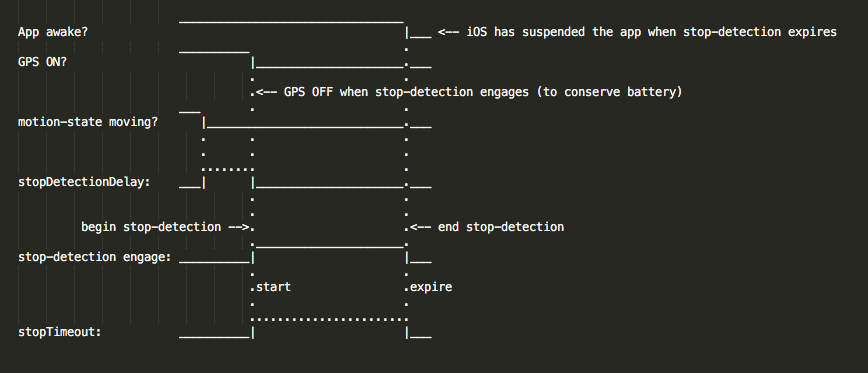
* ### iOS Stop-detection timing
*
* 
*
* ### Android
*
* Location-services **will never turn OFF** if you set this to **`true`**! It will be purely up to you or the user to execute
* [[BackgroundGeolocation.changePace]] __`false`__ or [[BackgroundGeolocation.stop]] to turn off location-services.
*/
disableStopDetection?: boolean;
/**
* Automatically [[BackgroundGeolocation.stop]] when the [[stopTimeout]] elapses.
* @break
*
* The plugin can optionally automatically stop tracking when the [[stopTimeout]] timer elapses. For example, when the plugin
* first fires [[BackgroundGeolocation.onMotionChange]] into the *moving* state, the next time an *onMotionChange* event occurs
* into the *stationary* state, the plugin will have automatically called [[BackgroundGeolocation.stop]] upon itself.
*
* ⚠️ `stopOnStationary` will **only** occur due to [[stopTimeout]] timer elapse. It will **not** occur by manually executing
* [[BackgroundGeolocation.changePace]] __`false`__.
*
* @example
* ```typescript
* BackgroundGeolocation.ready({
* stopOnStationary: true,
* isMoving: true
* }, (state) => {
* BackgroundGeolocation.start();
* });
* ```
*/
stopOnStationary?: boolean;
/**
* Your server `url` where you wish the SDK to automatically upload location data.
*
* @example
* ```typescript
* BackgroundGeolocation.ready({
* url: "https://my-server.com/locations"
* });
* ```
*
* You can observe the plugin performing HTTP requests in the logs for both iOS and Android (_See Wiki [Debugging](github:wiki/Debugging)_):
*
* @example
* ```
* ╔═════════════════════════════════════════════
* ║ LocationService: location
* ╠═════════════════════════════════════════════
* ╟─ 📍 Location[45.519199,-73.617054]
* ✅ INSERT: 70727f8b-df7d-48d0-acbd-15f10cacdf33
* ╔═════════════════════════════════════════════
* ║ HTTP Service
* ╠═════════════════════════════════════════════
* ✅ Locked 1 records
* 🔵 HTTP POST: 70727f8b-df7d-48d0-acbd-15f10cacdf33
* 🔵 Response: 200
* ✅ DESTROY: 70727f8b-df7d-48d0-acbd-15f10cacdf33
* ```
*
* |#| Log entry | Description |
* |-|-------------------------|-----------------------------------------------------------------------|
* |1| `📍Location` | Location received from native Location API. |
* |2| `✅INSERT` | Location record inserted into SDK's SQLite database. |
* |3| `✅Locked` | SDK's HTTP service locks a record (to prevent duplicate HTTP uploads).|
* |4| `🔵HTTP POST` | SDK's HTTP service attempts an HTTP request to your configured `url`. |
* |5| `🔵Response` | Response from your server. |
* |6| `✅DESTROY\|UNLOCK` | After your server returns a __`20x`__ response, the SDK deletes that record from it SQLite database. Otherwise, the SDK will __`UNLOCK`__ that record and try again in the future. |
*
* ### HTTP Failures
*
* If your server does *not* return a `20x` response (eg: `200`, `201`, `204`), the SDK will __`UNLOCK`__ that record. Another attempt to
* upload once again in the future until [[maxDaysToPersist]]:
* - When another location is recorded.
* - Application `pause` / `resume` events.
* - Application boot.
* - [[onHeartbeat]] events.
* - [[onConnectivityChange]] events.
* - __[iOS]__ Background `fetch` events.
*
* ### ⚠️ Note:
* It is highly recommended to let the plugin manage uploading locations to your server, **particularly for Android** when configured
* with **`stopOnTerminate: false`**, since `MainActivity` (where your application code lives) *will* terminate — only the plugin's
* native Android background service will continue to operate, recording locations and uploading to your server. The SDK's native HTTP
* service *is* better at this task, since the SDK will automatically __retry on server failure__.
*
* ### ℹ️ See also:
*
* - 📘 [[HttpEvent | HTTP Guide]]
* - 📘 [Philosophy of Operation](github:wiki/Philosophy-of-Operation)
*
*/
url?: string;
/**
* The HTTP method to use when creating an HTTP request to your configured [[url]].
*
* Defaults to `POST`. Valid values are `POST`, `PUT` and `OPTIONS`.
*
* @example
* ```typescript
* BackgroundGeolocation.ready({
* url: "http://my-server.com/locations",
* method: "PUT"
* });
* ```
*
* ### ℹ️ See also:
* - 📘 See [[HttpEvent | HTTP Guide]]
*
*/
method?: HttpMethod;
/**
* The root property of the JSON schema where location-data will be attached.
*
* @example
* ```typescript
* BackgroundGeolocation.ready({
* httpRootProperty: "myData",
* url: "https://my.server.com"
* });
*
* ```
*
* ```json
* {
* "myData":{
* "coords": {
* "latitude":23.232323,
* "longitude":37.373737
* }
* }
* }
* ```
*
* You may also specify the character **`httpRootProperty:"."`** to place your data in the *root* of the JSON:
*
* @example
* ```json
* {
* "coords": {
* "latitude":23.232323,
* "longitude":37.373737
* }
* }
* ```
*
* ### ℹ️ See also:
* - [[locationTemplate]]
* - [[geofenceTemplate]]
* - 📘 [[HttpEvent | HTTP Guide]]
*
*/
httpRootProperty?: string;
/**
* Optional HTTP **`params`** appended to the JSON body of each HTTP request.
*
* @example
* ```typescript
* BackgroundGeolocation.ready({
* url: "https://my-server.com/locations",
* params: {
* "user_id": 1234,
* "device_id": "abc123"
* }
* );
* ```
*
* Observing the HTTP request arriving at your server:
* @example
* ```typescript
* POST /locations
* {
* "location": {
* "coords": {
* "latitude": 45.51927004945047,
* "longitude": -73.61650072045029
* .
* .
* .
* }
* },
* "user_id": 1234, // <-- params appended to the data.
* "device_id": "abc123"
* }
* ```
*
* ### ℹ️ See also:
* - [[headers]]
* - [[extras]]
* - 📘 [[HttpEvent | HTTP Guide]]
*/
params?: Object;
/**
* Optional HTTP headers applied to each HTTP request.
*
* @example
* ```typescript
* BackgroundGeolocation.ready({
* url: "https://my.server.com",
* headers: {
* "authorization": "Bearer <a secret key>",
* "X-FOO": "BAR"
* }
* });
* ```
*
* Observing incoming requests at your server:
*
* ```
* POST /locations
* {
* "host": "tracker.transistorsoft.com",
* "content-type": "application/json",
* "content-length": "456"
* .
* .
* .
* "authorization": "Bearer <a secret key>",
* "X-FOO": "BAR"
* }
* ```
*
* ### ℹ️ Note:
* - The plugin automatically applies a number of required headers, including `"content-type": "application/json"`
*/
headers?: Object;
/**
* Optional arbitrary key/values `{}` applied to each recorded location.
*
* 📘 See [[HttpEvent | HTTP Guide]]
*
* @example
* ```typescript
* BackgroundGeolocation.ready({
* url: "https://my-server.com/locations",
* extras: {
* "route_id": 1234
* },
* params: {
* "device_id": "abc123"
* }
* });
* ```
*
* Observing incoming requests at your server:
*
* @example
* ```typescript
* - POST /locations
* {
* "device_id": "abc123" // <-- params appended to root of JSON
* "location": {
* "coords": {
* "latitude": 45.51927004945047,
* "longitude": -73.61650072045029,
* .
* .
* .
* },
* "extras": { // <-- extras appended to *each* location
* "route_id": 1234
* }
* }
* }
* ```
*/
extras?: Extras;
/**
* Immediately upload each recorded location to your configured [[url]].
* @break
*
* Default is `true`. If you've enabled HTTP feature by configuring an [[url]], the plugin will attempt to HTTP POST each location to your
* server **as soon as it is recorded**. If you set [[autoSync]] __`false`__, it's up to you to **manually** execute the
* [[BackgroundGeolocation.sync]] method to initiate the HTTP POST — the SDK will continue to persist **every** recorded location in the
* SQLite database until you execute [[BackgroundGeolocation.sync]].
*
* @example
* ```typescript
* BackgroundGeolocation.ready({
* url: "http://my.server.com/locations",
* autoSync: true,
* params: {
* user_id: 1234
* }
* })
* ```
* ----------------------------------------------------------------------
* ### ⚠️ Warning: [[autoSyncThreshold]]
*
* If you've configured [[autoSyncThreshold]], it **will be ignored** during a `onMotionChange` event — all queued locations will be uploaded, since:
* - If an `onMotionChange` event fires **into the *moving* state**, the device may have been sitting dormant for a long period of time. The plugin is *eager* to upload this state-change to the server as soon as possible.
* - If an `onMotionChange` event fires **into the *stationary* state**, the device may be *about to* lie dormant for a long period of time. The plugin is *eager* to upload all queued locations to the server before going dormant.
* ----------------------------------------------------------------------
*
* ### ℹ️ See also:
* - [[autoSyncThreshold]]
* - [[batchSync]]
* - [[maxBatchSize]]
*/
autoSync?: boolean;
/**
* The minimum number of persisted records the plugin must accumulate before triggering an [[autoSync]] action.
* @break
*
* Defaults to `0` (no threshold). If you configure a value greater-than **`0`**, the plugin will wait until that many locations are
* recorded before executing HTTP requests to your server through your configured [[url]].
*
* ℹ️ Configuring [[autoSyncThreshold]] in conjunction with [[batchSync]] __`true`__ **can conserve battery** by reducing the number of HTTP
* requests, since HTTP requests consume *far* more energy / second than GPS.
*
* @example
* ```typescript
* BackgroundGeolocation.ready({
* url: "http://my.server.com/locations",
* autoSync: true,
* autoSyncThreshold: 5,
* batchSync: true
* })
* ```
*
* ```
* 1 2 3 4 5 1 2 3 4 5
* Locations: __|__|__|__|__|____|__|__|__|__|___...
*
* POST POST
* Network: ______________|________________|___...
* ```
* ----------------------------------------------------------------------
* ### ⚠️ Warning
*
* `autoSyncThreshold` **will be ignored** during a [[BackgroundGeolocation.onMotionChange]] event — all queued locations will be uploaded, since:
* - If an `onMotionChange` event fires **into the *moving* state**, the device may have been sitting dormant for a long period of time. The plugin is *eager* to upload this state-change to the server as soon as possible.
* - If an `onMotionChange` event fires **into the *stationary* state**, the device may be *about to* lie dormant for a long period of time. The plugin is *eager* to upload all queued locations to the server before going dormant.
* ----------------------------------------------------------------------
*
*/
autoSyncThreshold?: number;
/**
* POST multiple locations to your [[url]] in a single HTTP request.
*
* Default is **`false`**. If you've enabled HTTP feature by configuring an [[url]], [[batchSync]] __`true`__ will POST *all* the locations
* currently stored in native SQLite database to your server in a single HTTP POST request. With [[batchSync]] __`false`__, an HTTP POST
* request will be initiated for **each** location in database.
*
* #### __`batchSync: true`__ — All accumulated locations POSTed in 1 HTTP request.
* @example
* ```typescript
* // Using batchSync: true
* BackgroundGeolocation.ready({
* url: "http://my.server.com/locations",
* autoSync: true,
* autoSyncThreshold: 5,
* batchSync: true
* })
* ```
*
* ```
* 1 2 3 4 5 1 2 3 4 5
* Locations: __|__|__|__|__|____|__|__|__|__|___...
*
* POST POST
* Network: ______________|________________|___...
* ```
*
* #### __`batchSync: false`__ — 1 POST per location
* @example
* ```typescript
* // With batchSync: false
* BackgroundGeolocation.ready({
* url: "http://my.server.com/locations",
* autoSync: true,
* autoSyncThreshold: 5,
* batchSync: false
* })
* ```
*
* ```
* 1 2 3 4 5 1 2 3 4 5
* Locations: __|__|__|__|__|____|__|__|__|__|___...
*
* POST POST
* Network: ______________|||||____________|||||___...
* ```
* ### ℹ️ See also:
* - [[maxBatchSize]]
* - [[autoSync]]
* - [[autoSyncThreshold]]
* 📘 See [[HttpEvent | HTTP Guide]]
*/
batchSync?: boolean;
/**
* Controls the number of records attached to **each** batch HTTP request.
* @break
*
* Defaults to `-1` (no maximum). If you've enabled HTTP feature by configuring an [[url]] with [[batchSync]] __`true`__, this parameter
* will limit the number of records attached to **each** batch request. If the current number of records exceeds the **[[maxBatchSize]]**,
* multiple HTTP requests will be generated until the location queue is empty.
*
* The plugin can potentially accumulate mega-bytes worth of location-data if operating in a disconnected environment for long periods.
* You will not want to [[batchSync]] __`true`__ a large amount of data in a single HTTP request.
*
* ### ℹ️ See also:
* - [[batchSync]]
* 📘 See [[HttpEvent | HTTP Guide]]
*/
maxBatchSize?: number;
/**
* Optional custom template for rendering [[Location]] JSON request data in HTTP requests.
* @break
*
* The [[locationTemplate]] will be evaluated for variables using Ruby `erb`-style tags:
*
* ```bash
* <%= variable_name %>
* ```
*
* @example
* ```typescript
* BackgroundGeolocation.ready({
* locationTemplate: '{"lat":<%= latitude %>,"lng":<%= longitude %>,"event":"<%= event %>",isMoving:<%= is_moving %>}'
* });
*
* // Or use a compact [Array] template!
* BackgroundGeolocation.ready({
* locationTemplate: '[<%=latitude%>, <%=longitude%>, "<%=event%>", <%=is_moving%>]'
* ))
* ```
*
* ### ⚠️ quoting `String` data.
*
* The plugin does not automatically apply double-quotes around `String` data. The plugin will attempt to JSON encode your template exactly
* as you're configured.
*
* The following will generate an error:
*
* @example
* ```typescript
* BackgroundGeolocation.ready({
* locationTemplate: '{"timestamp": <%= timestamp %>}'
* });
* ```
*
* Since the template-tag `timestamp` renders a string, the rendered String will look like this, generating a JSON error:
*
* @example
* ```json
* {"timestamp": 2018-01-01T12:01:01.123Z}
* ```
*
* The correct `locationTemplate` is:
* @example
* ```typescript
* BackgroundGeolocation.ready({
* locationTemplate: '{"timestamp": "<%= timestamp %>"}'
* });
* ```
*
* @example
* ```json
* {"timestamp": "2018-01-01T12:01:01.123Z"}
* ```
*
* ### Configured [[extras]]:
*
* If you've configured [[extras]], these key-value pairs will be merged *directly* onto your location data. For example:
*
* @example
* ```typescript
* BackgroundGeolocation.ready({
* httpRootProperty: 'data',
* locationTemplate: '{"lat":<%= latitude %>,"lng":<%= longitude %>}',
* extras: {
* "foo": "bar"
* }
* )
* ```
*
* Will result in JSON:
* @example
* ```json
* {
* "data": {
* "lat":23.23232323,
* "lng":37.37373737,
* "foo":"bar"
* }
* }
* ```
*
* ### Template Tags
*
* | Tag | Type | Description |
* |-----------------------|----------|-------------|
* | `latitude` | `Float` | |
* | `longitude` | `Float` | |
* | `speed` | `Float` | Meters |
* | `heading` | `Float` | Degrees |
* | `accuracy` | `Float` | Meters |
* | `altitude` | `Float` | Meters |
* | `altitude_accuracy` | `Float` | Meters |
* | `timestamp` | `String` |ISO-8601 |
* | `uuid` | `String` |Unique ID |
* | `event` | `String` |`motionchange,geofence,heartbeat,providerchange` |
* | `odometer` | `Float` | Meters |
* | `activity.type` | `String` | `still,on_foot,running,on_bicycle,in_vehicle,unknown`|
* | `activity.confidence` | `Integer`| 0-100% |
* | `battery.level` | `Float` | 0-100% |
* | `battery.is_charging` | `Boolean`| Is device plugged in?|
* | `mock` | `Boolean`| `true` when location was recorded from a Mock location app. |
* | `is_moving` | `Boolean`| `true` if location was recorded while device was in *moving* state.|
* | `timestampMeta` | `Object` | Renders timestamp meta-data. See [[Config.enableTimestampMeta]].|
*
* ### ℹ️ See also:
* - 📘 [[HttpEvent | HTTP Guide]]
* - [[geofenceTemplate]]
* - [[httpRootProperty]]
*/
locationTemplate?: string;
/**
* Optional custom template for rendering [[GeofenceEvent]] JSON request data in HTTP requests.
* @break
*
* The `geofenceTemplate` is similar to [[locationTemplate]] with the addition of two extra `geofence.*` tags.
*
* The `geofenceTemplate` will be evaluated for variables using Ruby `erb`-style tags:
*
* ```bash
* <%= variable_name %>
* ```
* ### ℹ️ See also:
* - [[locationTemplate]]
* - [[httpRootProperty]]
* - 📘 [[HttpEvent | HTTP Guide]]
*
* @example
* ```typescript
* BackgroundGeolocation.ready({
* geofenceTemplate: '{ "lat":<%= latitude %>, "lng":<%= longitude %>, "geofence":"<%= geofence.identifier %>:<%= geofence.action %>" }'
* });
*
* // Or use a compact [Array] template!
* BackgroundGeolocation.{(
* geofenceTemplate: '[<%= latitude %>, <%= longitude %>, "<%= geofence.identifier %>", "<%= geofence.action %>"]'
* )
* ```
*
* ### ⚠️ quoting `String` data.
*
* The plugin does not automatically apply double-quotes around `String` data. The plugin will attempt to JSON encode your template exactly
* as you're configured.
*
* The following will generate an error:
*
* @example
* ```typescript
* BackgroundGeolocation.ready({
* locationTemplate: '{"timestamp": <%= timestamp %>}'
* });
* ```
*
* Since the template-tag `timestamp` renders a string, the rendered String will look like this, generating a JSON error:
* @example
* ```json
* {"timestamp": 2018-01-01T12:01:01.123Z}
* ```
*
* The correct `geofenceTemplate` is:
*
* @example
* ```typescript
* BackgroundGeolocation.ready({
* geofenceTemplate: '{"timestamp": "<%= timestam