react-native-background-geolocation
Version:
The most sophisticated cross-platform background location-tracking & geofencing module with battery-conscious motion-detection intelligence
224 lines (221 loc) • 11 kB
TypeScript
declare module "react-native-background-geolocation" {
/**
* An object for redirecting a User to an Android device's settings screen from a [DeviceSettings] request.
*
* This object contains meta-data about the device ([[manufacturer]\], [[model]], [[version]]) in addition to a flag [seen] to let you know if you've
* already shown some particular screen to the user. [[lastSeenAt]] lets you know the `DateTime` you last showed a particular screen to the user.
*
*/
interface DeviceSettingsRequest {
/**
* Device manufacturer.
*/
manufacturer: string;
/**
* Device model
*/
model: string;
/**
* OS version
*/
version: string;
/**
* Flag showing whether you've already shown this screen to the user.
*/
seen: boolean;
/**
* The [DateTime] you last showed this screen to the user.
*/
lastSeenAt: Date;
/**
* The settings screen to be shown.
*
* ⚠️ This property is set automatically.
*/
action: string;
}
/**
* Device Settings API.
*
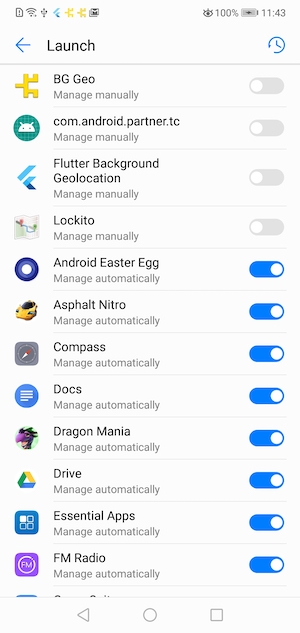
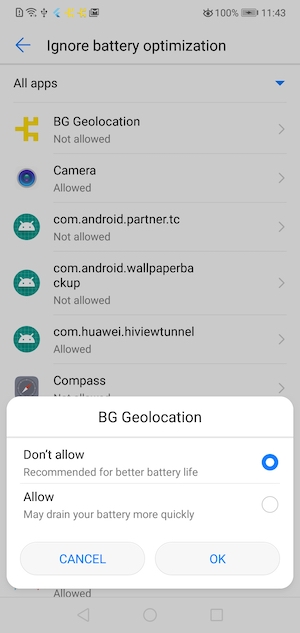
* Provides an API to show Android & vendor-specific Battery / Power Management settings screens that can affect performance of the Background Geolocation SDK on various devices.
*
* The site [Don't Kill My App](https://dontkillmyapp.com/) provides a comprehensive list of poor Android vendors which throttle background-services that this plugin relies upon.
*
* This `DeviceSettings` API is an attempt to provide resources to direct the user to the appropriate vendor-specific settings screen to resolve issues with background operation.
*
* 
* 
*
* @example
* ```typescript
* // Is Android device ignoring battery optimizations?
* let isIgnoring = await BackgroundGeolocation.deviceSettings.isIgnoringBatteryOptimizations();
* if (!isIgnoring) {
* BackgroundGeolocation.deviceSettings.showIgnoreBatteryOptimizations().then((request:DeviceSettingsRequest) => {
* console.log(`- Screen seen? ${request.seen} ${request.lastSeenAt}`);
* console.log(`- Device: ${request.manufacturer} ${request.model} ${request.version}`);
*
* // If we've already shown this screen to the user, we don't want to annoy them.
* if (request.seen) {
* return;
* }
*
* // It's your responsibility to instruct the user what exactly
* // to do here, perhaps with a Confirm Dialog:
* showMyConfirmDialog({
* title: "Settings request",
* text: "Please disable battery optimizations for your device"
* }).then((confirmed) => {
* if (confirmed) {
* // User clicked [Confirm] button. Execute the redirect to settings screen:
* BackgroundGeolocation.deviceSettings.show(request);
* }
* });
* }).catch((error) => {
* // Depending on Manufacturer/Model/OS Version, a Device may not implement
* // a particular Settings screen.
* console.warn(error);
* });
* }
*
* ```
*/
interface DeviceSettings {
/**
* Returns `true` if device is ignoring battery optimizations for your app.
*
* In most cases, the Background Geolocation SDK **will perform normally** with battery optimizations.
*
* 
*
* @example
* ```typescript
* let isIgnoring = await BackgroundGeolocation.deviceSettings.isIgnoringBatteryOptimizations();
* ```
*/
isIgnoringBatteryOptimizations():Promise<boolean>;
/**
* Shows the Android *Ignore Battery Optimizations* settings screen.
*
* **Note:** In most cases, the plugin **will perform normally** with battery optimizations. You should only instruct the user to *Ignore Battery Optimizations* for your app as a last resort to resolve issues with background operation.
*
* 
*
* **WARNING:** Ignoring battery optimizations *will* cause your app to consume **much** more power.
*
* `showIgnoreBatteryOptimizations` does **not** immediately redirect to the desired Device settings screen. Instead, it first returns a [[DeviceSettingsRequest]], containing
* meta-data about the device (`manufacturer`, `model`, `version`), in addition to a flags `seen` and `lastSeenAt`, letting you know if and when you've already shown this screen to the user.
*
*
* In your success-callback, it's completely **up to you** to instruct the user what exactly to do on that screen.
*
* Based upon the manufacturer/model/os, a Device may not have this particular Settings screen implemented. In this case, `catch` will fire.
*
* @example
* ```typescript
* // Is Android device ignoring battery optimizations?
* let isIgnoring = await BackgroundGeolocation.deviceSettings.isIgnoringBatteryOptimizations();
* if (!isIgnoring) {
* BackgroundGeolocation.deviceSettings.showIgnoreBatteryOptimizations().then((request:DeviceSettingsRequest) => {
* console.log(`- Screen seen? ${request.seen} ${request.lastSeenAt}`);
* console.log(`- Device: ${request.manufacturer} ${request.model} ${request.version}`);
*
* // If we've already shown this screen to the user, we don't want to annoy them.
* if (request.seen) {
* return;
* }
*
* // It's your responsibility to instruct the user what exactly
* // to do here, perhaps with a Confirm Dialog:
* showMyConfirmDialog({
* title: "Settings request",
* text: "Please disable battery optimizations for your device"
* }).then((confirmed) => {
* if (confirmed) {
* // User clicked [Confirm] button. Execute the redirect to settings screen:
* BackgroundGeolocation.deviceSettings.show(request);
* }
* });
* }).catch((error) => {
* // Depending on Manufacturer/Model/OS Version, a Device may not implement
* // a particular Settings screen.
* console.warn(error);
* });
* }
* ```
*
*/
showIgnoreBatteryOptimizations():Promise<DeviceSettingsRequest>;
/**
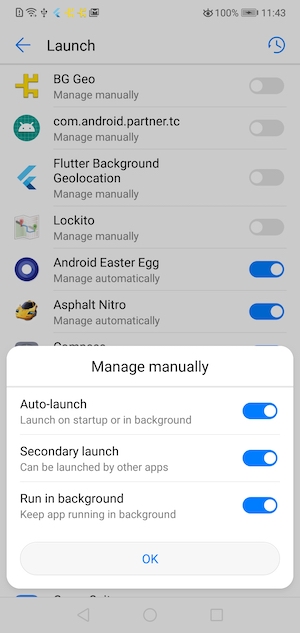
* Shows a vendor-specific "Power Management" screen.
*
* For example, a *Huawei* device will show the *Battery->Launch* screen:
*
* 
* 
*
* The site [Don't Kill My App](https://dontkillmyapp.com/) provides a comprehensive list of poor Android vendors which throttle background-services that this plugin relies upon.
*
* `showPowerManager` does **not** immediately redirect to the desired Device settings screen. Instead, it first returns a [[DeviceSettingsRequest]], containing
* meta-data about the device (`manufacturer`, `model`, `version`), in addition to a flags `seen` and `lastSeenAt`, letting you know if and when you've already shown this screen to the user.
*
* Unfortunately, there's no possible way to determine if the user *actually* performs the desired action to "white list" your app on the shown settings-screen.
* For this reason, you'll have to evaluate the provided properties [[DeviceSettingsRequest.seen]] & [[DeviceSettingsRequest.lastSeenAt]] and determine for yourself whether to [[DeviceSettings.show]] this screen.
*
* In your success-callback, it's completely **up to you** to instruct the user what exactly to do on that screen, based upon the provided [[DeviceSettingsRequest]] properties `manufacturer`, `model` and `version`.
*
* **Note:** Based upon the `manufacturer` / `model` / OS `version`, a Device **may not have** a particular Settings screen implemented (eg: Google Pixel). In this case, the `Promise` will fire an exception.
*
* ## Example
*
* ```typescript
* BackgroundGeolocation.deviceSettings.showPowerManager().then((request:DeviceSettingsRequest) => {
* console.log(`- Screen seen? ${request.seen} ${request.lastSeenAt}`);
* console.log(`- Device: ${request.manufacturer} ${request.model} ${request.version}`);
*
* // If we've already shown this screen to the user, we don't want to annoy them.
* if (request.seen) {
* return;
* }
* // It's your responsibility to instruct the user what exactly
* // to do here, perhaps with a Confirm Dialog:
* showMyConfirmDialog({
* title: "Device Power Management",
* text: "Please white-list the app in your Device's Power Management settings by clicking this then selecting that."
* }).then((confirmed) => {
* if (confirmed) {
* // User clicked [Confirm] button. Execute the redirect to settings screen:
* BackgroundGeolocation.deviceSettings.show(request);
* }
* });
* }).catch((error) => {
* // Depending on Manufacturer/Model/OS Version, a Device may not implement
* // a particular Settings screen.
* console.log(error);
* });
* ```
*
* ## Vendor Settings Screens
*
* The following Android Settings screen will be shown depending on Vendor / OS version:
*
* | Vendor | Settings Activity Name |
* |--------------------------------------|------------------------------------------------------------------------|
* | LeEco | `AutobootManageActivity` |
* | Huawei | `StartupAppControlActivity`,`StartupAppControlActivity` (depends on OS version) |
* | Color OS | `StartupAppListActivity` |
* | OPPO | `StartupAppListActivity` |
* | Vivo | `BgStartUpManagerActivity`,`AddWhiteListActivity`,`BgStartUpManager` (depends on OS version)|
* | Samsung | `BatteryActivity` |
* | HTC | `LandingPageActivity` |
* | Asus | `AutobootManageActivity` |
* | LeEco | `mobilemanager.MainActivity` |
*
*/
showPowerManager():Promise<DeviceSettingsRequest>;
/**
* This method is designed to be executed from a [[showPowerManager]] or [[showIgnoreBatteryOptimizations]] callback.
*/
show(request:DeviceSettingsRequest):Promise<boolean>;
}
}