react-js-cron-nextui
Version:
A React cron editor with nextui inspired by jqCron
517 lines (452 loc) • 15.4 kB
Markdown
## ReactJS Cron
> A React cron editor built with [antd](https://github.com/ant-design/ant-design)
[](https://www.npmjs.com/package/react-js-cron)
[](https://github.com/xrutayisire/react-js-cron/blob/master/LICENSE.md)
[](https://github.com/xrutayisire/react-js-cron/actions/workflows/build.yml)
[](https://github.com/xrutayisire/react-js-cron/actions/workflows/lint.yml)
[](https://github.com/xrutayisire/react-js-cron/actions/workflows/test.yml)
[](https://codecov.io/gh/xrutayisire/react-js-cron)
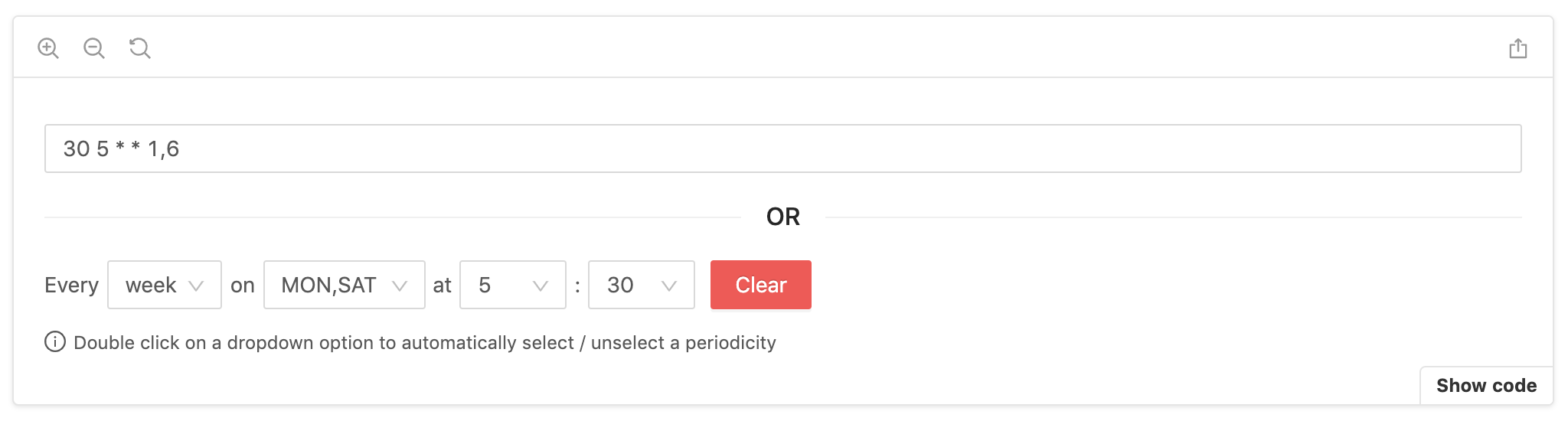
Live **demo** and **usage** at [https://xrutayisire.github.io/react-js-cron/](https://xrutayisire.github.io/react-js-cron/?path=/docs/reactjs-cron--demo)
## Features
- Zero dependencies except React and antd
- Supports all standard cron expressions
- Supports cron names for months and week days
- Supports cron shortcuts
- Supports "7" for Sunday
- Supports two-way sync binding with input
- Supports locale customization
- Supports multiple selection by double-clicking on an option
- And many more (disabled, read-only, 12-hour clock...)
## Inspired by
- [jqCron](https://github.com/arnapou/jqcron)
- [cron-converter](https://github.com/roccivic/cron-converter)
## TypeScript
react-js-cron is written in TypeScript with complete definitions
## Installation
Be sure that you have these dependencies on your project:
- react (>=17.0.0)
- antd (>=5.8.0)
```bash
# NPM
npm install react-js-cron
# Yarn
yarn add react-js-cron
```
## Usage
```jsx
import { Cron } from 'react-js-cron'
import 'react-js-cron/dist/styles.css'
export function App() {
const [value, setValue] = useState('30 5 * * 1,6')
return <Cron value={value} setValue={setValue} />
}
```
Don't forget to import styles manually:
```jsx
import 'react-js-cron/dist/styles.css'
```
## Converter
If you want to use the converter that react-js-cron uses internally, you can import it into your project:
```jsx
import { converter } from 'react-js-cron'
const cronString = converter.getCronStringFromValues(
'day', // period: 'year' | 'month' | 'week' | 'day' | 'hour' | 'minute' | 'reboot'
[], // months: number[] | undefined
[], // monthDays: number[] | undefined
[], // weekDays: number[] | undefined
[2], // hours: number[] | undefined
[1], // minutes: number[] | undefined
false // humanizeValue?: boolean
)
console.log('cron string:', converted)
```
```
cron string: '1 2 * * *'
```
The converter can also be helpful for parsing a string. Note that Sunday is represented as 0 in the output array but can be either 0 or 7 in the cron expression.
```jsx
import { converter } from 'react-js-cron'
const [minutes, hours, daysOfMonth, months, daysOfWeek] =
converter.parseCronString('0 2,14 * * 1-5')
console.log('parsed cron:', {
minutes,
hours,
daysOfMonth,
months,
daysOfWeek,
})
```
```
parsed cron: {
minutes: [0],
hours: [2, 14],
daysOfMonth: [],
months: [],
daysOfWeek: [1, 2, 3, 4, 5]
}
```
## Examples
Learn more with [dynamic settings](https://xrutayisire.github.io/react-js-cron/?path=/story/reactjs-cron--dynamic-settings).
- [Two-way sync binding with input](https://xrutayisire.github.io/react-js-cron/?path=/story/reactjs-cron--input)
- [Default value](https://xrutayisire.github.io/react-js-cron/?path=/story/reactjs-cron--default-value)
- [Default period](https://xrutayisire.github.io/react-js-cron/?path=/story/reactjs-cron--default-period)
- [Disabled mode](https://xrutayisire.github.io/react-js-cron/?path=/story/reactjs-cron--disabled)
- [Read-Only mode](https://xrutayisire.github.io/react-js-cron/?path=/story/reactjs-cron--read-only)
- [Humanized labels](https://xrutayisire.github.io/react-js-cron/?path=/story/reactjs-cron--humanize-labels)
- [Humanized value](https://xrutayisire.github.io/react-js-cron/?path=/story/reactjs-cron--humanize-value)
- [Leading zero for numbers](https://xrutayisire.github.io/react-js-cron/?path=/story/reactjs-cron--leading-zero)
- [Error management with text and style](https://xrutayisire.github.io/react-js-cron/?path=/story/reactjs-cron--track-error)
- ["Clear button" removal](https://xrutayisire.github.io/react-js-cron/?path=/story/reactjs-cron--no-clear-button)
- ["Clear button" action](https://xrutayisire.github.io/react-js-cron/?path=/story/reactjs-cron--clear-button-empty-value)
- [Empty value management](https://xrutayisire.github.io/react-js-cron/?path=/story/reactjs-cron--empty-never-allowed)
- [Cron shortcuts](https://xrutayisire.github.io/react-js-cron/?path=/story/reactjs-cron--shortcuts)
- [12-hour clock](https://xrutayisire.github.io/react-js-cron/?path=/story/reactjs-cron--twelve-hour-clock)
- [24-hour clock](https://xrutayisire.github.io/react-js-cron/?path=/story/reactjs-cron--twenty-four-hour-clock)
- [Locale customization](https://xrutayisire.github.io/react-js-cron/?path=/story/reactjs-cron--french-locale)
- [Prefix and suffix removal](https://xrutayisire.github.io/react-js-cron/?path=/story/reactjs-cron--no-prefix-and-suffix)
- [Style customization](https://xrutayisire.github.io/react-js-cron/?path=/story/reactjs-cron--custom-style)
- And many more...
## API
```
CronProps {
/**
* Cron value, the component is by design a controlled component.
* The first value will be the default value.
*
* required
*/
value: string
/**
* Set the cron value, similar to onChange.
* The naming tells you that you have to set the value by yourself.
*
* required
*/
setValue:
| (value: string, extra: { selectedPeriod }) => void
| Dispatch<SetStateAction<string>>
/**
* Set the container className and used as a prefix for other selectors.
* Available selectors: https://xrutayisire.github.io/react-js-cron/?path=/story/reactjs-cron--custom-style
*/
className?: string
/**
* Humanize the labels in the cron component, SUN-SAT and JAN-DEC.
*
* Default: true
*/
humanizeLabels?: boolean
/**
* Humanize the value, SUN-SAT and JAN-DEC.
*
* Default: false
*/
humanizeValue?: boolean
/**
* Add a "0" before numbers lower than 10.
*
* Default: false
*/
leadingZero?: boolean | ['month-days', 'hours', 'minutes']
/**
* Define the default period when the default value is empty.
*
* Default: 'day'
*/
defaultPeriod?: 'year' | 'month' | 'week' | 'day' | 'hour' | 'minute' | 'reboot'
/**
* Disable the cron component.
*
* Default: false
*/
disabled?: boolean
/**
* Make the cron component read-only.
*
* Default: false
*/
readOnly?: boolean
/**
* Show clear button for each dropdown.
*
* Default: true
*/
allowClear?: boolean
/**
* Define if empty should trigger an error.
*
* Default: 'for-default-value'
*/
allowEmpty?: 'always' | 'never' | 'for-default-value'
/**
* Support cron shortcuts.
*
* Default: ['@yearly', '@annually', '@monthly', '@weekly', '@daily', '@midnight', '@hourly']
*/
shortcuts?: boolean | ['@yearly', '@annually', '@monthly', '@weekly', '@daily', '@midnight', '@hourly', '@reboot']
/**
* Define the clock format.
*
* Default: undefined
*/
clockFormat?: '12-hour-clock' | '24-hour-clock'
/**
* Display the clear button.
*
* Default: true
*/
clearButton?: boolean
/**
* antd button props to customize the clear button.
*/
clearButtonProps?: ButtonProps
/**
* Define the clear button action.
*
* Default: 'fill-with-every'
*/
clearButtonAction?: 'empty' | 'fill-with-every'
/**
* Display error style (red border and background).
*
* Display: true
*/
displayError?: boolean
/**
* Triggered when the cron component detects an error with the value.
*/
onError?:
| (error: {
type: 'invalid_cron'
description: string
}) => void
| Dispatch<SetStateAction<{
type: 'invalid_cron'
description: string
}>>
| undefined
/**
* Define if a double click on a dropdown option should automatically
* select / unselect a periodicity.
*
* Default: true
*/
periodicityOnDoubleClick?: boolean
/**
* Define if it's possible to select only one or multiple values for each dropdown.
*
* Even in single mode, if you want to disable the double click on a dropdown option that
* automatically select / unselect a periodicity, set 'periodicityOnDoubleClick'
* prop at false.
*
* When single mode is active and 'periodicityOnDoubleClick' is false,
* each dropdown will automatically close after selecting a value
*
* Default: 'multiple'
*/
mode?: 'multiple' | 'single'
/**
* Define which dropdowns need to be displayed.
*
* Default: ['period', 'months', 'month-days', 'week-days', 'hours', 'minutes']
*/
allowedDropdowns?: [
'period',
'months',
'month-days',
'week-days',
'hours',
'minutes'
]
/**
* Define the list of periods available.
*
* Default: ['year', 'month', 'week', 'day', 'hour', 'minute', 'reboot']
*/
allowedPeriods?: ['year', 'month', 'week', 'day', 'hour', 'minute', 'reboot']
/**
* Define a configuration that is used for each dropdown specifically.
* Configuring a dropdown will override any global configuration for the same property.
*
* Configurations available:
*
* // See global configuration
* // For 'months' and 'week-days'
* humanizeLabels?: boolean
*
* // See global configuration
* // For 'months' and 'week-days'
* humanizeValue?: boolean
*
* // See global configuration
* // For 'month-days', 'hours' and 'minutes'
* leadingZero?: boolean
*
* // See global configuration
* For 'period', 'months', 'month-days', 'week-days', 'hours' and 'minutes'
* disabled?: boolean
*
* // See global configuration
* For 'period', 'months', 'month-days', 'week-days', 'hours' and 'minutes'
* readOnly?: boolean
*
* // See global configuration
* // For 'period', 'months', 'month-days', 'week-days', 'hours' and 'minutes'
* allowClear?: boolean
*
* // See global configuration
* // For 'months', 'month-days', 'week-days', 'hours' and 'minutes'
* periodicityOnDoubleClick?: boolean
*
* // See global configuration
* // For 'months', 'month-days', 'week-days', 'hours' and 'minutes'
* mode?: Mode
*
* // The function will receive one argument, an object with value and label.
* // If the function returns true, the option will be included in the filtered set.
* // Otherwise, it will be excluded.
* // For 'months', 'month-days', 'week-days', 'hours' and 'minutes'
* filterOption?: FilterOption
*
* Default: undefined
*/
dropdownsConfig?: {
'period'?: {
disabled?: boolean
readOnly?: boolean
allowClear?: boolean
}
'months'?: {
humanizeLabels?: boolean
humanizeValue?: boolean
disabled?: boolean
readOnly?: boolean
allowClear?: boolean
periodicityOnDoubleClick?: boolean
mode?: 'multiple' | 'single'
filterOption?: ({
value,
label,
}: {
value: string
label: string
}) => boolean
}
'month-days'?: {
leadingZero?: boolean
disabled?: boolean
readOnly?: boolean
allowClear?: boolean
periodicityOnDoubleClick?: boolean
mode?: 'multiple' | 'single'
filterOption?: ({
value,
label,
}: {
value: string
label: string
}) => boolean
}
'week-days'?: {
humanizeLabels?: boolean
humanizeValue?: boolean
disabled?: boolean
readOnly?: boolean
allowClear?: boolean
periodicityOnDoubleClick?: boolean
mode?: 'multiple' | 'single'
filterOption?: ({
value,
label,
}: {
value: string
label: string
}) => boolean
}
'hours'?: {
leadingZero?: boolean
disabled?: boolean
readOnly?: boolean
allowClear?: boolean
periodicityOnDoubleClick?: boolean
mode?: 'multiple' | 'single'
filterOption?: ({
value,
label,
}: {
value: string
label: string
}) => boolean
}
'minutes'?: {
leadingZero?: boolean
disabled?: boolean
readOnly?: boolean
allowClear?: boolean
periodicityOnDoubleClick?: boolean
mode?: 'multiple' | 'single'
filterOption?: ({
value,
label,
}: {
value: string
label: string
}) => boolean
}
}
/**
* Change the component language.
* Can also be used to remove prefix and suffix.
*
* When setting 'humanizeLabels' you can change the language of the
* alternative labels with 'altWeekDays' and 'altMonths'.
*
* The order of the 'locale' properties 'weekDays', 'months', 'altMonths'
* and 'altWeekDays' is important! The index will be used as value.
*
* Default './src/locale.ts'
*/
locale?: {
everyText?: string
emptyMonths?: string
emptyMonthDays?: string
emptyMonthDaysShort?: string
emptyWeekDays?: string
emptyWeekDaysShort?: string
emptyHours?: string
emptyMinutes?: string
emptyMinutesForHourPeriod?: string
yearOption?: string
monthOption?: string
weekOption?: string
dayOption?: string
hourOption?: string
minuteOption?: string
rebootOption?: string
prefixPeriod?: string
prefixMonths?: string
prefixMonthDays?: string
prefixWeekDays?: string
prefixWeekDaysForMonthAndYearPeriod?: string
prefixHours?: string
prefixMinutes?: string
prefixMinutesForHourPeriod?: string
suffixMinutesForHourPeriod?: string
errorInvalidCron?: string
weekDays?: string[]
months?: string[]
altWeekDays?: string[]
altMonths?: string[]
}
/**
* Define the container for the dropdowns.
* By default, the dropdowns will be rendered in the body.
* This is useful when you want to render the dropdowns in a specific
* container, for example, when using a modal or a specific layout.
*/
getPopupContainer?: () => HTMLElement
}
```
## License
MIT © [xrutayisire](https://github.com/xrutayisire)