react-fuzzy-searcher
Version:
React component for fuzzy searching using fuse.js for the search
173 lines (134 loc) • 6.33 kB
Markdown
[](https://goelhardik.visualstudio.com/The%20Seattle%20Project/_build?definitionId=6)
React fuzzy searcher using fuse.js
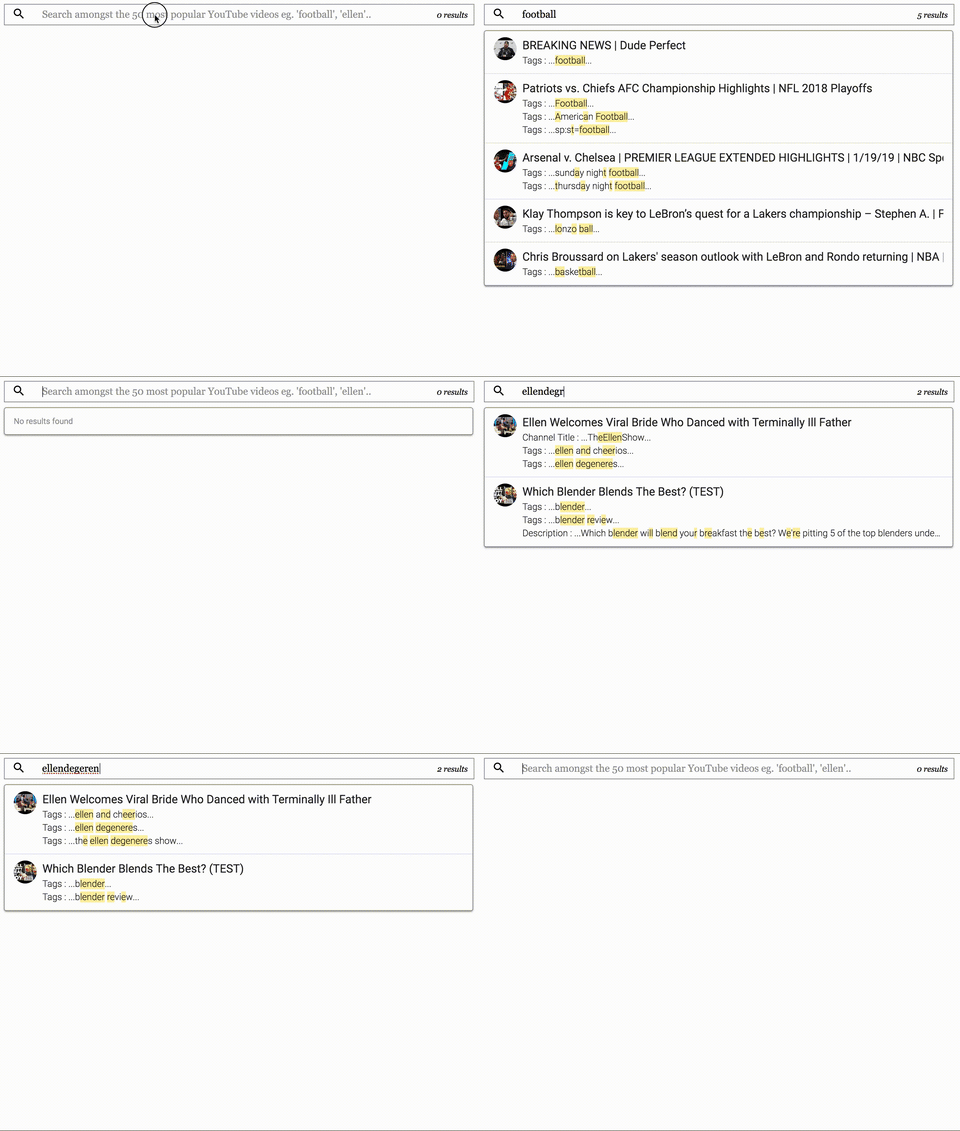
See [live demo](https://goelhardik.github.io/react-fuzzy-searcher/)
More details on usage and other improvements coming soon...
## Installation
Start by installing `react-fuzzy-searcher` via npm:
```bash
npm install react-fuzzy-searcher
```
## Usage
Here is a sample usage
```js
import * as React from "react";
import SearchBox from "react-fuzzy-searcher";
function getSearchKeys() {
return [
{
name: "snippet.channelTitle",
weight: 0.4
},
{
name: "snippet.tags",
weight: 0.2
},
{
name: "snippet.description",
weight: 0.5
}
];
}
export interface ISearchBoxDemoProps {
}
interface ISearchBoxDemoState {
searchableData: string;
}
var sampleData = require("./data/sampleData.json");
class SearchBoxDemo extends React.Component<ISearchBoxDemoProps, ISearchBoxDemoState> {
constructor(props: ISearchBoxDemoProps) {
super(props);
this.state = {
searchableData: JSON.stringify(sampleData)
}
}
public render() {
const fuseOptions = {
keys: getSearchKeys(),
includeMatches: true,
includeScore: true,
threshold: 0.5
};
sampleData = sampleData.map((d: any, idx: number) => {
d.onClick = () => console.log("Clicked");
return d;
});
return (
<SearchBox
fuseOptions={fuseOptions}
searchData={sampleData}
placeholder="Search amongst the 50 most popular YouTube videos eg. 'football', 'ellen'.."
searchResultOptions={{
showAvatar: true,
searchResultTitleKey: "snippet.title",
searchResultImageUrl: "snippet.thumbnails.default.url",
searchResultMatchKeys: {
"snippet.channelTitle": "Channel Title",
"snippet.tags": "Tags",
"snippet.description": "Description"
}
}}
/>
);
}
}
```
## Component API
### fuseOptions
Use `fuseOptions` to provide options for `Fuse.js`. Refer to documentation [here](http://fusejs.io/).
Among these `fuseOptions`, `includeMatches` and `includeScore` is always set to `true` by `react-fuzzy-searcher`
### searchData
Provide `searchData` which is the data on which search will be performed. Pass in a JSON which is an array of objects to search on. This list can contain any type of objects - **they don't have to be of the same type**.
> Add an `onClick` method to each item, if you want to control what happens when user clicks on this item (when/if it is presented in the search results dropdown). If not, `react-fuzzy-searcher` will expect `onClick` property to be a `string` and will use a `Link` react component with property `to` pointing to this string. So when user clicks on this search result, they will be redirected to that path. Also, remember to use the `Router` component in your app at a parent level, because `Link` cannot be used outside of `Router`.
> Add an `onRender` method to each item, if you want to render the search result yourself. If any of the items has this `onRender` property set, that method will be called when this item is rendered as a search result in the dropdown. If not specified, the default rendering will be done.
A sample list:
```json
[
{
"id": "J3xLG-whfFk",
"snippet": {
"title": "Pastry Chef Attempts to Make Gourmet Pringles | Gourmet Makes | Bon Appétit",
"description": "Pringles. They're the miraculously not greasy potato chips that come in a tube.",
"thumbnails": {
"default": {
"url": "https://i.ytimg.com/vi/J3xLG-whfFk/default.jpg"
}
},
"channelTitle": "Bon Appétit",
"tags": [
"claire saffitz",
"bon appetit"
]
}
},
{
"id": "1KiACA2ybTs",
"snippet": {
"title": "Cold As Balls All-Stars | Ronda Rousey Takes No BS | Laugh Out Loud Network",
"description": "Kevin Hart and Ronda Rousey kick off their shoes and jump in the tub to talk Olympic dreams",
"thumbnails": {
"default": {
"url": "https://i.ytimg.com/vi/1KiACA2ybTs/default.jpg"
}
},
"channelTitle": "LOL Network",
"tags": [
"kevin hart",
"hartbeat productions",
]
}
}
]
```
### placeholder (optional)
Placeholder text to display in the search box. If none provided, nothing is displayed.
### searchResultOptions (optional)
Options to control display of search results in the dropdown. All properties under this are optional.
- #### showAvatar (optional)
Boolean whether to show an avatar in the search result in dropdown.
- #### searchResultTitleKey (optional)
The property in the objects of `searchData` which will be treated as the title of the search result. This can be a nested property as well like `snippet.title`. If not provided, `react-fuzzy-searcher` will try to use a property named `title`.
- #### searchResultImageUrl (optional)
The property in the objects of `searchData` which will be treated as the url of the avatar to display in the search result. This can be a nested property as well like `snippet.thumbnails.default.url`. If not provided, `react-fuzzy-searcher` will try to use a property named `imageUrl`.
- #### searchResultMatchKeys (optional)
This is a JSON which represents a map of object keys to their display names. When matches are displayed in the dropdown, the keys that have been matched will be displayed with the custom name provided here. If not provided, no key is displayed. See usage example above for a sample.