react-float-anchor
Version:
React component for positioning an element aligned to another
105 lines (84 loc) • 4.71 kB
Markdown
[](https://github.com/StreakYC/react-float-anchor/blob/master/LICENSE.txt) [](https://badge.fury.io/js/react-float-anchor) [](https://circleci.com/gh/StreakYC/react-float-anchor)
This is a React component for anchoring a fixed position element, such as a
dropdown menu, to the edge of an element on the page. The fixed position
element will automatically be placed so that it fits on the screen if
possible, and it will automatically reposition if needed when the user scrolls.
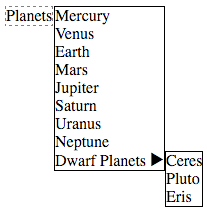
The above example can be tried here:
https://streakyc.github.io/react-float-anchor/example/
```ts
<FloatAnchor
options={{ position: 'right', vAlign: 'top', hAlign: 'left' }}
anchor={anchorRef => (
<div ref={anchorRef} style={{ border: '1px dashed gray', display: 'inline-block' }}>
Planets
</div>
)}
float={
<div style={{ border: '1px solid black', background: 'white' }}>
Mercury
...
</div>
}
/>
```
You can find its code in the `example` directory. The example may be compiled
by running:
```
yarn
yarn example-build
yarn example-watch
```
This module exports the `FloatAnchor` React component, which takes the
following props:
* `anchor` must be a function that takes a React ref value ("anchorRef"), and
returns a React node. The anchorRef value must be passed as the `ref` prop to
an HTML element. The returned node will be placed in the page where the
`FloatAnchor` element was used, with no added wrapper elements around it.
Alternatively, `anchor` may be a reference to a pre-existing HTMLElement.
Use this if you want to attach to a non-React HTMLElement on the page.
* `float` must be null, a React node, or a function that returns a React node.
If null, then FloatAnchor won't do anything other than render `anchor` as-is.
If non-null, the `float` React node will be rendered in a container div which
has `position:fixed` styling, is attached directly to the document body (or
parentElement), and is positioned to line up with the anchorRef element.
If `float` is a function, then the function will receive the return value from
the most recent call to [contain-by-screen](https://github.com/Macil/contain-by-screen),
or null if it hasn't been called yet. The initial render will pass null, and
then the component will be re-rendered after having been positioned by
contain-by-screen.
* `options` is an optional object of options to control how the float element's
container is aligned to the anchor element. The options are the same as those
supported by [contain-by-screen](https://github.com/Macil/contain-by-screen#readme).
* `zIndex` is an optional number controlling the z-index CSS property of the
float element's container.
* `floatContainerClassName` is an optional string specifying a CSS class to
apply to the float element's container div.
* `parentElement` is an optional HTMLElement to attach the float element
container div to. This defaults to the page body element.
FloatAnchor has the following static methods:
* `parentNodes(node)` takes a DOM node, and returns an iterator that yields the
node and then each parentNode, unless the current node is a `float` element's
container div, then its corresponding anchorRef DOM node will be yielded next
instead. This is useful when you are listening to events from the entire page
and need to determine whether an event's target is logically contained by a
React component that has children that use FloatAnchor.
The FloatAnchor component has a `repositionAsync()` method, which you should
call if you change the size of the contents of the anchor or float elements.
There's also a `reposition()` method which you can call if you need the component
to be repositioned synchronously. This method should not be used unless necessary.
The async version of this method is able to coalesce redundant queued reposition
calls together.
The container div of the `float` element has its `rfaAnchor` property set to
be equal to the anchorRef DOM element.
## Related
If you want interactive dropdown menus, check out the
[react-menu-list](https://github.com/StreakYC/react-menu-list) module that
is built with this!
## Types
Both [TypeScript](https://www.typescriptlang.org/) and
[Flow](https://flowtype.org/) type definitions for this module are included!
The type definitions won't require any configuration to use.