react-estimated-delivery
Version:
React component for estimated delivery with config and holiday options.
145 lines (108 loc) • 4.7 kB
Markdown
# React Estimated Delivery Component
React component for estimated delivery with business day, delivery day and holiday options configuration.
## How it works
- Next day delivery - If it's not past cut off & tomorrow is a delivery day.
- Determining estimated delivery date - If a business day has passed, the business day date + the deliveryDayIncrement is a delivery day.
## How to use
### Install
Installation: `npm install react-estimated-delivery`
### Usage
Import the package into your app:
`import { EstimatedDeliveryComponent } from "react-estimated-delivery";`
#### Component Example:
```
<EstimatedDeliveryComponent
businessDays={{
"monday": true,
"tuesday": true,
"wednesday": true,
"thursday": true,
"friday": true,
"saturday": false,
"sunday": false
}}
deliveryDays={{
"monday": true,
"tuesday": true,
"wednesday": true,
"thursday": false,
"friday": true,
"saturday": true,
"sunday": false
}}
cutOffTime={"23:50"}
holidays={["07/08/2024", "08/08/2024", "09/08/2024", "10/08/2024", "11/08/2024"]}
timezone={"Europe/London"}
dateFormat={"en-GB"}
enableCountDownTimer={true}
nextDayDeliveryAvailableText={"Next day delivery available."}
nextDayDeliveryNotAvailableText={"Next day delivery NOT available."}
estimatedDeliveryText={"Estimated delivery date:"}
orderWithinText={"Order within"}
timerText={{hours: "h", minutes: "m", seconds: "s"}}
isNextDayAvailable={true}
deliveryDayIncrement={1}
showDateRange={true}
dateRange={2}
loadingText={"Getting estimate..."}
>
<img alt="" src={TheIcon} height={24} width={24}></img>
</EstimatedDeliveryComponent>
```
### Component Options:
- The <EstimatedDeliveryComponent> can accept any element between the opening and closing tag this is to be used for the icon.
- `businessDays={{
"monday": true,
"tuesday": true,
"wednesday": true,
"thursday": true,
"friday": true,
"saturday": false,
"sunday": false
}}`
Set which days the business is open.
- `deliveryDays={{
"monday": true,
"tuesday": true,
"wednesday": true,
"thursday": false,
"friday": true,
"saturday": true,
"sunday": false
}}`
Set which days delivery is available.
- `cutOffTime={"12:00"}`
Cut off time for next day delivery.
- `holidays={["07/08/2024", "08/08/2024"]}`
Pass in an array of holidays, dd/mm/yyyy, this is to be used for bank holidays.
- `timezone={"Europe/London"}`
Set the timezone to diplay to the customer.
- `dateFormat={"en-GB"}`
Used when passing in holidays, the format should match the format of your holidays (dd/mm/yy or mm/dd/yyy).
- `enableCountDownTimer={true}`
Have the countdown show if next day delivery is available.
- `nextDayDeliveryAvailableText={"Next day delivery available."}`
Text for next day delivery available.
- `nextDayDeliveryNotAvailableText={"Next day delivery NOT available."}`
Text for next day delivery not available.
- `estimatedDeliveryText={"Estimated delivery date:"}`
Text for estimated delivery.
- `timerText={{hours: "h", minutes: "m", seconds: "s"}}`
Text for timer.
- `orderWithinText={"Order within"}`
Order within text.
- `isNextDayAvailable={true}`
Enable next day delivery.
- `deliveryDayIncrement={1}`
Set how many days to increment by.
- `showDateRange={true}`
Show date range
- `dateRange={2}`
Number of days to add to earliest delivery date for a date range.
- `loadingText={"Getting estimate..."}`
Text to display during estimate load.
## Example
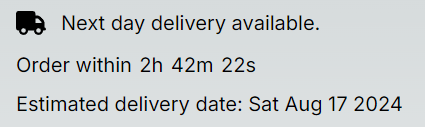
### Estimated Delivery with timer (Next Day available)
### Estimated Delivery wthout timer (Next day not available)
