react-emoji-popup-lister
Version:
React emoji search & select by colon syntax, with keyboard navigation
154 lines (122 loc) • 4.54 kB
Markdown
# React Emoji Popup Lister
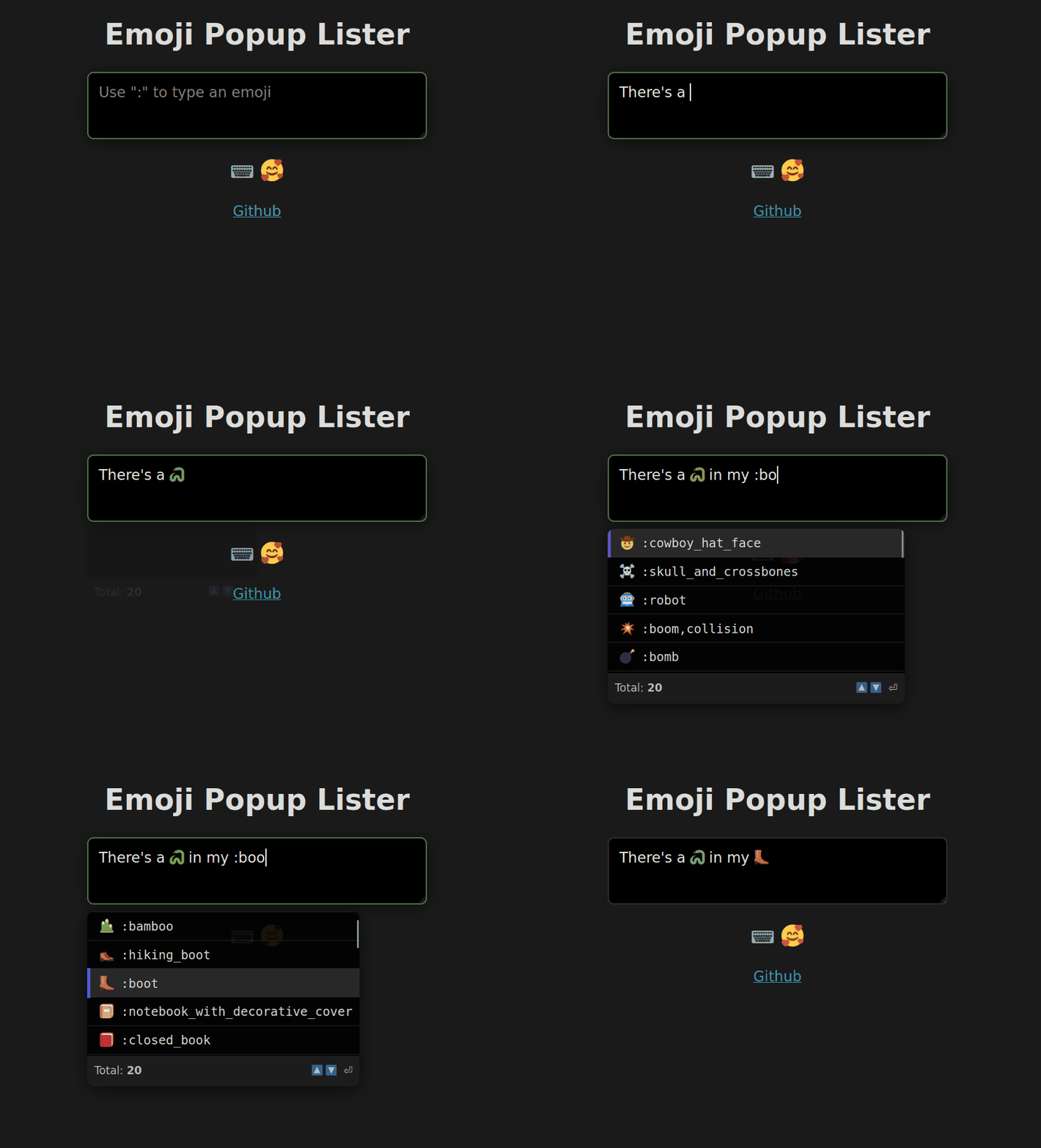
> Slack-lick emoji list and select via keyboard
[](https://www.npmjs.com/package/react-emoji-popup-lister)
## 📁 About
Type and insert emojis within your inputs, via their shortcode values. Written in Typescript.
`:cool:` :cool:
## ⌨️ Install
❗ [ESM only package](https://gist.github.com/sindresorhus/a39789f98801d908bbc7ff3ecc99d99c)
```bash
npm i -s react-emoji-popup-lister
```
## 🚀 Usage
### 1. Basic
```jsx
import EmojiPopup from "react-emoji-popup-lister"
export default function ExampleA () {
return <EmojiPopup />
}
```
### 2. Custom styling with props
```jsx
import EmojiPopup from "react-emoji-popup-lister"
export default function ExampleB () {
return (
<EmojiPopup
listMax={40}
maxHeight="200px"
maxWidth="300px"
placeholder="Add a profile description"
theme="light"
ariaLabel="Profile description input"
/>
);
}
```
### 3. Provide an input component, state, and events from your parent component
Also wrap in a container div, to align the input and popup
```tsx
import { useState, useEffect } from "react";
import EmojiPopup from "react-emoji-popup-lister"
// Your input with props passed, including input value state
function Input (props: any) {
useEffect(() => { }, [props.value]);
return (
<input
// Required. Anything after is optional, and will override values
{...props}
// Override or extend default values
className="your-class-name"
placeholder="Your placeholder text"
style={{ ...props.style, width: "100%" }}
/>
);
}
// Parend component with state, passed input, events, etc.
export default function ExampleC () {
const [text, setText] = useState("");
useEffect(() => { }, [inputText]);
const handleChange = function (e: React.ChangeEvent) { };
return (
{/* Container to align input and popup together */}
<div style={{ maxWidth: "400px", margin: "1rem auto 0"}}>
<EmojiPopup
input={Input}
value={text}
setValue={setText}
onChange={handleChange}
>
<div>Child content...</div>
</EmojiPopup>
</div>
);
}
```
## 🗃️ Prop Options
> All are optional
| Prop | Type | Default | Description |
| --- | --- | --- | --- |
| `input` | input/textarea component | `<input>` | Pass your own input element or component |
| `value` | useState `string` value | `""` | Store state in your parent component |
| `setValue` | useState `function` | setState | Set `value` from inside Emoji component |
| `listMax` | `number` | `6` | Max number of emoji matches to display |
| `theme` | `string` | `auto` | Popup display theme style. `light` `dark` `auto` |
| `strict` | `boolean` | `true` | Strict mode will ignore `a:b`, `👋:ab` |
| `maxWidth` | `number/string` | `400px` | Scroll container width cap |
| `maxHeight` | `number/string` | `250px` | Scroll container height cap |
| `footer` | `boolean` | `true` | Display or hide footer info bar |
| `placeholder` | `string` | `""` | Input placeholder value |
| `ariaLabel` | `string` | `""` | Input `aria-label` value |
## 🪅 Prop Events
> Place on `<EmojiPopup>` component, **Not** your custom `<input>` - as this will override necessary events
| Prop | Description |
| --- | --- |
| `onClick` | Input element Click event (* Not emoji list) |
| `onChange` | Input value Change event |
| `onKeyDown` | Input KeyDown event |
| `onKeyUp` | Input KeyUp event |
| `onFocus` | Input Focus event |
| `onBlur` | Input Blur event |
## 🗺️ Shortcuts
> These will `preventDefault` in the input while the popup is active
| Key | Function |
| --- | --- |
| `ArrowUp` | Up in emoji list |
| `ArrowDown` | Down in emoji list |
| `Home` | Start of emoji list |
| `End` | End of emoji list |
| `Enter` or `Tab` | Choose highlighted emoji |
## 🏗️ Todo
### Feature
- Add CSS classes for user styling
- Option to turn off Home/End shortcut
- Option to replace full emoji string automatically (2 colons)
- Add better positioning support
### Bugs
- Cursor over list, while using keyboard navigation still triggers hover change
- Deleting "combo" emojis on Firefox doesn't remove the entire emoji
- Escape to hide gets reset on successive typing
- Cursor changing caret position not triggering changes
## 🖊️ License
MIT © [nicfontaine](https://github.com/nicfontaine)