react-double-marquee
Version:
A smooth-scrolling React <marquee> component that loops content.
163 lines (112 loc) • 3.9 kB
Markdown
# react-double-marquee
> A React marquee component that smoothly loops content.
[](https://badge.fury.io/js/react-double-marquee) 
[](https://travis-ci.org/cdtinney/react-double-marquee) [](https://coveralls.io/github/cdtinney/react-double-marquee?branch=master)
[](https://github.com/semantic-release/semantic-release)
Lo-fi demo:
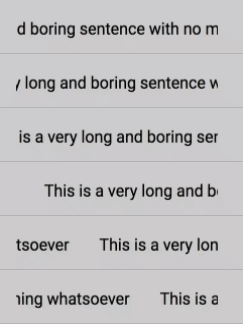
View the [demos page](https://cdtinney.github.io/react-double-marquee/) for live examples.
## Contents
- [Contents](#contents)
- [Getting Started](#getting-started)
- [Demos](#demos)
- [Usage](#usage)
- [Props](#props)
- [Developing](#developing)
- [Installing](#installing)
- [Building](#building)
- [Testing](#testing)
- [Linting](#linting)
- [Releasing](#releasing)
- [License](#license)
## Getting Started
### Demos
Demos can be found [here](https://cdtinney.github.io/react-double-marquee/).
### Usage
Install as a dependency:
```
$ npm install --save react-double-marquee
```
Then, import it and **wrap it in an element that does not display overflow**:
```js
import Marquee from 'react-double-marquee';
export default function FooComponent() {
return (
<div
style={{
width: '200px',
whiteSpace: 'nowrap',
}}
>
<Marquee>
Some really really really really really long text
</Marquee>
</div>
);
}
```
### Props
| Key | Type | Default | Description |
| ------------- | ----------------- | -------------------------------------- | ---------------------------------------------- |
| `speed` | `Number` | 0.04 | Movement speed, in pixels/millisecond. |
| `delay` | `Number` | 3000 | Time until animation begins, in milliseconds. |
| `direction` | `"right"\|\|"left"` | `"right"` | Horizontal direction. |
| `childMargin` | `Number` | 10 | Horizontal margin between children, in pixels. |
| `children` | React node | None | Children to render within the marquee. |
| `scrollWhen` | `"overflow"\|\|"always"` | `"always"` | Whether the text always scrolls, or only when the content overflows the container width. |
## Developing
First, clone the repository.
### Installing
Install dependencies:
```
$ npm install
```
### Building
To build the package bundle:
```
$ npm run build
```
To build the bundle with live rebuilding:
```
$ npm run watch
```
To run the demos with live reload:
```
$ npm run dev
```
Then, open `http://localhost:8001` to view the demo docs.
To build the static docs website (e.g. for GitHub Pages):
```
$ npm run docs
```
### Testing
To run tests:
```
$ npm run test
```
To run tests in watch mode:
```
$ npm run test:watch
```
To run tests with coverage reporting:
```
$ npm run test:coverage
```
### Linting
To run the linter:
```
$ npm run lint
```
### Releasing
Releases are done automatically via Travis CI and [`semantic-release`](https://github.com/semantic-release/semantic-release)
from the `master` branch.
To verify the repos for release:
```
$ npm run release:verify
```
To run the release script as a dry-run:
```
$ npm run release
```
## License
MIT