react-datepicker-cy
Version:
react datepicker component. (include persian jalaali calendar)
132 lines (93 loc) • 4.81 kB
Markdown
# React Date Picker Clickyab
A simple and reusable Datepicker component for React (with persian jalali calendar support) [Demo](https://alireza-mh.github.io/react-datepicker2/).
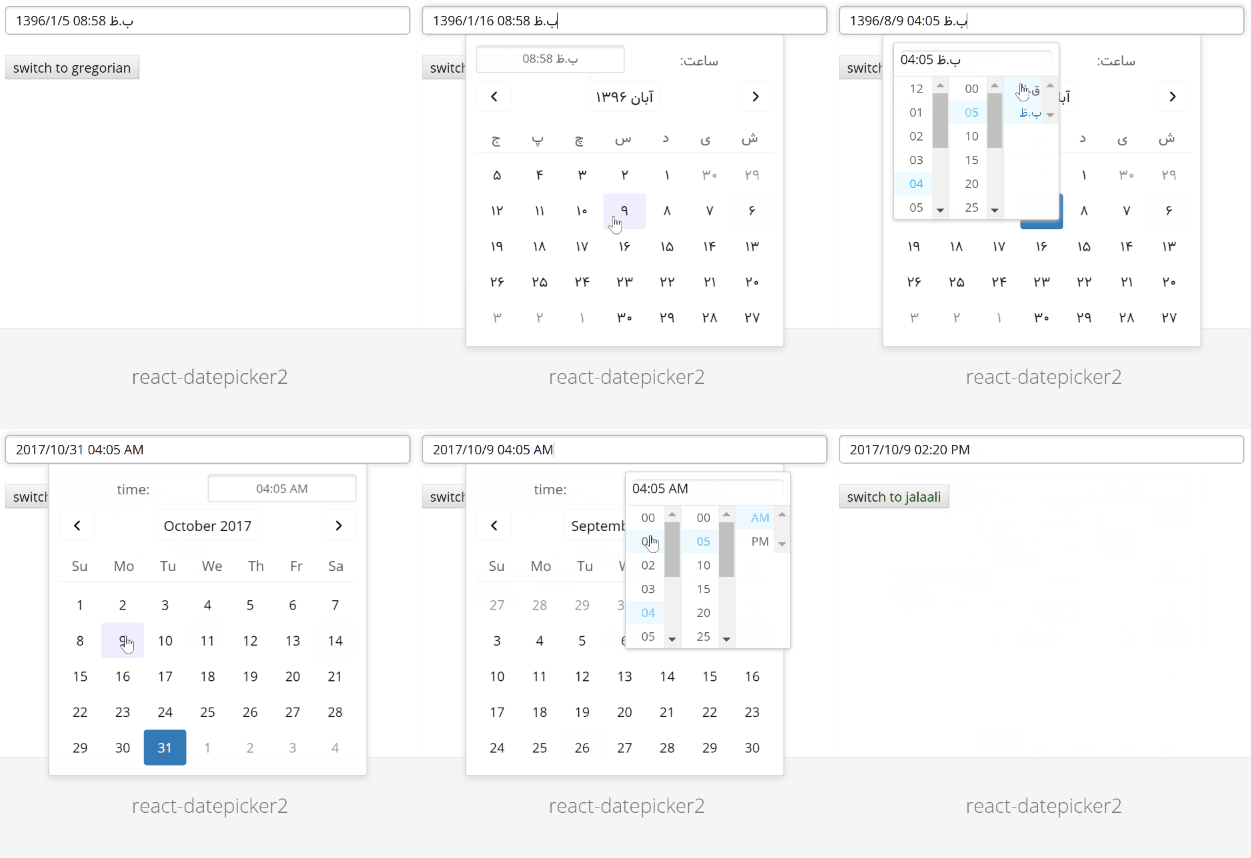
This package uses [react-persian-datepicker](https://github.com/evandhq/react-persian-datepicker) project under the hood.
This project Forked from [react-datepicker2](https://github.com/mberneti/react-datepicker2/) and some feature added to it. since none of pull requested reviewed, we decide to publish it as stand alone project.
## Installation
The package can be installed via NPM:
```
npm install react-datepicker-cy --save
```
At this point you can import react-datepicker-cy and its styles in your application as follows:
```js
import DatePicker from 'react-datepicker-cy';
// Be sure to include styles at some point, probably during your bootstrapping
import 'react-datepicker-cy/dist/react-datepicker-cy.min.css';
```
Below is a simple example on how to use the Datepicker in a React view. You will also need to require the css file from this package (or provide your own). The example below shows how to include the css from this package if your build system supports requiring css files (webpack is one that does).
```js
import React from 'react'
import moment from 'moment-jalaali'
import DatePicker from 'react-datepicker-cy';
import 'react-datepicker2/dist/react-datepicker-cy.min.css';
export default React.createClass({
getInitialState() {
return {
value: moment()
}
},
render() {
return <DatePicker
onChange={value => this.setState({ value })}
value={this.state.value}
/>
}
})
```
You can also use the standalone build by including react-datepicker2.js and react-datepicker2.css in your page. (If you do this though you'll also need to include the dependencies.) For example:
```html
<script src="https://cdnjs.cloudflare.com/ajax/libs/react/15.1.0/react.min.js"></script>
<script src="https://cdnjs.cloudflare.com/ajax/libs/react/15.1.0/react-dom.min.js"></script>
<script src="https://unpkg.com/classnames/index.js"></script>
<script src="https://unpkg.com/react-datepicker-cy/dist/index.js"></script>
<link rel="stylesheet" href="https://unpkg.com/react-datepicker-cy/dist/react-datepicker-cy.min.css">
```
Range support only implemented for Calender component, first import it to the project and set isRange property to true,
```js
import React from 'react'
import moment from 'moment-jalaali'
import {Calendar} from "react-datepicker-cy";
<Calendar isGregorian={false}
defaultMonth={this.state.currentMonth}
inputFormat="jYYYY/jM/jDD"
calendarClass={"persian-calendar-range first-picker"}
syncSelectedDay={(day) => console.log("selected day",day)}
isRange={true}
selectedDayArray={(this.state.selectedDayArray)}
/>
```
synceSelectedDay property will pass selected Day.
selectedDayArray will get array of days
## Some other property that have been added
### Datepicker Component added features
tetherAttachment: specify position of Datepicker thether. example:
```js
tetherAttachment={"top right"}
```
- onOpen : pass out if datepicker popup is open or not.
- inputReadOnly: it allows you to make your datepicker readonly
- calendarClass: accept class name for calendar customization
### Calendar Component added features
- isRange: set it to true if you would like to use range picker
- calendarClass: accept class name for calendar customization
## Configuration
The most basic use of the DatePicker can be described with:
```js
<DatePicker onChange={value => this.setState({ value })} value={this.state.value} />
```
## Local Development
The `master` branch contains the latest version of the Datepicker component. To start your example app, you can run `npm install` then `npm start`. This starts a simple webserver on http://localhost:4000.
## Todo
- [x] Write some tests
- [x] Better documentation
- [ ] UI improvements
- [ ] Remove classnames dependency
## Built With
* [moment-jalaali](https://github.com/jalaali/moment-jalaali) - A Jalaali (Jalali, Persian, Khorshidi, Shamsi) calendar system plugin for moment.js.
## Thanks
Special thanks to [@mohebifar](https://github.com/mohebifar) and [@mberneti](https://github.com/mberneti) for his open-source project which this component is based on.
## Contributing
Contributions are **welcome** and will be fully **credited**.
I'd be happy to accept PRs for that.
## License
Copyright (c) 2018 [clickyab](http://clickyab.com) Inc. and individual contributors. Licensed under MIT license, see [LICENSE](LICENSE) for the full license.