react-autocomplete-tagbox
Version:
React Autocomplete Tagbox is a modern, customizable React component for tag input with optional autocomplete. Effortlessly add, remove, and select tags with keyboard or mouse. Supports both free-form and restricted tag entry, smart suggestions, and a clea
175 lines (130 loc) • 6.81 kB
Markdown
<p align="center">
<img src="https://i.postimg.cc/43NF8qPy/logo1-1-1.png" alt="React Autocomplete Tagbox logo" />
<h1 align="center">React Autocomplete Tagbox</h1>
<p align="center">
<b>Modern, flexible, and fully customizable React tag input with autocomplete.</b>
</p>
<p align="center">
<a href="https://www.npmjs.com/package/react-autocomplete-tagbox"><img src="https://img.shields.io/npm/v/react-autocomplete-tagbox.svg?style=flat-square" alt="npm version"></a>
<a href="https://github.com/ecargsid-eht/react-autocomplete-tagbox/blob/main/LICENSE"><img src="https://img.shields.io/badge/license-MIT-green?style=flat-square" alt="MIT license"></a>
<img src="https://img.shields.io/npm/dm/react-autocomplete-tagbox.svg?style=flat-square" alt="downloads">
</p>
<p align="center">
<img src="https://img.shields.io/badge/React-20232A?logo=react&logoColor=61DAFB&style=for-the-badge" alt="React" />
<img src="https://img.shields.io/badge/JavaScript-F7DF1E?logo=javascript&logoColor=222&style=for-the-badge" alt="JavaScript" />
</p>
</p>
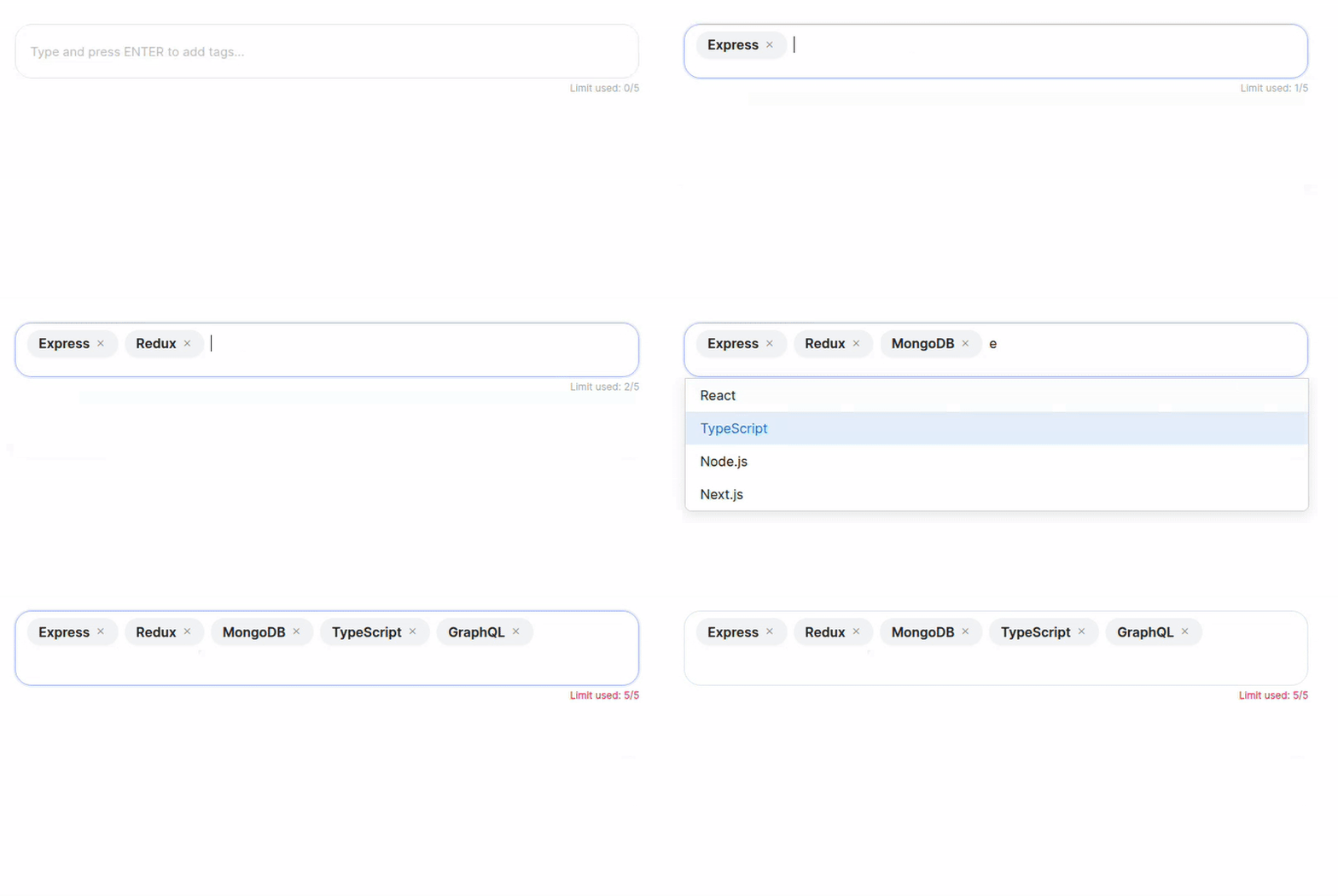
**React Autocomplete Tagbox** is a modern, flexible, and fully customizable React component for tag input with optional autocomplete. Effortlessly add, remove, and select tags with keyboard or mouse. Supports both free-form and restricted tag entry, smart suggestions, and a clean, accessible UI. Perfect for forms, search bars, and dynamic filters. Easy to integrate and fully styleable to match your project.
## 🎬 Without Autocomplete

## 🎬 With Autocomplete
## ✨ Features
- **Autocomplete Suggestions**: Show relevant tag options as users type.
- **Free-form or Restricted Tags**: Allow any input or restrict to a predefined list.
- **Custom Tag Validation (`filterData`)**: Accept only tags that match your custom logic (e.g., only URLs, emails, etc.).
- **Keyboard & Mouse Friendly**: Full keyboard navigation and intuitive mouse interactions.
- **Customizable UI**: Easily style to match your design system.
- **Tag Removal**: Remove tags with a click or keyboard.
- **Tag Limit**: Optionally limit the number of tags.
- **Paste Multiple Tags**: Paste a list of tags separated by space/comma/newline.
- **Accessible**: Built with accessibility in mind (ARIA roles, keyboard support).
- **TypeScript Support**: Fully typed for a great developer experience.
- **Lightweight**: Small bundle size, no heavy dependencies.
- **Easy Integration**: Plug-and-play with minimal setup.
## 🚀 Installation
```bash
npm install react-autocomplete-tagbox
# or
yarn add react-autocomplete-tagbox
```
## 🛠️ Usage
```tsx
import React, { useState } from "react";
import ReactAutocompleteTagbox from "react-autocomplete-tagbox";
const options = [
"React",
"JavaScript",
"TypeScript",
"GraphQL",
"Redux",
"Bootstrap",
];
// Example filter: only allow options that are at least 5 characters
const filterData = (str: string) => str.length >= 5;
const filteredOptions = options.filter(filterData);
export default function App() {
const [tags, setTags] = useState<string[]>([]);
return (
<ReactAutocompleteTagbox
tags={tags}
onChange={setTags}
options={filteredOptions} // Filtered options
filterData={filterData}
limit={5}
placeholder="Add technologies..."
/>
);
}
```
> **Note:**
> If you use both `options` and `filterData`, only options that pass `filterData` will be selectable or added as tags.
> It's recommended to filter your `options` with `filterData` before passing them to the component.
## ⚙️ Props
| Prop | Type | Default | Description |
| ---------------- | --------------------------- | --------------------------------------- | ------------------------------------------------------------------- |
| `tags` | `string[]` | `[]` | The current list of tags. |
| `onChange` | `(tags: string[]) => void` | | Callback when tags change. |
| `options` | `string[]` | `undefined` | Optional. Restricts tags to these options and enables autocomplete. |
| `limit` | `number` | `undefined` | Optional. Maximum number of tags allowed. |
| `placeholder` | `string` | `"Type and press ENTER to add tags..."` | Placeholder text for the input. |
| `containerStyle` | `React.CSSProperties` | `undefined` | Optional. Inline styles for the container. |
| `className` | `string` | `undefined` | Optional. Additional class for the container. |
| `filterData` | `(data: string) => boolean` | `undefined` | Optional. Custom validation/filter function for tags. |
## 🧠 Filtering Options
If you use both `options` and `filterData`, make sure your options match your filter. For example, to only allow URLs:
```tsx
const filterData = (str: string) => {
try {
const url = new URL(str.trim());
return url.protocol === "http:" || url.protocol === "https:";
} catch {
return false;
}
};
const filteredOptions = options.filter(filterData);
<ReactAutocompleteTagbox
tags={tags}
onChange={setTags}
options={filteredOptions}
filterData={filterData}
/>;
```
## 🎨 Customization
- **Styling**: The component uses CSS Modules. You can override styles by importing your own CSS or using the `className` prop.
- **Accessibility**: Keyboard navigation and ARIA attributes are included for a11y. You can further enhance accessibility by providing descriptive labels and ensuring color contrast in your custom styles.
## 🧑💻 Development
Clone the repo and run:
```bash
npm install
npm run dev
```
## 📝 License
[MIT](https://github.com/ecargsid-eht/react-autocomplete-tagbox/blob/main/LICENSE) © [Amrit Utsav](https://github.com/ecargsid-eht)
## 💡 Contributing
Contributions, issues, and feature requests are welcome!
Feel free to check [issues page](https://github.com/ecargsid-eht/react-autocomplete-tagbox/issues).
**React Autocomplete Tagbox** — The smart, beautiful way to manage tags in your React apps!