react-archer
Version:
Draw arrows between DOM elements in React
132 lines (95 loc) • 3.01 kB
Markdown
# react-archer
[](https://circleci.com/gh/pierpo/react-archer)
🏹 Draw arrows between DOM elements in React 🖋
## Installation
`npm install react-archer --save` or `yarn add react-archer`
## Example
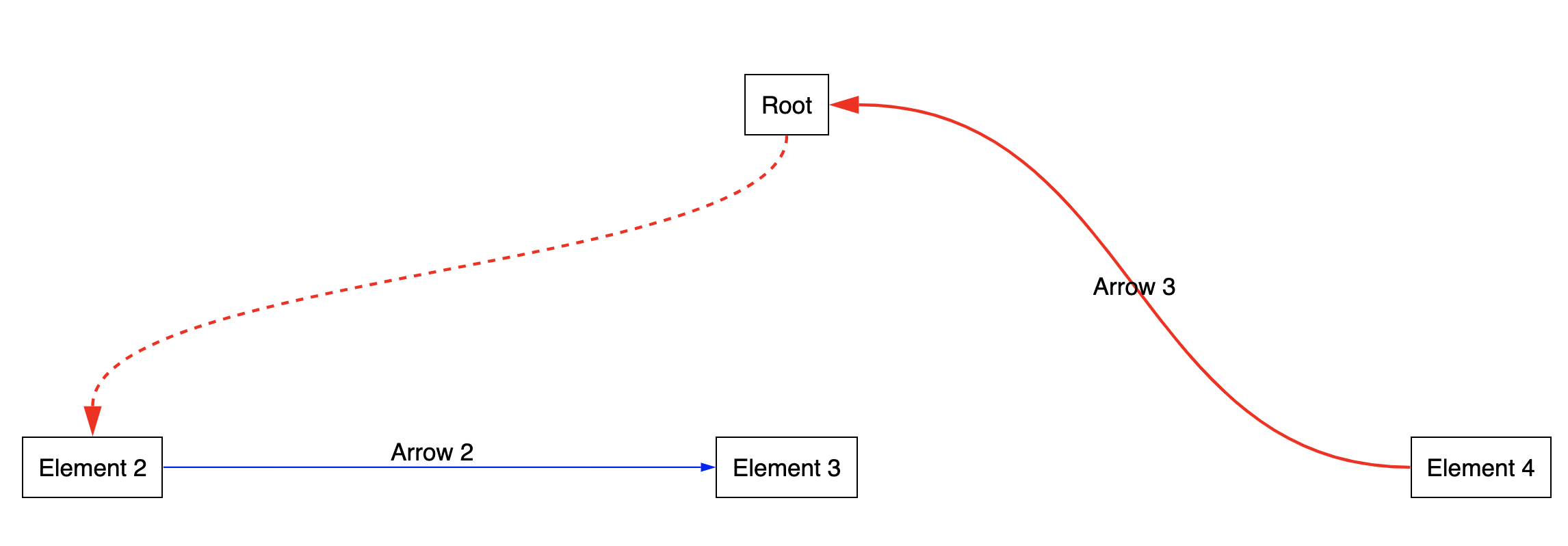
```jsx
import { ArcherContainer, ArcherElement } from 'react-archer';
const rootStyle = { display: 'flex', justifyContent: 'center' };
const rowStyle = { margin: '200px 0', display: 'flex', justifyContent: 'space-between', }
const boxStyle = { padding: '10px', border: '1px solid black', };
const App = () => {
return (
<div>
<ArcherContainer strokeColor='red' >
<div style={rootStyle}>
<ArcherElement
id="root"
relations={[{
from: { anchor: 'bottom' },
to: { anchor: 'top', id: 'element2' }
}]}
>
<div style={boxStyle}>Root</div>
</ArcherElement>
</div>
<div style={rowStyle}>
<ArcherElement
id="element2"
relations={[{
from: { anchor: 'right'},
to: { anchor: 'left', id: 'element3' },
label: <div style={{ marginTop: '-20px' }}>Arrow 2</div>,
}]}
>
<div style={boxStyle}>Element 2</div>
</ArcherElement>
<ArcherElement id="element3">
<div style={boxStyle}>Element 3</div>
</ArcherElement>
<ArcherElement
id="element4"
relations={[{
from: { anchor: 'left'},
to: { anchor: 'right', id: 'root' },
label: 'Arrow 3',
}]}
>
<div style={boxStyle}>Element 4</div>
</ArcherElement>
</div>
</ArcherContainer>
</div>
);
}
export default App;
```
## API
### `ArcherContainer`
#### `strokeColor`: PropTypes.string
A color string `'#ff0000'`
#### `strokeWidth`: PropTypes.number
A size in `px`
#### `arrowLength`: PropTypes.number
A size in `px`
#### `arrowThickness`: PropTypes.number
A size in `px`
#### `style`: PropTypes.object
#### `className`: PropTypes.string
#### `children`: PropTypes.node
### `ArcherElement`
#### `id`: PropTypes.string
#### `style`: PropTypes.object
#### `className`: PropTypes.string
#### `relations`: PropTypes.arrayOf(relation)
The `relation` object has the following shape:
```javascript
{
from: {
anchor: PropTypes.oneOf([ 'top', 'bottom', 'left', 'right' ])
},
to: {
anchor: PropTypes.oneOf([ 'top', 'bottom', 'left', 'right' ])
id: PropTypes.string
},
label: PropTypes.node
}
```
## TODO
- Automatic anchoring option
- Options to customize the path shape more (straight line, right angle line, smoothed right angle path)
- Individual customization of arrows (change color of a single arrow for example)
- Add a Code Sandbox
- Add flow