rdme
Version:
ReadMe's official CLI and GitHub Action.
76 lines (54 loc) • 3.78 kB
text/mdx
title: 'GitHub Actions Example: Syncing OpenAPI'
> 🚧 ReadMe Refactored Guidance
>
> This guidance is only applicable for projects that have been migrated to [ReadMe Refactored](https://docs.readme.com/main/docs/migration). The Refactored project architecture requires `rdme@10`, while the legacy project architecture requires `rdme@9`.
>
> For more information, check out our [migration guide](https://github.com/readmeio/rdme/blob/v10/documentation/migration-guide.md)
Is your OpenAPI definition stored on GitHub? With [the `rdme` GitHub Action](https://docs.readme.com/main/docs/rdme), you can sync it to ReadMe every time it's updated in GitHub. Let's go over how to set this up!
## Constructing a GitHub Actions Workflow
In order to construct the workflow file, you'll first want to determine a unique API definition slug from ReadMe so we know which definition you want to update on subsequent re-syncs. The slug value is technically optional and can be inferred from the file name — you can learn more about how we handle this [in the command documentation](https://github.com/readmeio/rdme/blob/v10/documentation/commands/openapi.md#rdme-openapi-upload-spec).
If you've already uploaded an existing file (either via uploading a file directly to your API Reference section in ReadMe or via `rdme`) and you'd like to update it, see below to determine what the slug of that API definition is.
<details>
<summary>Uploading a file</summary>
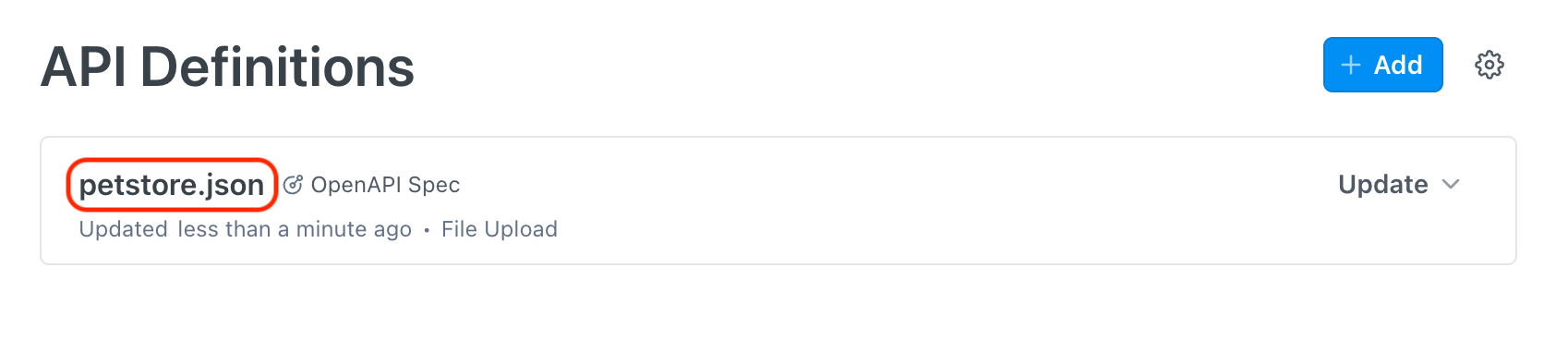
Follow [these instructions](https://docs.readme.com/main/docs/openapi) on uploading a new OpenAPI file in "edit" mode in your project's API Reference section. Once the file is uploaded, you'll see the following in the API Definitions list (the red outline is where you'll find your API definition slug):
</details>
<details>
<summary>Using the <code>rdme</code> CLI</summary>
Alternatively, you can obtain the API definition slug by running the following `rdme` CLI command on your local machine:
```sh
rdme openapi upload [url-or-local-path-to-file]
```
Once you follow the prompts and upload your OpenAPI definition, you'll receive a confirmation message that looks something like this:
```
🚀 Your API definition ([your-slug-here.json]) was successfully created in ReadMe!
```
</details>
Once you've obtained your API definition slug (let's call it `API_DEFINITION_SLUG`), your full GitHub Workflow file will look something like this:
```yml
name: Sync OpenAPI definition to ReadMe
# Run workflow for every push to the `main` branch
on:
push:
branches:
- main
jobs:
sync:
runs-on: ubuntu-latest
steps:
- name: Checkout this repo
uses: actions/checkout@v4
# Run GitHub Action to sync OpenAPI file at ./path-to-file.json
- name: GitHub Action
# We recommend specifying a fixed version, i.e. @RDME_VERSION
# Docs: https://docs.github.com/actions/using-workflows/workflow-syntax-for-github-actions#example-using-versioned-actions
uses: readmeio/rdme@RDME_VERSION
with:
rdme: openapi upload ./path-to-file.json --key=${{ secrets.README_API_KEY }} --slug=API_DEFINITION_SLUG
```
In the example above, every push to the `main` branch will sync the OpenAPI file located at `./path-to-file.json` to the API specification `API_DEFINITION_SLUG` in your ReadMe project.
> 📘 Keeping `rdme` up-to-date
>
> Note that `@RDME_VERSION` (used in the above example) is the latest version of `rdme`. We recommend [configuring Dependabot to keep your actions up-to-date](https://docs.github.com/code-security/dependabot/working-with-dependabot/keeping-your-actions-up-to-date-with-dependabot).