rcswitch-gpiomem
Version:
Rootless control of your wireless power outlet sockets with RCSwitch for the Raspberry Pi. Fork of https://github.com/marvinroger/node-rcswitch.
192 lines (125 loc) • 6.81 kB
Markdown
# node-rcswitch-gpiomem
<http://n8henrie.com/2015/12/control-an-rf-outlet-with-siri-via-homebridge>
Fork of <https://github.com/marvinroger/node-rcswitch> with `/dev/gpiomem`
access for rootless use on Raspbian Jessie as well as an exposing
the `setPulseLength` method and expanding `rcswitch.send` to accept a decimal
RF code (with bit length), as per the c++ version. Renamed as it may not be
backwards compatible with Wheezy / systems without `/dev/gpiomem`.
My contribution has been negligible; all credit goes to the original developers
of these libraries:
- <https://github.com/marvinroger/node-rcswitch>
- <https://github.com/FWeinb/homebridge-rcswitch>
- <https://github.com/32leaves/rcswitch-NodeOnPi>
- <https://github.com/r10r/rcswitch-pi>
- <http://code.google.com/p/rc-switch>
- <https://projects.drogon.net/raspberry-pi/wiringpi>
Additionally, this fork uses
[sched.h](http://pubs.opengroup.org/onlinepubs/007908775/xsh/sched.h.html) to
try to give the process a high priority during the RF transmission (currently
only implemented for `rcswitch.send()`). I've found this important for
optimizing reliability of the transmission if the CPU is busy. Reference [my
rf_pi post and
repository](http://n8henrie.com/2015/12/rf_pi-control-rf-outlets-from-your-raspberry-pi-without-sudo-or-root/)
for more information on using `libcap2-bin` and `setcap` to accomplish this,
but the short version is: `sudo apt-get install libcap2-bin && sudo setcap
cap_sys_nice+ep $(readlink -f $(which node))`. It works just fine without this
if you don't want to bother or are concerned about the security ramifications.
## Introduction
Node bindings for the rcswitch Raspberry Pi port: <https://github.com/r10r/rcswitch-pi>.
Personally, I have only tested on node v4.2.3. Per original author:
> It should be compatible with Node 0.8, 0.10 and 0.12 (tested only on 0.10 and
> 0.12). Successfully tested on Raspbian Wheezy up-to-date as of 2015-02-28.
## Requirements
- Like the c++ version of rcswitch, [WiringPi must be
installed](https://projects.drogon.net/raspberry-pi/wiringpi/download-and-install/)
in order to compile.
- To work without root by way of `/dev/gpiomem` part to work, it should be run
on Raspbian Jessie with [wiringPi >=
2.29](wiringpi.com/wiringpi-update-to-2-29/)
- Both the data and the power Pins of the 315/433Mhz emitter must be connected
to the RPi. Note the number of the ~~WiringPi data~~ BCM Pin. (see
http://wiringpi.com/pins/)
## Usage
```javascript
var rcswitch = require('rcswitch-gpiomem'); // May throw an error if /dev/gpiomem is not accessible
rcswitch.enableTransmit(17); // Use **BCM** pin 17
rcswitch.setPulseLength(190); // Set pulse length (see https://github.com/n8henrie/rf_pi)
rcswitch.setRepeatTransmit(15); // Set number of repeat transmissions
rcswitch.send(12345, 24) // send(code, bitlength)
// Alternative
rcswitch.switchOn("10110", 1); // Switch on the first unit of 10110 (code 1x23x) group
rcswitch.switchOff("11000", 2); // Switch off the second unit of 11000 (code 12xxx) group
```
Note: If testing / experimenting from a local copy of the repo, you need to
require the base directory of the repo:
```bash
git clone https://github.com/n8henrie/node-rcswitch-gpiomem.git
cd node-rcswitch-gpiomem
npm install .
node
> var rcswitch = require('.')
rcswitch.enableTransmit(17);
```
## API
### Configuration
#### `rcswitch.enableTransmit(int pin)`
Enable transmission on BCM `pin`. On Jessie should "just work". **NB:** if you to **not** want to use `/dev/gpiomem`, you'll need to first export the pin with the wiringPi `gpio` utility to avoid needing root.`
- `pin` - (Number) data Pin to use following [the WiringPi schema](http://wiringpi.com/pins/)
Return true if `pin` is an integer, false otherwise.
#### `rcswitch.disableTransmit()`
Disable transmission (set the pin to -1 which disable any following function call).
Return true.
#### `rcswitch.setPulseLength(int pLength)`
- `pLength` - RF pulse length, defaults to 190.
- See: <http://n8henrie.com/2015/12/rf_pi>
#### `rcswitch.setRepeatTransmit(int nRepeat)`
- `nRepeat` - Number of repeat transmissions (default 10)
#### `rcswitch.send(int code, int bLength)`
- `code` - **decimal** RF code to send
- `bLength` - bit length of decimal RF code
- See: <http://n8henrie.com/2015/12/rf_pi>
Return true if both are Uint32, otherwise false.
#### `rcswitch.send(`char* codeWord`)`
- `codeWord` - (String) codeword. Can use this to send the **binary** RF code,
see: <http://n8henrie.com/2015/12/rf_pi>
Return true.
## Specific RF receiver types
This is for use with specific RF protocols that I have never needed -- I just
use [RF_Snifer](https://github.com/n8henrie/rf_pi) to get the code. -@n8henrie
### Type A
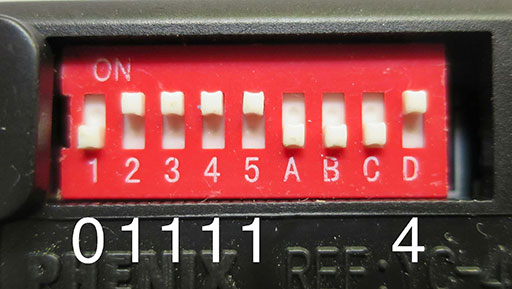
#### rcswitch.switchOn(`group`, `switch`)
Switch a remote switch on (Type A with 10 pole DIP switches).
* `group` - (String) code of the switch group (refers to DIP switches 1, 2, 3, 4 and 5 where "1" = on and "0" = off - e.g. if all DIP switches are on it's "11111")
* `switch` - (Number) switch number (can be 1 (if DIP switch A is on), 2 (if DIP switch B is on) and so on until 4)
Return true.
#### rcswitch.switchOff(`group`, `switch`)
Switch a remote switch off (Type A with 10 pole DIP switches).
* `group` - (String) code of the switch group (refers to DIP switches 1, 2, 3, 4 and 5 where "1" = on and "0" = off - e.g. if all DIP switches are on it's "11111")
* `switch` - (Number) switch number (can be 1 (if DIP switch A is on), 2 (if DIP switch B is on) and so on until 4)
Return true.
### Type B
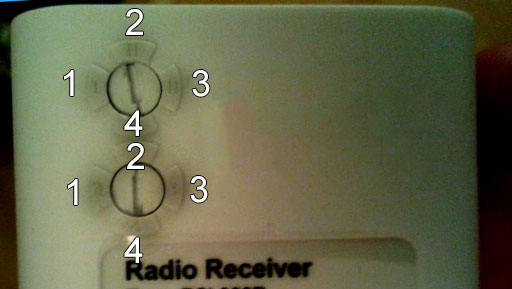
#### rcswitch.switchOn(`group`, `switch`)
Switch a remote switch on (Type B with two rotary/sliding switches).
* `group` - (Number) group (can be 1, 2, 3, 4)
* `switch` - (Number) switch (can be 1, 2, 3, 4)
Return true.
#### rcswitch.switchOff(`group`, `switch`)
Switch a remote switch off (Type B with two rotary/sliding switches).
* `group` - (Number) group (can be 1, 2, 3, 4)
* `switch` - (Number) switch (can be 1, 2, 3, 4)
Return true.
### Type C
#### rcswitch.switchOn(`family`, `group`, `switch`)
Switch a remote switch on (Type C Intertechno).
* `family` - (String) familycode (can be a, b, c, d, e, f)
* `group` - (Number) group (can be 1, 2, 3, 4)
* `switch` - (Number) switch (can be 1, 2, 3, 4)
Return true.
#### rcswitch.switchOff(`family`, `group`, `switch`)
Switch a remote switch off (Type C Intertechno).
* `family` - (String) familycode (can be a, b, c, d, e, f)
* `group` - (Number) group (can be 1, 2, 3, 4)
* `switch` - (Number) switch (can be 1, 2, 3, 4)
Return true.