quill-react-commercial
Version:
A Quill component for React and more maturely.
253 lines (204 loc) • 8.5 kB
Markdown
# quill-react-commercial
[中文](/readme_CN.md)
As an outstanding and popular open-source rich text editor, [Quill](https://github.com/quilljs/quill) has a good data structure, API, and plugin system. However, due to years of difficult updates and outdated plugins, there is an urgent need for a Quill rich text editor that can be used for production, meet the experience and extension, can be customized, and can be oriented towards commercialization.
## Features
- Use the latest quill@2.0.2. Implement using React Hooks, TS support, and Rollup packaging.
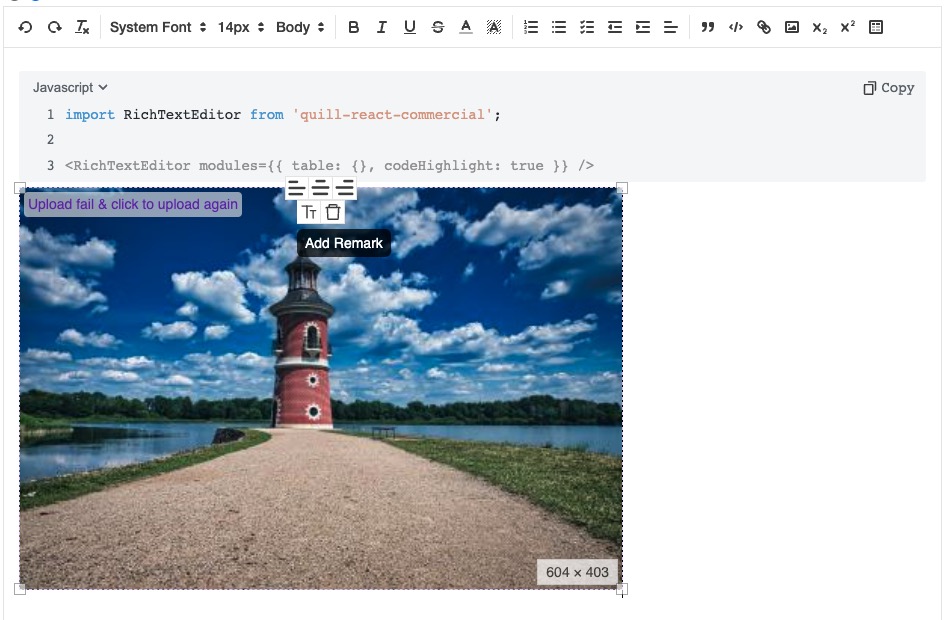
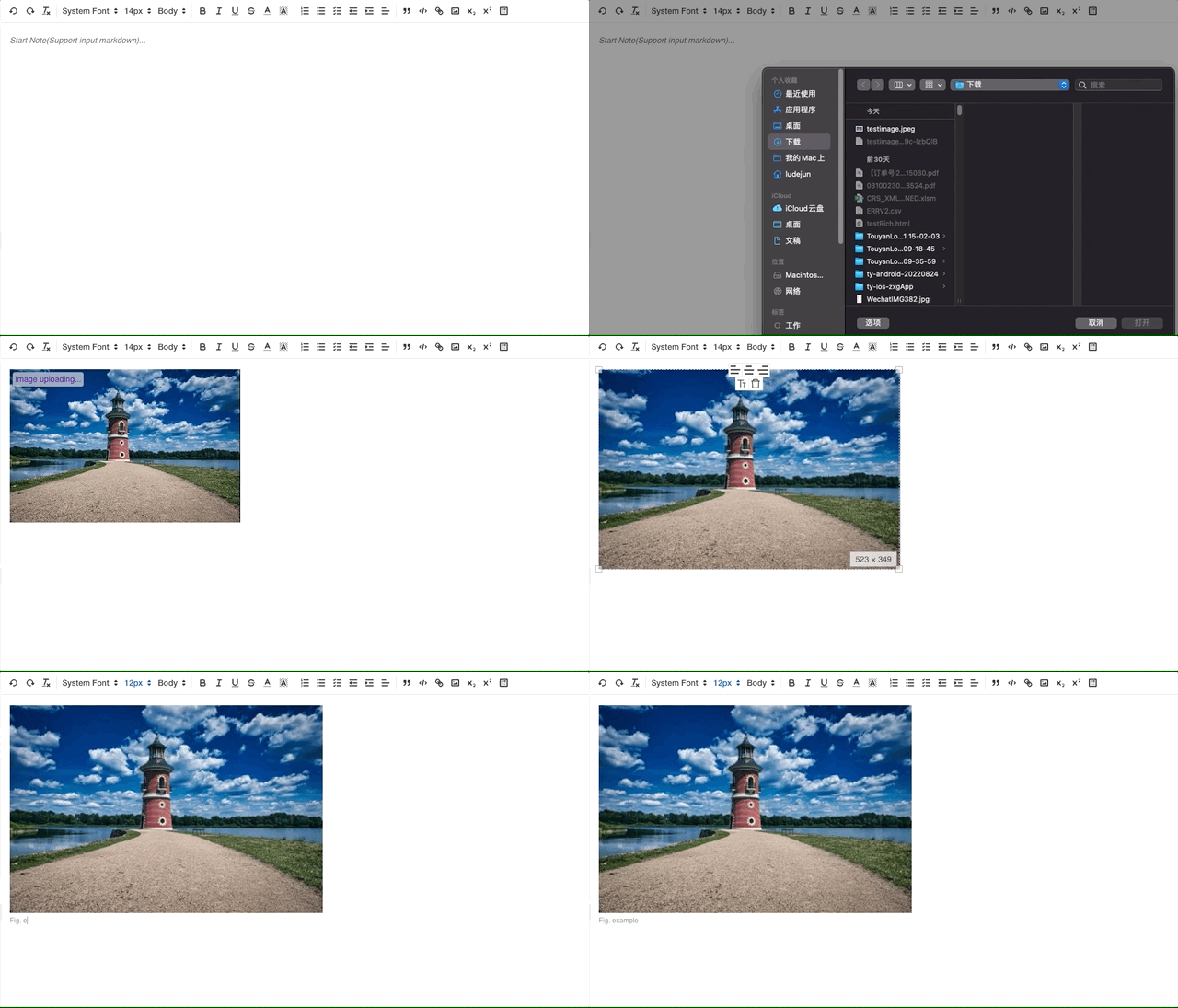
- Images support local upload and image Url insertion, and can limit the format and size before.
- All images support Base64 display, and can be uploaded remotely in the background. If fail, can click to upload again. Images support copying and dragging to insertion.
- Image support for resizing, aligning, adding notes, deleting, scrolling to remove overlayer.
- Refactoring Link Tooltip to add more actions.
- Support for inputing markdown directly.
- Code blocks support language selection, copying, and code line labeling.
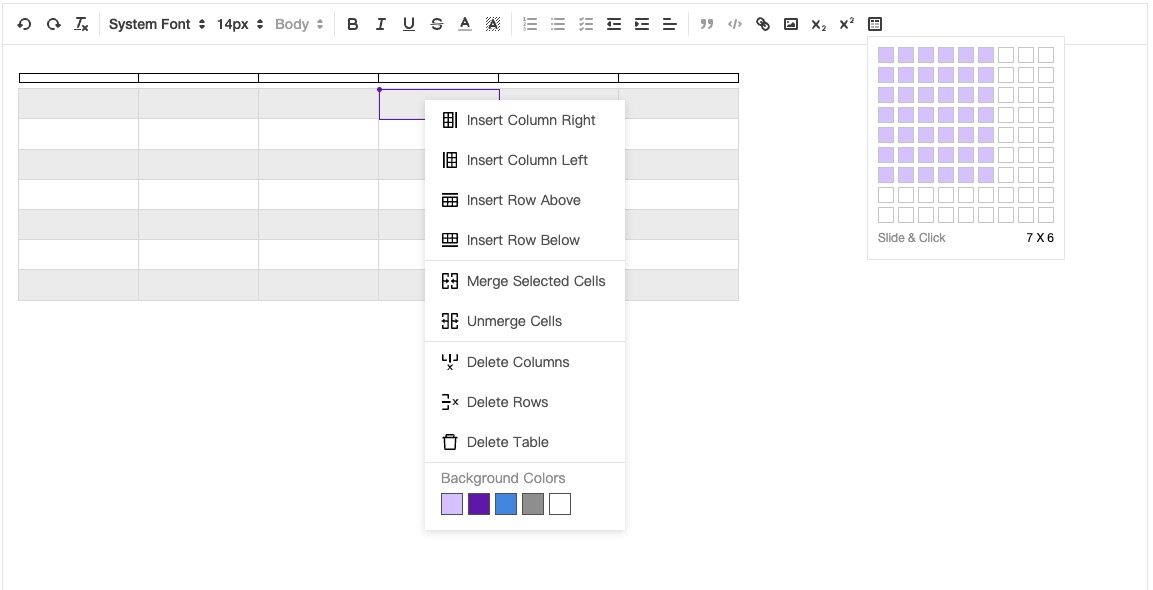
- Table supports toolbar selection of size, right-click for more options and new icons.
- Support for multilingual Tooltip prompts when Icon hover.
- Internationalization: Supports Chinese, English, and Spanish languages, including Chinese font compatibility.
- When using IME and other input methods (such as Pinyin), placeholders can disappear in a timely manner
- Automatically recognize input or copy URLs as LinkBlot.
- Other bugfix: Unable to input list in table, upload images in table, recognize ordered list, cannot delete blocks such as code and table, unable to save image location, etc.
## Install
```shell
npm install quill-react-commercial --save
# or
yarn add quill-react-commercial
```
## Quick Start
```javascript
import RichTextEditor from 'quill-react-commercial';
import 'quill-react-commercial/lib/index.css';
<RichTextEditor modules={{ table: {}, codeHighlight: true }} />;
```
- UMD / CDN: window.quillReactCommercial will get this Component. Demo in `example folder`
```html
<script src="../dist/quill-react-commercial.min.js"></script>
```
## Usage
### Properties(Refer to TS definition)
##### 1. modules:Required,Object;Each key can be false when not needed
```js
{
codeHighlight?: true,
table?: {
operationMenu?: {
insertColumnRight?: {
text: 'Insert Column Right',
}
}, // Generally not required
backgroundColors?: {
colors?: ['#4a90e2', '#999'], // backgroundcolor of table cell, default: ['#dbc8ff', '#6918b4', '#4a90e2', '#999', '#fff']
text?: 'Background Colors', // default: 'Background Colors'
},
toolBarOptions?: {
dialogRows?: 3, // default: 9
dialogColumns?: 4, // default: 9
i18?: 'en',
}, // when click table in toorbar, the configs of the dialog
}, // default: false
imageResize?: true, // default: true
imageDrop?: true, // default: true
magicUrl?: true, // Automatically recognize URLs, emails, etc., and add LinkBlot; default: true
markdown?: true, // Automatically support markdown and convert to rich text; default: true
link?: true, // default: true
imageHandler: {
imgUploadApi?: (formData: FormData) => Promise<string>; // Image upload API, it should return a Promise with a URL when resolve
uploadSuccCB?: (data: unknown) => void; // callback when success
uploadFailCB?: (error: unknown) => void; // callback when failure
imgRemarkPre?: 'Fig. '; // Leading string for the image remark, and can be deleted
maxSize?: 2; // The maximum size for uploading local images, in MB, defaults to 5MB
imageAccept?: string; // Acceptable image types for uploading local images, default: 'image/png, image/gif, image/jpeg, image/bmp, image/x-icon, image/webp'
},
toolbarOptions?: [][]; // Customize the required toolbar icons & order
}
```
Default value of modules.table.operationMenu
```js
{
insertColumnRight: {
text: 'Insert Column Right',
},
insertColumnLeft: {
text: 'Insert Column Left',
},
insertRowUp: {
text: 'Insert Row Above',
},
insertRowDown: {
text: 'Insert Row Below',
},
mergeCells: {
text: 'Merge Selected Cells',
},
unmergeCells: {
text: 'Unmerge Cells',
},
deleteColumn: {
text: 'Delete Columns',
},
deleteRow: {
text: 'Delete Rows',
},
deleteTable: {
text: 'Delete Table',
},
}
```
modules.imageHandler: If not defined, the default inserted image will be converted to base64 and stored in Delta
Demo of modules.toolbarOptionse. Details in https://quilljs.com/docs/modules/toolbar/
```javascript
const toolbarOptions = [
['undo', 'redo', 'clean'],
[
{ font: ['wsYaHei', 'songTi', 'serif', 'arial'] },
{ size: ['12px', '14px', '18px', '36px'] },
],
[{ color: [] }, { background: [] }],
['bold', 'italic', 'underline', 'strike'],
[
{ list: 'ordered' },
{ list: 'bullet' },
{ list: 'check' },
{ indent: '-1' },
{ indent: '+1' },
{ align: [] },
],
[
'blockquote',
'code-block',
'link',
'image',
{ script: 'sub' },
{ script: 'super' },
'table',
'divider',
],
];
```
Default of modules.codeHighlight, and you can change it. Or welcome your PR.
```javascript
[
{ key: 'plain', label: 'Plain' },
{ key: 'javascript', label: 'Javascript' },
{ key: 'java', label: 'Java' },
{ key: 'python', label: 'Python' },
{ key: 'cpp', label: 'C++/C' },
{ key: 'csharp', label: 'C#' },
{ key: 'php', label: 'PHP' },
{ key: 'sql', label: 'SQL' },
{ key: 'json', label: 'JSON' },
{ key: 'bash', label: 'Bash' },
{ key: 'go', label: 'Go' },
{ key: 'objectivec', label: 'Object-C' },
{ key: 'xml', label: 'Html/xml' },
{ key: 'css', label: 'CSS' },
{ key: 'ruby', label: 'Ruby' },
{ key: 'swift', label: 'Swift' },
{ key: 'scala', label: 'Scala' },
];
```
##### 2. placeholder:Option,string; placeholder of editor
**3. getQuill:Option,function; param is the instance of Quill**
instance's API:https://quilljs.com/docs/api/
```jsx
const quill = useRef(null);
const getQuill = (quillIns) => {
quill.current = quillIns;
}; // quill.current will has all quill's API:https://quilljs.com/docs/api/
// example
const content = quill.current?.getContent(); // get the content of editor
const text = quill.current?.getText(); // get all text of editor
```
**4. content:Option,Delta / string; initial data of editor**
```jsx
// Delta
<RichTextEditor modules={{ table: {}, codeHighlight: true }} getQuill={getQuill} content={JSON.parse("{\"ops\":[{\"insert\":\"Hello quill-react-commercial!\\n\"}]}")} />
// string of html
<RichTextEditor modules={{ table: {}, codeHighlight: true }} getQuill={getQuill} content={'<h1>Hello quill-react-commercial!</h1>'} />
```
**5. readOnly:Option,boolean;default value: false**
**6. onChange:Option,function;(Refer to TS definition)**
**7. onFocus:Option,function;(Refer to TS definition)**
**8. onBlur:Option,function;(Refer to TS definition)**
**9. i18n?: 'en' | 'zh' | 'es'; Option; International;default value: 'en'**
**10. style?: CSSProperties;**
**11. onSave: Option, function;**
**12. theme?: 'snow' | 'bubble'; default value: 'snow'**
### Other Issues
1. How to switch code highlighting color styles
Default use highlight.js xcode.css.
```javascript
import 'highlight.js/styles/darcula.css';
```
Or
```html
<link
rel="stylesheet"
href="//cdnjs.cloudflare.com/ajax/libs/highlight.js/10.1.2/styles/androidstudio.min.css"
/>
```
### How to develop & Welcome your PR.
When debugging the editor function, you can execute `yarn example` to package static resources for `index.html` use, and open index.html in browser.
- Modifying the JS, Less, and other features of the editor itself allows for hot updates, but the browser needs to be refreshed
- Modifying the JS in the example will not re babel, but requires re executing the `yarn example`
- Rollup packaging will be used after 1.3.7 to avoid the problem of introducing redundant configuration into SVG caused by previous tsc and webpack packaging