qtf
Version:
command for want to Quick use TensorFlow.js on cli.
211 lines (155 loc) • 6.92 kB
Markdown
Quick Tensorflow.js on CLI
---
[](https://github.com/amanoese/qtf/actions?query=workflow%3A%22Node+CI%22+branch%3Amaster)
[](https://www.npmjs.com/package/qtf)
[](https://opensource.org/licenses/Apache-2.0)
This is the command that makes it easy on cli to take advantage of TensorFlow.js pre-trained models in [tfjs-models](https://github.com/tensorflow/tfjs-models).
If you want to use more features, I recommend using [tfjs-models](https://github.com/tensorflow/tfjs-models).
## Table of Contents
- [Usage](#usage)
- [Install](#install)
- [Support models](#support-models)
- [Result Example](#result-example)
- [Save Local](#save-local)
- [Backend](#backend)
- [Develop](#develop)
- [On the roadmap, but still missing](#on-the-roadmap-but-still-missing)
## Usage
Output JSON.
```bash
$ qtf posenet input.jpg
{"score":0.9647475901771995,"keypoints":[{"score":0.998931884765625,"part":"nose","position":{"x":107.73031675583658,"y":53.548239147616734}},{"score":0.9975152611732483,"part":"leftEye","position":{"x":111.77570221303502,"y":47.67420431055447}},{"score":0.998687207698822,"part":"rightEye","position":{"x":103.54239877188716,"y":47.98000136794747}},{"score":0.9890928268432617,"part":"leftEar","position":{"x":122.54736138132296,"y":44.82373616853113}},{"score":0.5303822755813599,"part":"rightEar","position":{"x":99.82809460116732,"y":49.01344008390078}},{"score":0.9975290298461914,"part":"leftShoulder","position":{"x":134.81771339980546,"y":63.107547270184824}},{"score":0.9952900409698486,"part":"rightShoulder","position":{"x":100.9243829036965,"y":65.03463187013618}},{"score":0.9982808828353882,"part":"leftElbow","position":{"x":149.92353173638134,"y":95.12142813715954}},{"score":0.9930793046951294,"part":"rightElbow","position":{"x":86.52606699902724,"y":92.96833201605058}},{"score":0.997657299041748,"part":"leftWrist","position":{"x":144.95117947470817,"y":124.01598218628405}},{"score":0.9944704174995422,"part":"rightWrist","position":{"x":71.984375,"y":114.08531432392996}},{"score":0.9985787868499756,"part":"leftHip","position":{"x":130.9595695525292,"y":125.98659411478599}},{"score":0.9968750476837158,"part":"rightHip","position":{"x":110.72067272616732,"y":122.94964433365759}},{"score":0.9941878318786621,"part":"leftKnee","position":{"x":124.67179140321012,"y":173.04322714007782}},{"score":0.9907618165016174,"part":"rightKnee","position":{"x":90.9666904790856,"y":168.4438837548638}},{"score":0.9824202060699463,"part":"leftAnkle","position":{"x":128.6217017266537,"y":214.41898711089493}},{"score":0.9469689130783081,"part":"rightAnkle","position":{"x":105.84379559824903,"y":207.76614178015564}}]}
```
Output image file.
```bash
$ qtf posenet input.jpg -o output.jpg
```
| input.jpg | output.jpg |
| --- | --- |
| 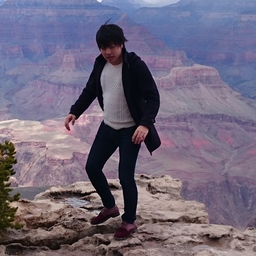 | 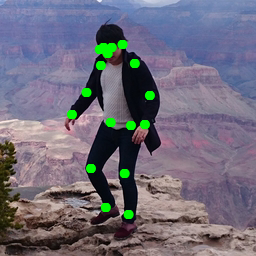 |
## Install (on Ubuntu)
```bash
$ npm i -g qtf
$ qtf save all
```
If you using node.js on volta or nodebrew.
We have confirmed works on it.
### from Repository
```bash
$ cd '<your any directory>'
$ git clone https://github.com/amanoese/qtf.git
$ cd qtf
$ npm install
$ npm link
## if you can not run 'npm link'.
$ echo "alias qtf=$PWD/src/index.js" >> ~/.bashrc
$ source ~/.bashrc
```
### on Windows
support. but some features don't work.
## Support models
Supports the following model now.
- posenet
- mobilenet
- blazeface
- BodyPix (Person segmentation)
- DeepLab v3
```bash
## check support model.
$ qtf --help
```
## Result Example
### posenet
```bash
$ qtf posenet input.jpg -o output.jpg
```
| input.jpg | output.jpg |
| --- | --- |
|  |  |
### mobilenet
Output is JSON only.
### blazeface
```bash
$ qtf blazeface input.jpg -o output.jpg
```
| input.jpg | output.jpg |
| --- | --- |
|  | 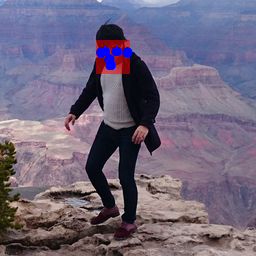 |
### BodyPix
#### Person segmentation
```bash
$ qtf body-pix input.jpg -o output.jpg
```
| input.jpg | output.jpg |
| --- | --- |
|  | 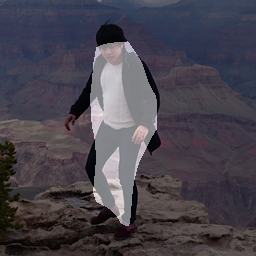 |
#### Person body part segmentation
TBD
### DeepLab v3
```bash
$ qtf deeplab input.jpg -o output.jpg
```
If you not set loadOption. output size fixed 513x513.
| input.jpg | output.jpg |
| --- | --- |
|  | 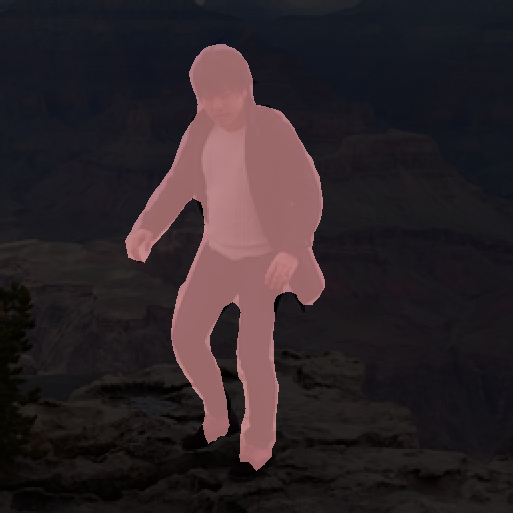 |
## Save Models on Local
This command uses a trained model on the internet (Google Cloud Starage)...
If use offline or you use the command several times.
It's good idea to download trained model file to local.
```bash
$ qtf save all
```
But trained model data want to diskspace.
you can also choose the model to download.
See below for details.
```bash
$ qtf save --help
```
## Backend
you can check suuport backend.
```bash
$ qtf backend
now : tensorflow
supports : cpu,wasm,tensorflow
```
If you want to use the backend.set environment to 'QTF_BACKEND'
```bash
$ export QTF_BACKEND=wasm
$ qtf backend
now : wasm
supports : cpu,wasm,tensorflow
```
This command support backends.
| name | project | personal opinion |
| --- | --- | --- |
| cpu | [tfjs-backend-cpu](https://github.com/tensorflow/tfjs/tree/master/tfjs-backend-cpu) | pureJS. slowly. but it's works in most environments. so cool. |
| wasm | [tfjs-backend-wasm](https://github.com/tensorflow/tfjs/tree/master/tfjs-backend-wasm) | WebAssembly. fast. environment independent. But that power was beyond my skill. It probably only works with "blazeface". |
| tensorflow | [tfjs-node](https://github.com/tensorflow/tfjs/tree/master/tfjs-node) | C Library. fast. but It depends on node-gyp. if you want to install, please see [this link](https://github.com/tensorflow/tfjs/tree/master/tfjs-node).|
A backend that fails to install does not appear in support.
may be increased by a global installation, like ```npm -g @tensorflow/tfjs-node```
I haven't checked. It probably works.
## Develop
```bash
$ npm install
$ npm link
$ qtf --help
```
### CI on Local
```bash
$ act -n
$ act push
```
## On the roadmap, but still missing
- Support tfjs-models
- PoseNet
- Support ResNet50
- different model stride
- Coco SSD
- BodyPix
- segmentPersonParts
- handpose
- facemesh
- Input Stream of UVC device.
## Other
qtf is not Qtransformers.