pwa-install-handler
Version:
Handle beforeinstallprompt event in your PWA.
97 lines (60 loc) • 4.61 kB
Markdown
# PWA Install Handler
[](https://www.npmjs.com/package/pwa-install-handler)
[](https://opensource.org/licenses/ISC)
Handling PWA installation prompt made easier. This library provides a simple interface to the `beforeinstallprompt` event, allowing you to create a custom install button for your Progressive Web App.
## Features
- **Easy to use:** Simple API to handle the PWA installation flow.
- **Lightweight:** Tiny footprint with zero dependencies.
- **Typed:** Written in TypeScript for a better developer experience.
## Installation
```sh
npm install pwa-install-handler
```
## Usage
### HTML
First, you need a button in your HTML that will trigger the installation prompt. Initially, it should be hidden.
```html
<button id="installButton" style="display: none;">Install</button>
```
### JavaScript
Then, in your JavaScript, you can use `pwaInstallHandler` to show the button when the app is installable and to trigger the prompt when the button is clicked.
```javascript
import { pwaInstallHandler } from 'pwa-install-handler'
const $installButton = document.querySelector('#installButton')
pwaInstallHandler.addListener((canInstall) => {
$installButton.style.display = canInstall ? 'inline-block' : 'none'
})
$installButton.addEventListener('click', () => {
pwaInstallHandler.install()
})
```
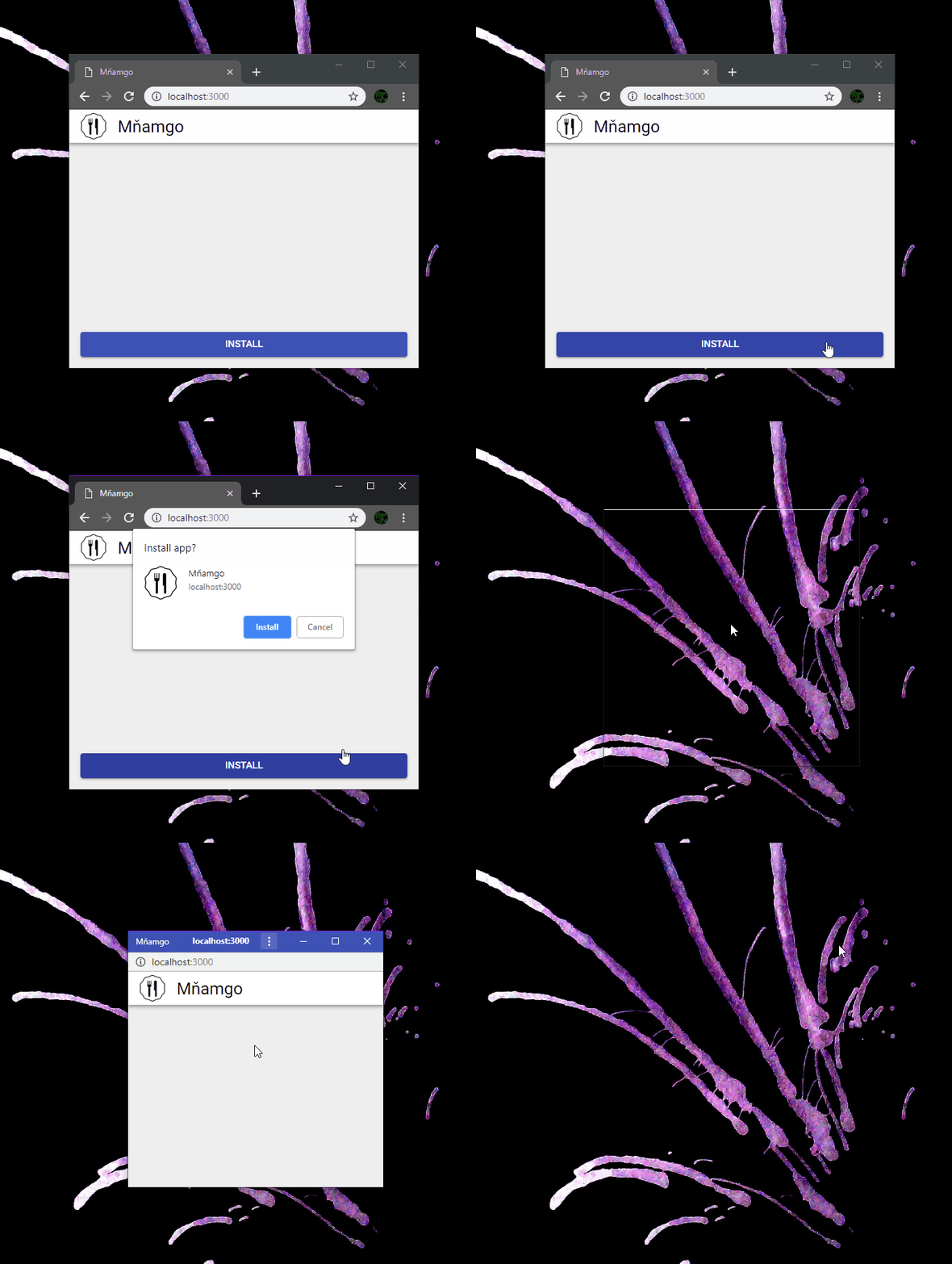
### Screencast
### Demo
Check out the [live demo](https://filipchalupa.cz/pwa-install-handler/) or the [source code](https://github.com/FilipChalupa/pwa-install-handler/tree/main/demo).
## API
### Methods
| Method | Signature | Description |
| ------------------ | --------------------------------------------------- | ------------------------------------------------------------------------------------------------------ |
| `install()` | `() => Promise<boolean>` | Triggers the installation prompt. Returns a promise that resolves to `true` if the app is installed. |
| `addListener()` | `(callback: (canInstall: boolean) => void) => void` | Adds a listener that is called when the installability state changes. The callback receives a boolean. |
| `removeListener()` | `(callback: (canInstall: boolean) => void) => void` | Removes a previously added listener. |
| `canInstall()` | `() => boolean` | Returns `true` if the app is ready to be installed. |
| `getEvent()` | `() => BeforeInstallPromptEvent \| null` | Returns the internal `BeforeInstallPromptEvent` object. |
### `BeforeInstallPromptEvent`
The `getEvent()` method returns a `BeforeInstallPromptEvent` object, which has the following properties:
| Property | Type | Description |
| ------------ | ------------------------------ | ---------------------------------------------------------------- |
| `prompt()` | `() => Promise<void>` | Shows the installation prompt to the user. |
| `userChoice` | `Promise<{ outcome: string }>` | A promise that resolves when the user interacts with the prompt. |
## Browser Support
The `beforeinstallprompt` event is not supported by all browsers. You can check the latest browser support on [caniuse.com](https://caniuse.com/#feat=mdn-api_beforeinstallpromptevent).
When the event is not supported, `canInstall` will always be `false`.
## Requirements for Installability
For the `beforeinstallprompt` event to be fired, your PWA must meet certain requirements. These requirements are browser-specific. You can learn more about them here:
- [MDN: Installable PWAs](https://developer.mozilla.org/en-US/docs/Web/Progressive_web_apps/Installable_PWAs#Requirements)
- [web.dev: Install criteria](https://web.dev/articles/install-criteria)
## Contributing
Contributions are welcome! Please open an issue or submit a pull request on our [GitHub repository](https://github.com/FilipChalupa/pwa-install-handler).
## License
This project is licensed under the ISC License. See the [LICENSE](LICENSE) file for details.