puzzlescript
Version:
Play PuzzleScript games in your terminal!
199 lines (127 loc) • 10.3 kB
Markdown
# Accessible PuzzleScript
[![NPM version][npm-image]][npm-url]
[![Downloads][downloads-image]][downloads-url]
[![Build status][travis-image]][travis-url]
[![Dependency status][dependency-image]][dependency-url]
[![Dev dependency status][dev-dependency-image]][dev-dependency-url]
[![Code coverage][coverage-image]][coverage-url]
This is a program that allows people to play [PuzzleScript](https://www.puzzlescript.net) games in a browser **or** in a terminal.
Also, it is **accessible**, meaning that [blind or visually impaired people can play these games](#video-games-that-blind-people-can-play) too! See [blog post](https://philschatz.com/2018/09/22/puzzlescript/) for more info or **[try the demo](https://philschatz.com/puzzlescript/)**.
## Play in a browser or on your mobile device
1. Visit the [demo site](https://philschatz.com/puzzlescript)
1. Click the "Add" button at the bottom to keep playing even without an internet connection
1. Plug in a :video_game: controller! (tested with PS3/4/XBox)
<details>
<summary>If you are using <strong>iOS (Apple phone or tablet)</strong> click here for instructions</summary>
1. Visit https://philschatz.com/puzzlescript
1. Click the Share button in Safari
1. Scroll over and click "Add to Home Screen"

</details>
## Play from the command line terminal
1. Run `npm install -g puzzlescript` to install
1. Run `puzzlescript` to start playing
# Screencaps
Here are some screencaps of games being played.
### [Pot Wash Panic!](https://philschatz.com/puzzlescript/#/pot-wash-panic) ([source](https://hauntpun.itch.io/pot-wash-panic))
(click to see the ascii screencast)
<a href="https://asciinema.org/a/188014?t=25"><img width="300" alt="video of install and a couple games" src="https://asciinema.org/a/188014.png"/></a>
### [Skipping Stones to Lonely Homes](https://philschatz.com/puzzlescript/#/skipping-stones) ([source](http://www.draknek.org/games/puzzlescript/skipping-stones.php))
<a href="https://asciinema.org/a/189279?t=20"><img width="300" alt="video of the beginning of Skipping Stones (BIG)" src="https://asciinema.org/a/189279.png"/></a>
### [Hack the Net](https://philschatz.com/puzzlescript/#/hack-the-net) ([source](http://www.draknek.org/games/puzzlescript/hack-the-net.php))
<a href="https://asciinema.org/a/188016"><img width="300" alt="video of a couple levels of Hack-the-Net" src="https://asciinema.org/a/188016.png"/></a>
### [Entanglement](https://philschatz.com/puzzlescript/#/entanglement-one) ([source](http://www.richardlocke.co.uk/release/entanglement/chapter-1/))
<a href="https://asciinema.org/a/212372?t=18"><img width="300" alt="video of the beginning of Entanglement" src="https://asciinema.org/a/212372.png"/></a>
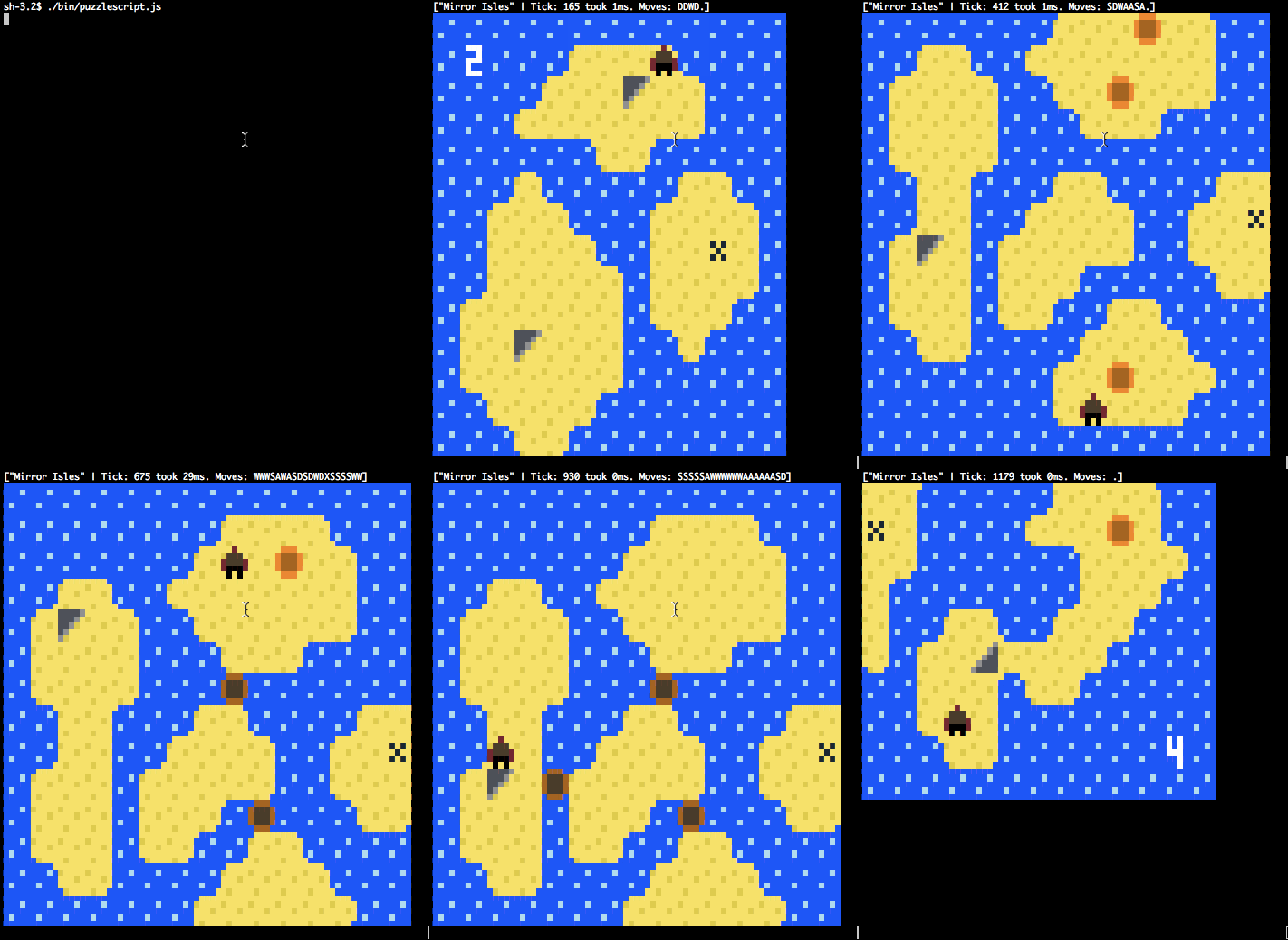
### [Mirror Isles](https://philschatz.com/puzzlescript/#/mirror-isles/0) ([source](http://www.draknek.org/games/puzzlescript/mirrors.php))
This screencast shows playing the game in a terminal using ASCII and ANSI colors.
# Video games that blind people can play?
PuzzleScript lends itself nicely to be playable by people with low or no vision:
1. each level is small (~10x10)
1. each sprite has a human-readable name (since the whole game is in 1 text file and the logic refers to the sprites)
1. a blind person has 2 sets of directions (one to move the player and one to move the “eye” which reads off which sprite is in that spot)
1. the games do not require quick reflexes and have Undo built-in so it is easy to think and try different options
1. we can just print to the terminal whenever something needs to be read (presumably the terminal is read aloud to the person)
If you are blind, you can play the games by running `puzzlescript --no-ui` and use the <kbd>I</kbd>, <kbd>K</kbd>, <kbd>J</kbd>, <kbd>L</kbd>, and <kbd>P</kbd> keys to move the cursor to explore the level.
If you want to experience what a non-sighted person would experience but still see the level, run `NODE_ENV=development puzzlescript` and use the <kbd>I</kbd>, <kbd>K</kbd>, <kbd>J</kbd>, <kbd>L</kbd>, and <kbd>P</kbd> keys to move the cursor to explore the level.
### Screencap
This screencap is a visual demonstration of exploring and then playing a level.
<a href="https://asciinema.org/a/190028?t=4"><img width="600" alt="exploring and playing a level without sight (visual depiction)" src="https://asciinema.org/a/190028.png"/></a>
This screencap is the **non-visual** version of the same steps as shown above. This is what vision-impaired people will read when they move the Inspector cursor around and then move the player to play the game.
<a href="https://asciinema.org/a/193133?t=7"><img width="600" alt="exploring and playing a level without sight" src="https://asciinema.org/a/193133.png"/></a>
# About
The goal of this project is to do 3 things:
1. make PuzzleScript easier to embed (like in 404 pages, easter eggs, etc). See [docs](https://philschatz.com/puzzlescript/docs/classes/_engine_.gameengine.html)
1. allow **blind people to play video games** (by passing the `--no-ui` argument)
1. use the terminal as a GUI for playing games
# Accessibility Notes
To use https://chromevox.com, table navigation keys on the Mac are <kbd>Ctrl</kbd> + <kbd>Command</kbd> + <kbd>Up</kbd>.
# Research
To convert a game to JSON, run the following:
```js
import { Parser } from 'puzzlescript'
import Serializer from 'puzzlescript/lib/parser/serializer'
const { data } = Parser.parse(gameSource)
const json = new Serializer(data).toJson()
const reparsedData = Serializer.fromJson(json, gameSource)
```
## Commands
- `npm run docs` generates docs in the `./docs/` directory
- `npm start` runs a game in the [./games/](./games/) directory without debugging info (10x faster) (uses `NODE_ENV=production`)
- `npm run start:dev` runs a game in the [./games/](./games/) directory with sprite info (useful for debugging)
- `npm run start:debug` runs a game in the [./games/](./games/) directory with a Chrome Debugger open so you can set breakpoints
- `npm demo` runs all of the games in the [./games/](./games/) directory with a few sample moves (up/down/left/right/action)
- `npm test` runs all of the unit tests (including solutions in the [./game-solutions/](./game-solutions/) directory)
- `npm run watch` Run the tests and when you update the source, it re-runs the tests
- `npm run test:debug` Run the tests but opens a debugger (remember to add a `debugger` line into the JavaScript)
- `npm test; open coverage/lcov-report/index.html` to see test coverage
- `npm run coverage` generates a coverage report which includes the JS code as well as any games that you ran in dev mode (using `npm run dev`)
- See the module dependency tree by running `npm run build:stats` and then uploading `webpack-stats.json` to https://webpack.github.io/analyse/#modules
## Embed in a Browser
See [./static/spec/html-table.xhtml](./static/spec/html-table.xhtml) for an example of embedding in a browser.
```js
// Include <script src="node_modules/puzzlescript/puzzlescript.js"></script>
// and then the following:
table = document.querySelector('table') // selector to the <table> that will be used
engine = new PuzzleScript.SyncTableEngine(table, optionalEventHandler)
engine.setGame(gameSourceString, 0 /*startLevel*/)
```
Or, if the game is slow, it can be played using a [Webworker](https://developer.mozilla.org/en-US/docs/Web/API/Web_Workers_API/Using_web_workers):
```js
worker = new Worker('path/from/browser/to/puzzlescript-webworker.js')
engine = new PuzzleScript.WebworkerTableEngine(worker, table, optionalEventHandler)
...
```
## Objects
- **Level** contains a table of Cells which contain a set of Sprites that should be rendered
- **Rule** contains the conditions and actions to be executed.
- It also contains methods for checking if the Rule matches a Cell and methods for how to change the Cell
- **Cell** contains a set of Sprites and is used to represent the current state of the Game
# TODO
Want to help? Here is a roadmap of things that need to be implemented:
- [ ] support tabbing through the sprites to say where they are and how many of them are in the puzzle
- [ ] output which sprites changed when the player moves or presses undo
- [ ] improve the sound effects (needs an implementation of [BiquadFilter](https://developer.mozilla.org/en-US/docs/Web/API/BiquadFilterNode) in NodeJS)
- [ ] support the `RIGID` keyword
- [x] output a simple `BEL` (ASCII character 7) when the `speaker` package is not installed
- [ ] output sound effects when any of the following occur:
- a sprite is `CREATE`, `DESTROY`, `CANTMOVE`
- a sprite is moved
- `RESTART`, `UNDO`, `TITLESCREEN`, `STARTGAME`, `STARTLEVEL`, `ENDLEVEL`, `ENDGAME`, `SHOWMESSAGE`, `CLOSEMESSAGE`
- [x] use HTML Tables to render in the browser
- [x] Cache Improvements
- [x] cache the `SimpleNeighbor.matchesCell()` function so we do not have to recompute if a cell matches a Neighbor
- [x] de-duplicate `SimpleNeighbor` that have a direction but none of the tiles depend on the direction (causes fewer caches to be updated)
- [x] improve `getMatches(level)` by storing a cache of all the sprites in each row/column so we can skip the row/column entirely if the necessary sprites are not available
[npm-image]: https://img.shields.io/npm/v/puzzlescript.svg
[npm-url]: https://npmjs.org/package/puzzlescript
[downloads-image]: https://img.shields.io/npm/dm/puzzlescript.svg
[downloads-url]: https://npmjs.org/package/puzzlescript
[travis-image]: https://img.shields.io/travis/philschatz/puzzlescript.svg
[travis-url]: https://travis-ci.org/philschatz/puzzlescript
[dependency-image]: https://img.shields.io/david/philschatz/puzzlescript.svg
[dependency-url]: https://david-dm.org/philschatz/puzzlescript
[dev-dependency-image]: https://img.shields.io/david/dev/philschatz/puzzlescript.svg
[dev-dependency-url]: https://david-dm.org/philschatz/puzzlescript?type=dev
[coverage-image]: https://img.shields.io/codecov/c/github/philschatz/puzzlescript.svg
[coverage-url]: https://codecov.io/gh/philschatz/puzzlescript