purity-prompt
Version:
Pretty, minimal and fast ZSH prompt
123 lines (72 loc) • 3.36 kB
Markdown
# Purity
> Pretty, minimal and fast ZSH prompt
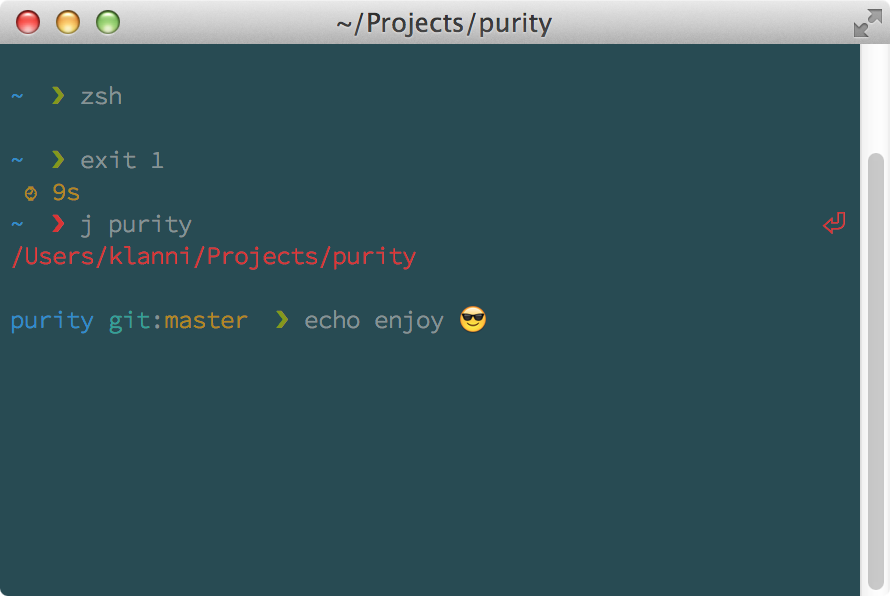
> Git status indicators will appear before the prompt terminator, view the source for details
## Overview
Most prompts are cluttered, ugly and slow. I wanted something visually pleasing that stayed out of my way.
### Why?
- Comes with the perfect prompt character. Author went through the whole Unicode range to find it.
- Shows `git` status info.
- Prompt character turns red if the last command didn't exit with `0`.
- Command execution time will be displayed if it exceeds the set threshold.
- Username and host only displayed when in an SSH session.
- Shows the current path in the title and the current directory and command when a process is running.
- Makes an excellent starting point for your own custom prompt.
## Install
Can be installed with `npm` or manually.
### npm
```sh
$ npm install --global purity-prompt
```
That's it. Skip to [Getting started](#getting-started).
### Manually
1. Either…
- Clone this repo
- add it as a submodule, or
- just download `purity.zsh`
2. Symlink `purity.zsh` to somewhere in [`$fpath`](http://www.refining-linux.org/archives/46/ZSH-Gem-12-Autoloading-functions/) with the name `prompt_purity_setup`.
#### Example
```sh
$ ln -s "$PWD/purity.zsh" /usr/local/share/zsh/site-functions/prompt_purity_setup
```
*Run `echo $fpath` to see possible locations.*
For a user-specific installation (which would not require escalated privileges), simply add a directory to `$fpath` for that user:
```sh
# .zshenv or .zshrc
fpath=( "$HOME/.zfunctions" $fpath )
```
Then install the theme there:
```sh
$ ln -s "$PWD/purity.zsh" "$HOME/.zfunctions/prompt_purity_setup"
```
## Getting started
Initialize the prompt system (if not so already) and choose `purity`:
```sh
# .zshrc
autoload -U promptinit && promptinit
prompt purity
```
## Options
### `PURITY_CMD_MAX_EXEC_TIME`
The max execution time of a process before its run time is shown when it exits. Defaults to `5` seconds.
### `PURITY_GIT_PULL`
Set `PURITY_GIT_PULL=0` to prevent Purity from checking whether the current Git remote has been updated.
## Example
```sh
# .zshrc
autoload -U promptinit && promptinit
# optionally define some options
PURITY_CMD_MAX_EXEC_TIME=10
prompt purity
```
## Tips
[Solarized](http://ethanschoonover.com/solarized) theme with the [Source Code Pro](https://github.com/adobe/source-code-pro) font (12pt) is a beautiful combination, as seen in the screenshot above. Just make sure you have anti-aliasing enabled in your Terminal.
## Integration
### [oh-my-zsh](https://github.com/robbyrussell/oh-my-zsh)
Symlink (or copy) `purity.zsh` to `~/.oh-my-zsh/custom/purity.zsh-theme` and add `ZSH_THEME="purity"` to your `.zshrc` file.
### [prezto](https://github.com/sorin-ionescu/prezto)
Symlink (or copy) `purity.zsh` to `~/.zprezto/modules/prompt/functions/prompt_purity_setup` alongside Prezto's other prompts. Then `set zstyle ':prezto:module:prompt' theme 'purity'` in `~/.zpreztorc`.
### [antigen](https://github.com/zsh-users/antigen)
Add `antigen bundle therealklanni/purity` to your .zshrc file (do not use the `antigen theme` function).
## License
[MIT](http://opensource.org/licenses/MIT) © [Kevin Lanni](https://github.com/therealklanni)