puer-mock
Version:
Puer + Mock.js = A configurable mock server with configurable mock(random) data.
176 lines (128 loc) • 6.18 kB
Markdown
# puer-mock
[![NPM version][npm-image]][npm-url] [![changelog][changelog-image]][changelog-url] [![license][license-image]][license-url]
[npm-image]: https://img.shields.io/npm/v/puer-mock.svg?style=flat-square
[npm-url]: https://npmjs.org/package/puer-mock
[license-image]: https://img.shields.io/badge/License-MIT-blue.svg?style=flat-square
[license-url]: https://github.com/ufologist/puer-mock/blob/master/LICENSE
[changelog-image]: https://img.shields.io/badge/CHANGE-LOG-blue.svg?style=flat-square
[changelog-url]: https://github.com/ufologist/puer-mock/blob/master/CHANGELOG.md
[Puer](https://github.com/leeluolee/puer) + [Mock.js](https://github.com/nuysoft/Mock) = A configurable mock server with configurable mock(random) data.
Start a mock server never ever so easy and configurable, no code needed, you only need config some mock API route and some mock data template, it all done!
## features
* mock server
* configurable RESTful API route
* API request
* API response mock data
* validate API request params
* effective immediately when config changed
* JSONP support
* CORS support
* built-in API doc
## install
Please install [puer](https://github.com/leeluolee/puer "puer 1.x") first.
> Puer - more than a live-reload server , built for efficient frontend development
```
npm install puer@1.x -g
```
And then install `puer-mock` package in your project root directory.
```
cd yourprojectdir
npm install puer-mock
```
If your project has a `package.json` file, suggest save `puer-mock` to `devDependencies`.
```
cd yourprojectrootdir
npm install puer-mock --save-dev
```
## usage
1. copy `node_modules/puer-mock/example` files to your project root directory
2. `cd yourprojectrootdir`
3. `puer -a _mockserver.js`
You may define a npm script in `package.json`, then use `npm run dev` next time.
```json
"dev": "puer -a _mockserver.js"
```
4. view mock API
* open `http://localhost:8000/api/configdemo-response/mock` view mock API return mock data
* open `http://localhost:8000/api/configdemo-response/mock?callback=test` view mock API return mock data by JSONP
* open `http://localhost:8000/_apidoc.html` view built-in all mock API doc
5. define your mock API in `_mockserver.json`
6. view your mock API(Yes! it with immediate effect)
## config
Config mock API in `_mockserver.json`.
The minimal `_mockserver.json`
```json
{
"api": {
"GET /api/users": {
"response": {}
}
}
}
```
Please view [mockserver config doc](https://github.com/ufologist/puer-mock/blob/master/_mockserver-config.md) for more detail info.
You can see more settings to config mock server in [`_mockserver.json`](https://github.com/ufologist/puer-mock/blob/master/example/_mockserver.json).
* comment is nice
* config route and mock response data template is so easy
* more data template please see [Mock.js examples](http://mockjs.com/examples.html)
* disable a route is convenient
* mock server will effective immediately when you changed `_mockserver.json`
## customize
Customize launch mock server in `_mockserver.js`.
* You may customize mock API doc
* You may customize `/_apidoc` route direct service a more graceful doc
```javascript
// _mockserver.js
module.exports = require('puer-mock')(null, null, function(mockConfig) {
// 任你自由发挥
return '<pre>' + JSON.stringify(mockConfig, null, 4) + '</pre>';
});
```
* You may customize `/_apidoc.html` which get mock API JSON from `/_apidoc`, you may totally implement it by yourself
* You may customize config file and launch file
If you do not use default `_mockserver.json` or `_mockserver.js`
```javascript
// use _mockserver2.json for config file
//
// _mockserver.js
// puer -a _mockserver.js
module.exports = require('puer-mock')(__filename, './_mockserver2.json');
```
```javascript
// use _mockserver2.js and _mockserver2.json
//
// _mockserver2.js
// puer -a _mockserver2.js
module.exports = require('puer-mock')(__filename, './_mockserver2.json');
```
* Play it fun with your imagination.
```javascript
// _mockserver.js
var puerMock = require('puer-mock');
var routeConfig = puerMock();
// 其实你完全可以这样来玩, 在这里接着定义 route 即可, 发挥你的想象力
// 例如定义一个常用的 500 接口, 来测试服务器报错的情况
routeConfig['GET /500'] = function(request, response, next) {
response.status(500).end();
};
module.exports = routeConfig;
```
## example
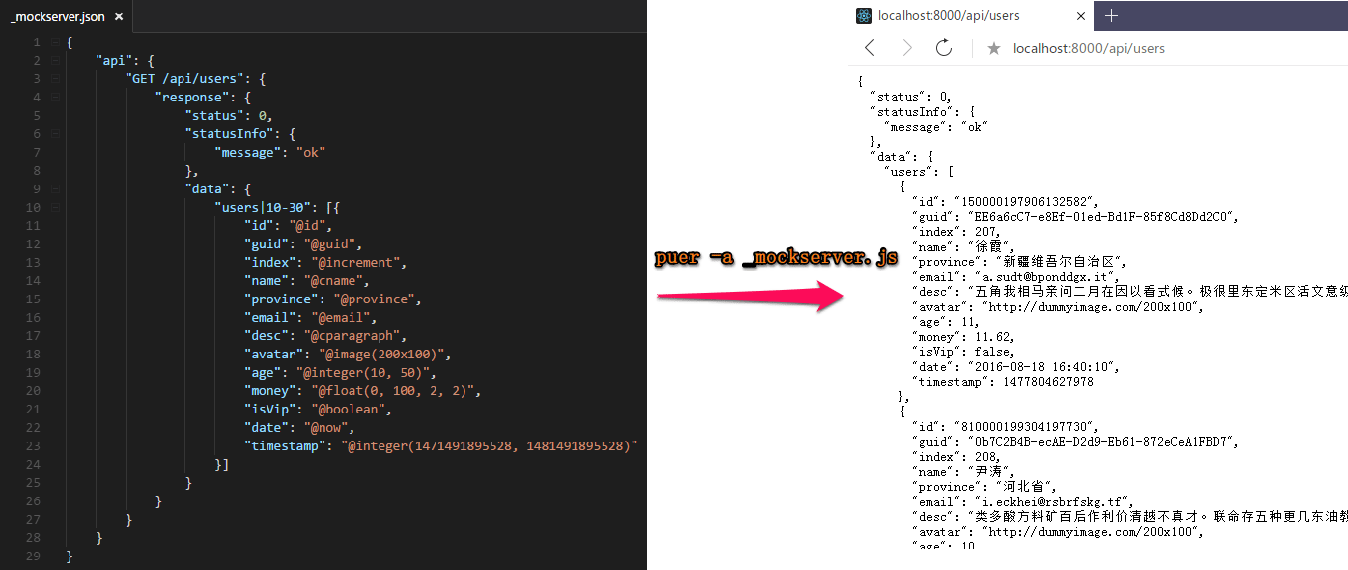
眼见为实耳听为虚, puer-mock 让你一秒钟就能拥有一个强大的 mock server, 所以请不要再自己手工做假数据了, 赶快尝试一下让你的工作效率翻番吧!
### 配置 API 并生成随机数据
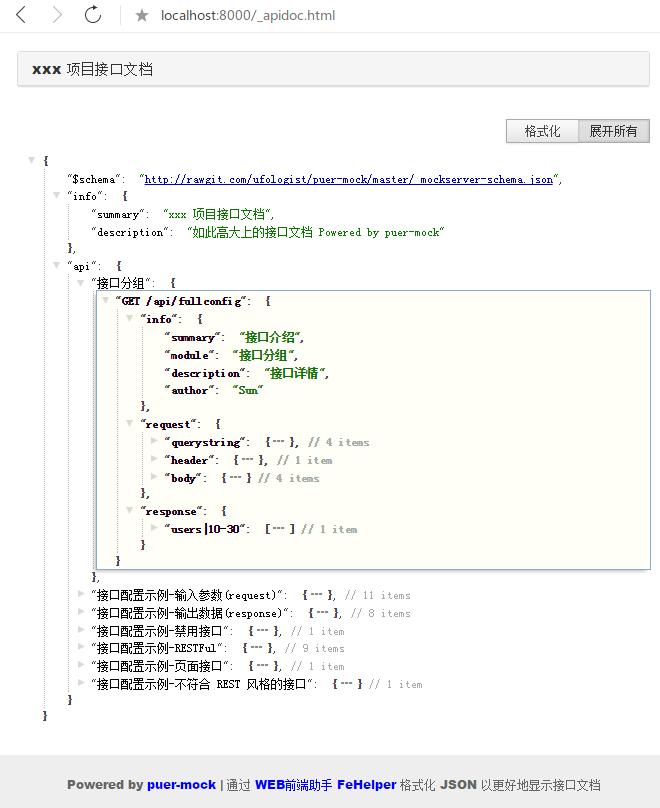
### 查看所有的 API 接口文档
通过 `/_apidoc.html` 查看接口文档
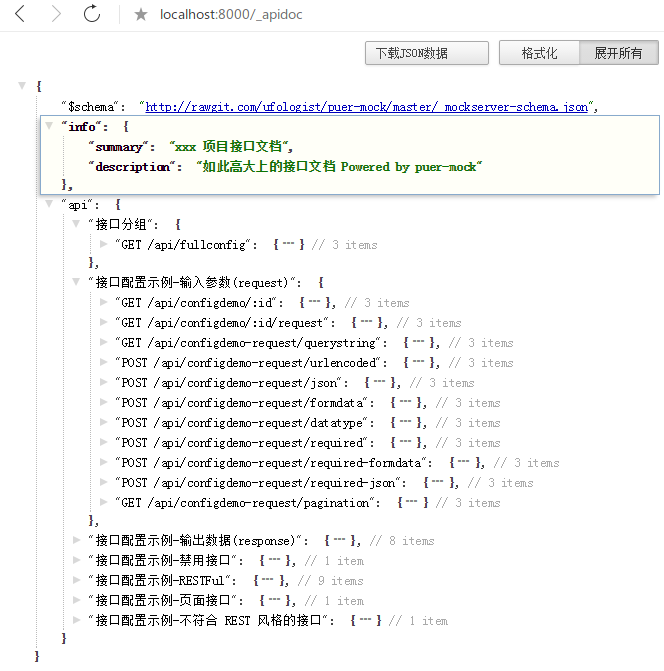
通过 `/_apidoc` 直接查看 JSON 数据, 即查看 mock server 配置了哪些 API(使用 [FeHelper 插件](https://www.baidufe.com/fehelper) 格式化了 JSON 数据)
## one more thing
谁需要这个工具
* 前端/APP端
* 任何与后端接口打交道的人
* [为什么你需要一个 mock server](https://github.com/ufologist/puer-mock/blob/master/why-your-need-a-mock-server.md)
* [推荐与 puer-proxy 一起使用开发时灵活切换 mock 或者后端接口](https://github.com/ufologist/puer-proxy)
* [关于 puer-mock 的讨论](https://www.v2ex.com/t/303650)
* [puer-mock FAQ](https://github.com/ufologist/puer-mock/blob/master/FAQ.md)
* [前后端接口规范](https://github.com/f2e-journey/treasure/blob/master/api.md)
感谢 puer 提供了如此强大的 mock 机制, 感谢 Mock.js 带来的假数据, 我才有幸做了这么一个扩展工具.