prismaql
Version:
A powerful tool for managing and editing Prisma schema files using a SQL-like DSL.
240 lines (177 loc) • 9.28 kB
Markdown
# PrismaQL Core - Advanced Prisma Schema Editing Library
[](https://www.npmjs.com/package/prismaql)
[](LICENSE.md)
[](https://github.com/unbywyd/prismaql/issues)
[](https://github.com/unbywyd/prismaql)
> This tool is actively used in the [TSDIApi.com](https://tsdiapi.com) framework for schema management and database operations.
## Introduction
**PrismaQL Core** provides a **powerful SQL-like DSL** for safely and programmatically **editing Prisma schema files**. It allows you to manage **models**, **fields**, **relations**, **enums**, **database connections**, and **generators** while preserving schema integrity via **AST-based validation**, **change tracking**, and **backup mechanisms**. This ensures a flexible and robust development workflow.
Designed as a **standalone library** or to be used alongside the [PrismaQL CLI](https://github.com/unbywyd/prismaql-cli), PrismaQL Core offers:
- **Declarative Command Syntax** – Intuitive and human-readable commands like `GET MODELS`, `ADD FIELD`, and more.
- **Query & Mutation Separation** – Clear distinction between read-only operations (`GET`, `PRINT`, `VALIDATE`) and modifying ones (`ADD`, `DELETE`, `UPDATE`).
- **Configurable Workflow** – Easily extend and integrate custom handlers for queries and mutations.
- **Safe & Reversible Edits** – Built-in validation with automatic backups to ensure data integrity.
- **Flexible Relation Management** – Supports **1:1, 1:M, and M:N** relationships, including **pivot table-based relations**. Allows both **direct** and **indirect** (foreign-key-only) associations, with the ability to choose the **FK holder side** for precise schema control.
---
## How It Works
1. **Parsing DSL** – Raw text commands (e.g. `GET MODEL User;`) go through the **PrismaQlDslParser**, producing a structured object.
2. **Chained Commands** – You can chain multiple commands in a single line, separated by semicolons, and they will be executed sequentially.
3. **Validation & Execution** – Queries simply inspect the schema; mutations modify it, ensuring AST-level integrity.
4. **Backup & Save** – Each mutation can undergo a dry run, then save changes. Old versions are stored in `.prisma/backups`.
5. **Extensible Handlers** – You can register **query** or **mutation** handlers to shape how commands are processed.
---
## Supported Commands
[PrismaQL CLI](https://github.com/unbywyd/prismaql-cli) supports the same **Query** and **Mutation** commands as the core library:
### 1. Query Commands
- `GET MODELS` – List all models with highlighting.
- `GET MODEL <name>` – Show details for a specific model (fields, relations, etc.).
- `GET ENUM_RELATIONS <enum>` – Show references to a specific enum across models.
- `GET FIELDS <model>` – List fields for a model.
- `GET FIELDS <field,field2> IN <model>` – Show specific fields.
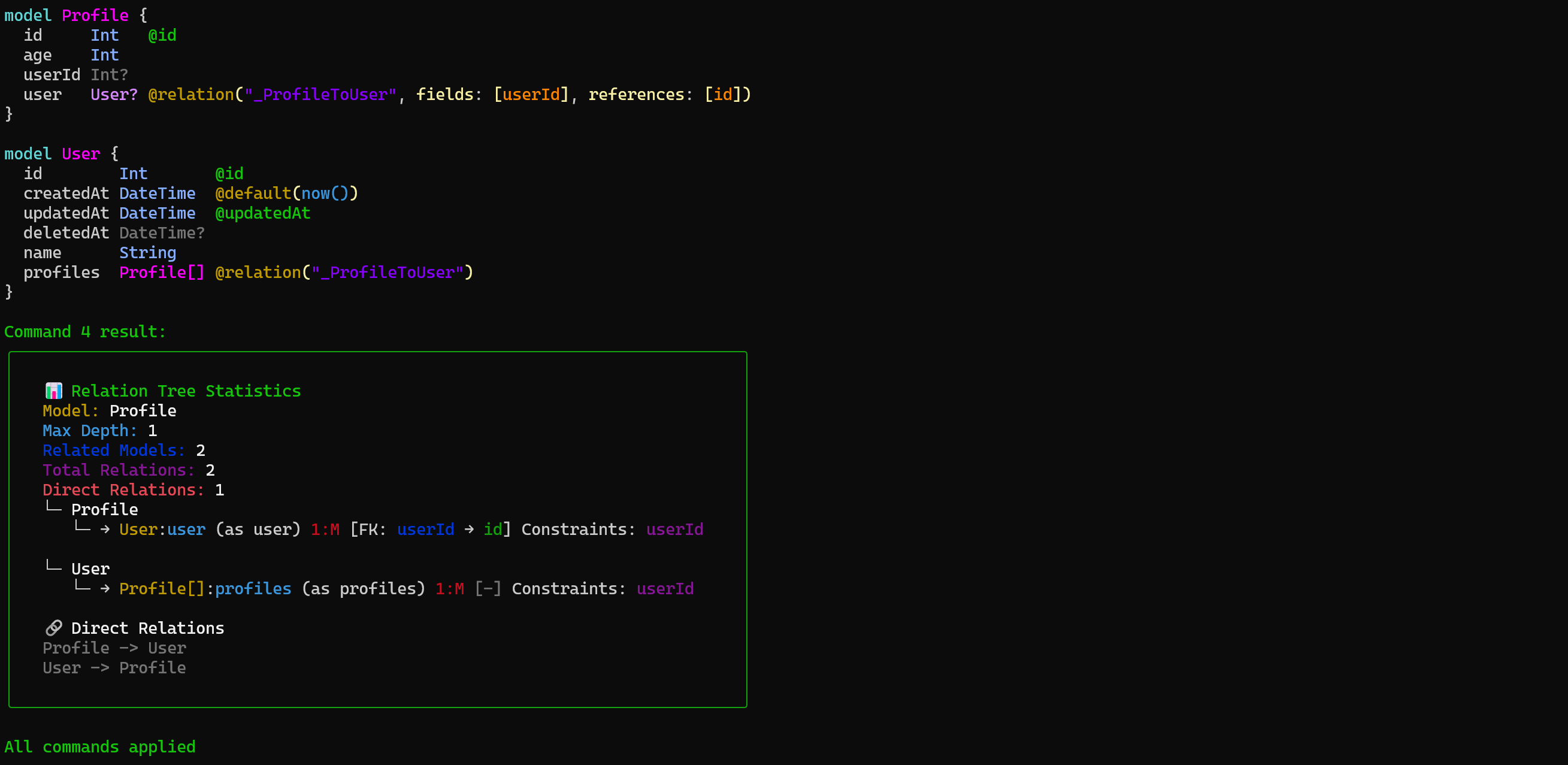
- `GET RELATIONS <model,model2> (depth?=1)` – Display relations; optionally set a depth.
- `GET ENUMS (raw?)` / `GET ENUMS <enum, ...>` – Show one or more enums.
- `GET MODELS_LIST` – Display a sorted list of all models.
- `PRINT` – Print the entire schema in color.
- `GET DB` – Show the current database connection.
- `GET GENERATORS` – List all generators.
- `VALIDATE` – Validate the schema.
### 2. Mutation Commands
- `ADD MODEL <name> ({...})` – Create a new model with a Prisma block.
- `ADD FIELD <name> TO <model> ({String})` – Add a field to a model.
- `ADD RELATION <modelA> AND <modelB> (type=1:M, ...)` – Create a relation between two models.
- `ADD ENUM <name> ({A|B|C})` – Create a new enum.
- `DELETE MODEL <name>` – Delete a model.
- `DELETE FIELD <name> IN <model>` – Remove a field.
- `DELETE RELATION <modelA>, <modelB> (relationName=...)` – Remove a relation.
- `DELETE ENUM <name>` – Delete an enum.
- `UPDATE FIELD <name> IN <model> ({...})` – Recreate a field (caution).
- `UPDATE ENUM <name> ({A|B}) (replace=?)` – Append or replace enum values.
- `UPDATE DB (url='...', provider='...')` – Update the database connection.
- `UPDATE GENERATOR <name> ({...}) (provider='...', output='...')` – Update a generator.
- `ADD GENERATOR <name> ({...})` – Add a new generator.
- `DELETE GENERATOR <name>` – Remove a generator.
#### 📸 Preview

## Flow of Execution
1. **Parse Command** – `PrismaQlDslParser` converts your raw command string into a structured `PrismaQLParsedDSL` object.
2. **Send to Provider** – `PrismaQlProvider` receives the parsed command. For example:
```ts
provider.apply(parsedCommand);
```
3. **Handlers** – The provider dispatches the command to the correct handler (`QueryHandler` or `MutationHandler`) based on `type`.
4. **Validation & Dry Run** – Each mutation can be tested in a `dryRun` mode before final merge.
5. **Backup** – If the command is valid, the old schema is backed up under `.prisma/backups`.
6. **Rebase** – The schema loader can rebase the in-memory state to reflect the final updated schema.
---
## Extending PrismaQL
### Custom Parsers
You can build your own DSL commands:
```ts
import {
PrismaQlDslParser,
BasePrismaQlDSLAction,
BasePrismaQLDSLCommand,
PrismaQlDSLArgsProcessor,
} from "prismaql";
// Extend base actions with a custom action
type CustomAction = BasePrismaQlDSLAction | "SAY";
// Extend base commands with a custom command
type CustomCommand = BasePrismaQLDSLCommand | "HI";
// Provide argument processors
const customArgsProcessors: Record<
CustomAction,
{
default: PrismaQlDSLArgsProcessor<any, any>;
} & Partial<Record<CustomCommand, PrismaQlDSLArgsProcessor<any, any>>>
> = {
// Use existing base processors here
...basePrismaQlAgsProcessor,
// Add custom action
SAY: {
default: (parsedArgs) => parsedArgs,
HI: (parsedArgs, rawArgs) => {
return {
models: rawArgs ? rawArgs.split(",").map((m) => m.trim()) : [],
};
},
},
};
// Create a custom parser
const customParser = new PrismaQlDslParser<CustomAction, CustomCommand>(
customArgsProcessors
);
// Register custom command
customParser.registerCommand("SAY", "HI", "query");
console.log(customParser.parseCommand("SAY HI model1, model2;"));
```
### Custom Handlers
Register your own logic for queries or mutations:
```ts
import {
PrismaQlMutationHandlerRegistry,
PrismaQlQueryHandlerRegistry,
} from "prismaql";
export const mutationsHandler = new PrismaQlMutationHandlerRegistry();
mutationsHandler.register("ADD", "MODEL", addModel);
export const queryHandler = new PrismaQlQueryHandlerRegistry();
queryHandler.register("GET", "MODEL", getModel);
```
### The Provider
Once you have parsers and handlers, set up a provider:
```ts
import {
PrismaQlProvider,
PrismaQlSchemaLoader,
PrismaQlRelationCollector,
} from "prismaql";
const manager = new PrismaQlSchemaLoader(new PrismaQlRelationCollector());
await manager.loadFromFile("./prisma/schema.prisma");
const provider = new PrismaQlProvider({
queryHandler: queryHandler,
mutationHandler: mutationsHandler,
loader: manager,
});
// Apply commands
provider.multiApply(`
ADD MODEL User ({ id Int @id, name String });
ADD FIELD email TO User ({String @unique});
`);
```
This approach works both **programmatically** and through the **CLI**, making dynamic schema changes easy.
---
## Example Usage
### Using PrismaQL in Code
```ts
import { prismaQlParser, PrismaQlProvider } from "prismaql";
const command =
"ADD MODEL User ({ id Int @id @default(autoincrement()), name String });";
const parsedCommand = prismaQlParser.parseCommand(command);
const provider = new PrismaQlProvider({
queryHandler: myQueryHandler,
mutationHandler: myMutationHandler,
loader: mySchemaLoader,
});
provider.apply(parsedCommand);
```
### Using PrismaQL CLI
Check out the [PrismaQL CLI](https://github.com/unbywyd/prismaql-cli):
```sh
# Add a new model (mutation)
prismaql "ADD MODEL TempData ({ name String });"
# Query schema
prismaql "GET MODELS"
# Add a field programmatically
prismaql "ADD FIELD email TO User ({String});"
# Delete an entire model
prismaql "DELETE MODEL TempData;"
```
---
## Current Status
If you're interested in contributing, reporting issues, or suggesting features, check out the [GitHub repository](https://github.com/unbywyd/prismaql).
---
## License
PrismaQL Core is licensed under the **MIT License**.
© 2025 [Artyom Gorlovetskiy](https://unbywyd.com).
## Additional Resources
- [Mutation Commands Documentation](./MutationCommands.md) - Detailed CLI examples and descriptions for all mutation commands.