prismalux
Version:
✨ A lightweight Prisma Schema Highlighter for CLI & Node.js. Works with CommonJS and ES Modules.
193 lines (129 loc) • 4 kB
Markdown
# Prismalux 🌓 - A **Zero-Dependency** Prisma Schema Highlighter
[](https://www.npmjs.com/package/prismalux)
[](LICENSE)
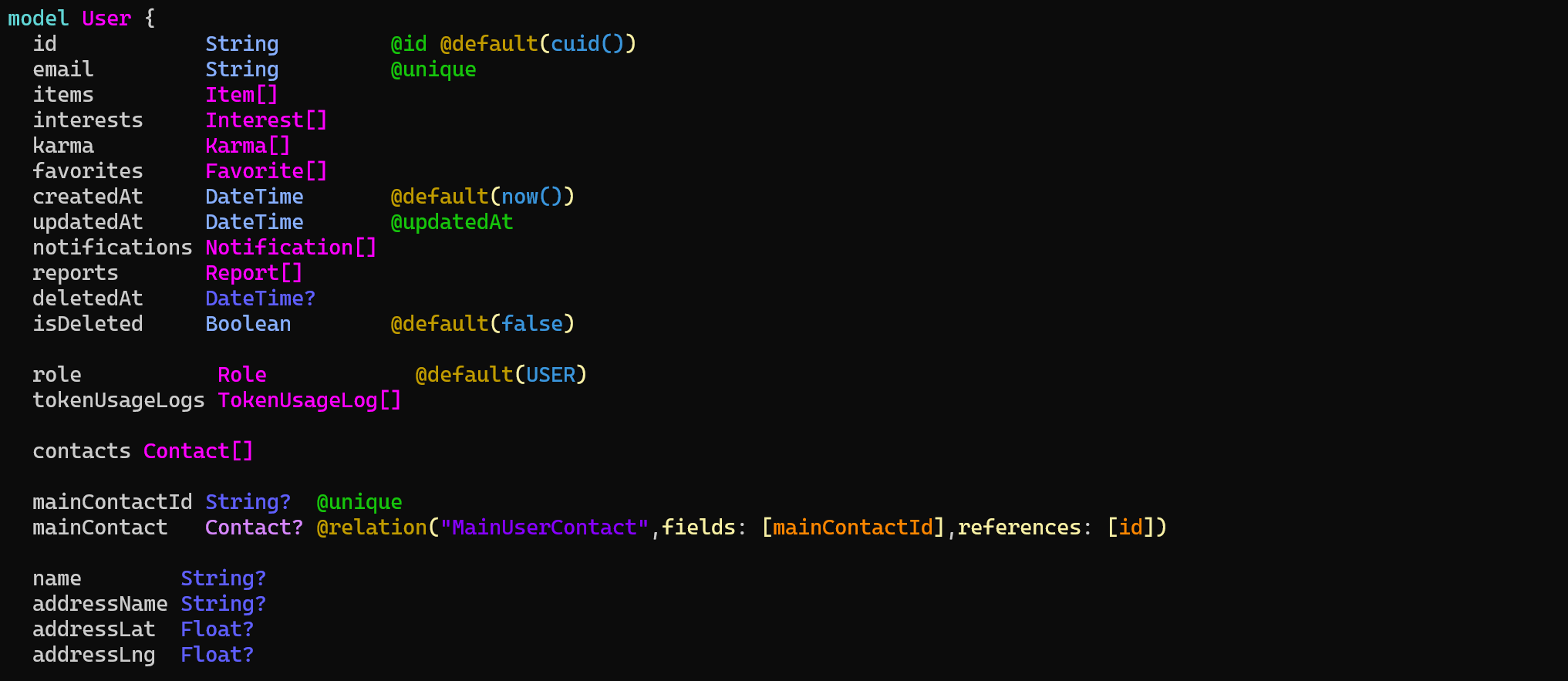
✨ **Prismalux** is a **lightweight, zero-dependency** **CLI tool & library** for highlighting **Prisma schema** files in the terminal.
🔍 You can also highlight a specific **model** or **enum** using the `--filter=` option.
## Just run it with npx:
```sh
npx prismalux
```
## 🚀 Features
✔ **Zero dependencies** - No extra packages required
✔ **Syntax highlighting** for Prisma schema files
✔ **Works as CLI & library** (use as `prismalux [path]` or import in code)
✔ **Filter a specific model or enum** using `--filter=User`
✔ **ESM & CommonJS** support
## 📸 Preview
## **📦 Get Started**
If you just want to run **Prismalux** without installing it, simply use:
```sh
npx prismalux
```
This will **automatically find** the Prisma schema in the current directory (e.g., `prisma/schema.prisma`).
If your schema is located elsewhere, specify the path manually:
```sh
npx prismalux --path=./path/to/schema.prisma
```
### **🔍 Highlight a Specific Model or Enum**
If you only want to highlight **a specific model or enum**, use the `--filter=` option:
```sh
prismalux --filter=User
```
Or **multiple models/enums**:
Use "," or "|" to separate multiple models/enums:
```sh
prismalux --filter="User|Role"
```
```sh
prismalux --filter=User,Role
```
This will **only** display:
```prisma
model User {
id String @id @default(cuid())
email String @unique
role Role
createdAt DateTime @default(now())
}
```
You can also **combine it with a custom schema path**:
```sh
prismalux --path=./custom/schema.prisma --filter=Post
```
## **📦 Installation**
### **Global Installation (CLI)**
If you want to use **Prismalux** as a command-line tool:
```sh
npm install -g prismalux
```
Now you can run:
```sh
prismalux
```
Or specify a custom path:
```sh
prismalux --path=./path/to/schema.prisma
```
## 🎮 **Usage**
### **1️⃣ CLI Mode**
```sh
# Display help
prismalux --help
# Show version
prismalux --version
# Highlight Prisma schema (auto-detects "prisma/schema.prisma")
prismalux
# Highlight a specific file
prismalux --path=./custom/schema.prisma
# Highlight a specific model or enum
prismalux --filter=User
```
### **2️⃣ Import in Code**
#### **📦 ESM (ES Modules)**
```typescript
import { PrismaHighlighter } from "prismalux";
const highlighter = new PrismaHighlighter();
const schema = `
model User {
id String @id @default(cuid())
email String @unique
role Role
createdAt DateTime @default(now())
}
`;
console.log(highlighter.highlight(schema));
```
#### **📦 CommonJS (CJS)**
Similar to ESM
```javascript
import { PrismaHighlighter } from "prismalux"; // or require("prismalux")
const highlighter = new PrismaHighlighter();
```
## 🔧 **Configuration**
Prismalux allows you to customize colors and disable highlighting if needed.
```typescript
const highlighter = new PrismaHighlighter({
enableColors: true,
colors: {
yellow: "\x1b[38;5;220m", // Custom yellow
orange: "\x1b[38;5;214m", // Custom orange
},
});
console.log(highlighter.highlight(schema));
```
To **disable colors** (useful for logs):
```typescript
const plainHighlighter = new PrismaHighlighter({ enableColors: false });
console.log(plainHighlighter.highlight(schema));
```
## 📜 **License**
**MIT License** © [Artyom Gorlovetskiy](https://github.com/unbywyd)