prisma-markdown
Version:
Prisma Markdown documents generator including ERD diagrams and comment descriptions
109 lines (80 loc) • 4.07 kB
Markdown
# Prisma Markdown
## Outline
[](https://github.com/samchon/prisma-markdown/blob/master/LICENSE)
[](https://www.npmjs.com/package/prisma-markdown)
[](https://www.npmjs.com/package/prisma-markdown)
[](https://github.com/samchon/prisma-markdown/actions?query=workflow%3Abuild)
Prisma markdown documents generator.
- Mermaid ERD diagrams
- Descriptions by `///` comments
- Separations by `` comments
If you want to see how markdown document being generated, visit below examples:
- Markdown Content: [samchon/prisma-markdown/ERD.md](https://github.com/samchon/prisma-markdown/blob/master/ERD.md)
- Prisma Schema: [samchon/prisma-markdown/schema.prisma](https://github.com/samchon/prisma-markdown/blob/master/schema.prisma)
[](https://github.com/samchon/prisma-markdown/blob/master/ERD.md)
## Setup
At first, install NPM package.
```bash
npm i -D prisma-markdown
```
At next, add the generator to the schema file.
```prisma
generator markdown {
provider = "prisma-markdown"
output = "./ERD.md"
title = "Shopping Mall"
}
```
At last, run below command, than [ERD.md](https://github.com/samchon/prisma-markdown/blob/master/ERD.md) file would be generated.
```bash
npx prisma generate
```
## Comment Tags
If your database has over hundreds of models, none of automatic ERD generators can express them perfect. In that case, `prisma-markdown` recommends you to separate hundreds of models to multiple paginated diagrams by using `/// @namespace <name>` comments.
When you write `/// @namespace <name>` comment on models, they would be separated to proper sections of markdown document. For reference, you can assign multiple `@namespace`s to a model, and if you do not assign any `@namespace` to a model, it would be assigned to `default` tag.
Also, if you use ` <name>` instead of ` <name>`, target model would be expressed only at ERD. It would not be appeared to the markdown content section. Otherwise, ` <name>` tag will show the model only at markdown content section, not at ERD.
- ` <name>`: Both ERD and markdown content
- ` <name>`: Only ERD
- ` <name>`: Only markdown content
- ``: Neither ERD nor markdown content
- ` 1`: Mandatory relationship when 1: **N** (`||---|{`)
```prisma
/// Both description and ERD on Actors chatper.
///
/// Also, only ERD on Articles and Orders chapters.
///
/// @namespace Actors
/// @erd Articles
/// @erd Orders
model shopping_customers {
/// The tag "minItems 1" means mandatory relationship `||---|{`.
///
/// Otherwise, no tag means optional relationship `||---o{`.
///
/// @minItems 1
login_histories shopping_customer_login_histories[]
}
/// Only description on Actors chapter.
///
/// @describe Actors
model shopping_customer_login_histories {}
/// Only ERD on Articles chapter.
///
/// @erd Articles
model shopping_sale_reviews {}
/// Never be shown.
///
/// @hidden
model shopping_sale_hits {}
```
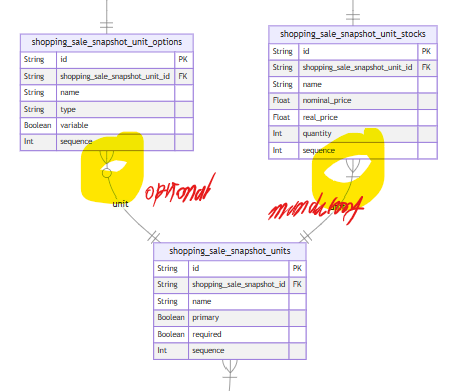
Additionally, when defining 1: N relationship, you can specify the N position to be whether optional or mandatory. If you want to configure the N position to be mandatory, just write the ` 1` comment tag. Otherwise the N position is optional, you don't need to do anything.
```prisma
model shopping_sale_units {
/// @minItems 1
stocks shopping_sale_snapshot_unit_stocks[];
options shopping_sale_snapshot_unit_options[]; // optional
}
model shopping_sale_snapshot_unit_stocks {}
model shopping_sale_snapshot_unit_options {}
```