preeti-to-unicode-input
Version:
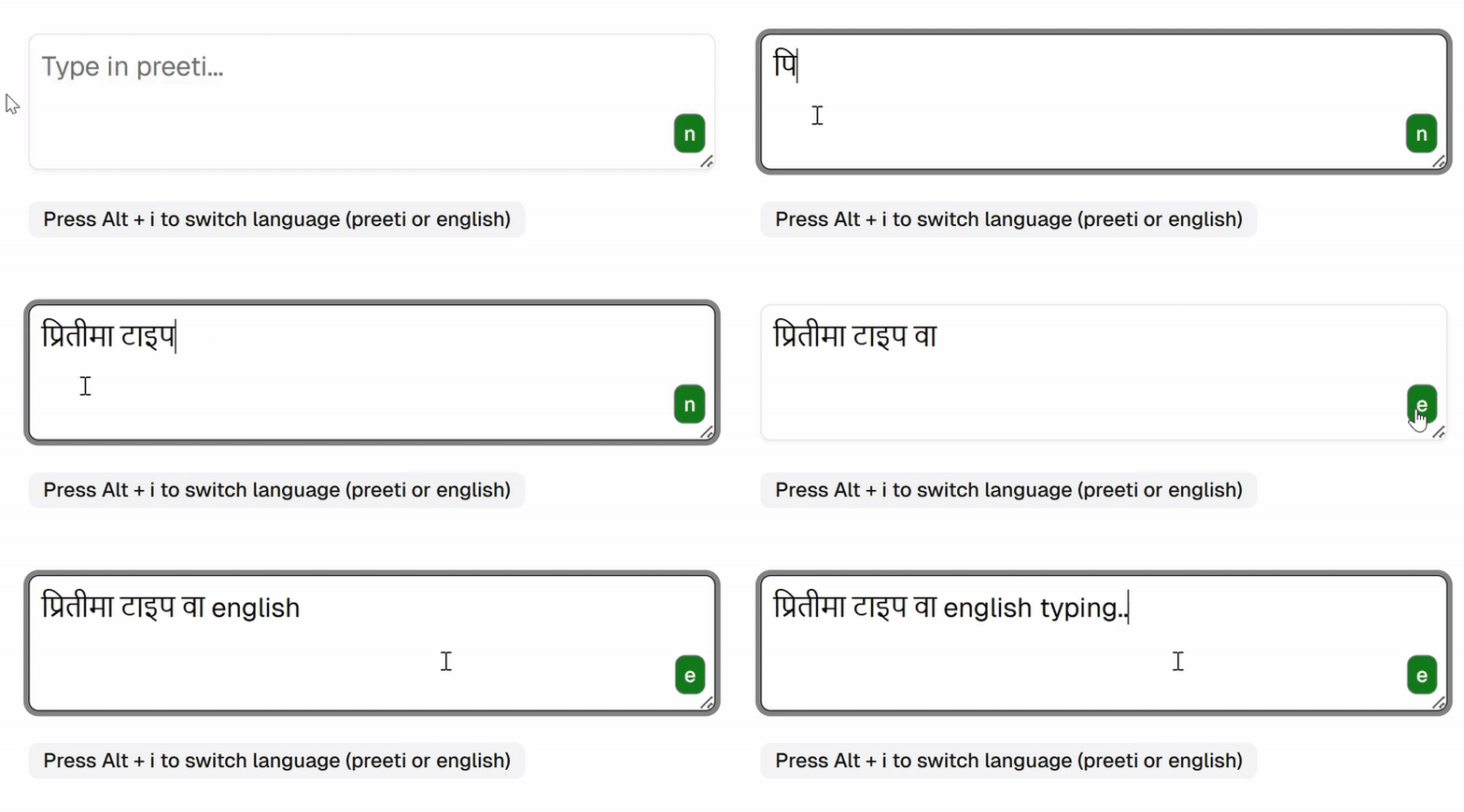
An input element or textarea to convert preeti font or nepali font to unicode with language toggle support for Nepali and english typing.
162 lines (135 loc) • 5.17 kB
Markdown
This React component provides an input (or a textarea) field that converts the user's preeti font input into Unicode format in same input box. The component is customizable and integrates seamlessly into any react-hook-form.
## Features
1. Type in Preeti font and get converted to unicode in same input box or textarea
2. Write in preeti font or in english font in same input (using alt + i to toggle language)
3. Give your own input element as props and get conversion feature added to it.
4. Supports shadcn form, zod validation (see examples below)
5. Support hrashwo akar **ि** as per preeti font typing. For example type `ls` and get `कि`.
6. Convert preeti to unicode using function preetiToUnicode(preetiText)
## Installation
Install it to your react project with npm
```bash
npm install preeti-to-unicode-input
```
## Demo
## Usage/Examples
```javascript
import { PreetiToUnicodeInput } from "preeti-to-unicode-input";
import { useState } from "react";
const MyForm = () => {
const [inputValue, setInputValue] = useState("");
return (
<form>
<PreetiToUnicodeInput
inputElement={
<input
value={inputValue}
onChange={(event) => setInputValue(event.target.value)}
/>
}
/>
</form>
);
};
```
| Props | Description |
| :---------------------------- | :------------------------------------------------------------------------------------------------------------------------------------------------------------------------------ |
| `inputElement` | Provide input element of type input or textarea as props for which preeti to unicode feature is to be enabled.You can provide shadcn component Input or Textarea component too. |
| `enableEnglishLanguageToggle` | Set this to true you want user to enable switching english and preeti unicode in same input box using `Alt + i` keyboard shortcut. |
**Example 1**
Basic javascript function to convert preeti text to unicode
```javascript
import { preetiToUnicode } from "preeti-to-unicode-input";
const preetiText = "lk|tLnfO{ o'lgsf]8df nfg]";
const unicodeText = preetiToUnicode(preetiText);
console.log(unicodeText);
//output: प्रितीलाई युनिकोडमा लाने
```
**Example 2**
Working with zod validation, zod resolver, react-hook-form and shadcn components
```javascript
import { useForm } from "react-hook-form";
import { z } from "zod";
import { zodResolver } from "@hookform/resolvers/zod";
import { PreetiToUnicodeInput } from "preeti-to-unicode-input";
// Import Shadcn form components
import {
Form,
FormField,
FormItem,
FormControl,
FormLabel,
FormMessage,
} from "./components/ui/form";
import { Input } from "./components/ui/input";
// Define Zod schema for validation
const formSchema = z.object({
normalInput: z
.string()
.min(4, { message: "Input must be at least 4 character" }),
preetiInput: z
.string()
.min(3, { message: "Input must be at least 3 characters" })
.max(50, { message: "Input must be less than 50 characters" }),
});
const MyForm = () => {
// Initialize react-hook-form with Zod resolver
const form = useForm({
resolver: zodResolver(formSchema),
defaultValues: {
normalInput: "",
preetiInput: "", // Default form value for the input
},
});
const onSubmit = (data: any) => {
console.log("Form Data:", data); // Log submitted form data
};
return (
<Form {...form}>
<form onSubmit={form.handleSubmit(onSubmit)}>
<FormField
name="normalInput"
control={form.control}
render={({ field }) => (
<FormItem>
<FormLabel>Normal Input</FormLabel>
<FormControl>
<Input placeholder="shadcn" {...field} />
</FormControl>
<FormMessage />
</FormItem>
)}
/>
<FormField
name="preetiInput"
render={({ field }) => (
<FormItem>
<FormLabel>Preeti to Unicode Input</FormLabel>
<FormControl>
<PreetiToUnicodeInput
enableEnglishLanguageToggle={true}
inputElement={
<Input
value={field.value}
onChange={(event) => field.onChange(event.target.value)}
placeholder="Type in Preeti here"
className="custom-classname"
/>
}
/>
</FormControl>
<FormMessage />
</FormItem>
)}
/>
<button type="submit">Submit</button>
</form>
</Form>
);
};
export default MyForm;
```