pq-calendar-lite
Version:
calendar for pq
183 lines (147 loc) • 4.29 kB
Markdown
# Calendar [Demo](https://simbawus.github.io/calendar)
- Develop with native javascript, doesn't rely on any frameworks and libraries.
- Easy API, easy use.
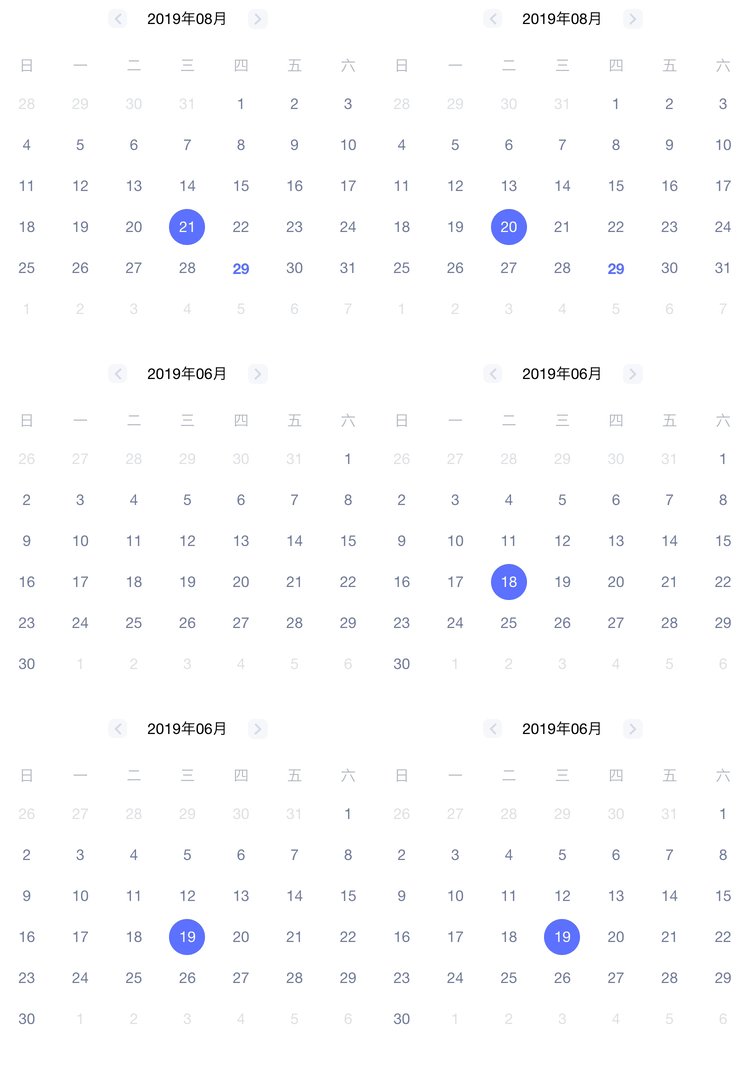
## PropTypes
| Property | Type | Default | Description |
| :--------------- | :------- | :---------------- | :------------------------------------- |
| el | DOM | - | parent node |
| currentDate | String | today(yyyy/MM/dd) | current Date |
| format | String | yyyy/MM/dd | date format |
| monthFormat | String | yyyy年MM月 | month format |
| onDayClick | Function | - | Trigger when clicking on the date |
| onClickPreMonth | Function | - | Trigger when clicking on the PreMonth |
| onClickNextMonth | Function | - | Trigger when clicking on the NextMonth |
| onMonthChange | Function | - | Trigger when month change |
## Getting Started
### Install
```shell
npm install pq-calendar-lite
```
### Usage Example
- **Native JavaScript**
```html
<html>
<head>
<meta charset="UTF-8" />
<meta name="author" content="simbawu" />
<title>calendar</title>
</head>
<body>
<div id="values"></div>
<div id="app"></div>
<script src="./calendar.js"></script>
</body>
</html>
```
```javascript
//calendar.js
import Calendar from "calendar-lite";
function onDayClick(date) {
console.log(date); // choose date
}
const daysWithActions = [
{
date: new Date('2020/05/01').toISOString(),
color: 'blue'
},
{
date: new Date('2020/05/04').toISOString(),
color: 'blue'
}
];
new Calendar({
el: document.querySelector("#app"),
daysWithActions,
showAwards: true,
onDayClick
});
```
- **React**
```jsx
import React from "react";
import Calendar from "calendar-lite";
class CalendarPage extends React.Component {
constructor() {
super();
}
componentDidMount() {
this.renderCalendar();
}
onDayClick = date => {
console.log(date); // choose date
};
renderCalendar = () => {
return new Calendar({
el: this.refs.slideRuler,
currentDate: "2019/08/28",
onDayClick: this.onDayClick
});
};
render() {
return <div ref="slideRuler" />;
}
}
export default CalendarPage;
```
- **Vue**
```js
<template>
<div></div>
</template>
<script>
import Calendar from 'calendar-lite';
export default {
mounted () {
this.renderCalendar();
},
methods: () {
renderCalendar() {
return new Calendar (
{
el: this.$el,
currentDate: "2019/08/28",
onDayClick: onDayClick
}
);
},
onDayClick(date) {
console.log(date); // choose date
}
}
}
</script>
```
- **Angular**
```typescript
import { Component, ViewChild, OnInit, ViewEncapsulation } from "@angular/core";
import Calendar from "calendar-lite";
@Component({
selector: "my-app",
template: `
<div #calendar></div>
`,
encapsulation: ViewEncapsulation.None
})
export class AppComponent implements OnInit {
@ViewChild("calendar") calendar;
ngOnInit() {
this.renderCalendar();
}
renderCalendar() {
return new Calendar({
el: this.calendar.nativeElement,
currentDate: "2019/08/28",
onDayClick: onDayClick
});
}
onDayClick(date) {
console.log(date); // choose date
}
}
```
## How to Contribute
Anyone and everyone is welcome to contribute to this project. The best way to start is by checking our [open issues](https://github.com/simbawus/calendar/issues),[submit a new issues](https://github.com/simbawus/calendar/issues/new?labels=bug) or [feature request](https://github.com/simbawus/calendar/issues/new?labels=enhancement), participate in discussions, upvote or downvote the issues you like or dislike.
## License
[**The MIT License**](LICENSE).