ppu-paddle-ocr
Version:
Blazing-fast and lightweight PaddleOCR library for Node.js and Bun. Perform accurate text detection, recognition, and image deskew with a simple, modern, and type-safe API. Ideal for document processing, data extraction, and computer vision tasks.
224 lines (157 loc) • 9.08 kB
Markdown
# ppu-paddle-ocr
A lightweight, type-safe, PaddleOCR implementation in Bun/Node.js for text detection and recognition in JavaScript environments.
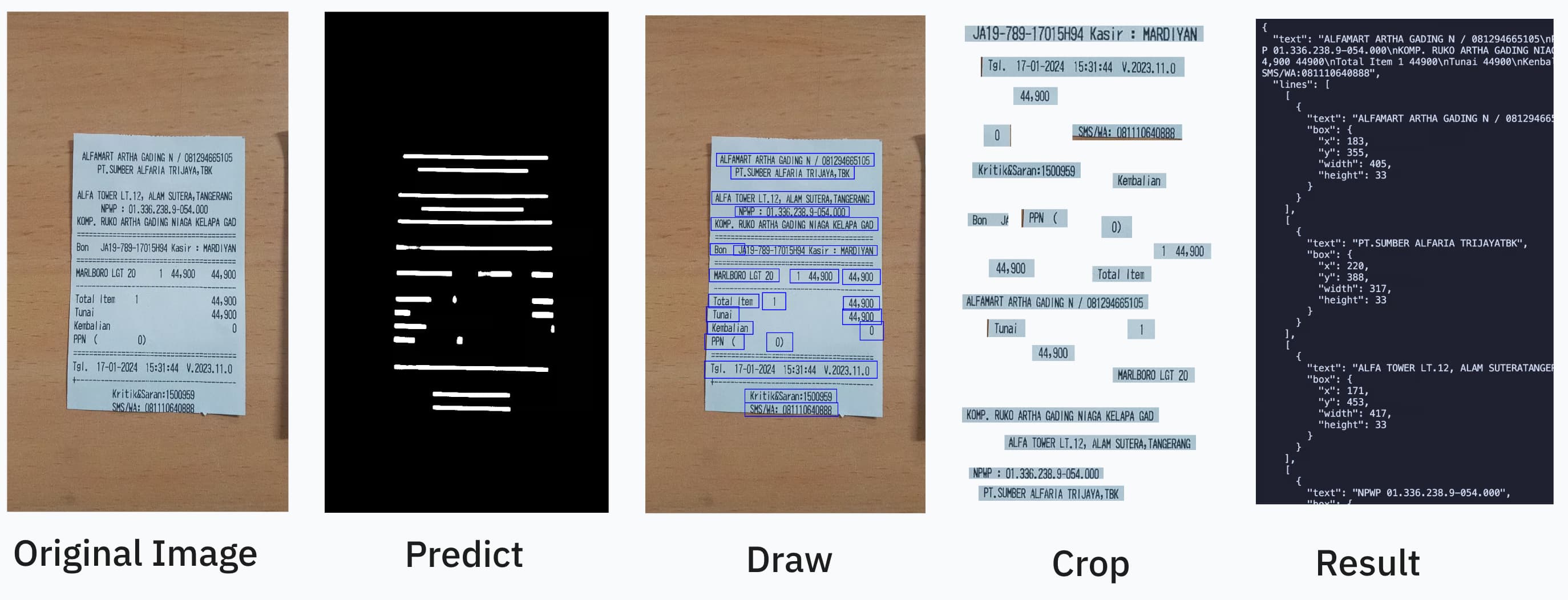
OCR should be as easy as:
```ts
import { PaddleOcrService } from "ppu-paddle-ocr";
const service = new PaddleOcrService();
await service.initialize();
const result = await service.recognize(fileBufferOrCanvas);
await service.destroy();
```
You can combine it further by using open-cv https://github.com/PT-Perkasa-Pilar-Utama/ppu-ocv for more improved accuracy.
#### Paddle works best with grayscale/thresholded image
```ts
import { ImageProcessor } from "ppu-ocv";
const processor = new ImageProcessor(bodyCanvas);
processor.grayscale().blur();
const canvas = processor.toCanvas();
processor.destroy();
```
## Description
ppu-paddle-ocr brings the powerful PaddleOCR optical character recognition capabilities to JavaScript environments. This library simplifies the integration of ONNX models with Node.js applications, offering a lightweight solution for text detection and recognition without complex dependencies.
Built on top of `onnxruntime-node`, ppu-paddle-ocr handles all the complexity of model loading, preprocessing, and inference, providing a clean and simple API for developers to extract text from images with minimal setup.
### Why use this library?
1. **Lightweight**: Optimized for performance with minimal dependencies
2. **Easy Integration**: Simple API to detect and recognize text in images
3. **Cross-Platform**: Works in Node.js and Bun environments
4. **Customizable**: Support for custom models and dictionaries
5. **Pre-packed Models**: Includes optimized PaddleOCR models ready for immediate use, with automatic fetching and caching on the first run.
6. **TypeScript Support**: Full TypeScript definitions for enhanced developer experience
7. **Auto Deskew**: Using multiple text analysis to straighten the image
## Installation
Install using your preferred package manager:
```bash
npm install ppu-paddle-ocr
yarn add ppu-paddle-ocr
bun add ppu-paddle-ocr
```
> [!NOTE]
> This project is developed and tested primarily with Bun.
> Support for Node.js, Deno, or browser environments is **not guaranteed**.
>
> If you choose to use it outside of Bun and encounter any issues, feel free to report them.
> I'm open to fixing bugs for other runtimes with community help.
## Usage
#### Basic Usage
To get started, create an instance of `PaddleOcrService` and call the `initialize()` method. This will download and cache the default models on the first run.
```ts
import { PaddleOcrService } from "ppu-paddle-ocr";
// Create a new instance of the service
const service = new PaddleOcrService({
debugging: {
debug: false,
verbose: true,
},
});
// Initialize the service (this will download models on the first run)
await service.initialize();
const result = await service.recognize("./assets/receipt.jpg");
console.log(result.text);
// It's important to destroy the service when you're done to release resources.
await service.destroy();
```
#### Using Custom Models
You can provide custom models via file paths, URLs, or `ArrayBuffer`s during initialization. If no models are provided, the default models will be fetched from GitHub.
```ts
const service = new PaddleOcrService({
model: {
detection: "./models/custom-det.onnx",
recognition: "https://example.com/models/custom-rec.onnx",
charactersDictionary: customDictArrayBuffer,
},
});
// Don't forget to initialize the service
await service.initialize();
```
#### Changing Models and Dictionaries at Runtime
You can dynamically change the models or dictionary on an initialized instance.
```ts
// Initialize the service first
const service = new PaddleOcrService();
await service.initialize();
// Change the detection model
await service.changeDetectionModel("./models/new-det-model.onnx");
// Change the recognition model
await service.changeRecognitionModel("./models/new-rec-model.onnx");
// Change the dictionary
await service.changeTextDictionary("./models/new-dict.txt");
```
See: [Example usage](./examples)
#### Using a Custom Dictionary for a Single Recognition
You can provide a custom dictionary for a single `recognize` call without changing the service's default dictionary. This is useful for one-off recognitions with special character sets.
```ts
// Initialize the service first
const service = new PaddleOcrService();
await service.initialize();
// Use a custom dictionary for this specific call
const result = await service.recognize("./assets/receipt.jpg", {
dictionary: "./models/new-dict.txt",
});
// The service's default dictionary remains unchanged for subsequent calls
const anotherResult = await service.recognize("./assets/another-image.jpg");
```
## Models
### `ppu-paddle-ocr` v2.x.x (Default)
- detection: `PP-OCRv5_mobile_det_infer.onnx`
- recogniton: `en_PP-OCRv4_mobile_rec_infer.onnx`
- dictionary: `en_dict.txt` (97 class)
See: [Models](./src/models/)
See also: [How to convert paddle ocr model to onnx](./examples/convert-onnx.ipynb)
## Configuration
All options are grouped under the `PaddleOptions` interface:
```ts
export interface PaddleOptions {
/** File paths, URLs, or buffers for the OCR model components. */
model?: ModelPathOptions;
/** Controls parameters for text detection. */
detection?: DetectionOptions;
/** Controls parameters for text recognition. */
recognition?: RecognitionOptions;
/** Controls logging and image dump behavior for debugging. */
debugging?: DebuggingOptions;
}
```
#### `ModelPathOptions`
Specifies paths, URLs, or buffers for the OCR models and dictionary files.
| Property | Type | Required | Description |
| :--------------------- | :---------------------: | :------------------------------: | :---------------------------------------------------- |
| `detection` | `string \| ArrayBuffer` | **No** (uses default model) | Path, URL, or buffer for the text detection model. |
| `recognition` | `string \| ArrayBuffer` | **No** (uses default model) | Path, URL, or buffer for the text recognition model. |
| `charactersDictionary` | `string \| ArrayBuffer` | **No** (uses default dictionary) | Path, URL, buffer, or content of the dictionary file. |
> [!NOTE]
> If you omit model paths, the library will automatically fetch the default models from the official GitHub repository.
> Don't forget to add a space and a blank line at the end of the dictionary file.
#### `DetectionOptions`
Controls preprocessing and filtering parameters during text detection.
| Property | Type | Default | Description |
| :--------------------- | :------------------------: | :---------------------: | :--------------------------------------------------------------- |
| `autoDeskew` | `boolean` | `True` | Correct orientation using multiple text analysis. |
| `mean` | `[number, number, number]` | `[0.485, 0.456, 0.406]` | Per-channel mean values for input normalization [R, G, B]. |
| `stdDeviation` | `[number, number, number]` | `[0.229, 0.224, 0.225]` | Per-channel standard deviation values for input normalization. |
| `maxSideLength` | `number` | `960` | Maximum dimension (longest side) for input images (px). |
| `paddingVertical` | `number` | `0.4` | Fractional padding added vertically to each detected text box. |
| `paddingHorizontal` | `number` | `0.6` | Fractional padding added horizontally to each detected text box. |
| `minimumAreaThreshold` | `number` | `20` | Discard boxes with area below this threshold (px²). |
#### `RecognitionOptions`
Controls parameters for the text recognition stage.
| Property | Type | Default | Description |
| :------------ | :------: | :-----: | :---------------------------------------------------- |
| `imageHeight` | `number` | `48` | Fixed height for resized input text line images (px). |
#### `DebuggingOptions`
Enable verbose logs and save intermediate images to help debug OCR pipelines.
| Property | Type | Default | Description |
| ------------- | :-------: | :-----: | :----------------------------------------------------- |
| `verbose` | `boolean` | `false` | Turn on detailed console logs of each processing step. |
| `debug` | `boolean` | `false` | Write intermediate image frames to disk. |
| `debugFolder` | `string` | ` |