ppu-paddle-ocr
Version:
A lightweight, type safe, PaddleOCR implementation in Bun/Node.js for text detection and recognition in JavaScript environments.
264 lines (189 loc) • 8.68 kB
Markdown
# ppu-paddle-ocr
A lightweight, type-safe, PaddleOCR implementation in Bun/Node.js for text detection and recognition in JavaScript environments.
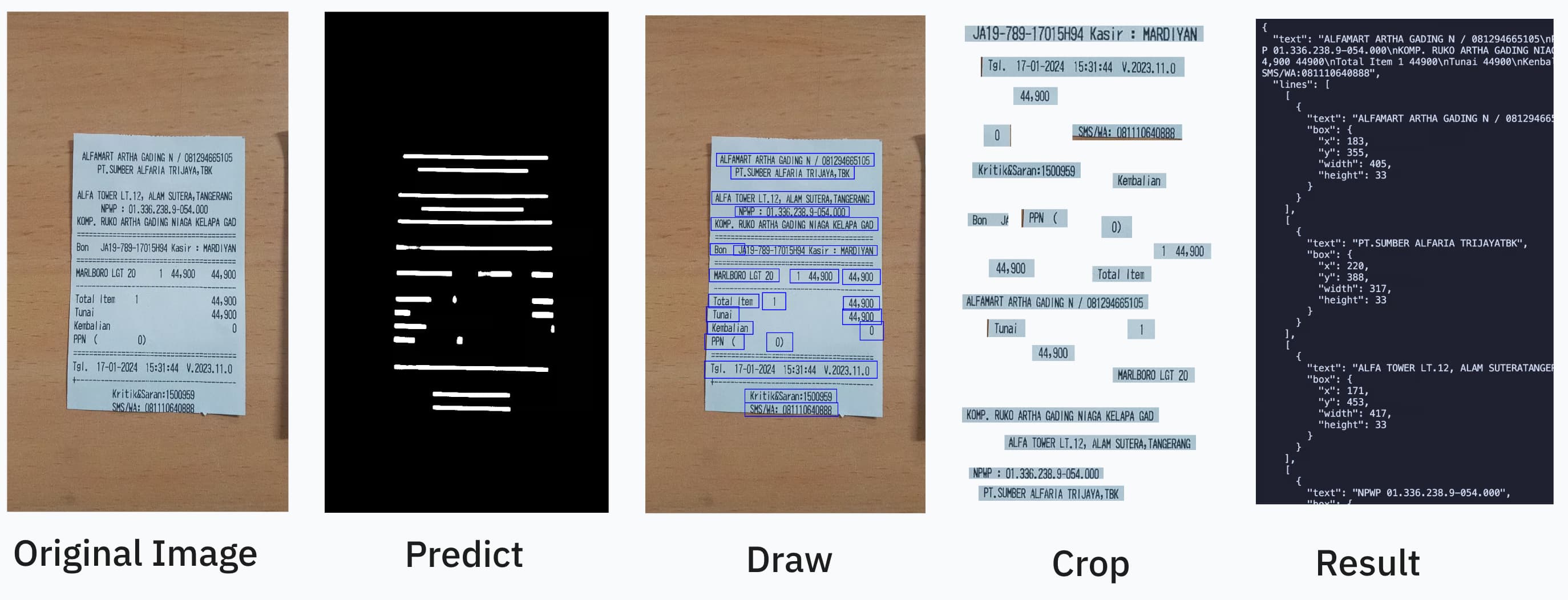
OCR should be as easy as:
```ts
import { PaddleOcrService } from "ppu-paddle-ocr";
const service = await PaddleOcrService.getInstance();
const result = await service.recognize(fileBufferOrCanvas);
service.destroy();
```
You can combine it further by using open-cv https://github.com/PT-Perkasa-Pilar-Utama/ppu-ocv for more improved accuracy.
## Description
ppu-paddle-ocr brings the powerful PaddleOCR optical character recognition capabilities to JavaScript environments. This library simplifies the integration of ONNX models with Node.js applications, offering a lightweight solution for text detection and recognition without complex dependencies.
Built on top of `onnxruntime-node`, ppu-paddle-ocr handles all the complexity of model loading, preprocessing, and inference, providing a clean and simple API for developers to extract text from images with minimal setup.
### Why use this library?
1. **Lightweight**: Optimized for performance with minimal dependencies
2. **Easy Integration**: Simple API to detect and recognize text in images
3. **Cross-Platform**: Works in Node.js and Bun environments
4. **Customizable**: Support for custom models and dictionaries
5. **Pre-packed Models**: Includes optimized PaddleOCR models ready for immediate use
6. **TypeScript Support**: Full TypeScript definitions for enhanced developer experience
## Installation
Install using your preferred package manager:
```bash
npm install ppu-paddle-ocr
yarn add ppu-paddle-ocr
bun add ppu-paddle-ocr
```
> [!NOTE]
> This project is developed and tested primarily with Bun.
> Support for Node.js, Deno, or browser environments is **not guaranteed**.
>
> If you choose to use it outside of Bun and encounter any issues, feel free to report them.
> I'm open to fixing bugs for other runtimes with community help.
## Usage
#### Basic usage as singleton
```ts
const service = await PaddleOcrService.getInstance({
debugging: {
debug: false,
verbose: true,
},
});
```
#### Basic usage using constructor
```ts
const service = new PaddleOcrService();
await service.initialize();
```
#### Using custom models with createInstance
```ts
const customService = await PaddleOcrService.createInstance({
model: {
detection: "./models/custom-det.onnx",
recoginition: "./models/custom-rec.onnx",
},
});
```
#### Changing models on an existing instance
```ts
await PaddleOcrService.changeModel({
model: {
detection: "./models/custom-det.onnx",
recoginition: "./models/custom-rec.onnx",
},
});
```
See: [Example usage](./examples)
## Models
### `ppu-paddle-ocr` v1.x.x
- detection: `en_PP-OCRv3_det_infer.onnx`
- recogniton: `en_PP-OCRv3_rec_infer.onnx`
- dictionary: `en_dict.txt` (97 class)
### `ppu-paddle-ocr` v2.x.x
- detection: `PP-OCRv5_mobile_det_infer.onnx`
- recogniton: `en_PP-OCRv4_mobile_rec_infer.onnx`
- dictionary: `en_dict.txt` (97 class)
See: [Models](./src/models/)
See also: [How to convert paddle ocr model to onnx](./examples/convert-onnx.ipynb)
## Configuration
All options are grouped under the PaddleOptions interface:
```ts
export interface PaddleOptions {
/** File paths to the required OCR model components. */
model?: ModelPathOptions;
/** Controls parameters for text detection. */
detection?: DetectionOptions;
/** Controls parameters for text recognition. */
recognition?: RecognitionOptions;
/** Controls logging and image dump behavior for debugging. */
debugging?: DebuggingOptions;
}
```
#### `ModelPathOptions`
Specifies filesystem paths to the OCR models and dictionary files.
| Property | Type | Required | Description |
| :--------------------- | :------: | :---------------------------: | :--------------------------------------- |
| `detection` | `string` | **Yes** if not using defaults | Path to the text detection model file. |
| `recognition` | `string` | **Yes** if not using defaults | Path to the text recognition model file. |
| `charactersDictionary` | `string` | **Yes** if not using defaults | Path to the dictionary file. |
> [!NOTE]
> If you omit model, the library will attempt to use built‑in default models.
> Don't forget to add space and blank at the end of the dictionary file.
#### `DetectionOptions`
Controls preprocessing and filtering parameters during text detection.
| Property | Type | Default | Description |
| :--------------------- | :------------------------: | :---------------------: | :--------------------------------------------------------------- |
| `mean` | `[number, number, number]` | `[0.485, 0.456, 0.406]` | Per-channel mean values for input normalization [R, G, B]. |
| `stdDeviation` | `[number, number, number]` | `[0.229, 0.224, 0.225]` | Per-channel standard deviation values for input normalization. |
| `maxSideLength` | `number` | `960` | Maximum dimension (longest side) for input images (px). |
| `paddingVertical` | `number` | `0.4` | Fractional padding added vertically to each detected text box. |
| `paddingHorizontal` | `number` | `0.6` | Fractional padding added horizontally to each detected text box. |
| `minimumAreaThreshold` | `number` | `20` | Discard boxes with area below this threshold (px²). |
#### `RecognitionOptions`
Controls parameters for the text recognition stage.
| Property | Type | Default | Description |
| :------------ | :------: | :-----: | :---------------------------------------------------- |
| `imageHeight` | `number` | `48` | Fixed height for resized input text line images (px). |
#### `DebuggingOptions`
Enable verbose logs and save intermediate images to help debug OCR pipelines.
| Property | Type | Default | Description |
| ------------- | :-------: | :-----: | :------------------------------------------------------- |
| `verbose` | `boolean` | `false` | Turn on detailed console logs of each processing step. |
| `debug` | `boolean` | `false` | Write intermediate image frames to disk. |
| `debugFolder` | `string` | `"out"` | Directory (relative to CWD) to save debug image outputs. |
## Result
```ts
{
"text": "LOREM IPSUM DOLOR\nSIT AMET",
"lines": [
[
{
"text": "LOREM",
"box": {
"x": 183,
"y": 355,
"width": 200,
"height": 33
}
},
{
"text": "IPSUM DOLOR",
"box": {
"x": 285,
"y": 355,
"width": 250,
"height": 33
}
}
],
[
{
"text": "SIT AMET",
"box": {
"x": 171,
"y": 453,
"width": 250,
"height": 33
}
}
]
]
}
```
## Contributing
Contributions are welcome! If you would like to contribute, please follow these steps:
1. **Fork the Repository:** Create your own fork of the project.
2. **Create a Feature Branch:** Use a descriptive branch name for your changes.
3. **Implement Changes:** Make your modifications, add tests, and ensure everything passes.
4. **Submit a Pull Request:** Open a pull request to discuss your changes and get feedback.
### Running Tests
This project uses Bun for testing. To run the tests locally, execute:
```bash
bun test
```
Ensure that all tests pass before submitting your pull request.
## Scripts
Recommended development environment is in linux-based environment.
Library template: https://github.com/aquapi/lib-template
All script sources and usage.
### [Build](./scripts/build.ts)
Emit `.js` and `.d.ts` files to [`lib`](./lib).
### [Publish](./scripts/publish.ts)
Move [`package.json`](./package.json), [`README.md`](./README.md) to [`lib`](./lib) and publish the package.
## License
This project is licensed under the MIT License. See the [LICENSE](LICENSE) file for details.
## Support
If you encounter any issues or have suggestions, please open an issue in the repository.
Happy coding!