ppu-ocv
Version:
A type-safe, modular, chainable image processing library built on top of OpenCV.js with a fluent API leveraging pipeline processing.
485 lines (359 loc) • 24 kB
Markdown
# ppu-ocv
[](https://www.npmjs.com/package/ppu-ocv) [](https://jsr.io/@snowfluke/ppu-ocv) [](https://www.npmjs.com/package/ppu-ocv) [](https://www.npmjs.com/package/ppu-ocv#provenance) [](./LICENSE) [](https://scorecard.dev/viewer/?uri=github.com/PT-Perkasa-Pilar-Utama/ppu-ocv) [](https://socket.dev/npm/package/ppu-ocv) [](https://www.bestpractices.dev/projects/12961)
A type-safe, modular, chainable image processing library built on top of OpenCV.js with a fluent API leveraging pipeline processing. Decoupled canvas utilities run anywhere — Node, Bun, browsers, browser extensions, and service workers — with or without OpenCV.
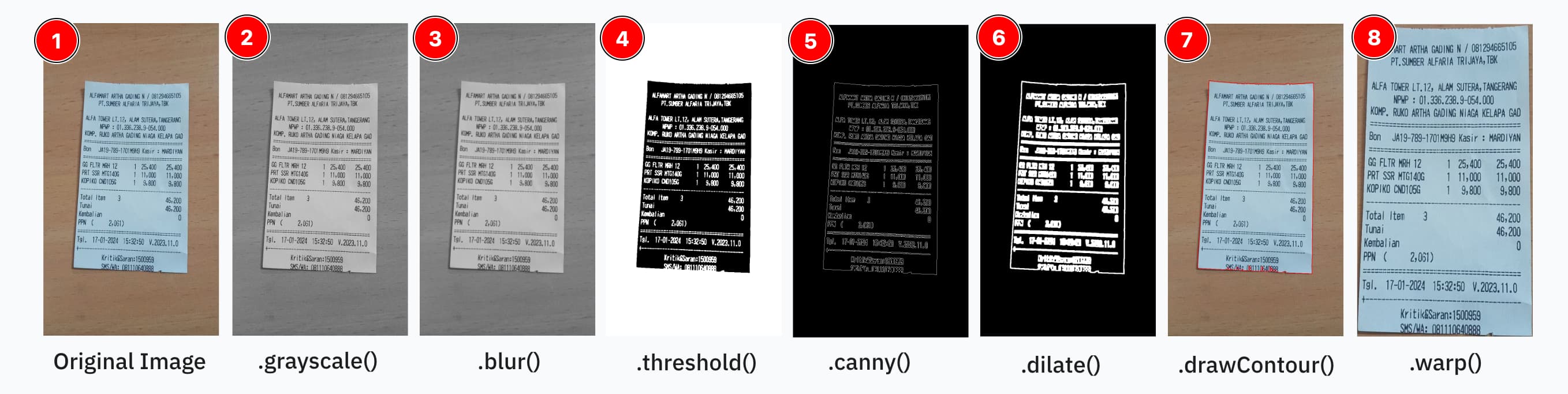
```ts
const processor = new ImageProcessor(canvas);
const result = processor
.grayscale()
.blur({ size: [5, 5] })
.threshold()
.invert()
.dilate({ size: [20, 20], iter: 5 })
.toCanvas();
processor.destroy();
```
Based on [TechStark/opencv-js](https://github.com/TechStark/opencv-js).
## Table of Contents
- [Why ppu-ocv?](#why-ppu-ocv)
- [Installation](#installation)
- [Usage (Node.js / Bun)](#usage-nodejs--bun)
- [Canvas-only Usage (no OpenCV)](#canvas-only-usage-no-opencv)
- [Web / Browser Support](#web--browser-support)
- [React Native / Mobile Support](#react-native--mobile-support)
- [Built-in Pipeline Operations](#built-in-pipeline-operations)
- [Extending Operations](#extending-operations)
- [Class Documentation](#class-documentation)
- [Migrating from v2](#migrating-from-v2)
- [Contributing](#contributing)
- [License](#license)
## Why ppu-ocv?
- **Simplified API** — chainable methods that hide OpenCV's verbose Mat allocation
- **No memory management** — automatic Mat lifecycle within the pipeline
- **Type-safe** — full TypeScript inference for operations and options
- **Extensible** — register custom operations with `registry.register(...)` without forking
- **Cross-platform** — same API in Node, Bun, browsers, and constrained runtimes
- **Loosely coupled** — canvas utilities work standalone; OpenCV is only loaded when actually needed
## Installation
Install using your preferred package manager:
```bash
npm install ppu-ocv
yarn add ppu-ocv
bun add ppu-ocv
```
## Usage (Node.js / Bun)
Note that operation order matters — you should have at least basic familiarity with OpenCV. See the operations table below.
```ts
import { CanvasProcessor, ImageProcessor } from "ppu-ocv";
const file = Bun.file("./assets/receipt.jpg");
const image = await file.arrayBuffer();
await ImageProcessor.initRuntime(); // init opencv
const canvas = await CanvasProcessor.prepareCanvas(image);
const processor = new ImageProcessor(canvas);
processor
.grayscale()
.blur({ size: [5, 5] })
.threshold();
const resultCanvas = processor.toCanvas();
processor.destroy();
```
Or use the `execute` API directly:
```ts
import { CanvasProcessor, CanvasToolkit, ImageProcessor, cv } from "ppu-ocv";
const file = Bun.file("./assets/receipt.jpg");
const image = await file.arrayBuffer();
const canvasToolkit = CanvasToolkit.getInstance();
await ImageProcessor.initRuntime();
const canvas = await CanvasProcessor.prepareCanvas(image);
const processor = new ImageProcessor(canvas);
const grayscaleImg = processor.execute("grayscale").toCanvas();
// The pipeline continues from the grayscaled image
const thresholdImg = processor
.execute("blur")
.execute("threshold", {
type: cv.THRESH_BINARY_INV + cv.THRESH_OTSU,
})
.toCanvas();
await canvasToolkit.saveImage({
canvas: thresholdImg,
filename: "threshold",
path: "out",
});
```
For more advanced usage, see: [Example usage of ppu-ocv](./examples)
## Canvas-only usage (no OpenCV)
Starting from v3.0.0, canvas utilities are fully decoupled from OpenCV. If you only need canvas I/O (e.g. loading/saving images, cropping, drawing) without any image processing, import from `ppu-ocv/canvas` (Node) or `ppu-ocv/canvas-web` (browser). OpenCV is **never imported or initialised** by these entry points, making them safe for use in Browser Extensions, Service Workers, and edge runtimes.
```ts
// Node.js — zero OpenCV dependency
import { CanvasProcessor, CanvasToolkit } from "ppu-ocv/canvas";
const file = Bun.file("./assets/image.jpg");
const canvas = await CanvasProcessor.prepareCanvas(await file.arrayBuffer());
const toolkit = CanvasToolkit.getInstance();
const cropped = toolkit.crop({
canvas,
bbox: { x0: 0, y0: 0, x1: 100, y1: 100 },
});
const buffer = await CanvasProcessor.prepareBuffer(cropped);
```
```ts
// Browser Extension background script — zero OpenCV dependency
import { CanvasProcessor, CanvasToolkit } from "ppu-ocv/canvas-web";
const response = await fetch("/image.jpg");
const canvas = await CanvasProcessor.prepareCanvas(await response.arrayBuffer());
```
## Web / Browser Support
Import from `ppu-ocv/web` to use the browser-native canvas APIs (`HTMLCanvasElement` / `OffscreenCanvas`) instead of `@napi-rs/canvas`.
### With a bundler (Vite, webpack, etc.)
```ts
import { CanvasProcessor, ImageProcessor, cv } from "ppu-ocv/web";
await ImageProcessor.initRuntime();
const response = await fetch("/my-image.jpg");
const buffer = await response.arrayBuffer();
const canvas = await CanvasProcessor.prepareCanvas(buffer);
const processor = new ImageProcessor(canvas);
processor
.grayscale()
.blur({ size: [5, 5] })
.threshold();
const result = processor.toCanvas(); // returns HTMLCanvasElement
document.body.appendChild(result);
processor.destroy();
```
### Vanilla HTML (no bundler)
The web build does not bundle OpenCV — load `opencv.js` yourself so it is on
`globalThis.cv`, then `initRuntime()` waits for the WASM to finish initializing:
```html
<!-- Load OpenCV; sets globalThis.cv (WASM initializes asynchronously). -->
<script async src="https://docs.opencv.org/4.10.0/opencv.js"></script>
<script type="module">
import {
CanvasProcessor,
ImageProcessor,
} from "https://cdn.jsdelivr.net/npm/ppu-ocv@3/index.web.js";
// Wait until the opencv.js script tag is present, then for the runtime.
await new Promise((resolve) => {
const ready = () => globalThis.cv && globalThis.cv.Mat;
const tick = () => (ready() ? resolve() : setTimeout(tick, 30));
tick();
});
await ImageProcessor.initRuntime();
const response = await fetch("/my-image.jpg");
const canvas = await CanvasProcessor.prepareCanvas(await response.arrayBuffer());
const processor = new ImageProcessor(canvas);
processor
.grayscale()
.blur({ size: [5, 5] })
.threshold();
const result = processor.toCanvas();
processor.destroy();
</script>
```
> With a bundler, importing `@techstark/opencv-js` once (it self-registers on
> `globalThis.cv`) is enough — no script tag needed.
> **Note:** ES modules require HTTP/HTTPS — use a local server (`npx serve .`) for dev, or deploy to GitHub Pages.
See the [interactive demo](./index.html) for a full working example.
### Entry point reference
| Import path | OpenCV | Canvas backend | `CanvasToolkit` | Use case |
| ----------------------- | ------ | ------------------------------------- | -------------------- | ------------------------------------------ |
| `ppu-ocv` | ✅ | `@napi-rs/canvas` | Full (with file I/O) | Full pipeline, Node.js / Bun |
| `ppu-ocv/web` | ✅ | `HTMLCanvasElement`/`OffscreenCanvas` | Base only | Full pipeline, browser |
| `ppu-ocv/canvas` | ❌ | `@napi-rs/canvas` | Full (with file I/O) | Canvas-only, Node (extensions, edge, etc.) |
| `ppu-ocv/canvas-web` | ❌ | `HTMLCanvasElement`/`OffscreenCanvas` | Base only | Canvas-only, browser extensions / SW |
| `ppu-ocv/canvas-mobile` | ❌ | `@shopify/react-native-skia` | Base only | Canvas-only, React Native / Expo |
### Platform abstraction
Under the hood, ppu-ocv uses a platform abstraction layer. Each entry point auto-registers its platform. You can also register a custom platform:
```ts
import { setPlatform, type CanvasPlatform } from "ppu-ocv/web";
const myPlatform: CanvasPlatform = {
createCanvas(width, height) {
/* ... */
},
loadImage(source) {
/* ... */
},
isCanvas(value) {
/* ... */
},
};
setPlatform(myPlatform);
```
## React Native / Mobile Support
Import from `ppu-ocv/canvas-mobile` for React Native apps (iOS / Android). This
entry point is backed by [`@shopify/react-native-skia`](https://shopify.github.io/react-native-skia/)
and is functionally equivalent to `ppu-ocv/canvas-web` — it exposes `CanvasProcessor`,
`CanvasToolkitBase`, and canvas factory types **without any OpenCV or WASM dependency**.
### Installation
```bash
# In your React Native / Expo project
npm install ppu-ocv @shopify/react-native-skia
# or
bun add ppu-ocv @shopify/react-native-skia
```
Follow the [react-native-skia setup guide](https://shopify.github.io/react-native-skia/docs/getting-started/installation)
to complete native installation (pod install / Gradle sync). Skia **must** be
initialised by the time you call any `ppu-ocv` API.
### Usage
```ts
import { CanvasProcessor } from "ppu-ocv/canvas-mobile";
// Load from an ArrayBuffer (e.g. from expo-file-system or fetch)
const response = await fetch("https://example.com/receipt.jpg");
const canvas = await CanvasProcessor.prepareCanvas(await response.arrayBuffer());
// Or load directly from a URI (file:// or https://)
const canvas = await CanvasProcessor.prepareCanvas("file:///path/to/photo.jpg");
// Chainable canvas-only pipeline (no OpenCV)
const regions = new CanvasProcessor(canvas)
.grayscale()
.threshold({ thresh: 127 })
.findRegions({ foreground: "light", minArea: 20 });
// Export back to bytes
const buffer = await CanvasProcessor.prepareBuffer(canvas);
```
### Requirements
- `@shopify/react-native-skia` ≥ 1.0.0
- React Native ≥ 0.74 / Expo SDK ≥ 51 (Hermes engine)
> **Note:** OpenCV (`@techstark/opencv-js`) is never loaded by this entry point.
> If you need full OpenCV operations in a React Native context, consider running
> the processing server-side and streaming results to the device.
## Built-in pipeline operations
To avoid bloat, we only ship essential operations for chaining. Currently shipped operations are:
| Operation | Depends on… | Why |
| ------------------------- | ------------------------------------------- | ---------------------------------------------------------------------------------------- |
| **grayscale** | – | Converts to single‐channel; many ops expect a gray image first. |
| **blur** | _(ideally after)_ grayscale | Noise reduction works best on 1-channel data. |
| **equalize** | _(after)_ grayscale | Histogram equalisation (CLAHE or global) for contrast normalisation before thresholding. |
| **threshold** | _(after)_ grayscale | Produces a binary image; needs gray levels. |
| **adaptiveThreshold** | _(after)_ grayscale (and optionally blur) | Local thresholding on gray values (smoother if blurred first). |
| **invert** | _(after)_ threshold or adaptiveThreshold | Inverting a binary mask flips foreground/background. |
| **canny** | _(after)_ grayscale + blur | Edge detection expects a smoothed gray image. |
| **dilate** | _(after)_ threshold or edge detection | Expands foreground regions—usually on a binary mask. |
| **erode** | _(after)_ threshold or edge detection | Shrinks or cleans up binary regions. |
| **morphologicalGradient** | _(after)_ dilation + erosion (or threshold) | Highlights boundaries by subtracting eroded from dilated image. |
| **warp** | – | Geometric transform; can be applied at any point. |
| **resize** | – | Also independent; purely geometry. |
| **border** | – | Independent; purely geometry. |
| **rotate** | – | Independent. |
## Extending operations
You can easily add your own by creating a prototype method or extending the `ImageProcessor` class.
See: [How to extend ppu-ocv operations](./docs/how-to-extend-ppu-ocv-operations.md)
## Class documentation
#### `CanvasProcessor`
Canvas-native image processing with **no OpenCV dependency**. Available from all entry points including `ppu-ocv/canvas` and `ppu-ocv/canvas-web`. Provides a chainable instance API alongside static I/O helpers.
```ts
const result = new CanvasProcessor(canvas)
.resize({ width: 360, height: 640 })
.grayscale()
.threshold({ thresh: 127 })
.invert()
.border({ size: 10, color: "white" })
.toCanvas();
// Detect connected white regions on a binary image
const regions = new CanvasProcessor(binaryCanvas).findRegions({
foreground: "light",
minArea: 20,
// thresh: 0 ← use on resized binary images to match OpenCV (any non-zero pixel = foreground)
// padding: { vertical: 0.4, horizontal: 0.6 } ← expand bbox by fraction of height
// scale: 1 / resizeRatio ← map coords back to original image space
});
regions.sort((a, b) => b.area - a.area); // largest first
// regions[0] → { bbox: { x0, y0, x1, y1 }, area }
```
**Static I/O**
| Method | Args | Description |
| ---------------------- | ----------- | ----------------------------------------------------- |
| static `prepareCanvas` | ArrayBuffer | Load image bytes into a `CanvasLike` |
| static `prepareBuffer` | CanvasLike | Export a `CanvasLike` to an `ArrayBuffer` (PNG bytes) |
**Instance operations** (chainable, return `this`)
| Method | Options | OpenCV equivalent | Fidelity |
| ----------- | ---------------------------------- | ------------------------- | -------------- |
| `resize` | `width`, `height` | `cv.resize` INTER_LINEAR | 1:1 (↓), ≈ (↑) |
| `grayscale` | — | `COLOR_RGBA2GRAY` | **1:1** |
| `convert` | `alpha?`, `beta?` | `Mat.convertTo` (α·x + β) | **1:1** |
| `invert` | — | `cv.bitwise_not` | **1:1** ¹ |
| `threshold` | `thresh?` (127), `maxValue?` (255) | `THRESH_BINARY` | **1:1** |
| `border` | `size?` (10), `color?` (CSS) | `BORDER_CONSTANT` | **1:1** |
| `rotate` | `angle`, `cx?`, `cy?` | `warpAffine` | ≈ (±6 px) ² |
| `toCanvas` | — | — | — |
**Region detection** (returns data, does not mutate)
| Method | Options | Description |
| ------------- | ---------------------------------------------------------------------------------------- | -------------------------------------------------------------- |
| `findRegions` | `foreground?` (`"light"`), `thresh?` (127), `minArea?`, `maxArea?`, `padding?`, `scale?` | 8-connected flood-fill on a binary canvas → `DetectedRegion[]` |
`DetectedRegion` shape: `{ bbox: BoundingBox, area: number }` where `bbox` is `{ x0, y0, x1, y1 }` (x1/y1 exclusive). Equivalent to OpenCV's `findContours(RETR_EXTERNAL) + boundingRect` — all matched bboxes agree within ±1 px on solid binary images. ³
**`thresh` option** — pixel value threshold for foreground detection (default `127`). For resized binary images, use `thresh: 0` so anti-aliased border pixels (values 1–127) are included as foreground, matching OpenCV's non-zero threshold. With `thresh: 0` + `padding` + `scale`, full-pipeline IoU vs OpenCV is **98.4%** (all 21/21 boxes matched).
> ¹ Canvas `invert` preserves the alpha channel; OpenCV `bitwise_not` also inverts alpha. Results are identical when the source is opaque (alpha=255).
>
> ² Canvas uses anti-aliased bilinear interpolation; OpenCV uses plain bilinear. Difference is visually imperceptible and has no impact on OCR quality.
>
> ³ `RETR_LIST` may return additional inner-hole contours for white regions that contain dark sub-regions; `findRegions` counts each connected white component once regardless of interior holes.
#### `ImageProcessor`
Requires OpenCV. Available from `ppu-ocv` and `ppu-ocv/web`.
| Method | Args | Description |
| -------------------- | ---------------- | ------------------------------------------------------------------ |
| constructor | cv.Mat or Canvas | Instantiate processor with initial image |
| static `initRuntime` | | OpenCV runtime initialization — required once per runtime |
| operations | depends | Chainable operations like `blur`, `grayscale`, `resize`, and so on |
| `execute` | name, options | Chainable operations via the `execute` API |
| `toMat` | | Return the current image as a `cv.Mat` |
| `toCanvas` | | Return the current image as a `CanvasLike` |
| `destroy` | | Clean up `cv.Mat` memory |
#### `CanvasToolkit`
| Method | Args | Description |
| ------------- | ---------------------- | ----------------------------------------------------------------------------------------- |
| `crop` | BoundingBox, Canvas | Crop a part of source canvas and return a new canvas of the cropped part |
| `isDirty` | Canvas, threshold | Check whether a binary canvas is dirty (full of major color either black or white) or not |
| `saveImage` | Canvas, filename, path | Save a canvas to an image file _(Node only)_ |
| `clearOutput` | path | Clear the output folder _(Node only)_ |
| `drawLine` | ctx, coordinate, style | Draw a non-filled rectangle outline on the canvas |
| `drawContour` | ctx, contour, style | Draw a contour on the canvas — accepts any `ContourLike` (`{ data32S }`) |
#### `DeskewService`
Detects and corrects text skew in document images using a multi-method consensus approach (minAreaRect, baseline analysis, Hough transform). Requires OpenCV. Available from `ppu-ocv` and `ppu-ocv/web`.
| Method | Args | Description |
| -------------------- | ------------- | ------------------------------------ |
| constructor | DeskewOptions | `verbose`, `minimumAreaThreshold` |
| `calculateSkewAngle` | CanvasLike | Detect skew angle in degrees |
| `deskewImage` | CanvasLike | Return a deskewed copy of the canvas |
#### `Contours`
| Method | Args | Description |
| -------------------------------- | --------------- | ---------------------------------------------------------------- |
| constructor | cv.Mat, options | Instantiate Contours and automatically find & store contour list |
| `getAll` | | Return the full `cv.MatVector` of contours |
| `getFromIndex` | index | Get contour at a specific index |
| `getRect` | contour | Get the bounding rectangle of a contour |
| `iterate` | callback | Iterate over all contours |
| `getLargestContourArea` | | Return the contour with the largest area |
| `getCornerPoints` | options | Get four corner points for perspective transformation (warp) |
| `getApproximateRectangleContour` | options | Simplify a contour to an approximate rectangle |
| `destroy` | | Destroy and clean up contour memory |
#### `ImageAnalysis`
A collection of utility functions for analyzing image properties (requires OpenCV).
- `calculateMeanNormalizedLabLightness`: Calculates the mean normalized lightness of an image using the L channel of the Lab color space.
- `calculateMeanGrayscaleValue`: Calculates the mean pixel value after converting to grayscale.
## Contributing
See [CONTRIBUTING.md](./CONTRIBUTING.md) for the full guide — setup, commit conventions, quality checks, and PR flow. Also:
- [Code of Conduct](./CODE_OF_CONDUCT.md) — community standards.
- [Security policy](./SECURITY.md) — how to report vulnerabilities privately.
- [Issue tracker](https://github.com/PT-Perkasa-Pilar-Utama/ppu-ocv/issues) — bug reports, feature requests, and docs gaps each have a template.
Quick local commands:
```bash
bun install
bun test # run unit tests
bun run fmt # check formatting
bun run lint # check lint
bun run type-check # tsgo --noEmit
bun task build # emit ./lib
bun task bench # micro-bench the operations registry
```
## Migrating from v2
See [MIGRATION.md](./MIGRATION.md) for a full guide. The short version:
```diff
- import { ImageProcessor } from "ppu-ocv";
- const canvas = await ImageProcessor.prepareCanvas(buffer);
- const buf = await ImageProcessor.prepareBuffer(canvas);
+ import { CanvasProcessor } from "ppu-ocv";
+ const canvas = await CanvasProcessor.prepareCanvas(buffer);
+ const buf = await CanvasProcessor.prepareBuffer(canvas);
```
## License
This project is licensed under the MIT License. See the [LICENSE](LICENSE) file for details.
## Support
If you encounter any issues or have suggestions, please open an issue in the repository.
Happy coding!