ppu-ocv
Version:
A type-safe, modular, chainable image processing library built on top of OpenCV.js with a fluent API leveraging pipeline processing.
219 lines (152 loc) • 10.6 kB
Markdown
# ppu-ocv
A type-safe, modular, chainable image processing library built on top of OpenCV.js with a fluent API leveraging pipeline processing.
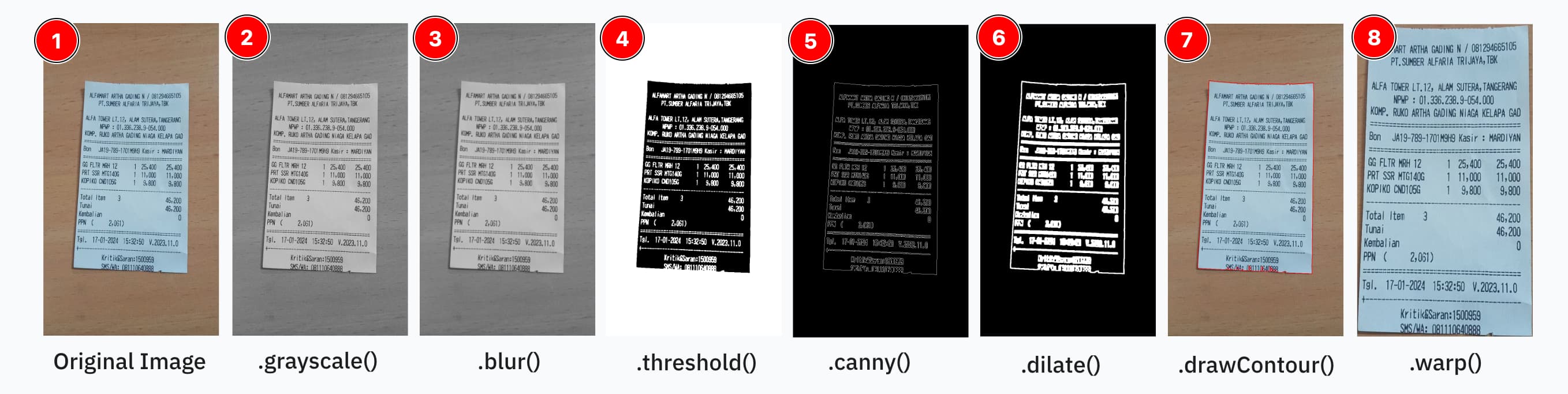
Image manipulation as easy as:
```ts
const processor = new ImageProcessor(canvas);
const result = processor
.grayscale()
.blur({ size: 5 })
.threshold()
.invert()
.dilate({ size: [20, 20], iter: 5 })
.toCanvas();
// Memory cleanup
processor.destroy();
```
This work is based on https://github.com/TechStark/opencv-js.
## Why use this library?
OpenCV is powerful but can be cumbersome to use directly. This library provides:
1. **Simplified API**: Transform complex OpenCV calls into simple chainable methods
2. **Reduced Boilerplate**: No need to manage memory, conversions, or dimensions manually
3. **Development Speed**: Add image processing to your app in minutes, not hours
4. **Extensibility**: Custom operations for your specific needs without library modifications
5. **TypeScript Integration**: Full IntelliSense support with parameter validation
## Installation
Install using your preferred package manager:
```bash
npm install ppu-ocv
yarn add ppu-ocv
bun add ppu-ocv
```
> [!NOTE]
> This project is developed and tested primarily with Bun.
> Support for Node.js, Deno, or browser environments is **not guaranteed**.
> If you choose to use it outside of Bun and encounter any issues, feel free to report them.
> I'm open to fixing bugs for other runtimes with community help.
## Usage
Note that Operation order is matter, you should atleast know some basic in using OpenCV. See the operations table below this.
```ts
import { ImageProcessor } from "ppu-ocv";
const file = Bun.file("./assets/receipt.jpg");
const image = await file.arrayBuffer();
const canvas = await ImageProcessor.prepareCanvas(image);
await ImageProcessor.initRuntime();
const processor = new ImageProcessor(canvas);
processor.grayscale().blur({ size: 5 }).threshold();
const resultCanvas = processor.toCanvas();
processor.destroy();
```
Or you can do directly via execute api:
```ts
import { CanvasToolkit, ImageProcessor, cv } from "ppu-ocv";
const file = Bun.file("./assets/receipt.jpg");
const image = await file.arrayBuffer();
const canvasToolkit = CanvasToolkit.getInstance();
const canvas = await ImageProcessor.prepareCanvas(image);
await ImageProcessor.initRuntime();
const processor = new ImageProcessor(canvas);
const grayscaleImg = processor.execute("grayscale").toCanvas();
// the pipeline operation continued from grayscaled image
const thresholdImg = processor
.execute("blur")
.execute("threshold", {
type: cv.THRESH_BINARY_INV + cv.THRESH_OTSU,
})
.toCanvas();
await canvasToolkit.saveImage({
canvas: thresholdImg,
filename: "threshold",
path: "out",
});
```
For more advanced usage, see: [Example usage of ppu-ocv](./examples)
## Built-in pipeline operations
To avoid bloat, we only ship essential operations for chaining. Currently shipped operations are:
| Operation | Depends on… | Why |
| ------------------------- | ------------------------------------------- | --------------------------------------------------------------- |
| **grayscale** | – | Converts to single‐channel; many ops expect a gray image first. |
| **blur** | _(ideally after)_ grayscale | Noise reduction works best on 1-channel data. |
| **threshold** | _(after)_ grayscale | Produces a binary image; needs gray levels. |
| **adaptiveThreshold** | _(after)_ grayscale (and optionally blur) | Local thresholding on gray values (smoother if blurred first). |
| **invert** | _(after)_ threshold or adaptiveThreshold | Inverting a binary mask flips foreground/background. |
| **canny** | _(after)_ grayscale + blur | Edge detection expects a smoothed gray image. |
| **dilate** | _(after)_ threshold or edge detection | Expands foreground regions—usually on a binary mask. |
| **erode** | _(after)_ threshold or edge detection | Shrinks or cleans up binary regions. |
| **morphologicalGradient** | _(after)_ dilation + erosion (or threshold) | Highlights boundaries by subtracting eroded from dilated image. |
| **warp** | – | Geometric transform; can be applied at any point. |
| **resize** | – | Also independent; purely geometry. |
| **border** | – | Independent; purely geometry. |
## Extending operations
You can easily add your own by creating a prototype method or extend the class of `ImageProcessor`.
See: [How to extend ppu-ocv operations](./docs/how-to-extend-ppu-ocv-operations.md)
## Class documentation
#### `ImageProcessor`
| Method | Args | Description |
| ---------------------- | ---------------- | --------------------------------------------------------------------------- |
| constructor | cv.Mat or Canvas | Instantiate processor with initial image |
| static `prepareCanvas` | ArrayBuffer | Utility to load image from file buffer to canvas |
| static `initRuntime` | | Important open-cv runtime initialization, required to call once per runtime |
| operations | depends | Chainable operations like `blur`, `grayscale`, `resize` and so on |
| `execute` | name, options | Chainable operations directly via `execute` api |
| outputs | | Non-chainable & non-interupting method for output like `toMat`, `toCanvas` |
| `destroy` | | Non-chainable clean-up memory to destroy the object and the state |
#### `CanvasToolkit`
| Method | Args | Description |
| ------------- | ---------------------- | ----------------------------------------------------------------------------------------- |
| `crop` | BoundingBox, Canvas | Crop a part of source canvas and return a new canvas of the cropped part |
| `isDirty` | Canvas, threshold | Check whether a binary canvas is dirty (full of major color either black or white) or not |
| `saveImage` | Canvas, filename, path | Save a canvas to an image file |
| `clearOutput` | path | Clear the output folder |
| `drawLine` | ctx, coordinate, style | Draw a non-filled rectangle outline on the canvas |
| `drawContour` | ctx, contour, style | Draw a contour on the canvas |
#### `Contours`
| Method | Args | Description |
| ----------------------- | --------------- | ----------------------------------------------------------------------------------------- |
| constructor | cv.Mat, options | Instantiate Contours and automatically find & store contour list from args |
| `getAll` | | Crop a part of source canvas and return a new canvas of the cropped part |
| `getFromIndex` | index | Get contour at a specific index |
| `getRect` | | Get the rectangle that bounds the contour |
| `iterate` | callback | Iterate over all contours and call the callback function for each contour |
| `getLargestContourArea` | | Get the largest contour area |
| `getCornerPoints` | Canvas, contour | Get four corner points for a given contour. Useful for perspective transformation (warp). |
| `destroy` | | Destroy & clean-up the memory from the contours |
#### `ImageAnalysis`
Just a collection of utility functions for analyzing image properties.
- `calculateMeanNormalizedLabLightness`: Calculates the mean normalized lightness of an image using the L channel of the Lab color space. Lightness is normalized based on the image's own maximum lightness value before averaging.
- `calculateMeanGrayscaleValue`: Calculates the mean pixel value of the image after converting it to grayscale.
## Contributing
Contributions are welcome! If you would like to contribute, please follow these steps:
1. **Fork the Repository:** Create your own fork of the project.
2. **Create a Feature Branch:** Use a descriptive branch name for your changes.
3. **Implement Changes:** Make your modifications, add tests, and ensure everything passes.
4. **Submit a Pull Request:** Open a pull request to discuss your changes and get feedback.
### Running Tests
This project uses Bun for testing. To run the tests locally, execute:
```bash
bun test
```
Ensure that all tests pass before submitting your pull request.
## Scripts
Recommended development environment is in linux-based environment.
Library template: https://github.com/aquapi/lib-template
All script sources and usage.
### [Build](./scripts/build.ts)
Emit `.js` and `.d.ts` files to [`lib`](./lib).
### [Publish](./scripts/publish.ts)
Move [`package.json`](./package.json), [`README.md`](./README.md) to [`lib`](./lib) and publish the package.
## License
This project is licensed under the MIT License. See the [LICENSE](LICENSE) file for details.
## Support
If you encounter any issues or have suggestions, please open an issue in the repository.
Happy coding!