piano-chart
Version:
Display notes on a piano keyboard
118 lines (83 loc) • 5.01 kB
Markdown
# piano-chart — JavaScript library to visualize musical notes on a piano keyboard
The purpose of `piano-chart` is to allow developers to include visual representation of musical notes on a piano keyboard.
## Installation
```
npm install piano-chart
```
or
```
yarn add piano-chart
```
## Usage
### The basics
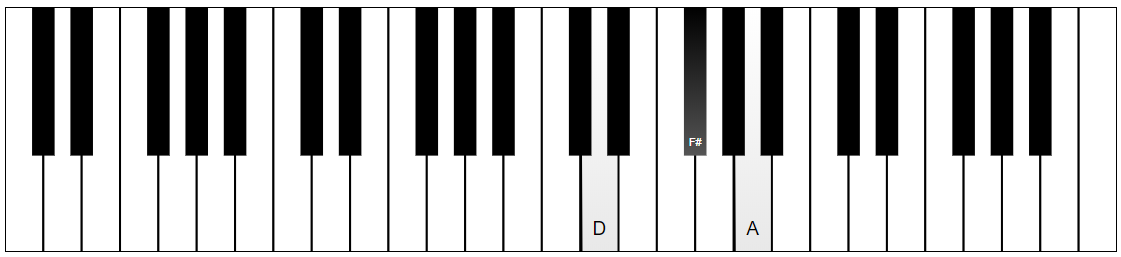
All you need to do to display your notes on a piano chart is create the instrument by specifying a container to render into, and then tell it what notes to "press". Here's how you would show a D Major chord in 4th octave:
```js
import { Instrument } from "piano-chart";
const piano = new Instrument(document.getElementById('pianoContainer'));
piano.create();
piano.keyDown("D4");
piano.keyDown("F#4");
piano.keyDown("A4");
```
And you should get this:
### Configuration
As you can see it's very easy to get a simple piano chart. But there are more things you can customize to your liking.
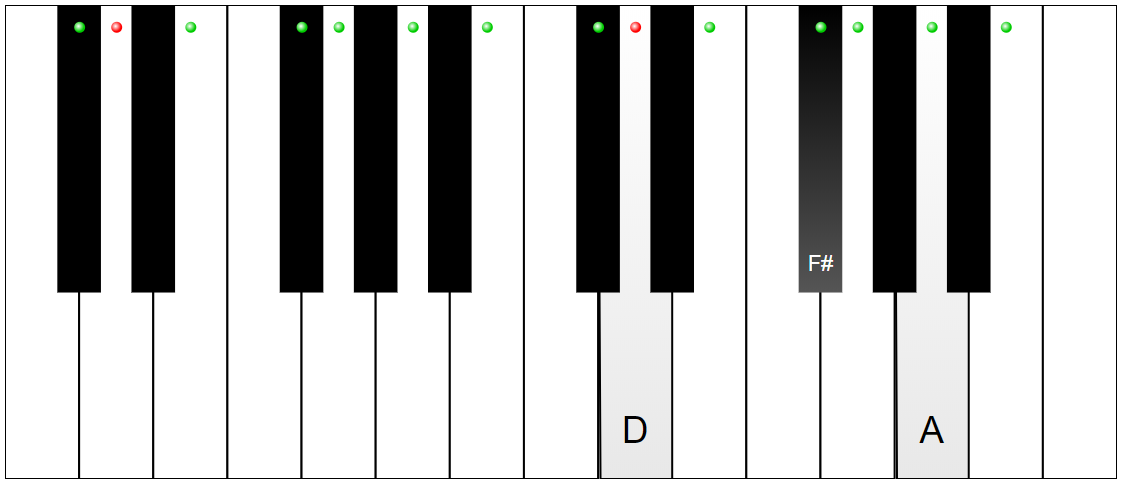
This examples changes the keyboard to smaller one and also highlights the notes in D Major scale.
```js
import { Instrument } from "piano-chart";
const piano = new Instrument(document.getElementById('pianoContainer'), {
startOctave: 3,
endOctave: 5,
highlightedNotes: ["D", "E", "F#", "G", "A", "B", "C#"],
specialHighlightedNotes: [{ note: "D" }],
}
);
piano.create();
piano.keyDown("D4");
piano.keyDown("F#4");
piano.keyDown("A4");
```
This is what you get as a result:
You pass configuration object as a second parameter to the `Instrument` constructor and you can also change most of them later by calling the `applySettings()` method.
#### Available settings:
- `startOctave: number` (default 2) - the first displayed octave;
- `startNote: Note` (default "C") - the first displayed note in the first displayed octave;
- `endOctave`: number (default 6) - the last displayed octave;
- `endNote`: Note (default "C") - the last displayed note in the last displayed octave;
- `showNoteNames: NoteNameBehavior` (default "onpress") - when to show note labels on the keys. Available values:
- `always` - labels are always on;
- `onpress` - labels are displayed when a key is pressed;
- `onhighlight` - labels are displayed only on highlighted keys;
- `never` - labels are never displayed.
- `highlightedNotes: NoteValue[]` (default []) - an array of notes to highlight (octave number can be omitted);
- `highlightColor: string` (default "#0c0") - the base color for the highlight bubble;
- `specialHighlightedNotes: NoteValue[]` (default []) - an array of notes to highlight in a special way (eg. root notes)
- `specialHighlightColor: string` (default "#f00") - the base color of the special highlight bubbles;
- `showOctaveNumbers: boolean` (default false) - whether to show octave numbers on the keyboard or not;
- `keyPressStyle: KeyPressStyle` (default "subtle") (new in v.1.5) - the style of key press visualization. Values:
- `subtle` - fills keys with a subtle gradient;
- `vivid` - fills keys with a color specified via `vividKeyPressColor`.
- `vividKeyPressColor: string` (default "#f33") (new in v.1.5) - key fill color for key presses when `keyPressStyle` is set to `vivid`.
### Methods
- `create()` - create and show an instrument chart;
- `keyDown(note: INoteValue | string)` - press a key;
- `keyUp(note: INoteValue | string)` - release a key;
- `applySettings(settings: IInstrumentSettings)` - apply new settings (changes to start/end notes and octaves are not supported through this method - recreate the `Instrument` instead);
- `rasterize(done: (dataUrl: string) => void, signature?: string))` (new in v.1.4) - creates a PNG screenshot of the current keyboard and calls the specified callback with the data URL that can be used as the `src` of a HTML image. If `signature` string is provided, it will be added at the bottom right corner of the screenshot.
- `destroy()` - perform cleanup;
### Events
`piano-chart` can raise events when keys are clicked with a mouse. To handle these events you need to add listeners using `addKeyMouseDownListener()`, `addKeyMouseUpListener()` and remove them using `removeKeyMouseDownListener()` and `removeKeyMouseUpListener()` when no longer needed.
All handlers receive an argument of `INoteValue` type:
```js
interface INoteValue {
note: Note;
accidental?: Accidetnal;
octave?: number;
}
```
Note that you need to route this note back to the `keyDown()`/`keyUp()` methods if you want for these clicks to result in visible key presses.
## License
piano-chart is distributed under the [MIT License](https://github.com/ailon/piano-chart/blob/master/LICENSE).
Copyright by Alan Mendelevich.