phonix-input
Version:
A modern, customizable React phone input component with country code selection, flags, and validation. Features responsive design, TypeScript support, and easy integration.
323 lines (248 loc) • 9.35 kB
Markdown
# React Phone Input with Country Selection
[](https://badge.fury.io/js/phonix-input)
[](https://opensource.org/licenses/MIT)
A modern, customizable React component for phone number input with country code selection. Features a clean design, country flags, validation, and responsive layout that works seamlessly across all devices.
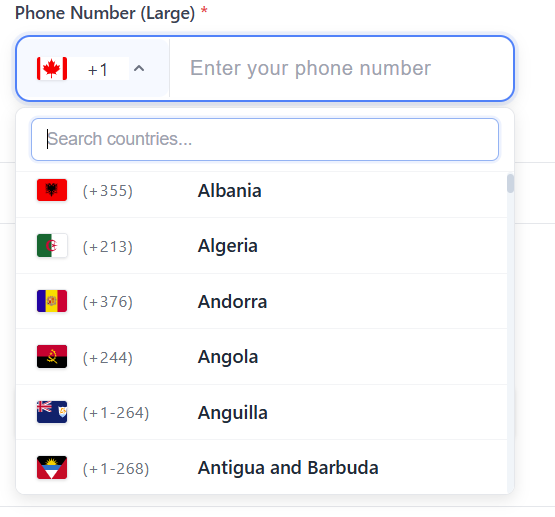
## ✨ Features
- 🎨 **Modern Design**: Clean, professional interface with premium styling
- 🏳️ **Country Flags**: Visual country selection with flag icons
- 📱 **Responsive**: Mobile-first design that adapts to all screen sizes
- ✅ **Validation**: Built-in phone number validation with custom error messages
- 🎛️ **Customizable**: Extensive styling options and configuration props
- 🔧 **TypeScript**: Full TypeScript support with comprehensive type definitions
- ⚡ **Lightweight**: Minimal dependencies and optimized bundle size
- 🔄 **Easy Integration**: Simple API that fits into any React application
## 📦 Installation
```bash
npm install phonix-input
```
### Peer Dependencies
This package requires the following peer dependencies:
```bash
npm install react react-dom
```
**Supported versions:**
- React: ^17.0.0 || ^18.0.0 || ^19.0.0
- React DOM: ^17.0.0 || ^18.0.0 || ^19.0.0
## 🎨 CSS Import
The component includes built-in styles that are automatically imported. However, if you're experiencing styling issues, you can manually import the CSS:
### Option 1: Automatic Import (Recommended)
The styles are automatically imported when you import the component.
### Option 2: Manual CSS Import
```bash
# Import CSS in your main CSS file
'phonix-input/dist/index.css';
```
### Option 3: JavaScript Import
```javascript
import { importStyles } from 'phonix-input';
importStyles(); // Call this in your app initialization
```
### Option 4: CDN Import
```html
<link rel="stylesheet" href="https://unpkg.com/phonix-input@1.0.10/dist/index.css">
```
## 🚀 Quick Start
**Note**: The component defaults to India (+91) as the selected country. You can change this by providing a different initial value.
```tsx
import React, { useState } from 'react';
import { PhoneInputWithCountrySelectList } from 'phonix-input';
function App() {
const [phoneData, setPhoneData] = useState({
countryCode: '+91',
phone: ''
});
const handlePhoneChange = (value: { countryCode: string; phone: string }) => {
setPhoneData(value);
};
return (
<PhoneInputWithCountrySelectList
countryFieldId="country"
phoneFieldId="phone"
label="Phone Number"
placeholder="Enter your phone number"
countryPlaceholder="Select country"
required={true}
value={phoneData}
onChange={handlePhoneChange}
validationMessages={{
phoneRequired: "Please enter your phone number",
phoneInvalid: "Invalid phone number format",
countryRequired: "Please select a country"
}}
/>
);
}
```
## 📖 Documentation
### Props
| Prop | Type | Default | Description |
|------|------|---------|-------------|
| `countryFieldId` | `string` | - | **Required.** Unique ID for the country select input |
| `phoneFieldId` | `string` | - | **Required.** Unique ID for the phone input |
| `label` | `string` | `"Phone Number"` | Label text displayed above the inputs |
| `placeholder` | `string` | `"Enter phone number"` | Placeholder text for the phone input |
| `countryPlaceholder` | `string` | `"Select country"` | Placeholder text for the country dropdown |
| `required` | `boolean` | `false` | Shows a red asterisk (*) next to the label when true |
| `disabled` | `boolean` | `false` | Disables both inputs |
| `value` | `object` | `{ countryCode: "", phone: "" }` | Current value of the inputs |
| `onChange` | `function` | - | Callback fired when the value changes |
| `validationMessages` | `object` | - | Custom validation error messages |
### Styling Props
Customize the appearance with these optional styling props:
| Prop | Type | Default | Description |
|------|------|---------|-------------|
| `inputHeight` | `string` | `"48px"` | Height of both input fields |
| `inputPadding` | `string` | `"12px 16px"` | Internal padding of input fields |
| `countryWidth` | `string` | `"180px"` | Width of the country dropdown |
| `phoneWidth` | `string` | `"auto"` | Width of the phone input field |
| `dropdownHeight` | `string` | `"280px"` | Maximum height of the dropdown menu |
| `dropdownWidth` | `string` | `"200px"` | Minimum width of the dropdown menu |
| `inputHeightMobile` | `string` | `"52px"` | Height of inputs on mobile devices |
### Value Object
```typescript
interface PhoneValue {
countryCode: string; // e.g., "+91", "+1", "+44"
phone: string; // The phone number without country code
}
```
### Validation Messages
```typescript
interface ValidationMessages {
phoneRequired?: string; // When phone number is required but empty
phoneInvalid?: string; // When phone number format is invalid
phoneLengthInvalid?: string; // When phone number length is incorrect
countryRequired?: string; // When country selection is required but empty
}
```
## 🎨 Styling & Customization
### Basic Styling
The component comes with a modern, clean design out of the box. You can customize the appearance using the styling props:
```tsx
<PhoneInputWithCountrySelectList
// ... other props
inputHeight="56px"
inputPadding="16px 20px"
countryWidth="200px"
phoneWidth="300px"
dropdownHeight="320px"
/>
```
### Custom CSS Classes
The component uses CSS classes that you can override:
```css
/* Main container */
.phone-input-container {
/* Your custom styles */
}
/* Country dropdown */
.country-select {
/* Your custom styles */
}
/* Phone input field */
.phone-input {
/* Your custom styles */
}
/* Required asterisk styling */
.required::after {
content: "*";
color: #dc3545;
padding-left: 0.25rem;
font-weight: bold;
}
```
## 🌍 Supported Countries
The component includes support for 195+ countries with:
- Country names in English
- ISO country codes
- International dialing codes
- Flag icons
- Proper phone number formatting
## 📱 Mobile Responsiveness
The component is designed with mobile-first principles:
- Touch-friendly input sizes
- Responsive dropdown menus
- Optimized for small screens
- Separate mobile styling options
## 🔧 Advanced Usage
### Form Integration
```tsx
import { useForm, Controller } from 'react-hook-form';
function ContactForm() {
const { control, handleSubmit } = useForm();
return (
<form onSubmit={handleSubmit(onSubmit)}>
<Controller
name="phone"
control={control}
rules={{ required: "Phone number is required" }}
render={({ field, fieldState }) => (
<PhoneInputWithCountrySelectList
countryFieldId="country"
phoneFieldId="phone"
value={field.value}
onChange={field.onChange}
validationMessages={{
phoneRequired: fieldState.error?.message
}}
/>
)}
/>
</form>
);
}
```
### With Custom Validation
```tsx
const validatePhoneNumber = (countryCode: string, phone: string) => {
// Your custom validation logic
return phone.length >= 7 && phone.length <= 15;
};
<PhoneInputWithCountrySelectList
// ... other props
onChange={(value) => {
if (validatePhoneNumber(value.countryCode, value.phone)) {
// Handle valid phone number
}
handlePhoneChange(value);
}}
/>
```
## 🛠️ Development
### Building the Library
```bash
npm run build
```
### Publishing
The package includes a `prepublishOnly` script that automatically builds the library before publishing:
```bash
npm publish
```
## 🤝 Contributing
Contributions are welcome! Please feel free to submit a Pull Request. For major changes, please open an issue first to discuss what you would like to change.
1. Fork the repository
2. Create your feature branch (`git checkout -b feature/amazing-feature`)
3. Commit your changes (`git commit -m 'Add some amazing feature'`)
4. Push to the branch (`git push origin feature/amazing-feature`)
5. Open a Pull Request
## 📄 License
This project is licensed under the MIT License - see the [LICENSE](LICENSE) file for details.
## 🔧 Troubleshooting
### CSS Not Loading
If the component appears unstyled, try these solutions:
1. **Check CSS Import**: Make sure the CSS is properly imported
2. **Clear Cache**: Clear your browser cache and node_modules
3. **Manual Import**: Use one of the CSS import options above
4. **Build Issues**: Rebuild your project after installing the package
### Common Issues
- **Dropdown not showing**: Check z-index conflicts
- **Mobile responsiveness**: Ensure viewport meta tag is set
- **TypeScript errors**: Make sure you have the latest version
## 💝 Support
If you find this package helpful, please consider:
- ⭐ Starring the repository
- 🐛 Reporting bugs
- 💡 Suggesting new features
- 📢 Sharing with others
---
**Made with ❤️ by [Irfan Haidar Mukhi](https://github.com/IrfanhaidarMukhi12)**