phil-lib
Version:
Blazingly fast TypeScript library for Node.js and the browser.
992 lines (939 loc) • 33.1 kB
text/typescript
/**
* Cast an object to a type.
* Check the type at runtime.
* @param item Check the type of this item.
* @param ty The expected type. This should be a class.
* @param notes This will be included in the error message.
* @returns item
* @throws If the item is not of the correct type, throw an `Error` with a detailed message.
*/
export function assertClass<T extends object, ARGS extends any[]>(
item: unknown,
ty: { new (...args: ARGS): T },
notes = "Assertion Failed."
): T {
const failed = (typeFound: string) => {
throw new Error(
`${notes} Expected type: ${ty.name}. Found type: ${typeFound}.`
);
};
if (item === null) {
failed("null");
} else if (typeof item != "object") {
failed(typeof item);
} else if (!(item instanceof ty)) {
failed(item.constructor.name);
} else {
return item;
}
throw new Error("wtf");
}
/**
* Asserts that the value is not `undefined` or `null`.
* Similar to ! or NonNullable, but also performs the check at runtime.
* @param value The value to check and return.
* @returns The given value.
* @throws If `value === undefined || value === null`.
*/
export function assertNonNullable<T>(value: T): NonNullable<T> {
if (value === undefined || value === null) {
throw new Error("wtf");
}
return value;
}
/**
* This is a wrapper around setTimeout() that works with await.
*
* `await sleep(100)`;
* @param ms How long in milliseconds to sleep.
* @returns A promise that you can wait on.
*/
export function sleep(ms: number) {
// https://stackoverflow.com/a/39914235/971955
return new Promise((resolve): void => {
setTimeout(resolve, ms);
});
}
/**
* On success `parsed` points to the XML Document.
* On success `error` points to an HTMLElement explaining the problem.
* Exactly one of those two fields will be undefined.
*/
export type XmlStatus =
| { parsed: Document; error?: undefined }
| { parsed?: undefined; error: HTMLElement };
/**
* Check if the input is a valid XML file.
* @param xmlStr The input to be parsed.
* @returns If the input valid, return the XML document. If the input is invalid, this returns an HTMLElement explaining the problem.
*/
export function testXml(xmlStr: string): XmlStatus {
const parser = new DOMParser();
const dom = parser.parseFromString(xmlStr, "application/xml");
// https://developer.mozilla.org/en-US/docs/Web/API/DOMParser/parseFromString
// says that parseFromString() will throw an error if the input is invalid.
//
// https://developer.mozilla.org/en-US/docs/Web/Guide/Parsing_and_serializing_XML
// says dom.documentElement.nodeName == "parsererror" will be true if the input
// is invalid.
//
// Neither of those is true when I tested it in Chrome. Nothing is thrown.
// If the input is "" I get:
// dom.documentElement.nodeName returns "html",
// doc.documentElement.firstElementChild.nodeName returns "body" and
// doc.documentElement.firstElementChild.firstElementChild.nodeName = "parsererror".
// It seems that the <parsererror> can move around. It looks like it's trying to
// create as much of the XML tree as it can, then it inserts <parsererror> whenever
// and wherever it gets stuck. It sometimes generates additional XML after the
// parsererror, so .lastElementChild might not find the problem.
//
// In case of an error the <parsererror> element will be an instance of
// HTMLElement. A valid XML document can include an element with name name
// "parsererror", however it will NOT be an instance of HTMLElement.
//
// getElementsByTagName('parsererror') might be faster than querySelectorAll().
for (const element of Array.from(dom.querySelectorAll("parsererror"))) {
if (element instanceof HTMLElement) {
// Found the error.
return { error: element };
}
}
// No errors found.
return { parsed: dom };
}
/**
* This is my preferred way to parse an XML document. Any and all errors result in
* `undefined`. `See testXml()` if you need better error messages.
* @param bytes The input as a string.
*
* If the input is undefined, immediately return undefined. This makes it easy to
* propagate errors and only check for undefined once, at the end.
* @returns The root element of the resulting XML Document, or undefined in case of any errors.
*/
export function parseXml(bytes: string | undefined): Element | undefined {
if (bytes === undefined) {
return undefined;
} else {
const { parsed } = testXml(bytes);
return parsed?.documentElement;
}
}
/**
* Walk through a path into an XML (or similar) document.
*
* Note that tag names must be unique. If you have an element like
* ```
* <parent>
* <twin />
* <twin />
* <unique />
* </parent>
* ```
* and you say `followPath(parent, "twin")` the result will be `undefined` because we don't know which twin to return.
* `followPath(parent, "unique")` will return the last child element.
* @param from Start from this element.
* @param path A list of instructions, like `0` to take the first child element or a string to look for an element with that tag name.
* @returns The requested `Element`, or `undefined` if there were any problems.
*/
export function followPath(
from: Element | undefined,
...path: readonly (number | string)[]
): Element | undefined {
for (const transition of path) {
if (from === undefined) {
return undefined;
} else if (typeof transition === "number") {
// Element.children includes only element nodes.
from = from.children[transition];
} else {
const hasCorrectName = from.getElementsByTagName(transition);
if (hasCorrectName.length != 1) {
// Not found or ambiguous.
return undefined;
} else {
from = hasCorrectName[0];
}
}
}
return from;
}
/**
*
* @param attributeName The name of the attribute we want to read.
* @param from Start the search from this `Element`.
* @param path We use `followPath()` to find an `Element` then we look for the attribute there.
* Leave this empty to look for the attribute directly in `from`.
* @returns The value of the attribute. Or `undefined` if there are any problems.
*/
export function getAttribute(
attributeName: string,
from: Element | undefined,
...path: readonly (number | string)[]
): string | undefined {
from = followPath(from, ...path);
if (from === undefined) {
return undefined;
}
if (!from.hasAttribute(attributeName)) {
// MDN recommends explicitly checking for this.
// https://developer.mozilla.org/en-US/docs/Web/API/Element/getAttribute#non-existing_attributes
return undefined;
}
return from.getAttribute(attributeName) ?? undefined;
}
/**
* There are a lot of ways to convert a string to a number in JavaScript.
* And they are all slightly different!
*
* This is my preferred way to parse a number. Any errors are reported
* as undefined, so you can choose to get rid of them with ??.
*
* I get rid of NaNs and infinities. I don't think I every really send
* an infinity over the network or save it in a file. These become
* undefined, just like errors.
* @param source The input to parse.
* @returns A finite number or undefined if the parse failed.
*/
export function parseFloatX(
source: string | undefined | null
): number | undefined {
if (source === undefined || source === null) {
return undefined;
}
const result = +source;
if (isFinite(result)) {
return result;
} else {
return undefined;
}
}
/**
* There are a lot of ways to convert a string to a number in JavaScript.
* And they are all slightly different!
*
* I get rid of NaNs, infinities, numbers with a fraction, or integers
* that are too big to fit into JavaScript numbers. These are all
* converted into undefined.
* @param source The input to parse
* @returns A finite integer or undefined if the parse failed.
*/
export function parseIntX(
source: string | undefined | null
): number | undefined {
const result = parseFloatX(source);
if (result === undefined) {
return undefined;
} else if (
result > Number.MAX_SAFE_INTEGER ||
result < Number.MIN_SAFE_INTEGER ||
result != Math.floor(result)
) {
return undefined;
} else {
return result;
}
}
/**
* Convert a number in time_t format into a JavaScript Date object.
* @param source The time in time_t format. In Unix & C it's common to count the number of seconds past
* the Unix epoch as an integer. As opposed to Java which counts the number of milliseconds past the
* Unix epoch as an integer, or JavaScript which counts the number of milliseconds past the epoch as
* a floating point number. We interpret 0 was a way to say no value.
* @returns A `Date` if possible, or undefined on any error.
*/
export function parseTimeT(
source: string | number | undefined | null
): Date | undefined {
if (typeof source === "string") {
source = parseIntX(source);
}
if (source === undefined || source === null) {
return undefined;
}
if (source <= 0) {
// 0 can be a valid date, but it is also often used to say no value.
// I'm choosing no value because it matches most of the data I read.
// I'm converting negative numbers into undefined just to be consistent;
// It would be weird if the 1 and -1 converted into times that were
// 2 seconds apart, but 0 converted into an error.
return undefined;
}
return new Date(source * 1000);
}
/**
* Parse the entire body of a CSV file at once.
* @param data An entire CSV file.
* @returns An array, one element per line. Each element is a sub array, one element per column.
*/
export const csvStringToArray = (data: string) => {
// Source:
// https://gist.github.com/Jezternz/c8e9fafc2c114e079829974e3764db75?permalink_comment_id=3457862#gistcomment-3457862
const re = /(,|\r?\n|\r|^)(?:"([^"]*(?:""[^"]*)*)"|([^,\r\n]*))/gi;
const result: string[][] = [[]];
let matches;
while ((matches = re.exec(data))) {
if (matches[1].length && matches[1] !== ",") result.push([]);
result[result.length - 1].push(
matches[2] !== undefined ? matches[2].replace(/""/g, '"') : matches[3]
);
}
return result;
};
/**
* Pick any arbitrary element from the container.
* @param container Presumably a Map or a Set.
* Something with a `.values()` iterator.
* @returns An item in the set or a value from the map. Unless the input is empty, then this returns undefined.
*/
export function pickAny<T>(
container: Pick<ReadonlySet<T>, "values">
): T | undefined {
const first = container.values().next();
if (first.done) {
return undefined;
} else {
return first.value;
}
}
/**
* Returns a randomly selected element of the array.
*
* See `take()` for a destructive version of this function.
* @param array Pick from here. Must not be empty.
* @returns A randomly selected element of the array.
* @throws An error if the array is empty.
*/
export function pick<T>(array: ArrayLike<T>): T {
if (array.length == 0) {
throw new Error("wtf");
}
return array[(Math.random() * array.length) | 0];
}
/**
* Destructively remove and return a random element from an array.
*
* See `pick()` for a non-destructive version of this function.
* @param array Take a random element from here, destructively.
* @returns The element that was removed.
* @throws An error if the array is empty.
*/
export function take<T>(array: T[]): T {
if (array.length < 1) {
throw new Error("wtf");
}
const index = (Math.random() * array.length) | 0;
const removed = array.splice(index, 1);
return removed[0];
}
/**
* This is like calling `input.map(transform).filter(item => item !=== undefined)`.
* But if I used that line typescript would get the output type wrong.
* `Array.prototype.flatMap()` is a standard and traditional alternative.
* @param input The values to be handed to `transform()` one at a time.
* @param transform The function to be called on each input.
* `index` is the index of the current input, just like in Array.prototype.forEach().
* @returns The items returned by `transform()`, with any undefined items removed.
*/
export function filterMap<Input, Output>(
input: Input[],
transform: (input: Input, index: number) => Output | undefined
) {
const result: Output[] = [];
input.forEach((input, index) => {
const possibleElement = transform(input, index);
if (undefined !== possibleElement) {
result.push(possibleElement);
}
});
return result;
}
/**
* Easier than `new Promise()`.
* @returns An object including a promise and the methods to resolve or reject that promise.
*/
export function makePromise<T = void>() {
let resolve!: (value: T | PromiseLike<T>) => void;
let reject!: (reason?: any) => void;
const promise = new Promise<T>((resolve1, reject1) => {
resolve = resolve1;
reject = reject1;
});
return { promise, resolve, reject };
}
/**
* Fri Sep 12 275760 17:00:00 GMT-0700 (Pacific Daylight Time)
* This is a value commonly used as the largest date.
*
* Strictly speaking this could get a little higher, but this is what is always used on the internet.
*
* Warning: If you pass this value to MySQL it will overflow and fail poorly.
*/
export const MAX_DATE = new Date(8640000000000000);
/**
* Mon Apr 19 -271821 16:07:02 GMT-0752 (Pacific Daylight Time)
* This is a value commonly used as the smallest date.
*
* Strictly speaking this could get a little lower, but this is what is always used on the internet.
*
* Warning: If you pass this value to MySQL it will overflow and fail poorly.
*/
export const MIN_DATE = new Date(-8640000000000000);
export function dateIsValid(date: Date): boolean {
return isFinite(date.getTime());
}
/**
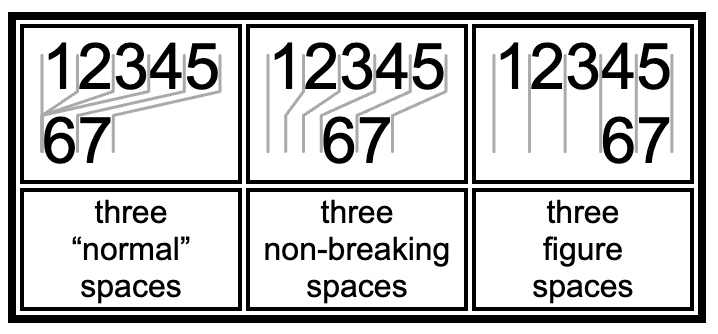
* Looks like a space. But otherwise treated like a normal character.
* In particular, HTML will __not__ combine multiple `NON_BREAKING_SPACE` characters like it does for normal spaces.
*
* If you are writing to element.innerHTML you could use "&nbsp;" to get the same result. If you are writing to
* element.innerText or anything that is not HTML, you need to use this constant.
*
* Google slides still treats this like a normal space. 🙁
*
* 
*/
export const NON_BREAKING_SPACE = "\xa0";
/**
* Looks like a space. Is the width of a digit.
*
* HTML completely ignores some “normal” spaces.
* HTML always draws a figure space.
*
* 
*/
export const FIGURE_SPACE = "\u2007";
/**
* 2π radians.
*/
export const FULL_CIRCLE = 2 * Math.PI;
export const degreesPerRadian = 360 / FULL_CIRCLE;
export const radiansPerDegree = FULL_CIRCLE / 360;
export const phi = (1 + Math.sqrt(5)) / 2;
/**
* Find the shortest path from `angle1` to `angle2`.
* This will never take the long way around the circle or make multiple loops around the circle.
*
* More precisely find `difference` where `positiveModulo(angle1 + difference, FULL_CIRCLE) == positiveModulo(angle2, FULL_CIRCLE)`.
* Then select the `difference` where `Math.abs(difference)` is smallest.
* Return the `difference`.
* @param angle1 radians
* @param angle2 radians
* @returns A value to add to `angle1` to get another angle that is equivalent to `angle2`.
* A value between -π and π.
*/
export function angleBetween(angle1: number, angle2: number) {
const angle1p = positiveModulo(angle1, FULL_CIRCLE);
const angle2p = positiveModulo(angle2, FULL_CIRCLE);
let difference = angle2p - angle1p;
const maxDifference = FULL_CIRCLE / 2;
if (difference > maxDifference) {
difference -= FULL_CIRCLE;
} else if (difference < -maxDifference) {
difference += FULL_CIRCLE;
}
if (Math.abs(difference) > maxDifference) {
throw new Error("wtf");
}
return difference;
}
/**
* This is similar to `numerator % denominator`, i.e. modulo division.
* The difference is that the result will never be negative.
* If the numerator is negative `%` will return a negative number.
*
* If the 0 point is chosen arbitrarily then you should use `positiveModulo()` rather than `%`.
* For example, C's `time_t` and JavaScript's `Date.prototype.valueOf()` say that 0 means midnight January 1, 1970.
* Negative numbers refer to times before midnight January 1, 1970, and positive numbers refer to times after midnight January 1, 1970.
* But midnight January 1, 1970 was chosen arbitrarily, and you probably don't want to treat times before that differently than times after that.
* And how many people would even think to test a negative date?
*
* `positiveModulo(n, d)` will give the same result as `positiveModulo(n + d, d)` for all vales of `n` and `d`.
* (You might get 0 sometimes and -0 other times, but those are both `==` so I'm not worried about that.)
*/
export function positiveModulo(numerator: number, denominator: number) {
const simpleAnswer = numerator % denominator;
if (simpleAnswer < 0) {
return simpleAnswer + Math.abs(denominator);
} else {
return simpleAnswer;
}
}
/**
* Create a new array by rotating another array.
* @param input The initial array.
* @param by How many places to rotate left.
* Negative values mean to the right.
* This should be a 32 bit integer.
* 0 and large numbers are handled efficiently.
*/
export function rotateArray<T>(input: ReadonlyArray<T>, by: number) {
if ((by | 0) != by) {
throw new Error(`invalid input: ${by}`);
}
by = positiveModulo(by, input.length);
if (by == 0) {
return input;
} else {
return [...input.slice(by), ...input.slice(0, by)];
}
}
/**
* This is a drop in replacement for `window.random()`.
* You can also ask for the current seed, for us in a call to
* or Random.create(), Random.fromString() or Random.seedIsValid().
*/
export type RandomFunction = {
readonly currentSeed: string;
(): number;
};
/**
* This provides a random number generator that can be seeded.
* `Math.rand()` cannot be seeded. Using a seed will allow
* me to repeat things in the debugger when my program acts
* strange.
*/
export class Random {
private constructor() {
throw new Error("wtf");
}
/**
* Creates a new random number generator using the sfc32 algorithm.
*
* sfc32 (Simple Fast Counter) is part of the [PractRand](http://pracrand.sourceforge.net/)
* random number testing suite (which it passes of course).
* sfc32 has a 128-bit state and is very fast in JS.
*
* [Source](https://stackoverflow.com/a/47593316/971955)
* @param a A 32 bit integer. The 1st part of the seed.
* @param b A 32 bit integer. The 2nd part of the seed.
* @param c A 32 bit integer. The 3rd part of the seed.
* @param d A 32 bit integer. The 4th part of the seed.
* @returns A function that will act a lot like `Math.rand()`, but it starts from the given seed.
*/
private static sfc32(
a: number,
b: number,
c: number,
d: number
): RandomFunction {
function random() {
a |= 0;
b |= 0;
c |= 0;
d |= 0;
let t = (((a + b) | 0) + d) | 0;
d = (d + 1) | 0;
a = b ^ (b >>> 9);
b = (c + (c << 3)) | 0;
c = (c << 21) | (c >>> 11);
c = (c + t) | 0;
return (t >>> 0) / 4294967296;
}
const result = random as RandomFunction;
Object.defineProperty(result, "currentSeed", {
get() {
return JSON.stringify([a, b, c, d]);
},
});
return result;
}
static #nextSeedInt = 42;
/**
* Returns true if this was a valid seed created by
* `RandomFunction.currentSeed` or Random.newSeed().
* @param seed The string to test
* @returns True if this was a saved seed value.
*/
static seedIsValid(seed: string): boolean {
try {
this.create(seed);
return true;
} catch {
return false;
}
}
/**
* Create a new instance of a random number generator.
*
* Also consider `Random.fromString()` which is slightly newer.
* This only works with seeds that have been created and saved by
* this class. `Random.fromString()` can turn any string into a
* seed.
* @param seed The result from a previous call to `Random.newSeed()`.
* By default this will create a new seed.
* Either way the seed will be sent to the JavaScript console.
*
* Typical use: Use the default until you want to repeat something.
* Then copy the last seed from the log and use here.
* @returns A function that can be used as a drop in replacement for `Math.random()`.
* @throws If the seed is invalid this will `throw` an `Error`.
*/
static create(seed = this.newSeed()): RandomFunction {
console.info(seed);
// The following line throws a lot of exceptions, by design.
// If you checked "pause on caught exceptions", and you are here,
// just hit resume.
const seedObject: unknown = JSON.parse(seed);
if (!(seedObject instanceof Array)) {
throw new Error("invalid input");
}
if (seedObject.length != 4) {
throw new Error("invalid input");
}
const [a, b, c, d] = seedObject;
if (
!(
typeof a == "number" &&
typeof b == "number" &&
typeof c == "number" &&
typeof d == "number"
)
) {
throw new Error("invalid input");
}
return this.sfc32(a, b, c, d);
}
/**
*
* @returns A new seed value appropriate for use in a call to `Random.create()`.
* This will be reasonably random.
*
* The seed is intended to be opaque, a magic cookie.
* It's something that's easy to copy and paste.
* Don't try to parse or create one of these.
*/
static newSeed() {
const ints: number[] = [];
ints.push(Date.now() | 0);
ints.push(this.#nextSeedInt++ | 0);
ints.push((Math.random() * 2 ** 31) | 0);
ints.push((performance.now() * 10000) | 0);
const seed = JSON.stringify(ints);
return seed;
}
/**
* Create a new random number generator based on a string.
* The result will be repeatable.
* I.e. the same input will always lead the the same random number generator.
* @param s Any string is acceptable.
* This can include random things like "try again 27".
*
* And it can include special things like "[1,2,3,4]" which are generated by this library.
* randomNumberGenerator.currentSeed() will return a seed that can be used to clone the random number generator in its current state.
* @returns A new random number generator.
*/
static fromString(s: string): RandomFunction {
try {
return this.create(s);
} catch {
return this.create(this.anyStringToSeed(s));
}
}
/**
*
* @param input Any string is valid.
* Reasonable inputs include "My game", "My game 32", "My game 33", "在你用中文测试过之前你还没有测试过它。".
* I.e. you might just add or change one character, and you want to maximize the resulting change.
*/
static anyStringToSeed(input: string): string {
function rotateLeft32(value: number, shift: number): number {
return ((value << shift) | (value >>> (32 - shift))) >>> 0;
}
const ints = [0x9e3779b9, 0x243f6a88, 0x85a308d3, 0x13198a2e];
const data = new TextEncoder().encode(input);
data.forEach((byte) => {
ints[0] ^= byte;
ints[0] = rotateLeft32(ints[0], 3);
ints[1] ^= byte;
ints[1] = rotateLeft32(ints[1], 5);
ints[2] ^= byte;
ints[2] = rotateLeft32(ints[2], 7);
ints[3] ^= byte;
ints[3] = rotateLeft32(ints[3], 11);
});
// Final mixing step
ints[0] ^= rotateLeft32(ints[1], 7);
ints[1] ^= rotateLeft32(ints[2], 11);
ints[2] ^= rotateLeft32(ints[3], 13);
ints[3] ^= rotateLeft32(ints[0], 17);
return JSON.stringify(ints);
}
static test() {
const maxGenerators = 10;
const iterationsPerCycle = 20;
const generators = [this.create()];
while (generators.length <= maxGenerators) {
for (let iteration = 0; iteration < iterationsPerCycle; iteration++) {
const results = generators.map((generator) => generator());
for (let i = 1; i < results.length; i++) {
if (results[i] !== results[0]) {
debugger;
throw new Error("wtf");
}
}
}
const currentSeed = pick(generators).currentSeed;
generators.forEach((generator) => {
if (generator.currentSeed != currentSeed) {
debugger;
throw new Error("wtf");
}
});
generators.push(this.create(currentSeed)!);
}
}
}
/**
* According to TypeScript SvgRect is an alias for DomRect. But that's
* not true. SvgRect is a class that has the following four properties.
* DomRect has a lot more properties. I can't find that documented
* anywhere, but that's what I see running Chrome.
*/
export type RealSvgRect = {
x: number;
y: number;
width: number;
height: number;
};
export type ReadOnlyRect = Readonly<RealSvgRect>;
/**
*
* @param r1 A non-empty rectangle.
* @param r2 A non-empty rectangle.
* @returns The smallest rectangle that completely contains both inputs.
*/
export function rectUnion(r1: ReadOnlyRect, r2: ReadOnlyRect): ReadOnlyRect {
const x = Math.min(r1.x, r2.x);
const y = Math.min(r1.y, r2.y);
const right = Math.max(r1.x + r1.width, r2.x + r2.width);
const bottom = Math.max(r1.y + r1.height, r2.y + r2.height);
const width = right - x;
const height = bottom - y;
return { x, y, width, height };
}
export function rectAddPoint(r: ReadOnlyRect, x: number, y: number) {
return rectUnion(r, { x, y, width: 0, height: 0 });
}
/**
*
* @param date To convert to a string.
* @returns Like the MySQL format, but avoids the colon because that's not valid in a file name.
*/
export function dateToFileName(date: Date) {
if (isNaN(date.getTime())) {
return "0000⸱00⸱00 00⦂00⦂00";
} else {
return `${date.getFullYear().toString().padStart(4, "0")}⸱${(
date.getMonth() + 1
)
.toString()
.padStart(2, "0")}⸱${date.getDate().toString().padStart(2, "0")} ${date
.getHours()
.toString()
.padStart(2, "0")}⦂${date.getMinutes().toString().padStart(2, "0")}⦂${date
.getSeconds()
.toString()
.padStart(2, "0")}`;
}
}
/**
* ```
* const randomValue = lerp(lowestLegalValue, HighestLegalValue, Math.random())
* ```
* @param at0 `lerp(at0, at1, 0)` → at0
* @param at1 `lerp(at0, at1, 1)` → at1
* @param where
* @returns
*/
export function lerp(at0: number, at1: number, where: number) {
return at0 + (at1 - at0) * where;
}
/**
* This is a wrapper around `isFinite()`.
* @param values the values to check.
* @throws If any of the values are not finite, an error is thrown.
*/
export function assertFinite(...values: number[]): void {
values.forEach((value) => {
if (!Number.isFinite(value)) {
throw new Error("wtf");
}
});
}
/**
* Randomly reorder the contents of the array.
* @param array The array to shuffle. This is modified in place.
* @returns The original array.
*/
export function shuffleArray<T>(array: T[]) {
// https://stackoverflow.com/a/12646864/971955
for (let i = array.length - 1; i > 0; i--) {
const j = Math.floor(Math.random() * (i + 1));
[array[i], array[j]] = [array[j], array[i]];
}
return array;
}
// https://dev.to/chrismilson/zip-iterator-in-typescript-ldm
export type Iterableify<T> = { [K in keyof T]: Iterable<T[K]> };
/**
* Given a list of iterables, make a single iterable.
* The resulting iterable will contain arrays.
* The first entry in the output will contain the first entry in each of the inputs.
* The nth entry in the output will contain the nth entry in each of the inputs.
* This will stop iterating when the first of the inputs runs out of data.
* ```
* for (const [rowHeader, rowBody] of zip(sharedStuff.rowHeaders, thisTable.rowBodies)) {
* ...
* }
* ```
* @param toZip Any number of iterables.
*/
export function* zip<T extends Array<any>>(
...toZip: Iterableify<T>
): Generator<T> {
// Get iterators for all of the iterables.
const iterators = toZip.map((i) => i[Symbol.iterator]());
while (true) {
// Advance all of the iterators.
const results = iterators.map((i) => i.next());
// If any of the iterators are done, we should stop.
if (results.some(({ done }) => done)) {
break;
}
// We can assert the yield type, since we know none
// of the iterators are done.
yield results.map(({ value }) => value) as T;
}
}
export function* count(start = 0, end = Infinity, step = 1) {
for (let i = start; i < end; i += step) {
yield i;
}
}
/**
* Create and initialize an array.
* @param count The number of items in the array.
* @param callback A function which will take the (zero based) array index as an input and will return the value to put into the array at that index.
* @returns An array containing all of the results.
*/
export function initializedArray<T>(
count: number,
callback: (index: number) => T
): T[] {
const result: T[] = [];
for (let i = 0; i < count; i++) {
result.push(callback(i));
}
return result;
}
/**
* @deprecated Use `initializedArray()`. `countMap` was my first attempt at a name and I don't like it!
*/
export const countMap = initializedArray;
export function sum(items: number[]): number {
return items.reduce((accumulator, current) => accumulator + current, 0);
}
/**
* For use with `makeLinear()` and `makeBoundedLinear()`.
*/
export type LinearFunction = (x: number) => number;
/**
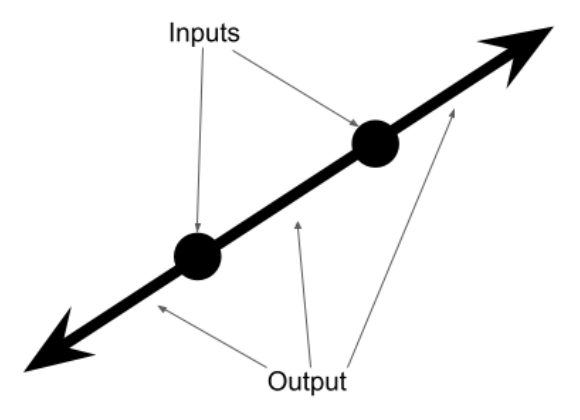
* Linear interpolation and extrapolation.
*
* Given two points, this function will find the line that lines on those two points.
* And it will return a function that will find all points on that line.
* @param x1 One valid input.
* @param y1 The expected output at x1.
* @param x2 Another valid input. Must differ from x2.
* @param y2 The expected output at x2.
* @returns A function of a line. Give an x as input and it will return the expected y.
* 
*/
export function makeLinear(
x1: number,
y1: number,
x2: number,
y2: number
): LinearFunction {
const slope = (y2 - y1) / (x2 - x1);
return function (x: number) {
return (x - x1) * slope + y1;
};
}
/**
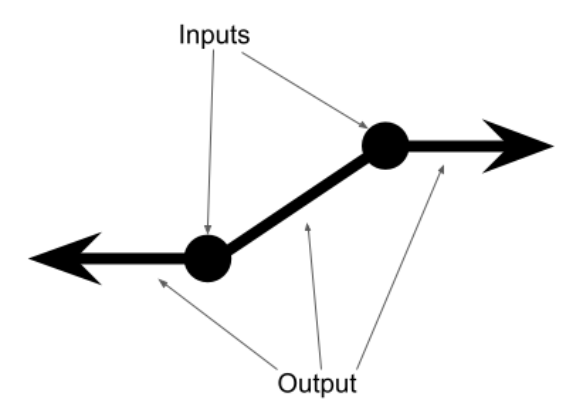
* Linear interpolation.
*
* Given two points, this function will find the line segment that connects the two points.
* @param x1 One valid input.
* @param y1 The expected output at x1.
* @param x2 Another valid input.
* @param y2 The expected output at x2.
* @returns A function that takes x as an input.
* If x is between x1 and x2, return the corresponding y from the line segment.
* Outside of the line segment, the function is flat.
* I.e. f(-Infinity) == f(min(x1,x2) - 100) == f(min(x1,x2)).
* And f(Infinity) == f(max(x1,x2) + 100) == f(max(x1,x2)).
* 
*/
export function makeBoundedLinear(
x1: number,
y1: number,
x2: number,
y2: number
): LinearFunction {
if (x2 < x1) {
[x1, y1, x2, y2] = [x2, y2, x1, y1];
}
// Now x1 <= x2;
const slope = (y2 - y1) / (x2 - x1);
return function (x: number) {
if (x <= x1) {
return y1;
} else if (x >= x2) {
return y2;
} else {
return (x - x1) * slope + y1;
}
};
}
export function polarToRectangular(r: number, θ: number) {
return { x: Math.cos(θ) * r, y: Math.sin(θ) * r };
}
/**
* Create all permutations of an array.
* @param toPermute The items that need to find a location. Initially all items are here.
* @param prefix The items that are already in the correct place. Initially this is empty. New items will be added to the end of this list.
* @returns Something you can iterate over to get all permutations of the original array.
*/
export function* permutations<T>(
toPermute: readonly T[],
prefix: readonly T[] = []
): Generator<readonly T[], void, undefined> {
if (toPermute.length == 0) {
yield prefix;
} else {
for (let index = 0; index < toPermute.length; index++) {
const nextItem = toPermute[index];
const newPrefix = [...prefix, nextItem];
const stillNeedToPermute = [
...toPermute.slice(0, index),
...toPermute.slice(index + 1),
];
yield* permutations(stillNeedToPermute, newPrefix);
}
}
}
//console.log(Array.from(permutations(["A", "B", "C"])), Array.from(permutations([1 , 2, 3, 4])), Array.from(permutations([])));
/**
* Greatest Common Divisor.
*/
export function gcd(a: number, b: number) {
if (!b) {
return a;
}
return gcd(b, a % b);
}
/** Least Common Multiple */
export function lcm(a: number, b: number) {
return (a * b) / gcd(a, b);
}