ph-municipalities
Version:
Lists and writes Philippine municipalities by province or region into JSON files using PAGASA 10-Day weather forecast Excel files as a data source
926 lines (674 loc) • 37.1 kB
Markdown
## ph-municipalities
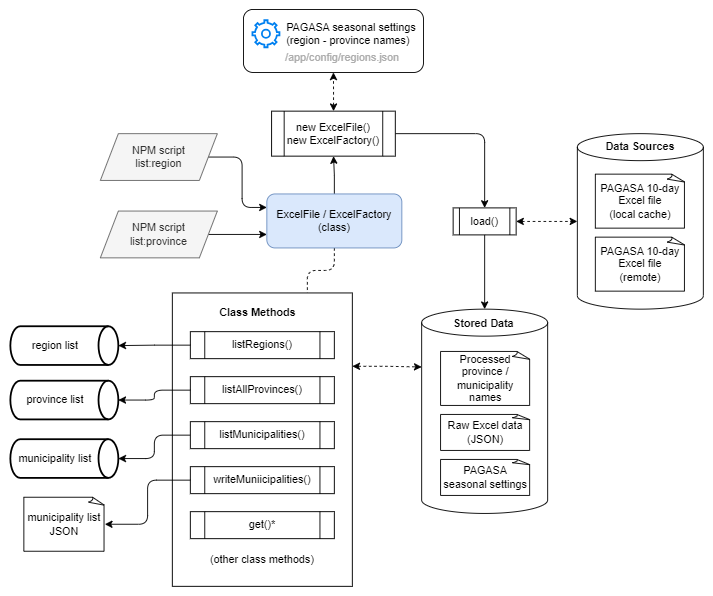
The **ph-municipalities** NPM package provides **NPM scripts** that allow interactive querying of Philippine municipalities included in one or more provinces or from a whole region, with an option of writing them to JSON files from the command line through a CLI-like application and **classes** for only parsing and listing municipality names and provinces from Excel file data sources.
It uses a **PAGASA 10-day weather forecast Excel** file in `/app/data/day1.xlsx` (downloaded and stored as of this 20220808) from PAGASA's [10-Day Climate Forecast web page](https://www.pagasa.dost.gov.ph/climate/climate-prediction/10-day-climate-forecast) as the default data source.
> Since the **PAGASA 10-day weather forecast Excel** files do not have region names, the parser scripts sync it with the **PAGASA Seasonal weather forecast** regions and province names defined in the manually-encoded `/app/config/regions.json` file to determine the region names. The **classes** also provide an option to specify a new region name configuration file on initialization.
It also asks users to key in the file download URL of a remote PAGASA 10-Day weather forecast Excel file should they want to use another Excel file for a new and updated data source.
> _**INFO:** When installing the package using `npm i ph-municipalities`, the default data source is inside `/data/day1.xlsx`. All source codes and files are also inside the **ph-municipalities** root directory._
### Architecture Diagram
### Dataset Output
Extracted municipalities are written in JSON files following the format:
```
{
"metadata": {
"source": "https://pubfiles.pagasa.dost.gov.ph/pagasaweb/files/climate/tendayweatheroutlook/day1.xlsx",
"title": "List of PH Municipalities By Province and Region",
"description": "This dataset generated with reference to the excel file contents from the source URL on 20220808.",
"date_created": "Mon Aug 08 2022"
},
"data": {
"Albay": ["Bacacay", "Camalig", ... ],
"Camarines Norte": ["Basud", "Capalonga", ... ],
"Camarines Sur": ["Baao", "Balatan", ... ],
...
}
}
```
Pre-compiled windows binaries are available for download in the latest [Releases](https://github.com/ciatph/ph-municipalities/releases) download page.
<span id="class-documentation"></span>
## Class Documentation
- Class and methods documentation is available at [https://ciatph.github.io/ph-municipalities](https://ciatph.github.io/ph-municipalities).
- Class source codes are available at the [ph-municipalities](https://github.com/ciatph/ph-municipalities) GitHub repository.
- The NPM package is available at [https://www.npmjs.com/package/ph-municipalities](https://www.npmjs.com/package/ph-municipalities)
- Refer to the [Building the Class Documentation](#building-the-class-documentation) section for more information about updating and building the class documentation.
## Contributing
We welcome contributions! Please see [CONTRIBUTING.md](https://github.com/ciatph/ph-municipalities/blob/dev/CONTRIBUTING.md) for guidelines.
<span id="requirements"></span>
## Requirements
The following dependencies are used for this project. Feel free to use other dependency versions as needed.
<details>
<summary>Requirements list</summary>
1. Windows 10 OS
2. nvm for Windows v1.1.9
3. NodeJS LTS v16 or higher, installed using nvm
```
Recommended:
node v16.14.2
npm v8.5.0
```
4. Excel file
- ph-municipalities uses a PAGASA 10-Day Forecast Excel file in the `/app/data` directory as data source.
- At minimum, the Excel file should have a **column** that contains municipality and province names following the pattern `"municipalityName (provinceName)"`
- (Optional) The Excel file should have a row on the same **column** as above containing the text `"Project Areas"` plus two (2) blank rows before rows containing municipality and province names to enable strict testing and validation of the number of parsed data rows
- Checkout the excel file format on the `/app/data/day1.xlsx` sample file for more information
5. (Optional) Download URL for a remote excel file.
- See the `EXCEL_FILE_URL` variable on the [Installation](#installation) section.
6. (Optional) Docker
- Use Docker for localhost development
- See the [Docker Dependencies](#docker-dependencies) section for more information.
</details>
<span id="faqs"></span>
## FAQs
<details>
<summary style="color: #808080; font-size: 22px;">
<b>What is the purpose or goal of ph-municipalities?</b>
</summary>
<br>
ph-municipalities aims to provide a simple, organized, and flexible interface for viewing, querying, and listing Philippine provinces and municipalities using the [PAGASA 10-day weather forecast Excel files](https://www.pagasa.dost.gov.ph/climate/climate-prediction/10-day-climate-forecast) as the data source. It aims to enable easy extension of Philippine regions/provinces/municipalities listing for parsing the PAGASA 10-day weather forecast data.
Its early stages were written as procedural functions within a _private backend project_ for extracting 10-day weather forecast data from the PAGASA 10-day weather forecast Excel files. When the private project started gaining complexity, a need to separate the logic and management for listing the Philippine province and municipalities per region rose. Creating an independent, public OpenSource version listing the provinces and municipalities per region was decided after experiencing drawbacks and difficulties testing using similar OpenSource libraries (some of which are [listed below](#similar-libraries)) for that project.
> **_ph-municipalities aim to contribute to the OpenSource community by listing ONLY Philippine provinces and municipalities' names, using [PAGASA's 10-day weather forecast Excel files](https://www.pagasa.dost.gov.ph/climate/climate-prediction/10-day-climate-forecast), which are publicly accessible to everyone._**
**ph-municipalities** is entirely public and open-source, and it has no linkage to private and proprietary source codes and resources.
</details>
<br>
<details>
<summary style="color: #808080; font-size: 22px;">
<b>Can ph-municipalities parse and extract PAGASA 10-day weather forecast data?</b>
</summary>
<br>
While ph-municipalities use a [PAGASA 10-day weather forecast Excel file](https://www.pagasa.dost.gov.ph/climate/climate-prediction/10-day-climate-forecast) as a data source for its provinces and municipalities list, **_NO, it cannot parse and extract PAGASA 10-day weather forecast data_**.
ph-municipalities only have class methods for parsing, extracting, listing and querying provinces and municipalities names data from a PAGASA 10-day weather forecast Excel file. Refer to the **ExcelFile** [class documentation](https://ciatph.github.io/ph-municipalities/ExcelFile.html) for more information about its available methods.
</details>
<br>
<details>
<summary style="color: #808080; font-size: 22px;" id="similar-libraries">
<b>Are there alternative libraries to ph-municipalities for listing Philippine provinces and municipalities?</b>
</summary>
<br>
Yes, several OpenSource libraries and projects similar to ph-municipalities exist, which you can use in its place to list Philippine provinces and municipalities.
Here is a list of several of these libraries and code repositories.
Note, however, that these items use old and new data sources. These may not be for you if you require using provinces and municipalities' names data from the [PAGASA 10-day weather forecast Excel files](https://www.pagasa.dost.gov.ph/climate/climate-prediction/10-day-climate-forecast).
- [psgc2](https://www.npmjs.com/package/psgc2)
- [use-postal-ph](https://www.npmjs.com/package/use-postal-ph)
- [philippine-address-selector](https://github.com/wilfredpine/philippine-address-selector)
- [philippines](https://www.npmjs.com/package/philippines)
- [ph-locations](https://github.com/hubertursua/ph-locations)
- [select-philippines-address](https://www.npmjs.com/package/select-philippines-address)
- [psgc-api](https://github.com/OSSPhilippines/psgc-api)
- [phl-admin-psgc](https://github.com/benhur07b/phl-admin-psgc)
</details>
<br>
<details>
<summary style="color: #808080; font-size: 22px;">
<b>Is it possible to make ph-municipalities parse and extract PAGASA 10-day weather forecast data?</b>
</summary>
<br>
While ph-municipalites do not support parsing and extracting PAGASA 10-day weather forecast data, _you can extend the `ExcelFile` or `ExcelFactory` classes with custom logic and codes to enable parsing and extracting PAGASA 10-day weather forecast data_.
Since the `ExcelFile` or `ExcelFactory` are JavaScript [Classes](https://developer.mozilla.org/en-US/docs/Web/JavaScript/Reference/Classes) (Functions in disguise, not true OOP, but inheritance still works), you can extend them with class inheritance, overriding or creating new class methods to accommodate processing the PAGASA 10-day weather forecast data. Refer to the [ph-municipalities class documentation](https://ciatph.github.io/ph-municipalities) to know more about the available classes, member variables, and methods.
An example of extending the classes to parse PAGASA 10-day weather forecast data may go along the lines of:
```javascript
const { ExcelFile } = require('ph-municipalities')
class PAGASATendayParser extends ExcelFile {
/* Override constructor if neccessary
constructor (params) {
super(params)
// Custom class initialization logic here
}
*/
getWeatherData () {
// Note: this.#data contains the "raw" original Excel rows data as JSON with weather data
const weatherData = this.#data.reduce((list, row, index) => {
// Write logic to parse and extract weather data here
}, [])
return weatherData
}
}
const parser = new PAGASATendayParser()
weatherForecast = parser.getWeatherData()
```
</details>
<br>
<details>
<summary style="color: #808080; font-size: 22px;">
<span style="color: #808080; font-size: 22px;">
<b>How does ph-municipalities determine which provinces belong to a region?</b>
</span>
</summary>
<br>
The PAGASA 10-day Excel files only contain province and municipality names linked with weather data - _it has no region information_. Therefore, ph-municipalities link the province names in the 10-day Excel files to region/province names defined in the `/app/config/regions.json` file to determine which region they belong to.
### The `/app/config/regions.json` file
This file contains region/province names mapping encoded manually with reference from the region and province names listed in the [PAGASA Seasonal Forecast website's](https://www.pagasa.dost.gov.ph/climate/climate-prediction/seasonal-forecast) Forecast Analysis Rainfall table.
**ph-municipalities** expect similar region naming conventions from the **PAGASA Seasonal Forecast** and the **PAGASA 10-Day Forecast** since both are data products produced by PAGASA.
> **NOTE:**<br>
> The region/province mapping defined in this file may become outdated as time passes. ph-municipalities users are encouraged to [Use a Custom Configuration File](#using-a-custom-configuration-file), defining new region/province name mappings following the file's current format if they notice region-to-province inconsistencies in the generated municipality lists.
</details>
<br>
<details>
<summary style="color: #808080; font-size: 22px;">
<span style="color: #808080; font-size: 22px;">
<b>Are the provinces and municipality lists generated by ph-municipalities updated?</b>
</span>
</summary>
<br>
NO. By default, ph-municipalities use an outdated PAGASA 10-day Excel file for its local data source, downloaded on August 8, 2022. However, it also provides several ways for using updated PAGASA 10-day Excel files as data sources:
- Prompting to download an updated PAGASA 10-day Excel file using the [Interactive CLI Scripts](#interactive-cli-scripts)
- Providing [class methods](https://ciatph.github.io/ph-municipalities/ExcelFile.html#download) for programmatically downloading and using a remote PAGASA 10-day Excel file
- Allowing to override the default region - province mapping settings during class initialization (See [Class Usage - Using a Custom Configuration File](#using-a-custom-configuration-file))
> **NOTE:**<br>
> Overall, the provinces and municipality list rely on the latest contents of a [PAGASA 10-day Excel file](https://www.pagasa.dost.gov.ph/climate/climate-prediction/10-day-climate-forecast) and manual configuration of region/province names mapping in the `/app/config/regions.json` file (See [Class Usage - Using a Custom Configuration File](#using-a-custom-configuration-file)). It is not yet known and tested if these are in sync with the latest regions, provinces, and municipalities in the more standard and canon [Philippine Standard Geographic Code (PSGC)](https://psa.gov.ph/classification/psgc) data.
</details>
<br>
<span id="table-of-contents"></span>
## Table of Contents
<details>
<summary>
Click to expand the table of contents
</summary>
- [ph-municipalities](#ph-municipalities)
- [Class Documentation](#class-documentation)
- [Requirements](#requirements)
- [FAQs](#faqs)
- [Table of Contents](#table-of-contents)
- [Installation](#installation)
- [Installation Using Docker](#installation-using-docker)
- [Available Scripts](#available-scripts)
- [Interactive CLI Scripts](#interactive-cli-scripts)
- `npm start` / `npm run list:region`
- `npm run list:province`
- [NPM Scripts for Building Windows Executable Files of the Interactive CLI Scripts](#npm-scripts-for-building-windows-executable-files-of-the-interactive-cli-scripts)
- `npm run build:win:region`
- `npm run build:win:province`
- `npm run build:win:all`
- `npm run minify:region`
- [NPM Scripts for Compiling the Interactive CLI Scripts into Stand-Alone Scripts](#npm-scripts-for-compiling-the-interactive-cli-scripts-into-stand-alone-scripts)
- `npm run minify:province`
- `npm run minify:all`
- [NPM Scripts for Building Documentation](#npm-scripts-for-building-documentation)
- `npm run generate-docs`
- `npm run docs:install`
- `npm run docs:build`
- [NPM Scripts for Linting Files and Unit Testing](#npm-scripts-for-linting-files-and-unit-testing)
- `npm run lint`
- `npm run lint:fix`
- `npm test`
- `npm run example`
- [Class Usage](#class-usage)
- [Load and Parse a Local Excel File](#load-and-parse-a-local-excel-file)
- [Download and Parse a Remote Excel File](#download-and-parse-a-remote-excel-file)
- [Alternate Usage - Events](#alternate-usage---events)
- [Using a Custom Configuration File](#using-a-custom-configuration-file)
- [Building Standalone Windows Executables](#building-standalone-windows-executables)
- [Compiling into Single, Minified Files](#compiling-into-single-minified-files)
- [Building the Class Documentation](#building-the-class-documentation)
- [Using Docker](#using-docker)
- [Using NodeJS](#using-nodejs)
- [Troubleshooting](#troubleshooting)
</details>
<span id="installation"></span>
## Installation
1. Clone this repository.<br>
`git clone https://github.com/ciatph/ph-municipalities.git`
2. Install dependencies.<br>
```bash
cd app
npm install
```
3. Create a `.env` file from the `.env.example` file inside the `/app` directory. Use the default values for the following environment variables.
<details>
<summary>List of .env variables and their description.</summary>
> **INFO:** If installed as an NPM package with `npm i ph-municipalities`, create the `.env` file inside the NPM project's root directory.
| Variable Name | Description |
| --- | --- |
| EXCEL_FILE_URL | (Optional) Remote excel file's download URL.<br>If provided, the excel file will be downloaded and saved on the specified `pathToFile` local filesystem location during the `ExcelFile` class initialization.<br>Read on [Usage](#usage) for more information. |
| SHEETJS_COLUMN | Column name read by [sheetjs](https://sheetjs.com/) in an excel file.<br>This column contains the municipality and province names following the string pattern<br>`"municipalityName (provinceName)"`<br>Default value is `__EMPTY`|
| SORT_ALPHABETICAL | Arranges the municipality names in alphabetical order.<br>Default value is `1`. Set to `0` to use the ordering as read from the Excel file. |
| SPECIAL_CHARACTERS | Key-value pairs of special characters or garbled text and their normalized text conversions, delimited by the `":"` character.<br>Multiple key-value pairs are delimited by the `","` character.<br>If a special character key's value is a an empty string, write it as i.e.,: `"some-garbled-text:"` |
| IMAGE_URL | Raw URL of the README image file from this GitHub repository.<br> <blockquote>**NOTE:** Only add this variable in the GitHub Secrets for publishing to the NPM registry since NPM does not allow displaying images by relative path.</blockquote> |
</details>
<span id="installation-using-docker"></span>
## Installation Using Docker
We can use Docker to run dockerized Node app for local development mode. The following methods require Docker and Docker compose correctly installed and set up on your development machine.
### Docker Dependencies
<details>
<summary>
The following dependencies are used to build and run the image. Please feel feel free to use other OS and versions as needed.
</summary>
1. Ubuntu 22.04.1
- Docker version 23.0.1, build a5eeb1
- Docker Compose v2.16.0
2. Microsoft Windows 10 Pro
- version 22H2 Build 19045.4651
- Docker Desktop
- Docker Compose version v2.27.1-desktop.1
- Docker Engine version 26.1.4, build 5650f9b
</details>
<span id="docker-for-localhost-development"></span>
### Docker for Localhost Development
<details>
<summary>Steps for using Docker with local development</summary>
1. Set up the environment variables for the `/app` directory. Visit the [Installation](#installation) section, **step #3** for more information.
2. Stop and delete all docker instances for a fresh start.
- > **NOTE:** Running this script will delete all docker images, containers, volumes, and networks. Run this script if you feel like everything is piling but do not proceed if you have important work on other running Docker containers.
- ```
sudo chmod u+x scripts/docker-cleanup.sh
./scripts/docker-cleanup.sh
# Answer all proceeding prompts
```
3. Build and run the app using Docker.
- Build<br>
`docker compose -f docker-compose.dev.yml build`
- Run<br>
`docker compose -f docker-compose.dev.yml up`
- Stop<br>
`docker compose -f docker-compose.dev.yml down`
4. Edit and execute scripts within the running docker container from **step #3**.
- For running NPM scripts (see the [Available Scripts](#available-scripts) section for more information):<br>
`docker exec -it ph-municipalities <NPM_SCRIPT>`
- For new scripts (example only):<br>
`docker exec -it ph-municipalities node ./src/new.js`
</details>
<span id="available-scripts"></span>
## Available Scripts
> _**Note:** These NPM scripts run relative within the `/app` directory, when working on a git-cloned repository of the app. To run using only NodeJS, navigate first to the `/app` directory and execute a target script, for example:_
```
cd app
npm run list:region
```
<details>
<summary style="font-size: 18px;" id="interactive-cli-scripts">
<b>Interactive CLI Scripts</b>
</summary>
### `npm start` / `npm run list:region`
- Asks users to enter the download URL of a remote excel file or use the default local excel file
- Loads and parses the local excel file in `/app/data/day1.xlsx` by default.
- Loads and parses the downloaded excel file to `/app/data/datasource.xlsx` if download URL in the class constructor is provided.
- Displays a list of available PH **region** names.
- Lists all provinces and municipalities of a specified region via commandline input.
- Asks for an option to write results to a JSON file.
- Run the script as follows if installed using `npm i ph-municipalities`:
- `node .\node_modules\ph-municipalities\src\scripts\by_region.js`
### `npm run list:province`
- Asks users to enter the download URL of a remote excel file or use the default local excel file
- Loads and parses the local excel file in `/app/data/day1.xlsx` by default.
- Loads and parses the downloaded excel file to `/app/data/datasource.xlsx` if download URL in the class constructor is provided.
- Lists all municipalities under specified province(s) via commandline input.
- Asks for an option to write results to a JSON file.
- Run the script as follows if installed using `npm i ph-municipalities`:
- `node .\node_modules\ph-municipalities\src\scripts\by_province.js`
</details>
---
<details>
<summary style="font-size: 18px;" id="npm-scripts-for-building-windows-executable-files-of-the-interactive-cli-scripts">
<b>NPM Scripts for Building Windows Executable Files of the Interactive CLI Scripts</b>
</summary>
### `npm run build:win:region`
- Package the Node.js project's `npm start` script into a stand-alone windows `node16-win-x64` executable.
- The windows executable file will be stored in `/dist/ph-regions-win.exe`. Click the executable file to run.
### `npm run build:win:province`
- Package the Node.js project's `npm list:province` script into a stand-alone windows `node16-win-x64` executable.
- The windows executable file will be stored in `/dist/ph-provinces-win.exe`. Click the executable file to run.
### `npm run build:win:all`
- Package the Node.js project's `npm start` and `npm list:province` script into a stand-alone windows `node16-win-x64` executables in one go.
- Each window executable file will be stored in the `/dist` directory.
</details>
---
<details>
<summary style="font-size: 18px;" id="npm-scripts-for-compiling-the-interactive-cli-scripts-into-stand-alone-scripts">
<b>NPM Scripts for Compiling the Interactive CLI Scripts into Stand-Alone Scripts</b>
</summary>
### `npm run minify:region`
- Compiles the Node.js project's `npm list:region` script and dependencies into a single script using [**ncc**](https://www.npmjs.com/package/@vercel/ncc).
- The compiled/minified file will be stored in `/dist/region`. Run the command to use the compiled script:<br>
`node dist/region`
### `npm run minify:province`
- Compiles the Node.js project's `npm list:province` script and dependencies into a single script using [**ncc**](https://www.npmjs.com/package/@vercel/ncc).
- The compiled/minified file will be stored in `/dist/province`. Run the command to use the compiled script:<br>
`node dist/province`
### `npm run minify:all`
- Run the `npm list:region` and `npm list:province` scripts in one go.
- Each compiled/minified files will be stored in the `/dist` directory.
</details>
---
<details>
<summary style="font-size: 18px;" id="npm-scripts-for-building-documentation">
<b>NPM Scripts for Building Documentation</b>
</summary>
### `npm run generate-docs`
Builds the class documentation into the **/docs** directory.
> **NOTE:**<br>
> This script requires manual installation of the `jsdoc@4.0.3`, `minami@1.2.3`, and `taffydb@2.7.3` packages as **devDependencies** inside the **/app** directory.
> These libraries, only used for building the class documentation, were excluded from the final package.json to have fewer external dependencies.
> ```bash
> npm install --save-dev jsdoc@4.0.3 minami@1.2.3 taffydb@2.7.3
> ```
> Installing these libraries will update the `package.json` and `package-lock.json` files. Take care not to push changes caused by installation.
### `npm run docs:install`
Runs the Bash script that installs the JSDoc and theme dependencies for building the class documentation only within the **development Docker environment**.
> **NOTE:**<br>
> This script requires running from a Bash terminal - it won't work from a Windows command line terminal. It is reserved for building the documentation with Docker.
This script is used for building the class documentation from a local Docker environment along with the `npm run docs:build` NPM script.
```bash
docker exec -u root -it ph-municipalities npm run docs:install
docker exec -u root -it ph-municipalities npm run docs:build
```
### `npm run docs:build`
Runs the Bash script that builds the class documentation using JSDoc only within the **development Docker environment**.
> **NOTE:**<br>
> This script requires running from a Bash terminal - it won't work from a Windows command line terminal. It is reserved for building the documentation with Docker.
This script is used for building the class documentation from a local Docker environment along with the `npm run docs:install` NPM script.
```bash
docker exec -u root -it ph-municipalities npm run docs:install
docker exec -u root -it ph-municipalities npm run docs:build
```
</details>
---
<details>
<summary style="font-size: 18px;" id="npm-scripts-for-linting-files-and-unit-testing">
<b>NPM Scripts for Linting Files and Unit Testing</b>
</summary>
### `npm run lint`
Lint JavaScript source codes.
### `npm run lint:fix`
Fix JavaScript lint errors.
### `npm test`
Run tests defined in the `/app/__tests__` directory.
### `npm run example`
- Downloads and parses a remote excel file.
- Demonstrates sample usage with `await`
</details>
<br>
<span id="class-usage"></span>
## Class Usage
Below are example usages of the `ExcelFile` class, run from the **/app/src/examples** directory. Check out the `/app/src/examples/sample_usage.js` file for more examples.
### Load and Parse a Local Excel File
This is a simple usage example of the `ExcelFile` class.
<details>
<summary>Simple Usage</summary>
```javascript
const path = require('path')
const ExcelFile = require('../classes/excel')
// Use the the following if installed via npm
// const { ExcelFile } = require('ph-municipalities')
// Reads an existing excel file on /app/data/day1.xlsx
file = new ExcelFile({
pathToFile: path.join(__dirname, '..', '..', 'data', 'day1.xlsx'),
// fastload: false
})
// Call init() if fastload=false
// file.init()
// listMunicipalities() lists all municipalities
// for each province
const provinces = ['Albay','Masbate','Sorsogon']
const municipalitiesFromProvince = file.listMunicipalities({ provinces })
// writeMunicipalities() writes municipalities data to a JSON file
// and returns the JSON object
const json = file.writeMunicipalities({
provinces,
fileName: path.join(__dirname, 'municipalities.json'),
prettify: true
})
// shapeJsonData() returns the output of writeMunicipalities()
// without writing to a JSON file
const json2 = file.shapeJsonData(provinces)
// JSON data of the parsed excel file will is accessible on
// file.datalist
console.log(file.datalist)
// Set the contents of file.datalist
file.datalist = [
{ municipality: 'Tayum', province: 'Abra' },
{ municipality: 'Bucay', province: 'Abra' }]
```
</details>
<details>
<summary>
Reading regions, provinces and municipalities
</summary>
```javascript
const path = require('path')
const ExcelFile = require('../classes/excel')
// Use the the following if installed via npm
// const { ExcelFile } = require('ph-municipalities')
// Reads an existing excel file on /app/data/day1.xlsx
const file = new ExcelFile({
pathToFile: path.join(__dirname, '..', '..', 'data', 'day1.xlsx'),
fastload: true
})
// listRegions() lists all regions from the regions settings file
const regions = file.listRegions()
console.log('---regions', regions)
// List region data from query
const regionQuery = file.listRegions('region_name')
console.log(`---region full name`, regionQuery)
// listProvinces() lists all provinces of a region
// for each given province
const provinces = file.listProvinces('Region IX')
console.log(`---provinces of ${regions[0]}`, provinces)
const municipalitiesFromProvince = file.listMunicipalities({ provinces })
console.log(`---municipalities`, municipalitiesFromProvince)
```
</details>
<span id="download-and-parse-a-remote-excel-file"></span>
### Download and Parse a Remote Excel File
Adding a `url` field in the constructor parameter prepares the class to download a remote Excel file for the data source.
<details>
<summary>
Remote Excel file download example
</summary>
> **INFO:** Run the `.init()` method after initializing a class with a `url` parameter to start the async file download.
```javascript
require('dotenv').config()
const path = require('path')
const ExcelFile = require('../classes/excel')
// Use the the following if installed via npm
// const { ExcelFile } = require('ph-municipalities')
const main = async () => {
// Excel file will be downloaded to /app/src/examples/excelfile.xlsx
const file = new ExcelFile({
pathToFile: path.join(__dirname, 'excelfile.xlsx'),
url: process.env.EXCEL_FILE_URL
})
try {
// Download file
await file.init()
console.log(file.datalist)
} catch (err) {
console.log(err.message)
}
}
main()
```
</details>
<span id="alternate-usage---events"></span>
### Alternate Usage - Events
<details>
<summary>
Initialize an ExcelFile class instance
</summary>
```javascript
require('dotenv').config()
const path = require('path')
const ExcelFile = require('../classes/excel')
// Use the the following if installed via npm
// const { ExcelFile } = require('ph-municipalities')
const main = () => {
try {
// Initialize an ExcelFile class instance.
const PHExcel = new ExcelFile({
pathToFile: path.join(__dirname, 'excelfile.xlsx'),
url: process.env.EXCEL_FILE_URL
})
// Download file
PHExcel.init()
// Listen to the instance's EVENTS.LOADED event.
PHExcel.events.on(PHExcel.EVENTS.LOADED, () => {
console.log('--Excel data loaded!', PHExcel.datalist)
})
} catch (err) {
console.log(`[ERROR]: ${err.message}`)
}
}
main()
```
</details>
<span id="using-a-custom-configuration-file"></span>
### Using a Custom Configuration File
The **ph-municipalities** `ExcelFile` and `ExcelFactory` classes use a default configuration file to define their regions and provinces in the `/app/config/regions.json` file. The data in this file syncs with the PAGASA Seasonal and 10-Day Weather Forecast Excel files provinces and municipalities naming convention, encoded by hand as of August 24, 2024.
Follow the codes to define a custom regions config file, following the format of the `/app/config/regions.json` file to customize region definitions.
> _**Note:** The custom config file's province/municipality names should match those in the 10-day Excel file._
#### Availability
This method is available from ph-municipalities version [1.3.3](https://github.com/ciatph/ph-municipalities/releases/tag/v1.3.3) and higher.
<details>
<summary>
config.json
</summary>
```
{
"metadata": {
"sources": [
"http://localhost:3000"
],
"title": "List of Random Provinces by Regions",
"description": "Sample regions config file",
"date_created": "20240824"
},
"data": [
{
"name": "Mondstat",
"abbrev": "MON",
"region_num": "1",
"region_name": "The City of Freedom",
"provinces": ["Brightcrown Mountains","Galesong Hill","Starfell Valley","Windwail Highland","Dragonspine"]
},
{
"name": "Inazuma",
"abbrev": "INZ",
"region_num": "3",
"region_name": "The Realm of Eternity",
"provinces": ["Narukami","Kannazuka","Yashiori","Watatsumi","Seirai","Tsurumi","Enkanomiya"]
},
...
]
}
```
</details>
<details>
<summary>
Custom config usage
</summary>
```javascript
require('dotenv').config()
const path = require('path')
const ExcelFile = require('../classes/excel')
// Use the the following if installed via npm
// const { ExcelFile } = require('ph-municipalities')
const config = require('./config.json')
// Load the local Excel file
const file = new ExcelFile({
pathToFile: path.join(__dirname, '..', '..', 'data', 'day1.xlsx'),
fastload: true,
// Use a custom settings file to define region info
settings: config
})
// Load provinces from the custom config file
const provinces = file.listProvinces('Inazuma')
// List the municipalities of defined provinces in the config file
// Note: Province/municipality names should match with those in the 10-day Excel file
const municipalities = file.listMunicipalities({ provinces })
console.log('---provinces', provinces)
console.log('\nProvince/municipality names should match with those in the 10-day Excel file')
console.log('---municipalities', municipalities)
```
</details>
<span id="building-standalone-windows-executables"></span>
## Building Standalone Windows Executables
<details>
<summary>
The main npm scripts can be packaged into standalone windows executables. Pre-compiled windows binaries are available for download in the latest <a href="https://github.com/ciatph/ph-municipalities/releases">Releases</a> download page.
</summary>
1. Run any of the following scripts to build the programs.
```bash
npm run build:win:region
npm run build:win:province
# npm run build:win:all
```
2. Click the resulting executable files in the `/dist` directory to execute.
</details>
<span id="compiling-into-single-minified-files"></span>
## Compiling into Single, Minified Files
<details>
<summary>
The main npm scripts can be compiled into standalone JavaScript files together with all its dependencies.
</summary>
1. Run any of the following scripts to compile the source codes.
```bash
npm run minify:region
npm run minify:province
# npm run minify:all
```
2. Run the compiled source codes in the `/dist` directory to execute.
```bash
node dist/region
node dist/province
```
</details>
<span id="building-the-class-documentation"></span>
## Building the Class Documentation
The class documentation uses [JSDoc](https://jsdoc.app/) annotations where applicable in the JavaScript source codes inside the **/src** directory. There are two (2) options for building the class documentation.
<details>
<summary style="font-size: 18px;" id="using-docker">
<b>Using Docker</b>
</summary>
1. Run docker for localhost development. Refer to the [Docker for Localhost Development](#docker-for-localhost-development) section for more information.
2. Install the dependencies for JSDoc. Suceeding builds will not need to install dependencies after an initial installation. Refer to the [**npm run docs:install**](#npm-run-docsinstall) script usage for more information.<br>
```bash
docker exec -u root -it ph-municipalities npm run docs:install
```
3. Build the documentation. Refer to the [**npm run docs:build**](#npm-run-docsbuild) script usage for more information.<br>
```bash
docker exec -u root -it ph-municipalities npm run docs:build
```
</details>
<br>
<details>
<summary style="font-size: 18px;" id="using-nodejs">
<b>Using NodeJS</b>
</summary>
1. Install the dependencies for JSDoc. Refer to the [**`npm run generate-docs`**](#npm-run-generate-docs) Script usage for more information.
2. Copy Bash scripts to the **/app** directory.
- Create a **/scripts** directory inside the **/app** directory.
- Copy the `/scripts/docs-install.sh` and `/scripts/docs-build.sh` Bash scripts to the **/scripts** directory created from the previous step.
3. Copy static assets to the **/app** directory.
- Copy the `/docs/diagrams` directory inside the **/app** directory.
- Copy the `README.md` file to the **/app** directory.
4. Add appropriate user permission to the files.
```bash
chmod u+x scripts/docs-install.sh
chmod u+x scripts/docs-build.sh
```
5. Run the commands for building the documentation.
> **INFO:** Use a GitBash terminal if you are working on a Windows OS machine.
```bash
./scripts/docs-install.sh
./scripts/docs-build.sh
```
</details>
<span id="troubleshooting"></span>
## Troubleshooting
This section describes several common errors and related fixes.
<details>
<summary style="font-size: 18px;">
<b>EACCESS: permission denied</b>
</summary>
#### Information
- This error usually happens when writing to files inside Docker-mounted volumes on an Ubuntu host during run time.
- A full sample error log is:<br>
> EACCESS: permission denied, open '/opt/app/region1.json'
#### Fix
1. Find the host UID of the ph-municipalities Docker user. Its name is `"app,"` defined in the Dockerfile.<br>
`docker run --rm -it ciatph/ph-municipalities:dev sh -c "id -u app"`
2. Change the ownership of the `./app` directory using the ph-municipalities user host UID from **step #1**.<br>
`sudo chown -R <APP_UID>:<APP_UID> ./app`
3. Re-run the NPM script.
</details>
<br>
<br>
20220807