pake-cli
Version:
🤱🏻 Turn any webpage into a desktop app with one command. 🤱🏻 一键打包网页生成轻量桌面应用。
210 lines (180 loc) • 13.3 kB
Markdown
<h4 align="right"><strong>English</strong> | <a href="README_CN.md">简体中文</a></h4>
<p align="center">
<img src=https://gw.alipayobjects.com/zos/k/fa/logo-modified.png width=138/>
</p>
<h1 align="center">Pake</h1>
<p align="center"><strong>Turn any webpage into a desktop app with one command, supports macOS, Windows, and Linux</strong></p>
<div align="center">
<a href="https://twitter.com/HiTw93" target="_blank">
<img alt="twitter" src="https://img.shields.io/badge/follow-Tw93-red?style=flat-square&logo=Twitter"></a>
<a href="https://t.me/+GclQS9ZnxyI2ODQ1" target="_blank">
<img alt="telegram" src="https://img.shields.io/badge/chat-telegram-blueviolet?style=flat-square&logo=Telegram"></a>
<a href="https://github.com/tw93/Pake/releases" target="_blank">
<img alt="GitHub downloads" src="https://img.shields.io/github/downloads/tw93/Pake/total.svg?style=flat-square"></a>
<a href="https://github.com/tw93/Pake/commits" target="_blank">
<img alt="GitHub commit" src="https://img.shields.io/github/commit-activity/m/tw93/Pake?style=flat-square"></a>
<a href="https://github.com/tw93/Pake/issues?q=is%3Aissue+is%3Aclosed" target="_blank">
<img alt="GitHub closed issues" src="https://img.shields.io/github/issues-closed/tw93/Pake.svg?style=flat-square"></a>
</div>
## Features
- 🎐 **Lightweight**: Nearly 20 times smaller than Electron packages, typically around 5M
- 🚀 **Fast**: Built with Rust Tauri, much faster than traditional JS frameworks with lower memory usage
- ⚡ **Easy to use**: One-command packaging via CLI or online building, no complex configuration needed
- 📦 **Feature-rich**: Supports shortcuts, immersive windows, drag & drop, style customization, ad removal
## Getting Started
- **Beginners**: Download ready-made [Popular Packages](#popular-packages) or use [Online Building](docs/github-actions-usage.md) with no environment setup required
- **Developers**: Install [CLI Tool](docs/cli-usage.md) for one-command packaging of any website with customizable icons, window settings, and more
- **Advanced Users**: Clone the project locally for [Custom Development](#development), or check [Advanced Usage](docs/advanced-usage.md) for style customization and feature enhancement
- **Troubleshooting**: Check [FAQ](docs/faq.md) for common issues and solutions
## Popular Packages
<table>
<tr>
<td>WeRead
<a href="https://github.com/tw93/Pake/releases/latest/download/WeRead.dmg">Mac</a>
<a href="https://github.com/tw93/Pake/releases/latest/download/WeRead_x64.msi">Windows</a>
<a href="https://github.com/tw93/Pake/releases/latest/download/WeRead_x86_64.deb">Linux</a>
</td>
<td>Twitter
<a href="https://github.com/tw93/Pake/releases/latest/download/Twitter.dmg">Mac</a>
<a href="https://github.com/tw93/Pake/releases/latest/download/Twitter_x64.msi">Windows</a>
<a href="https://github.com/tw93/Pake/releases/latest/download/Twitter_x86_64.deb">Linux</a>
</td>
</tr>
<tr>
<td><img src=https://raw.githubusercontent.com/tw93/static/main/pake/WeRead.jpg width=600/></td>
<td><img src=https://raw.githubusercontent.com/tw93/static/main/pake/Twitter.jpg width=600/></td>
</tr>
<tr>
<td>Grok
<a href="https://github.com/tw93/Pake/releases/latest/download/Grok.dmg">Mac</a>
<a href="https://github.com/tw93/Pake/releases/latest/download/Grok_x64.msi">Windows</a>
<a href="https://github.com/tw93/Pake/releases/latest/download/Grok_x86_64.deb">Linux</a>
</td>
<td>DeepSeek
<a href="https://github.com/tw93/Pake/releases/latest/download/DeepSeek.dmg">Mac</a>
<a href="https://github.com/tw93/Pake/releases/latest/download/DeepSeek_x64.msi">Windows</a>
<a href="https://github.com/tw93/Pake/releases/latest/download/DeepSeek_x86_64.deb">Linux</a>
</td>
</tr>
<tr>
<td><img src=https://raw.githubusercontent.com/tw93/static/main/pake/Grok.png width=600/></td>
<td><img src=https://raw.githubusercontent.com/tw93/static/main/pake/DeepSeek.png width=600/></td>
</tr>
<tr>
<td>ChatGPT
<a href="https://github.com/tw93/Pake/releases/latest/download/ChatGPT.dmg">Mac</a>
<a href="https://github.com/tw93/Pake/releases/latest/download/ChatGPT_x64.msi">Windows</a>
<a href="https://github.com/tw93/Pake/releases/latest/download/ChatGPT_x86_64.deb">Linux</a>
</td>
<td>Gemini
<a href="https://github.com/tw93/Pake/releases/latest/download/Gemini.dmg">Mac</a>
<a href="https://github.com/tw93/Pake/releases/latest/download/Gemini_x64.msi">Windows</a>
<a href="https://github.com/tw93/Pake/releases/latest/download/Gemini_x86_64.deb">Linux</a>
</td>
</tr>
<tr>
<td><img src=https://raw.githubusercontent.com/tw93/static/main/pake/ChatGPT.png width=600/></td>
<td><img src=https://raw.githubusercontent.com/tw93/static/main/pake/Gemini.png width=600/></td>
</tr>
<tr>
<td>YouTube Music
<a href="https://github.com/tw93/Pake/releases/latest/download/YouTubeMusic.dmg">Mac</a>
<a href="https://github.com/tw93/Pake/releases/latest/download/YouTubeMusic_x64.msi">Windows</a>
<a href="https://github.com/tw93/Pake/releases/latest/download/YouTubeMusic_x86_64.deb">Linux</a>
</td>
<td>YouTube
<a href="https://github.com/tw93/Pake/releases/latest/download/YouTube.dmg">Mac</a>
<a href="https://github.com/tw93/Pake/releases/latest/download/YouTube_x64.msi">Windows</a>
<a href="https://github.com/tw93/Pake/releases/latest/download/YouTube_x86_64.deb">Linux</a>
</td>
</tr>
<tr>
<td><img src=https://raw.githubusercontent.com/tw93/static/main/pake/YouTubeMusic.png width=600 /></td>
<td><img src=https://raw.githubusercontent.com/tw93/static/main/pake/YouTube.jpg width=600 /></td>
</tr>
<tr>
<td>LiZhi
<a href="https://github.com/tw93/Pake/releases/latest/download/LiZhi.dmg">Mac</a>
<a href="https://github.com/tw93/Pake/releases/latest/download/LiZhi_x64.msi">Windows</a>
<a href="https://github.com/tw93/Pake/releases/latest/download/LiZhi_x86_64.deb">Linux</a>
</td>
<td>ProgramMusic
<a href="https://github.com/tw93/Pake/releases/latest/download/ProgramMusic.dmg">Mac</a>
<a href="https://github.com/tw93/Pake/releases/latest/download/ProgramMusic_x64.msi">Windows</a>
<a href="https://github.com/tw93/Pake/releases/latest/download/ProgramMusic_x86_64.deb">Linux</a>
</td>
</tr>
<tr>
<td><img src=https://raw.githubusercontent.com/tw93/static/main/pake/LiZhi.jpg width=600/></td>
<td><img src=https://raw.githubusercontent.com/tw93/static/main/pake/ProgramMusic.jpg width=600/></td>
</tr>
<tr>
<td>Excalidraw
<a href="https://github.com/tw93/Pake/releases/latest/download/Excalidraw.dmg">Mac</a>
<a href="https://github.com/tw93/Pake/releases/latest/download/Excalidraw_x64.msi">Windows</a>
<a href="https://github.com/tw93/Pake/releases/latest/download/Excalidraw_x86_64.deb">Linux</a>
</td>
<td>XiaoHongShu
<a href="https://github.com/tw93/Pake/releases/latest/download/XiaoHongShu.dmg">Mac</a>
<a href="https://github.com/tw93/Pake/releases/latest/download/XiaoHongShu_x64.msi">Windows</a>
<a href="https://github.com/tw93/Pake/releases/latest/download/XiaoHongShu_x86_64.deb">Linux</a>
</td>
</tr>
<tr>
<td><img src=https://raw.githubusercontent.com/tw93/static/main/pake/Excalidraw.png width=600/></td>
<td><img src=https://raw.githubusercontent.com/tw93/static/main/pake/XiaoHongShu.png width=600/></td>
</tr>
</table>
<details>
<summary>🏂 You can download more applications from <a href="https://github.com/tw93/Pake/releases">Releases</a>. <b>Click here to expand the shortcuts reference!</b></summary>
<br/>
| Mac | Windows/Linux | Function |
| --------------------------------------------------------- | --------------------------------------------------- | ----------------------------------- |
| <kbd>⌘</kbd> + <kbd>[</kbd> | <kbd>Ctrl</kbd> + <kbd>←</kbd> | Return to the previous page |
| <kbd>⌘</kbd> + <kbd>]</kbd> | <kbd>Ctrl</kbd> + <kbd>→</kbd> | Go to the next page |
| <kbd>⌘</kbd> + <kbd>↑</kbd> | <kbd>Ctrl</kbd> + <kbd>↑</kbd> | Auto scroll to top of page |
| <kbd>⌘</kbd> + <kbd>↓</kbd> | <kbd>Ctrl</kbd> + <kbd>↓</kbd> | Auto scroll to bottom of page |
| <kbd>⌘</kbd> + <kbd>r</kbd> | <kbd>Ctrl</kbd> + <kbd>r</kbd> | Refresh Page |
| <kbd>⌘</kbd> + <kbd>w</kbd> | <kbd>Ctrl</kbd> + <kbd>w</kbd> | Hide window, not quit |
| <kbd>⌘</kbd> + <kbd>-</kbd> | <kbd>Ctrl</kbd> + <kbd>-</kbd> | Zoom out the page |
| <kbd>⌘</kbd> + <kbd>=</kbd> | <kbd>Ctrl</kbd> + <kbd>=</kbd> | Zoom in the Page |
| <kbd>⌘</kbd> + <kbd>0</kbd> | <kbd>Ctrl</kbd> + <kbd>0</kbd> | Reset the page zoom |
| <kbd>⌘</kbd> + <kbd>L</kbd> | <kbd>Ctrl</kbd> + <kbd>L</kbd> | Copy Current Page URL |
| <kbd>⌘</kbd> + <kbd>⇧</kbd> + <kbd>⌥</kbd> + <kbd>V</kbd> | <kbd>Ctrl</kbd> + <kbd>Shift</kbd> + <kbd>V</kbd> | Paste and Match Style |
| <kbd>⌘</kbd> + <kbd>⇧</kbd> + <kbd>H</kbd> | <kbd>Ctrl</kbd> + <kbd>Shift</kbd> + <kbd>H</kbd> | Go to Home Page |
| <kbd>⌘</kbd> + <kbd>⌥</kbd> + <kbd>I</kbd> | <kbd>Ctrl</kbd> + <kbd>Shift</kbd> + <kbd>I</kbd> | Toggle Developer Tools (Debug Only) |
| <kbd>⌘</kbd> + <kbd>⇧</kbd> + <kbd>⌫</kbd> | <kbd>Ctrl</kbd> + <kbd>Shift</kbd> + <kbd>Del</kbd> | Clear Cache & Restart |
In addition, double-click the title bar to switch to full-screen mode. For Mac users, you can also use the gesture to go to the previous or next page and drag the title bar to move the window. The new menu also offers options for navigation, zoom, and window controls.
</details>
## Command-Line Packaging
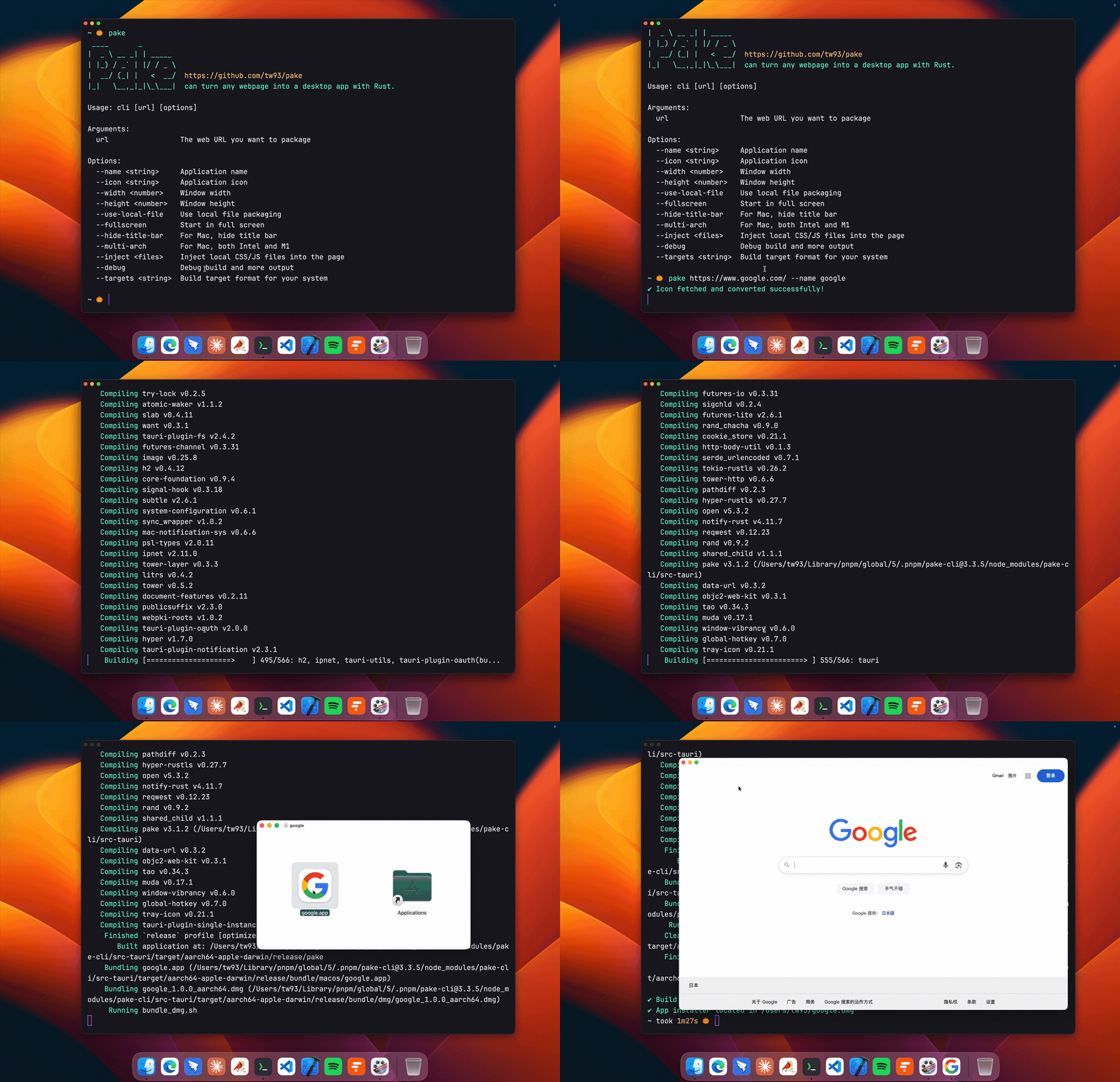
```bash
# Install Pake CLI
pnpm install -g pake-cli
# Basic usage - automatically fetches website icon
pake https://github.com --name GitHub
# Advanced usage with custom options
pake https://weekly.tw93.fun --name Weekly --icon https://cdn.tw93.fun/pake/weekly.icns --width 1200 --height 800 --hide-title-bar
```
First-time packaging requires environment setup and may be slower, subsequent builds are fast. For complete parameter documentation, see [CLI Usage Guide](docs/cli-usage.md). Don't want to use CLI? Try [GitHub Actions Online Building](docs/github-actions-usage.md).
## Development
Requires Rust `>=1.85` and Node `>=22` (recommended LTS; `>=18` also works). For detailed installation guide, see [Tauri documentation](https://v2.tauri.app/start/prerequisites/). If unfamiliar with development environment, use the CLI tool instead.
```bash
# Install dependencies
pnpm i
# Local development [right-click to open debug mode]
pnpm run dev
# Build application
pnpm run build
```
For style customization, feature enhancement, container communication and other advanced features, see [Advanced Usage Documentation](docs/advanced-usage.md).
## Developers
Pake's development can not be without these Hackers. They contributed a lot of capabilities for Pake. Also, welcome to follow them! ❤️
<a href="https://github.com/tw93/Pake/graphs/contributors">
<img src="./CONTRIBUTORS.svg?v=2" alt="Contributors" width="1000" />
</a>
## Support
- If Pake helped you, [share it](https://twitter.com/intent/tweet?url=https://github.com/tw93/Pake&text=Pake%20-%20Turn%20any%20webpage%20into%20a%20desktop%20app%20with%20one%20command.%20Nearly%2020x%20smaller%20than%20Electron%20packages,%20supports%20macOS%20Windows%20Linux) with friends or give it a star.
- Got ideas or bugs? Open an issue or PR, feel free to contribute your best AI model.
- I have two cats, TangYuan and Coke. If you think Pake delights your life, you can feed them <a href="https://cats.tw93.fun?name=Pake" target="_blank">canned food 🥩</a>.
<a href="https://cats.tw93.fun?name=Pake"><img src="https://cdn.jsdelivr.net/gh/tw93/sponsors@main/assets/sponsors.svg" width="1000" loading="lazy" /></a>