painter-highlight
Version:
A simple tool for generating highlighted code images.(一个简单的高亮代码图片生成工具)
112 lines (92 loc) • 2.79 kB
Markdown
一个基于 painter 和 highlight.js 实现的高亮代码图片生成工具,用于方便用户快速分享自己的代码片段。
使用场景:一些不支持代码高亮的平台来分享自己的代码,VSCode 插件([前端每日一题](https://github.com/Huang-LM/front-end-daily-question))等。
```
npm install painter-highlight
// yarn add painter-highlight
```
```js
import phl from 'painter-highlight';
```
需要传入的值
```tsx
phl(
CanvasNode: object, // 绑定的一个canvas元素
canvas: CanvasRenderingContext2D, // 将canvas通过getContext后得到的东西
template: template, // 生成图片的样式,下方有可配置项
code: string, // 要转换的代码(代码需用``包裹)
language: string // 转换代码的语言
)
```
template 格式
```js
template = {
background: string; // 整个模版的背景,支持网络图片的链接、纯色和渐变色
width: string; // 可填"auto" 将自动判断宽度
height: string; // 可填"auto" 将自动判断高度
borderRadius: string;
}
```
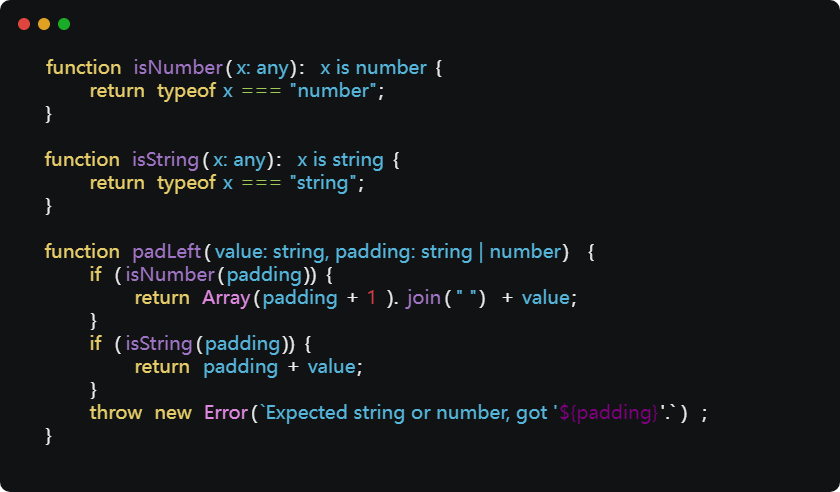
```vue
<template>
<div id="app">
<button @click="paint">生成</button>
<canvas id="canvas" />
</div>
</template>
<script>
import { phl } from 'painter-highlight';
export default {
name: 'App',
mounted() {
this.canvasNode = document.getElementById('canvas');
this.canvas = this.canvasNode.getContext('2d');
},
data() {
return {
canvasNode: '',
canvas: '',
template: {
background: '#101213',
width: 'auto', // '600px'
height: 'auto',
borderRadius: '5px',
},
code: `
function isNumber(x: any): x is number {
return typeof x === "number";
}
function isString(x: any): x is string {
return typeof x === "string";
}
function padLeft(value: string, padding: string | number) {
if (isNumber(padding)) {
return Array(padding + 1).join(" ") + value;
}
if (isString(padding)) {
return padding + value;
}
throw new Error(\`Expected string or number, got '\${padding}'.\`);
}
`,
language: 'ts',
};
},
methods: {
paint() {
phl(this.canvasNode, this.canvas, this.template, this.code, this.language);
},
},
};
</script>
```
> 待开发功能
>
> - [x] 自动宽高
> - [ ] 在网站上部署服务,可以直接转换代码
> - [ ] 自定义主题