paella-core
Version:
Multistream HTML video player
186 lines (152 loc) • 6.11 kB
Markdown
# Video 360º
A 360° video is one that has been recorded using a special lens that captures an omnidirectional view. The frames are encoded into a normal video that can then be adapted to allow the user to select the part of the scene they want to view interactively. An [equirectangular projection](https://en.wikipedia.org/wiki/Equirectangular_projection) is generally used. An equirectangular projection is used to project a spherical surface onto a plane, in the same way as a globe. In a 360º video, instead of having the projection of a globe, we have the projection captured by the camera lens in 360º, which can be approximated to a sphere.
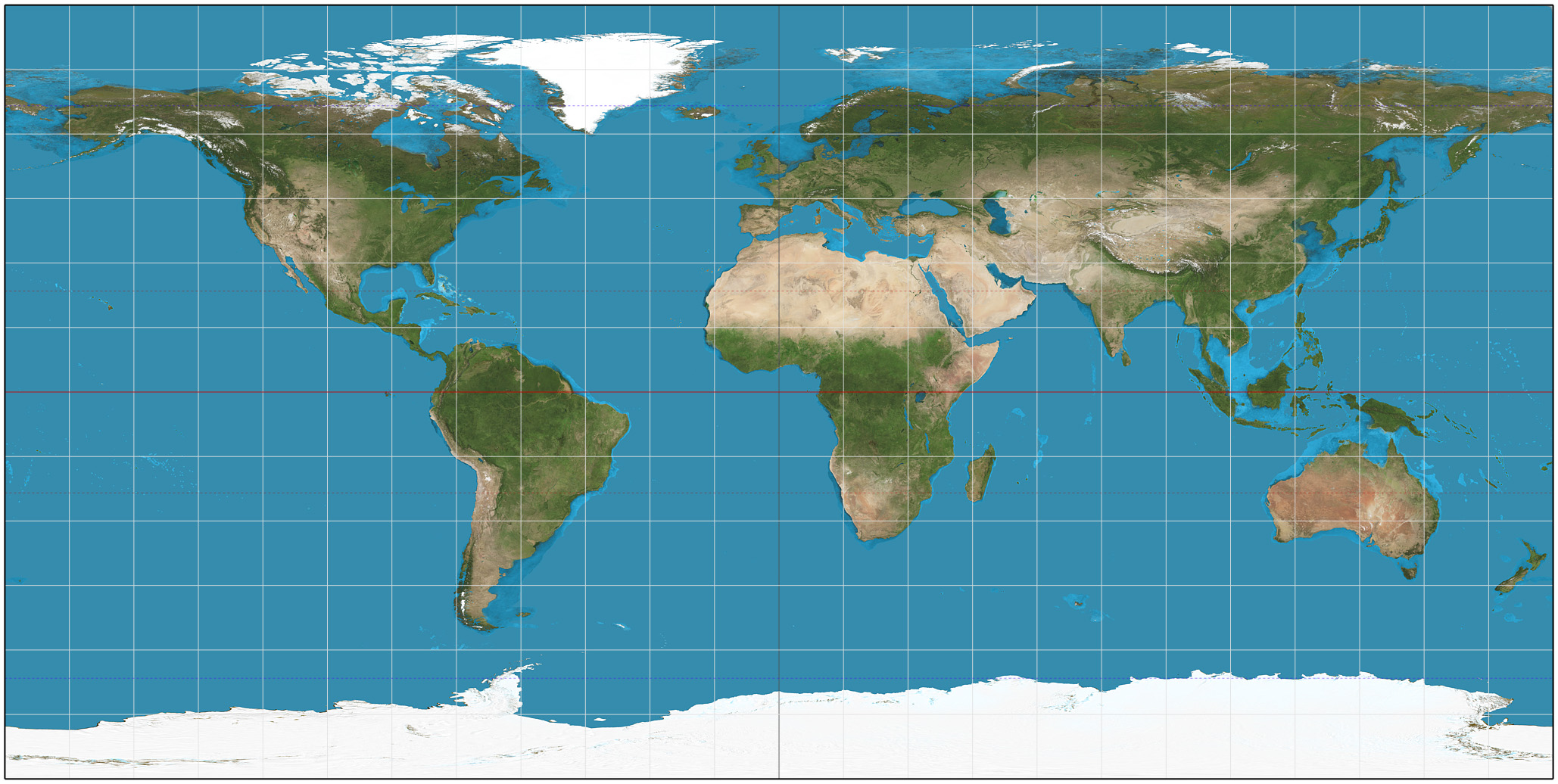
This serves as an example of two videos that may have the same format (e.g. mp4), but internally the pixels of the videos require different processing: in a normal video, the frames are simply displayed as they are received. In a 360° video, the frames have to be processed to focus on the part of the sphere that the user wants to view.
To solve such cases, `paella-core` introduces the concept of video canvas type. The default video canvas is called `video`, and indicates that the video frame data is a normal video. To display 360° videos we have the `video360` canvas type. The type of video canvas is specified in the video manifest:
```json
{
"streams": [
{
"sources": {
"mp4": [
{
"src": "https://repository.paellaplayer.upv.es/video360/video360.mp4",
"mimetype": "video/mp4"
}
]
},
"content":"presenter",
"canvas":["video360"]
}
]
}
```
It may be the case that the player does not have any canvas to render `video360`. For that reason, a stream can specify a list of supported video canvas types, in order of preference. In case no suitable canvas is available, at least `video` can be used to display the raw equirectangular image:
```json
{
"streams": [
{
...
"canvas":["video360","video"]
}
]
}
```
## Video 360 plugin
The plugin for displaying 360° video is inside the `paella-webgl-plugins` package. This package contains canvas plugins that render using WebGL. Since 360º video is not a native browser feature, this plugin uses WebGL to project the video onto a sphere, and handles input events to focus the camera.
We install the `paella-webgl-plugins` package and import it into the `initParams` object. We are going to import the plugin and define the configuration in one step, since we can also add the configuration in the same step:
```sh
npm install --save paella-webgl-plugins
```
**main.js:**
```js
...
import {
Video360CanvasPlugin
} from 'paella-webgl-plugins';
...
const initParams = {
...
plugins: [
...
{
plugin: Video360CanvasPlugin,
config: {
enabled: true
}
}
],
...
```
Añadimos un nuevo manifest para el video de 360º:
**public/repo/video360/data.json**
```json
{
"streams": [
{
"sources": {
"mp4": [
{
"src": "https://repository.paellaplayer.upv.es/video360/video360.mp4",
"mimetype": "video/mp4"
}
]
},
"content": "presenter",
"canvas": [ "video360", "video" ]
}
]
}
```
Load the video via the URL [http://localhost:5173/?id=video360](http://localhost:5173/?id=video360). The video loads using the default video canvas, what is going on?
The problem is that we also another two video canvas loaded to handle `video` canvas types:
**settings.json**
```json
{
...
"plugins": {
...
"es.upv.paella.videoCanvas": {
"enabled": true,
"order": 1
},
"es.upv.paella.zoomPlugin": {
"enabled": true,
"order": 0
},
...
}
}
```
We have loaded the plugin for the `video360` canvas using a static configuration without specifying the loading order of the plugin, we have only configured the plugin to be active by default:
```js
...
const initParams = {
...
plugins: [
...
{
plugin: Video360CanvasPlugin,
config: {
enabled: true
}
}
],
...
```
Finally, the video manifest of the 360 video example has two types of canvas configured, so that if the video360 plugin is not available, at least the video can be displayed in normal format:
```json
{
"streams": [
{
...
"canvas": [ "video360", "video" ]
}
]
}
```
The problem is that the video canvas plugin to be used is determined by the priority order of loading plugins. The `canvas` attribute of the video manifest does not set any kind of priority, so we have to configure the player to give more priority to the 360 video canvas. To do this, let's add the 360 video canvas configuration:
```json
{
...
"plugins": {
...
"es.upv.paella.videoCanvas": {
"enabled": true,
"order": 2
},
"es.upv.paella.zoomPlugin": {
"enabled": true,
"order": 1
},
"es.upv.paella.video360Canvas": {
"enabled": true,
"order": 0
}
...
}
}
```
In general, plugins that are more restrictive should be set with higher priority (i.e. with a lower `order` value). In this case, the least restrictive plugin is the `videoCanvas` plugin, because it should work with any type of video. The `zoomPlugin` plugin is more restrictive because it may not activate if the video does not have sufficient resolution. Finally, the `video360Canvas` plugin requires WebGL to work, and in addition to that, videos using this plugin will also specify the `video` video canvas only as a fallback method in case WebGL is not available. Por ese motivo, el orden de carga se ha configurado para que se carguen los plugins `video360Canvas`, luego `zoomPlugin` y por último `videoCanvas`.
Previous tutorial: [Video canvas: adding zoom](video_canvas.md)
Next tutorial: [Audio streams](audio_streams.md)