openframe
Version:
Openframe controller process which runs on the machine controlling the frame.
54 lines (33 loc) • 3.73 kB
Markdown
# Openframe Frame Controller
> *Friendly disclaimer:* This project is under active development; we cannot promise that everything will work 100%. We encourage you to try it out! Feedback and <a href="https://github.com/OpenframeProject">pull requests</a> are welcome :)
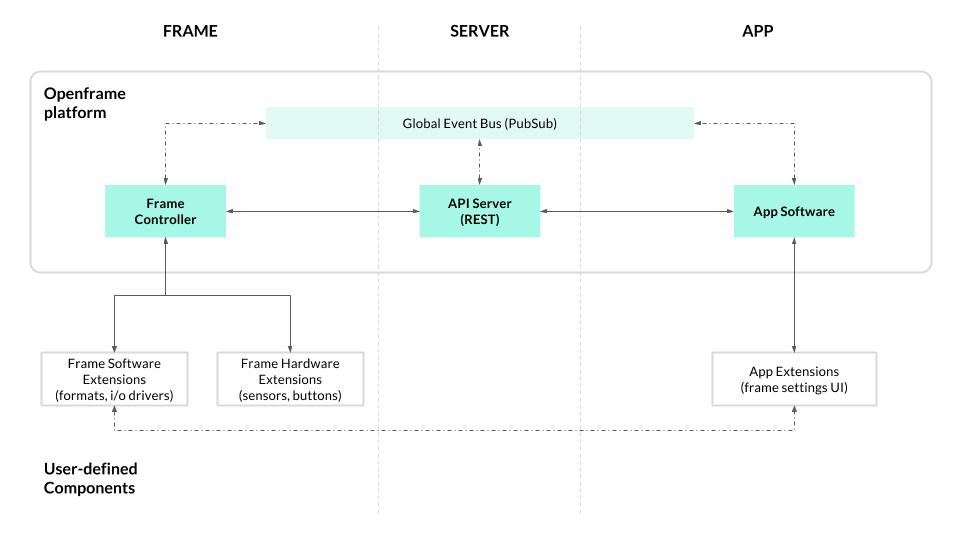
The Openframe controller is the software that runs on the frame itself (i.e. the RPi), acting as a process manager for starting, stopping, and transitioning between artworks. It communicates with an [Openframe API Server](https://github.com/OpenframeProject/Openframe-APIServer) server via a REST API, and connects to a [global event system](https://github.com/OpenframeProject/Openframe-PubSubServer) allowing for realtime updates. The idea is to work towards a system which supports the basic goals of Openframe, guided by a handful of [pilot use cases](https://github.com/OpenframeProject/Openframe-APIServer/wiki/Pilot-Use-Cases).
The block diagram below represents a proposed architecture for the Openframe platform. It will continue to evolve as development on the project progresses.
#### Modules
* `controller.js` - manages the actions around controlling the frame (changing artwork, updating settings, etc.)
* `process-manager.js` - manages starting and stopping processes for displaying artworks
* `extensions-manager.js` - manages installing and initializing extensions (aka plugins)
* `frame.js` - a wrapper for the Frame model, which gets persisted to
* `user.js` - a wrapper for the User model
* `pubsub.js` - creates and manages connection to global event system
* `rest.js` - creates and manages connection to REST API via Swagger.js
* `downloader.js` - utility for downloading files
* `config.js` - configuration options
### Usage
> FYI: Pardon the lack of detail and documentation. We'll be updating frequently over the coming weeks / months!
If you're just trying to get a frame up and running on a Raspberry Pi, please check out the [Openframe User Guide](https://github.com/OpenframeProject/Openframe/wiki/Openframe-User-Guide).
If you're interested in hacking on Openframe, feel free to fork/clone this repo. Run `npm install` to install the deps, then start up the openframe software:
```
$ npm start
```
Upon startup, the application will prompt you for your Openframe username and password, and a name for this frame. You can run this on a mac or linux machine (windows untested), though various artwork format extensions are likely to be developed with a specific target platform in mind.
For DEBUG output, set the DEBUG env var:
```bash
$ DEBUG=* npm start
```
### Configuration files
When you run `npm install`, the `install.sh` script will be executed. This script creates a hidden directory, `.openframe`, in your user home folder (/home/{username}/.openframe), and copies the default `.ofrc`configuration file there. The `.ofrc` file contains the server settings — by default this will point to the hosted API server at openframe.io, but if you're running a local server for development or are hosting your own API server you can update the settings in `.ofrc` accordingly.
After starting the application and answering the prompts, two additional files are created in the `.openframe` dir, `frame.json` which stores the frame state, and `user.json` which stores user data.
### Extensions
Extensions are npm packages which add functionality to the frame, either by adding support for a new artwork format (i.e. media type) or by adding other functionality.
For more info on extensions, see the [Openframe-Extension](https://github.com/OpenframeProject/Openframe-Extension) repo.