openframe-apiserver
Version:
The Openframe API Server.
79 lines (49 loc) • 3.63 kB
Markdown
# Openframe API
The Openframe API server.
> Note: This repo is under active development. The API is likely to change.
### Design Notes
This version of the API Server is built on [loopback](http://loopback.io/). The idea is to work towards a data model which supports the basic goals of Openframe, guided by a handful of [pilot use cases](https://github.com/OpenframeProject/Openframe-API/wiki/Pilot-Use-Cases).
At present, the API provides a basic RESTful interface to the data model. It represents the **API Server (REST)** in the diagram below. The Global Event Bus lives in a separate repository, [Openframe-PubSubServer](https://github.com/OpenframeProject/Openframe-PubSubServer).
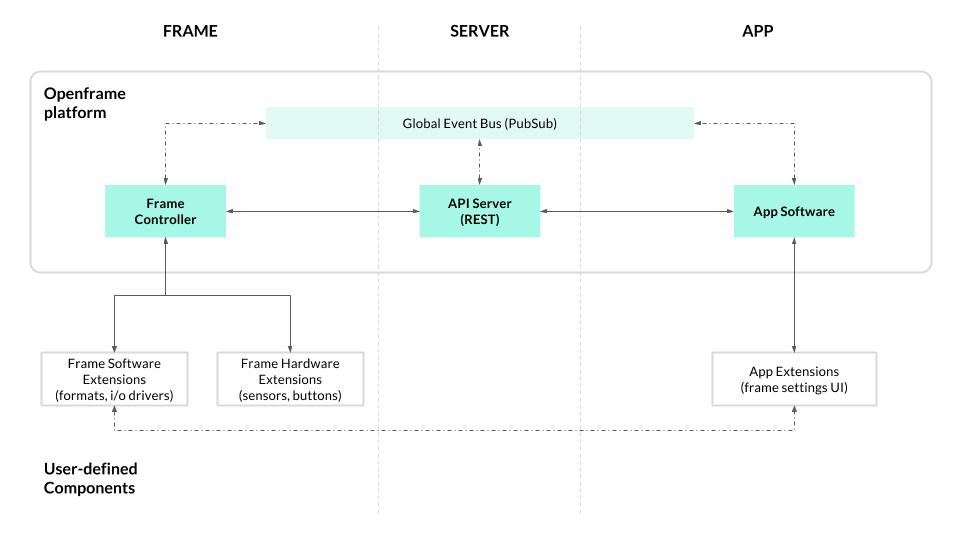
The block diagram above represents a proposed architecture for the Openframe platform. It will continue to evolve as development on the project progresses.
### Running an Openframe API Server
This package provides a cli which can be used to start up a server. Install the package with npm, and run `openframe-apiserver` to start it.
```bash
$ sudo npm install -g openframe-apiserver
# start the server...
$ openframe-apiserver
```
For DEBUG output, set the DEBUG env var:
```bash
# output ALL debug (includes a lot due to loopback)
$ DEBUG=* openframe-apiserver
# output openframe-specific debug
$ DEBUG=openframe:* openframe-apiserver
```
If you're not running an instance of the pubsub server separately, you can start up an instance of that concurrently by passing the `-p` parameter.
```bash
# start the API server and PubSub server
$ openframe-apiserver -p
```
Various configuration options can be set using a `.env` file using the `-f` flag. An example .env file might specify the port on which to expose the API server, configure the datasource, and specify a host and port on which the API server can expect to find the pubsub server. Take a look at the `.env.example` file in the project root.
```
# in .env file...
PORT=1234
# indicate how the API server should connect to the pubsub server
PS_HOST='pubsub.openframe.io'
PS_PORT=2345
```
### Local Development
The codebase was largely written following the [loopback docs'](https://docs.strongloop.com/display/public/LB/LoopBack) recommendations and examples. By default the API server will use an in-memory data store and will generate some dummy data (a few users, a few artworks). To run locally, clone the repo, install the npm dependencies, and run `npm start`.
```bash
# (you'll probably fork the repo, and clone your fork)
$ git clone https://github.com/OpenframeProject/Openframe-APIServer.git
$ cd Openframe-APIServer
$ npm install
$ npm start
```
This repo includes the [pubsub server](https://github.com/OpenframeProject/Openframe-PubSubServer) as a dependency. Running `npm start` will spin up an instance of the pubsub server on port 8889. If you want to start only the API, run `npm run start-api`. Likewise, if you want to run only the pubsub server, run `npm run start-pubsub`.
### REST API Docs
Loopback provides auto-generated documentation (via swagger) based on the data model definitions. After starting up the server locally, visit [localhost:8888/explorer/](http://localhost:8888/explorer/) to view the docs and test out the API.
### License
The code in this project is licensed under the GNU AGPLv3, a copyleft license that promotes server-based software freedom. For me info, see the description [here](https://choosealicense.com/licenses/agpl-3.0/), or take a look at the LICENSE included in the repo.