opencv4nodejs
Version:
Asynchronous OpenCV 3.x nodejs bindings with JavaScript and TypeScript API.
573 lines (407 loc) • 22.1 kB
Markdown
opencv4nodejs
=============

[](http://travis-ci.org/justadudewhohacks/opencv4nodejs)
[](https://ci.appveyor.com/project/justadudewhohacks/opencv4nodejs/branch/master)
[](https://codecov.io/gh/justadudewhohacks/opencv4nodejs)
[](https://www.npmjs.com/package/opencv4nodejs)
[](http://nodejs.org/download/)
[](https://slack.bri.im/)
**opencv4nodejs allows you to use the native OpenCV library in nodejs. Besides a synchronous API the package provides an asynchronous API, which allows you to build non-blocking and multithreaded computer vision tasks. opencv4nodejs supports OpenCV 3 and OpenCV 4.**
**The ultimate goal of this project is to provide a comprehensive collection of nodejs bindings to the API of OpenCV and the OpenCV-contrib modules. To get an overview of the currently implemented bindings, have a look at the [type declarations](https://github.com/justadudewhohacks/opencv4nodejs/tree/master/lib/typings) of this package. Furthermore, contribution is highly appreciated. If you want to add missing bindings check out the <a href="https://github.com/justadudewhohacks/opencv4nodejs/tree/master/CONTRIBUTING.md"><b>contribution guide</b>.**
* **[Examples](#examples)**
* **[How to install](#how-to-install)**
* **[Usage with Docker](#usage-with-docker)**
* **[Usage with Electron](#usage-with-electron)**
* **[Usage with NW.js](#usage-with-nwjs)**
* **[Quick Start](#quick-start)**
* **[Async API](#async-api)**
* **[With TypeScript](#with-typescript)**
* **[External Memory Tracking (v4.0.0)](#external-mem-tracking)**
<a name="examples"></a>
# Examples
See <a href="https://github.com/justadudewhohacks/opencv4nodejs/tree/master/examples"><b>examples</b></a> for implementation.
### Face Detection
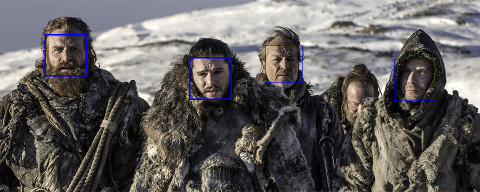
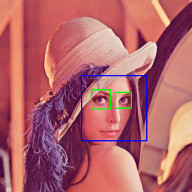
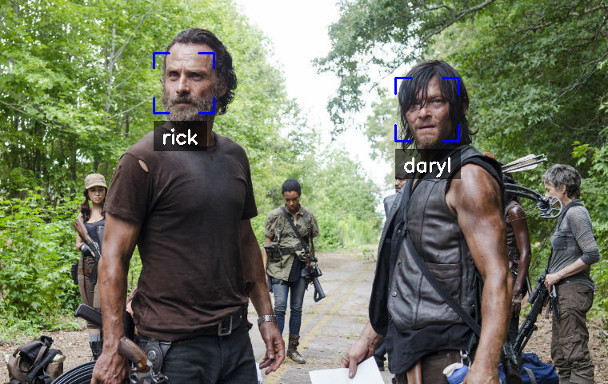
### Face Recognition with the OpenCV face module
Check out <a href="https://medium.com/@muehler.v/node-js-opencv-for-face-recognition-37fa7cb860e8"><b>Node.js + OpenCV for Face Recognition</b></a>.
### Face Landmarks with the OpenCV face module
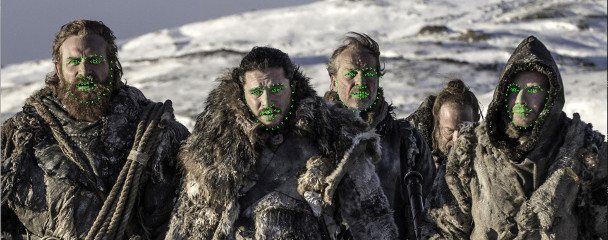
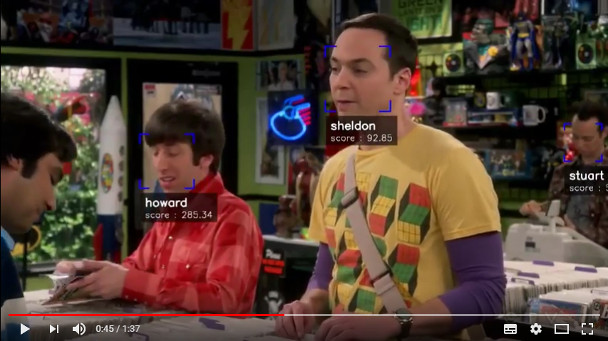
### Face Recognition with <a href="https://github.com/justadudewhohacks/face-recognition.js"><b>face-recognition.js</b></a>
Check out <a href="https://medium.com/@muehler.v/node-js-face-recognition-js-simple-and-robust-face-recognition-using-deep-learning-ea5ba8e852"><b>Node.js + face-recognition.js : Simple and Robust Face Recognition using Deep Learning</b></a>.
[](https://www.youtube.com/watch?v=ArcFHpX-usQ "Nodejs Face Recognition using face-recognition.js and opencv4nodejs")
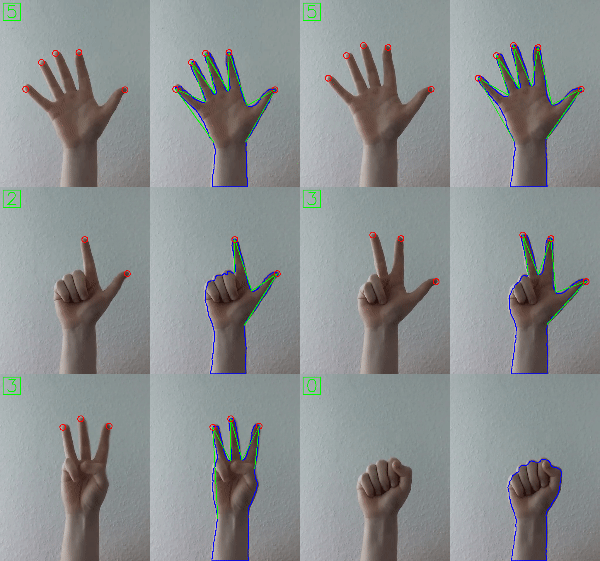
### Hand Gesture Recognition
Check out <a href="https://medium.com/@muehler.v/simple-hand-gesture-recognition-using-opencv-and-javascript-eb3d6ced28a0"><b>Simple Hand Gesture Recognition using OpenCV and JavaScript</b></a>.
### Object Recognition with Deep Neural Networks
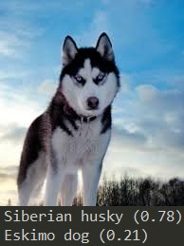
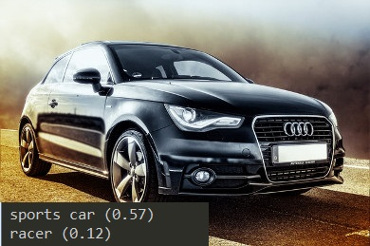
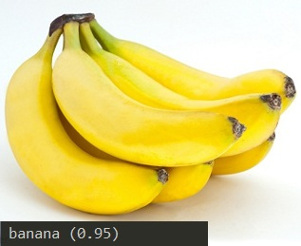
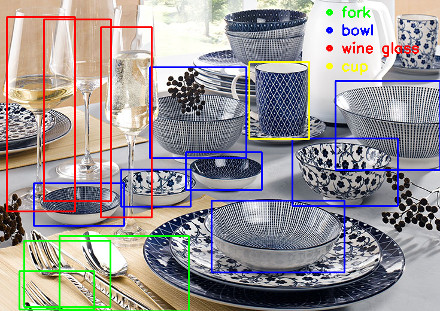
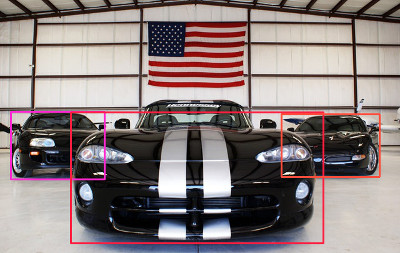
Check out <a href="https://medium.com/@muehler.v/node-js-meets-opencvs-deep-neural-networks-fun-with-tensorflow-and-caffe-ff8d52a0f072"><b>Node.js meets OpenCV’s Deep Neural Networks — Fun with Tensorflow and Caffe</b></a>.
#### Tensorflow Inception
#### Single Shot Multibox Detector with COCO
### Machine Learning
Check out <a href="https://medium.com/@muehler.v/machine-learning-with-opencv-and-javascript-part-1-recognizing-handwritten-letters-using-hog-and-88719b70efaa"><b>Machine Learning with OpenCV and JavaScript: Recognizing Handwritten Letters using HOG and SVM</b></a>.

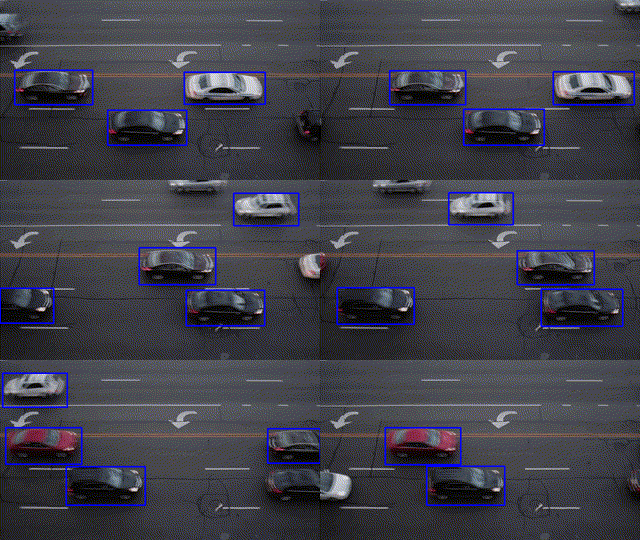
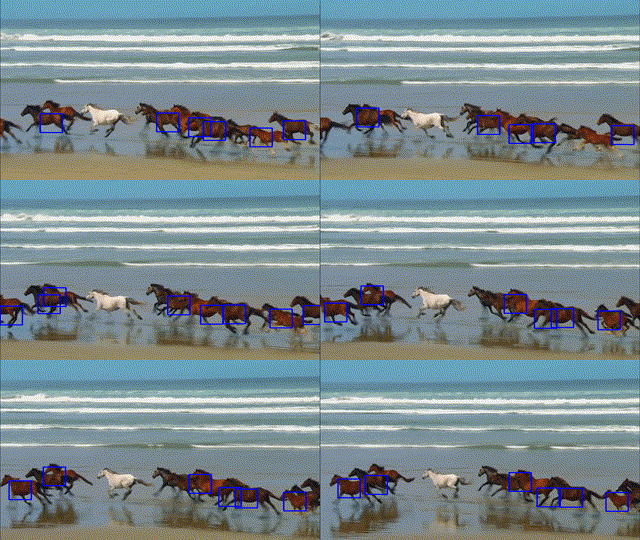
### Object Tracking
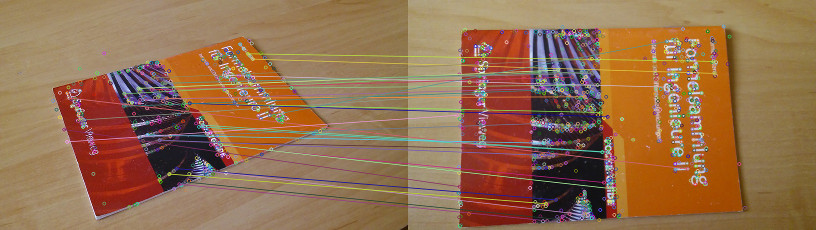
### Feature Matching
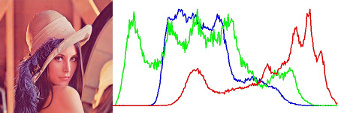
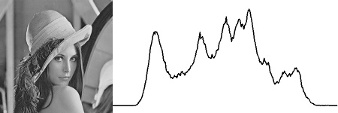
### Image Histogram
### Boiler plate for combination of opencv4nodejs, express and websockets.
[opencv4nodejs-express-websockets](https://github.com/Mudassir-23/opencv4nodejs-express-websockets) - Boilerplate express app for getting started on opencv with nodejs and to live stream the video through websockets.
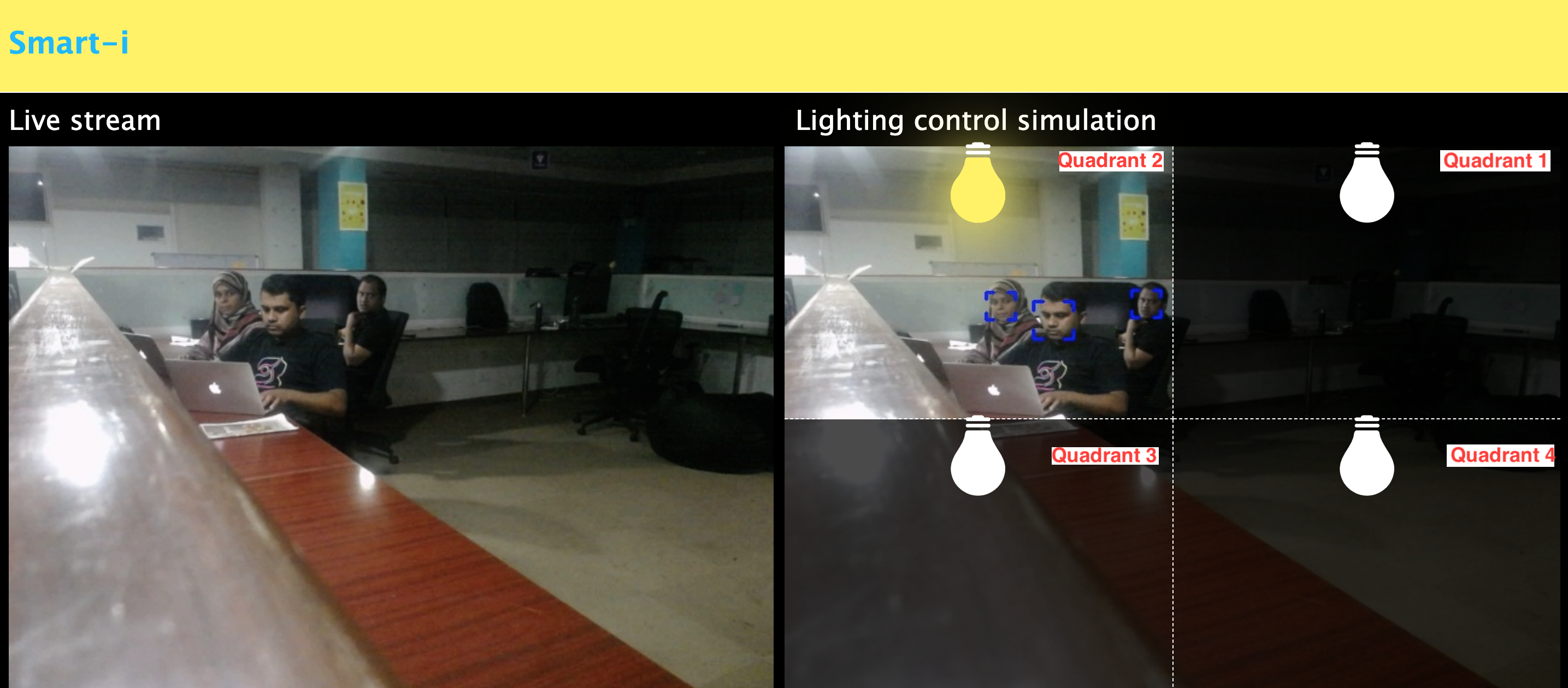
### Automating lights by people detection through classifier
Check out <a href="https://medium.com/softway-blog/automating-lights-with-computer-vision-nodejs-fb9b614b75b2"><b>Automating lights with Computer Vision & NodeJS</b></a>.
<a name="how-to-install"></a>
# How to install
``` bash
npm install --save opencv4nodejs
```
Native node modules are built via node-gyp, which already comes with npm by default. However, node-gyp requires you to have python installed. If you are running into node-gyp specific issues have a look at known issues with [node-gyp](https://github.com/nodejs/node-gyp) first.
**Important note:** node-gyp won't handle whitespaces properly, thus make sure, that the path to your project directory does **not contain any whitespaces**. Installing opencv4nodejs under "C:\Program Files\some_dir" or similar will not work and will fail with: "fatal error C1083: Cannot open include file: 'opencv2/core.hpp'"!**
On Windows you will furthermore need Windows Build Tools to compile OpenCV and opencv4nodejs. If you don't have Visual Studio or Windows Build Tools installed, you can easily install the VS2015 build tools:
``` bash
npm install --global windows-build-tools
```
## Installing OpenCV Manually
Setting up OpenCV on your own will require you to set an environment variable to prevent the auto build script to run:
``` bash
# linux and osx:
export OPENCV4NODEJS_DISABLE_AUTOBUILD=1
# on windows:
set OPENCV4NODEJS_DISABLE_AUTOBUILD=1
```
### Windows
You can install any of the OpenCV 3 or OpenCV 4 <a href="https://github.com/opencv/opencv/releases/"><b>releases</b></a> manually or via the [Chocolatey](https://chocolatey.org/) package manager:
``` bash
# to install OpenCV 4.1.0
choco install OpenCV -y -version 4.1.0
```
Note, this will come without contrib modules. To install OpenCV under windows with contrib modules you have to build the library from source or you can use the auto build script.
Before installing opencv4nodejs with an own installation of OpenCV you need to expose the following environment variables:
- *OPENCV_INCLUDE_DIR* pointing to the directory with the subfolder *opencv2* containing the header files
- *OPENCV_LIB_DIR* pointing to the lib directory containing the OpenCV .lib files
Also you will need to add the OpenCV binaries to your system path:
- add an environment variable *OPENCV_BIN_DIR* pointing to the binary directory containing the OpenCV .dll files
- append `;%OPENCV_BIN_DIR%;` to your system path variable
Note: Restart your current console session after making changes to your environment.
### MacOSX
Under OSX we can simply install OpenCV via brew:
``` bash
brew update
brew install opencv@4
brew link --force opencv@4
```
### Linux
Under Linux we have to build OpenCV from source manually or using the auto build script.
## Installing OpenCV via Auto Build Script
The auto build script comes in form of the [opencv-build](https://github.com/justadudewhohacks/npm-opencv-build) npm package, which will run by default when installing opencv4nodejs. The script requires you to have git and a recent version of cmake installed.
### Auto Build Flags
You can customize the autobuild flags using *OPENCV4NODEJS_AUTOBUILD_FLAGS=<flags>*.
Flags must be space-separated.
This is an advanced customization and you should have knowledge regarding the OpenCV compilation flags. Flags added by default are listed [here](https://github.com/justadudewhohacks/npm-opencv-build/blob/master/src/constants.ts#L44-L82).
### Installing a Specific Version of OpenCV
You can specify the Version of OpenCV you want to install via the script by setting an environment variable:
`export OPENCV4NODEJS_AUTOBUILD_OPENCV_VERSION=4.1.0`
### Installing only a Subset of OpenCV modules
If you only want to build a subset of the OpenCV modules you can pass the *-DBUILD_LIST* cmake flag via the *OPENCV4NODEJS_AUTOBUILD_FLAGS* environment variable. For example `export OPENCV4NODEJS_AUTOBUILD_FLAGS=-DBUILD_LIST=dnn` will build only modules required for `dnn` and reduces the size and compilation time of the OpenCV package.
## Configuring Environments via package.json
It's possible to specify build environment variables by inserting them into the `package.json` as follows:
```json
{
"name": "my-project",
"version": "0.0.0",
"dependencies": {
"opencv4nodejs": "^X.X.X"
},
"opencv4nodejs": {
"disableAutoBuild": 1,
"opencvIncludeDir": "C:\\tools\\opencv\\build\\include",
"opencvLibDir": "C:\\tools\\opencv\\build\\x64\\vc14\\lib",
"opencvBinDir": "C:\\tools\\opencv\\build\\x64\\vc14\\bin"
}
}
```
The following environment variables can be passed:
- autoBuildBuildCuda
- autoBuildFlags
- autoBuildOpencvVersion
- autoBuildWithoutContrib
- disableAutoBuild
- opencvIncludeDir
- opencvLibDir
- opencvBinDir
<a name="usage-with-docker"></a>
# Usage with Docker
### [opencv-express](https://github.com/justadudewhohacks/opencv-express) - example for opencv4nodejs with express.js and docker
Or simply pull from [justadudewhohacks/opencv-nodejs](https://hub.docker.com/r/justadudewhohacks/opencv-nodejs/) for opencv-3.2 + contrib-3.2 with opencv4nodejs globally installed:
``` docker
FROM justadudewhohacks/opencv-nodejs
```
**Note**: The aforementioned Docker image already has ```opencv4nodejs``` installed globally. In order to prevent build errors during an ```npm install```, your ```package.json``` should not include ```opencv4nodejs```, and instead should include/require the global package either by requiring it by absolute path or setting the ```NODE_PATH``` environment variable to ```/usr/lib/node_modules``` in your Dockerfile and requiring the package as you normally would.
Different OpenCV 3.x base images can be found here: https://hub.docker.com/r/justadudewhohacks/.
<a name="usage-with-electron"></a>
# Usage with Electron
### [opencv-electron](https://github.com/justadudewhohacks/opencv-electron) - example for opencv4nodejs with electron
Add the following script to your package.json:
``` python
"electron-rebuild": "electron-rebuild -w opencv4nodejs"
```
Run the script:
``` bash
$ npm run electron-rebuild
```
Require it in the application:
``` javascript
const cv = require('opencv4nodejs');
```
<a name="usage-with-nwjs"></a>
# Usage with NW.js
Any native modules, including opencv4nodejs, must be recompiled to be used with [NW.js](https://nwjs.io/). Instructions on how to do this are available in the **[Use Native Modules](http://docs.nwjs.io/en/latest/For%20Users/Advanced/Use%20Native%20Node%20Modules/)** section of the the NW.js documentation.
Once recompiled, the module can be installed and required as usual:
``` javascript
const cv = require('opencv4nodejs');
```
<a name="quick-start"></a>
# Quick Start
``` javascript
const cv = require('opencv4nodejs');
```
### Initializing Mat (image matrix), Vec, Point
``` javascript
const rows = 100; // height
const cols = 100; // width
// empty Mat
const emptyMat = new cv.Mat(rows, cols, cv.CV_8UC3);
// fill the Mat with default value
const whiteMat = new cv.Mat(rows, cols, cv.CV_8UC1, 255);
const blueMat = new cv.Mat(rows, cols, cv.CV_8UC3, [255, 0, 0]);
// from array (3x3 Matrix, 3 channels)
const matData = [
[[255, 0, 0], [255, 0, 0], [255, 0, 0]],
[[0, 0, 0], [0, 0, 0], [0, 0, 0]],
[[255, 0, 0], [255, 0, 0], [255, 0, 0]]
];
const matFromArray = new cv.Mat(matData, cv.CV_8UC3);
// from node buffer
const charData = [255, 0, ...];
const matFromArray = new cv.Mat(Buffer.from(charData), rows, cols, cv.CV_8UC3);
// Point
const pt2 = new cv.Point(100, 100);
const pt3 = new cv.Point(100, 100, 0.5);
// Vector
const vec2 = new cv.Vec(100, 100);
const vec3 = new cv.Vec(100, 100, 0.5);
const vec4 = new cv.Vec(100, 100, 0.5, 0.5);
```
### Mat and Vec operations
``` javascript
const mat0 = new cv.Mat(...);
const mat1 = new cv.Mat(...);
// arithmetic operations for Mats and Vecs
const matMultipliedByScalar = mat0.mul(0.5); // scalar multiplication
const matDividedByScalar = mat0.div(2); // scalar division
const mat0PlusMat1 = mat0.add(mat1); // addition
const mat0MinusMat1 = mat0.sub(mat1); // subtraction
const mat0MulMat1 = mat0.hMul(mat1); // elementwise multiplication
const mat0DivMat1 = mat0.hDiv(mat1); // elementwise division
// logical operations Mat only
const mat0AndMat1 = mat0.and(mat1);
const mat0OrMat1 = mat0.or(mat1);
const mat0bwAndMat1 = mat0.bitwiseAnd(mat1);
const mat0bwOrMat1 = mat0.bitwiseOr(mat1);
const mat0bwXorMat1 = mat0.bitwiseXor(mat1);
const mat0bwNot = mat0.bitwiseNot();
```
### Accessing Mat data
``` javascript
const matBGR = new cv.Mat(..., cv.CV_8UC3);
const matGray = new cv.Mat(..., cv.CV_8UC1);
// get pixel value as vector or number value
const vec3 = matBGR.at(200, 100);
const grayVal = matGray.at(200, 100);
// get raw pixel value as array
const [b, g, r] = matBGR.atRaw(200, 100);
// set single pixel values
matBGR.set(50, 50, [255, 0, 0]);
matBGR.set(50, 50, new Vec(255, 0, 0));
matGray.set(50, 50, 255);
// get a 25x25 sub region of the Mat at offset (50, 50)
const width = 25;
const height = 25;
const region = matBGR.getRegion(new cv.Rect(50, 50, width, height));
// get a node buffer with raw Mat data
const matAsBuffer = matBGR.getData();
// get entire Mat data as JS array
const matAsArray = matBGR.getDataAsArray();
```
### IO
``` javascript
// load image from file
const mat = cv.imread('./path/img.jpg');
cv.imreadAsync('./path/img.jpg', (err, mat) => {
...
})
// save image
cv.imwrite('./path/img.png', mat);
cv.imwriteAsync('./path/img.jpg', mat,(err) => {
...
})
// show image
cv.imshow('a window name', mat);
cv.waitKey();
// load base64 encoded image
const base64text='data:image/png;base64,R0lGO..';//Base64 encoded string
const base64data =base64text.replace('data:image/jpeg;base64','')
.replace('data:image/png;base64','');//Strip image type prefix
const buffer = Buffer.from(base64data,'base64');
const image = cv.imdecode(buffer); //Image is now represented as Mat
// convert Mat to base64 encoded jpg image
const outBase64 = cv.imencode('.jpg', croppedImage).toString('base64'); // Perform base64 encoding
const htmlImg='<img src=data:image/jpeg;base64,'+outBase64 + '>'; //Create insert into HTML compatible <img> tag
// open capture from webcam
const devicePort = 0;
const wCap = new cv.VideoCapture(devicePort);
// open video capture
const vCap = new cv.VideoCapture('./path/video.mp4');
// read frames from capture
const frame = vCap.read();
vCap.readAsync((err, frame) => {
...
});
// loop through the capture
const delay = 10;
let done = false;
while (!done) {
let frame = vCap.read();
// loop back to start on end of stream reached
if (frame.empty) {
vCap.reset();
frame = vCap.read();
}
// ...
const key = cv.waitKey(delay);
done = key !== 255;
}
```
### Useful Mat methods
``` javascript
const matBGR = new cv.Mat(..., cv.CV_8UC3);
// convert types
const matSignedInt = matBGR.convertTo(cv.CV_32SC3);
const matDoublePrecision = matBGR.convertTo(cv.CV_64FC3);
// convert color space
const matGray = matBGR.bgrToGray();
const matHSV = matBGR.cvtColor(cv.COLOR_BGR2HSV);
const matLab = matBGR.cvtColor(cv.COLOR_BGR2Lab);
// resize
const matHalfSize = matBGR.rescale(0.5);
const mat100x100 = matBGR.resize(100, 100);
const matMaxDimIs100 = matBGR.resizeToMax(100);
// extract channels and create Mat from channels
const [matB, matG, matR] = matBGR.splitChannels();
const matRGB = new cv.Mat([matR, matB, matG]);
```
### Drawing a Mat into HTML Canvas
``` javascript
const img = ...
// convert your image to rgba color space
const matRGBA = img.channels === 1
? img.cvtColor(cv.COLOR_GRAY2RGBA)
: img.cvtColor(cv.COLOR_BGR2RGBA);
// create new ImageData from raw mat data
const imgData = new ImageData(
new Uint8ClampedArray(matRGBA.getData()),
img.cols,
img.rows
);
// set canvas dimensions
const canvas = document.getElementById('myCanvas');
canvas.height = img.rows;
canvas.width = img.cols;
// set image data
const ctx = canvas.getContext('2d');
ctx.putImageData(imgData, 0, 0);
```
### Method Interface
OpenCV method interface from official docs or src:
``` c++
void GaussianBlur(InputArray src, OutputArray dst, Size ksize, double sigmaX, double sigmaY = 0, int borderType = BORDER_DEFAULT);
```
translates to:
``` javascript
const src = new cv.Mat(...);
// invoke with required arguments
const dst0 = src.gaussianBlur(new cv.Size(5, 5), 1.2);
// with optional paramaters
const dst2 = src.gaussianBlur(new cv.Size(5, 5), 1.2, 0.8, cv.BORDER_REFLECT);
// or pass specific optional parameters
const optionalArgs = {
borderType: cv.BORDER_CONSTANT
};
const dst2 = src.gaussianBlur(new cv.Size(5, 5), 1.2, optionalArgs);
```
<a name="async-api"></a>
# Async API
The async API can be consumed by passing a callback as the last argument of the function call. By default, if an async method is called without passing a callback, the function call will yield a Promise.
### Async Face Detection
``` javascript
const classifier = new cv.CascadeClassifier(cv.HAAR_FRONTALFACE_ALT2);
// by nesting callbacks
cv.imreadAsync('./faceimg.jpg', (err, img) => {
if (err) { return console.error(err); }
const grayImg = img.bgrToGray();
classifier.detectMultiScaleAsync(grayImg, (err, res) => {
if (err) { return console.error(err); }
const { objects, numDetections } = res;
...
});
});
// via Promise
cv.imreadAsync('./faceimg.jpg')
.then(img =>
img.bgrToGrayAsync()
.then(grayImg => classifier.detectMultiScaleAsync(grayImg))
.then((res) => {
const { objects, numDetections } = res;
...
})
)
.catch(err => console.error(err));
// using async await
try {
const img = await cv.imreadAsync('./faceimg.jpg');
const grayImg = await img.bgrToGrayAsync();
const { objects, numDetections } = await classifier.detectMultiScaleAsync(grayImg);
...
} catch (err) {
console.error(err);
}
```
<a name="with-typescript"></a>
# With TypeScript
``` javascript
import * as cv from 'opencv4nodejs'
```
Check out the TypeScript [examples](https://github.com/justadudewhohacks/opencv4nodejs/tree/master/examples/typed).
<a name="external-mem-tracking"></a>
# External Memory Tracking (v4.0.0)
Since version 4.0.0 was released, external memory tracking has been enabled by default. Simply put, the memory allocated for Matrices (cv.Mat) will be manually reported to the node process. This solves the issue of inconsistent Garbage Collection, which could have resulted in spiking memory usage of the node process eventually leading to overflowing the RAM of your system, prior to version 4.0.0.
Note, that in doubt this feature can be **disabled** by setting an environment variable `OPENCV4NODEJS_DISABLE_EXTERNAL_MEM_TRACKING` before requiring the module:
``` bash
export OPENCV4NODEJS_DISABLE_EXTERNAL_MEM_TRACKING=1 // linux
set OPENCV4NODEJS_DISABLE_EXTERNAL_MEM_TRACKING=1 // windows
```
Or directly in your code:
``` javascript
process.env.OPENCV4NODEJS_DISABLE_EXTERNAL_MEM_TRACKING = 1
const cv = require('opencv4nodejs')
```