ol-contextmenu
Version:
Custom Context Menu for Openlayers
245 lines (193 loc) • 6.2 kB
Markdown
# OpenLayers Custom Context Menu
<p align="center">
<a href="https://travis-ci.org/jonataswalker/ol-contextmenu">
<img src="https://travis-ci.org/jonataswalker/ol-contextmenu.svg?branch=master" alt="build status">
</a>
<a href="https://www.npmjs.com/package/ol-contextmenu">
<img src="https://img.shields.io/npm/v/ol-contextmenu.svg"
alt="npm version">
</a>
<a href="https://github.com/jonataswalker/ol-contextmenu/blob/master/LICENSE">
<img src="https://img.shields.io/npm/l/ol-contextmenu.svg"
alt="license">
</a>
<a href="https://david-dm.org/jonataswalker/ol-contextmenu">
<img src="https://david-dm.org/jonataswalker/ol-contextmenu/status.svg"
alt="dependency status">
</a>
<a href="https://david-dm.org/jonataswalker/ol-contextmenu">
<img src="https://david-dm.org/jonataswalker/ol-contextmenu/dev-status.svg" alt="devDependency status">
</a>
</p>
A `contextmenu` extension for [OpenLayers](http://openlayers.org/). **Requires** OpenLayers **v3.11.0** or higher.
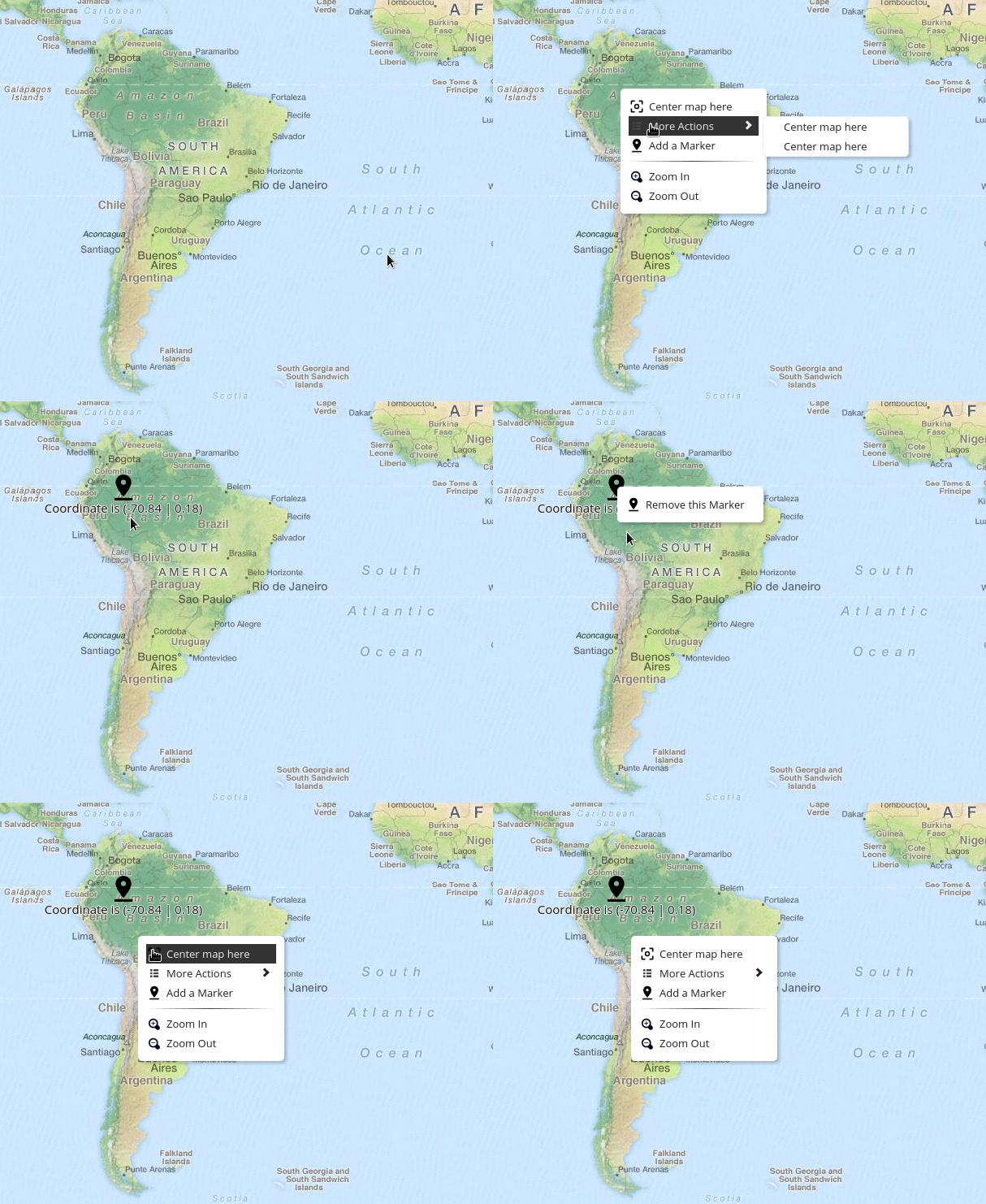
## Demo
You can see [here a demo](http://rawgit.com/jonataswalker/ol-contextmenu/master/examples/contextmenu.html) or [JSFiddle](https://jsfiddle.net/jonataswalker/ooxs1w5d/).
## How to use it?
##### NPM
`npm install ol-contextmenu`
##### CDN Hosted - [jsDelivr](https://www.jsdelivr.com/package/npm/ol-contextmenu)
Load CSS and Javascript:
```HTML
<link href="https://cdn.jsdelivr.net/npm/ol-contextmenu@latest/dist/ol-contextmenu.min.css" rel="stylesheet">
<script src="https://cdn.jsdelivr.net/npm/ol-contextmenu"></script>
```
##### CDN Hosted - UNPKG
Load CSS and Javascript:
```HTML
<link href="https://unpkg.com/ol-contextmenu/dist/ol-contextmenu.min.css" rel="stylesheet">
<script src="https://unpkg.com/ol-contextmenu"></script>
```
##### Self hosted
Download [latest release](https://github.com/jonataswalker/ol-contextmenu/releases/latest) and (obviously) load CSS and Javascript.
##### Instantiate with some options and add the Control
```javascript
var contextmenu = new ContextMenu({
width: 170,
defaultItems: true, // defaultItems are (for now) Zoom In/Zoom Out
items: [
{
text: 'Center map here',
classname: 'some-style-class', // add some CSS rules
callback: center // `center` is your callback function
},
{
text: 'Add a Marker',
classname: 'some-style-class', // you can add this icon with a CSS class
// instead of `icon` property (see next line)
icon: 'img/marker.png', // this can be relative or absolute
callback: marker
},
'-' // this is a separator
]
});
map.addControl(contextmenu);
```
##### You can add a (nested) submenu like this:
If you provide `items {Array}` a submenu will be created as a child of the current item.
```javascript
var all_items = [
{
text: 'Some Actions',
items: [ // <== this is a submenu
{
text: 'Action 1',
callback: action
},
{
text: 'Other action',
callback: action2
}
]
},
{
text: 'Add a Marker',
icon: 'img/marker.png',
callback: marker
},
'-' // this is a separator
];
```
##### Would you like to propagate custom data to the callback handler?
```javascript
var removeMarker = function (obj) {
vectorLayer.getSource().removeFeature(obj.data.marker);
};
var removeMarkerItem = {
text: 'Remove this Marker',
icon: 'img/marker.png',
callback: removeMarker
};
var restore = false;
contextmenu.on('open', function (evt) {
var feature = map.forEachFeatureAtPixel(evt.pixel, function (ft, l) {
return ft;
});
if (feature) {
contextmenu.clear();
removeMarkerItem.data = { marker: feature };
contextmenu.push(removeMarkerItem);
restore = true;
} else if (restore) {
contextmenu.clear();
contextmenu.extend(contextmenu_items);
contextmenu.extend(contextmenu.getDefaultItems());
restore = false;
}
});
```
# API
## Constructor
#### `new ContextMenu(options)`
###### `options` is an object with the following possible properties:
* `eventType`: `contextmenu`; The listening event type (You could use `'click'`, `'dblclick'`)
* `defaultItems`: `true`; Whether the default items (which are: Zoom In/Out) are enabled
* `width`: `150`; The menu's width
* `items`: `[]`; An array of object|string
## Methods
#### contextmenu.clear()
Remove all elements from the menu.
#### contextmenu.close()
Close the menu programmatically.
#### contextmenu.extend(arr)
`@param {Array} arr`
Add items to the menu. This pushes each item in the provided array to the end of the menu.
Example:
```js
var contextmenu = new ContextMenu();
map.addControl(contextmenu);
var add_later = [
'-', // this is a separator
{
text: 'Add a Marker',
icon: 'img/marker.png',
callback: marker
}
];
contextmenu.extend(add_later);
```
#### contextmenu.push(item)
`@param {Object|String} item`
Insert the provided item at the end of the menu.
#### contextmenu.shift()
Remove the first item of the menu.
#### contextmenu.pop()
Remove the last item of the menu.
#### contextmenu.getDefaultItems()
Get an array of default items.
#### contextmenu.isOpen()
Whether the menu is open.
#### contextmenu.updatePosition(pixel)
`@param {Array} pixel`
Update menu's position.
## Events
#### If you want to disable this plugin under certain circumstances, listen to `beforeopen`
```javascript
contextmenu.on('beforeopen', function (evt) {
var feature = map.forEachFeatureAtPixel(evt.pixel, function (ft, l) {
return ft;
});
if (feature) { // open only on features
contextmenu.enable();
} else {
contextmenu.disable();
}
});
```
#### Listen and make some changes when context menu opens
```javascript
contextmenu.on('open', function(evt){
var feature = map.forEachFeatureAtPixel(evt.pixel, function (ft, l) {
return ft;
});
if (feature) {
// add some other items to the menu
}
});
```
#### Any action when context menu gets closed?
```javascript
contextmenu.on('close', function (evt) {
// it's upon you
});
```