ohm-js
Version:
220 lines (157 loc) • 9.08 kB
Markdown
# [Ohm](https://ohmjs.org/) · [](https://www.npmjs.com/package/ohm-js) [](https://github.com/ohmjs/ohm/actions/workflows/node.js.yml) [](https://discord.gg/KwxY5gegRQ)
Ohm is a parsing toolkit consisting of a library and a domain-specific language. You can use it to parse custom file formats or quickly build parsers, interpreters, and compilers for programming languages.
The _Ohm language_ is based on [parsing expression grammars](http://en.wikipedia.org/wiki/Parsing_expression_grammar)
(PEGs), which are a formal way of describing syntax, similar to regular expressions and context-free
grammars. The _Ohm library_ provides a JavaScript interface for creating parsers, interpreters, and
more from the grammars you write.
- **Full support for left-recursive rules** means that you can define left-associative operators in a natural way.
- **Object-oriented grammar extension** makes it easy to extend an existing language with new syntax.
- **Modular semantic actions.** Unlike many similar tools, Ohm completely
separates grammars from semantic actions. This separation improves modularity and extensibility, and makes both grammars and semantic actions easier to read and understand.
- **Online editor and visualizer.** The [Ohm Editor](https://ohmjs.org/editor/) provides instant feedback and an [interactive visualization](https://dubroy.com/blog/visualizing-packrat-parsing/) that makes the entire execution of the parser visible and tangible. It'll [make you feel like you have superpowers](https://twitter.com/kylestetz/status/1349770893120172036). 💪
Some awesome things people have built using Ohm:
- [Seymour](https://harc.github.io/seymour-live2017/), a live programming environment for the classroom.
- [Shadama](https://tinlizzie.org/~ohshima/shadama2/live2017/), a particle simulation language designed for high-school science.
- [turtle.audio](http://turtle.audio/), an audio environment where simple text commands generate lines that can play music.
- A [browser-based tool](https://www.arthurcarabott.com/konnakkol/) that turns written _Konnakkol_ (a South Indian vocal percussion art) into audio.
- [Wildcard](https://www.geoffreylitt.com/wildcard/), a browser extension that empowers anyone to modify websites to meet their own specific needs, uses Ohm for its spreadsheet formulas.
## Sponsors
Since 2017, Ohm has been maintained by [@pdubroy](https://github.com/pdubroy) on an unpaid basis. Please consider [becoming a sponsor](http://github.com/sponsors/pdubroy/)!
### Diamond 💎
<table>
<tr>
<td><a href="https://shopify.com"><img alt="Shopify" src="./doc/images/shopify-logo.png" height="48"></a></td>
<td><a href="https://projectsubstrate.org"><img alt="Project Substrate" src="./doc/images/substrate-logo.png" height="128"></a></td>
</tr>
</table>
## Getting Started
The easiest way to get started with Ohm is to use the [interactive editor](https://ohmjs.org/editor/). Alternatively, you can play with one of the following examples on JSFiddle:
- [Basic parsing example](https://jsfiddle.net/pdubroy/p3b1v2xb/)
- [Arithmetic example with semantics](https://jsfiddle.net/pdubroy/15k63qae/)
### Resources
- Tutorial: [Ohm: Parsing Made Easy](https://nextjournal.com/dubroy/ohm-parsing-made-easy)
- The [math example](https://github.com/ohmjs/ohm/tree/main/examples/math/index.html) is extensively commented and is a good way to dive deeper.
- [Examples](https://github.com/ohmjs/ohm/tree/main/examples/)
- [Documentation](doc/README.md)
- For community support and discussion, join us on [Discord](https://discord.gg/KwxY5gegRQ), [GitHub Discussions](https://github.com/ohmjs/ohm/discussions), or the [ohm-discuss mailing list](https://groups.google.com/u/0/g/ohm-discuss).
- For updates, follow [@\_ohmjs on Twitter](https://twitter.com/_ohmjs).
### Installation
#### On a web page
To use Ohm in the browser, just add a single `<script>` tag to your page:
```html
<!-- Development version of Ohm from unpkg.com -->
<script src="https://unpkg.com/ohm-js@17/dist/ohm.js"></script>
```
or
```html
<!-- Minified version, for faster page loads -->
<script src="https://unpkg.com/ohm-js@17/dist/ohm.min.js"></script>
```
This creates a global variable named `ohm`.
#### Node.js
First, install the `ohm-js` package with your package manager:
- [npm](http://npmjs.org): `npm install ohm-js`
- [Yarn](https://yarnpkg.com/): `yarn add ohm-js`
- [pnpm](https://pnpm.io/): `pnpm add ohm-js`
Then, you can use `require` to use Ohm in a script:
<!-- @markscript
markscript.transformNextBlock(s => s.replace('const ', 'var '));
-->
```js
const ohm = require('ohm-js');
```
Ohm can also be imported as an ES module:
```js
import * as ohm from 'ohm-js';
```
#### Deno
To use Ohm from [Deno](https://deno.land/):
```js
import * as ohm from 'https://unpkg.com/ohm-js@17';
```
### Basics
#### Defining Grammars
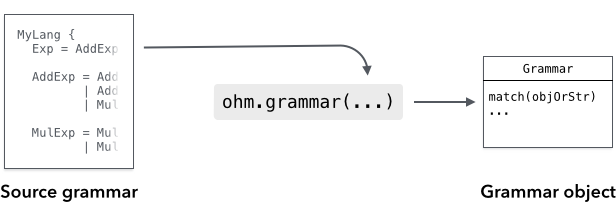
To use Ohm, you need a grammar that is written in the Ohm language. The grammar provides a formal
definition of the language or data format that you want to parse. There are a few different ways
you can define an Ohm grammar:
- The simplest option is to define the grammar directly in a JavaScript string and instantiate it
using `ohm.grammar()`. In most cases, you should use a [template literal with String.raw](https://developer.mozilla.org/en-US/docs/Web/JavaScript/Reference/Global_Objects/String/raw):
```js
const myGrammar = ohm.grammar(String.raw`
MyGrammar {
greeting = "Hello" | "Hola"
}
`);
```
- **In Node.js**, you can define the grammar in a separate file, and read the file's contents and instantiate it using `ohm.grammar(contents)`:
In `myGrammar.ohm`:
MyGrammar {
greeting = "Hello" | "Hola"
}
In JavaScript:
```js
const fs = require('fs');
const ohm = require('ohm-js');
const contents = fs.readFileSync('myGrammar.ohm', 'utf-8');
const myGrammar = ohm.grammar(contents);
```
For more information, see [Instantiating Grammars](doc/api-reference.md#instantiating-grammars) in the API reference.
#### Using Grammars
<!-- @markscript
// The duplication here is required because Markscript only executes top-level code blocks.
// TODO: Consider fixing this in Markscript.
const myGrammar = ohm.grammar('MyGrammar { greeting = "Hello" | "Hola" }');
-->
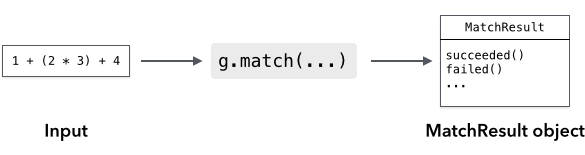
Once you've instantiated a grammar object, use the grammar's `match()` method to recognize input:
```js
const userInput = 'Hello';
const m = myGrammar.match(userInput);
if (m.succeeded()) {
console.log('Greetings, human.');
} else {
console.log("That's not a greeting!");
}
```
The result is a MatchResult object. You can use the `succeeded()` and `failed()` methods to see whether the input was recognized or not.
For more information, see the [main documentation](doc/README.md).
### Debugging
Ohm has two tools to help you debug grammars: a text trace, and a graphical visualizer.
[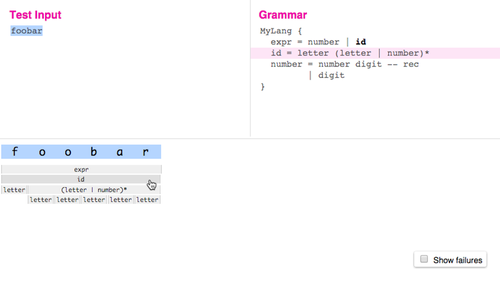](https://ohmjs.org/editor)
You can [try the visualizer online](https://ohmjs.org/editor).
To see the text trace for a grammar `g`, just use the [`g.trace()`](doc/api-reference.md#trace)
method instead of `g.match`. It takes the same arguments, but instead of returning a MatchResult
object, it returns a Trace object — calling its `toString` method returns a string describing
all of the decisions the parser made when trying to match the input. For example, here is the
result of `g.trace('ab').toString()` for the grammar `G { start = letter+ }`:
<!-- @markscript
markscript.transformNextBlock(function(code) {
const trace = ohm.grammar('G { start = letter+ }').trace('ab');
assert.equal(trace.toString().trim(), code.trim());
});
-->
```
ab ✓ start ⇒ "ab"
ab ✓ letter+ ⇒ "ab"
ab ✓ letter ⇒ "a"
ab ✓ lower ⇒ "a"
ab ✓ Unicode [Ll] character ⇒ "a"
b ✓ letter ⇒ "b"
b ✓ lower ⇒ "b"
b ✓ Unicode [Ll] character ⇒ "b"
✗ letter
✗ lower
✗ Unicode [Ll] character
✗ upper
✗ Unicode [Lu] character
✗ unicodeLtmo
✗ Unicode [Ltmo] character
✓ end ⇒ ""
```
## Publishing Grammars
If you've written an Ohm grammar that you'd like to share with others, see
our [suggestions for publishing grammars](./doc/publishing-grammars.md).
## Contributing to Ohm
Interested in contributing to Ohm? Please read [CONTRIBUTING.md](./CONTRIBUTING.md)
and the [Ohm Contributor Guide](doc/contributor-guide.md).