ofd_dev.js
Version:
189 lines (140 loc) • 7.06 kB
Markdown
# ofd.js
 [](./LICENSE)
目前方案采用wasm实现ofd解析、渲染、验签,不支持IE
examples已增加原生js、reactjs的demo
效果:

[体验地址](https://51shouzu.xyz)
[pc安装包](https://github.com/DLTech21/ofd.js/releases/download/0.2.8/ofd.js.Setup.1.0.0.exe)
## Usage with npm
```
npm i ofd.js
```
## Usage with CDN
引入
[https://cdn.jsdelivr.net/npm/ofd_parser.js](https://cdn.jsdelivr.net/npm/ofd_parser.js)
以及 [https://cdn.jsdelivr.net/npm/ofd.js]([https://cdn.jsdelivr.net/npm/ofd.js)
```js
<script src="https://cdn.jsdelivr.net/npm/ofd_parser.js"></script>
<script src="https://cdn.jsdelivr.net/npm/ofd.js"></script>
```
## 相关接口说明
#### webassembly加载回调,必须调用
Browser `<script>`:
```js
ofd.onWebassemblyRuntimeInitialized(()=>{
//后续接口
})
```
Webpack:
```js
import {onWebassemblyRuntimeInitialized} from './ofd.js'
onWebassemblyRuntimeInitialized(()=>{
//后续接口
})
```
#### 解析OFD文件
**此方法需要在webassembly回调后使用**
| 参数 | 说明 | 是否必填 |
| ----------- | ------------------------------------------------------------ | -------- |
| ofdFile | OFD文件。支持File、ArrayBuffer及url | 是 |
| secret | 校验码,demo提供的校验码有时间限制 | 是 |
| haaders | 如果url需要headers传入此参数,如{key1:value1, key2:value2} | 否 |
```
parseOfdDocument({
ofd: ofdFile,
secret: '6wsz1zH2NHnRKuvH',
success(core) {
console.log(core)
},
fail(error){
console.log(error)
}
})
```
#### 获取OFD文档页数
**此方法需要在parseOfdDocument success回调后使用**
| 参数 | 说明 | 是否必填 |
| ----------- | ------------------------------------------------------------ | -------- |
| documentIndex | ofd文档中document的索引,默认从0开始 | 是 |
```
getOFDPageCount(documentIndex)
```
#### 获取OFD文档对应页的页宽
**此方法需要在parseOfdDocument success回调后使用**
| 参数 | 说明 | 是否必填 |
| ----------- | ------------------------------------------------------------ | -------- |
| documentIndex | ofd文档中document的索引,默认从0开始 | 是 |
| pageIndex | ofd文档中页码,默认从0开始 | 是 |
```
pageWidth(documentIndex, pageIndex)
```
#### 获取OFD文档对应页的页高
**此方法需要在parseOfdDocument success回调后使用**
| 参数 | 说明 | 是否必填 |
| ----------- | ------------------------------------------------------------ | -------- |
| documentIndex | ofd文档中document的索引,默认从0开始 | 是 |
| pageIndex | ofd文档中页码,默认从0开始 | 是 |
```
pageHeight(documentIndex, pageIndex)
```
#### 获取OFD文档对应页的实际size以及渲染的size
**此方法需要在parseOfdDocument success回调后使用**
| 参数 | 说明 | 是否必填 |
| ----------- | ------------------------------------------------------------ | -------- |
| documentIndex | ofd文档中document的索引,默认从0开始 | 是 |
| pageIndex | ofd文档中页码,默认从0开始 | 是 |
| width | 预期渲染的宽度,像素值 ,如800 | 否 |
```
pageSize(documentIndex, pageIndex, width)
```
#### 一次性渲染OFD对应文档的所有页,适合页数少
**此方法需要在parseOfdDocument success回调后使用**
| 参数 | 说明 | 是否必填 |
| ----------- | ------------------------------------------------------------ | -------- |
| documentIndex | ofd文档中document的索引,默认从0开始 | 是 |
| width | 预期渲染的宽度,像素值 ,如800 | 否 |
```
renderOfd(documentIndex, width).then(divs=>{
// do something
})
```
#### 渲染OFD对应文档的对应页
**此方法需要在parseOfdDocument success回调后使用**
| 参数 | 说明 | 是否必填 |
| ----------- | ------------------------------------------------------------ | -------- |
| documentIndex | ofd文档中document的索引,默认从0开始 | 是 |
| pageIndex | ofd文档中页码,默认从0开始 | 是 |
| width | 预期渲染的宽度,像素值 ,如800 | 否 |
```
renderOfdByIndex(documentIndex, pageIndex, width).then(div => {
// do something
}})
```
#### 打开一个基础的内置ofdview。适合打开大于100页的文档,具体看examples中的html例子
html需要添加一个id为xxx的div容器,其中overflow必须设置为auto,width和height必须设置
```
<div id="OfdView" style="overflow:auto;width:800px;height:1000px"></div>
```
**此方法需要在webassembly回调后使用**
| 参数 | 说明 | 是否必填 |
| ----------- | ------------------------------------------------------------ | -------- |
| ofdFile | OFD文件。支持File、ArrayBuffer及url | 是 |
| secret | 校验码,demo提供的校验码有时间限制 | 是 |
| contentDiv | document.getElementById('xxx') | 是 |
| expectWidth | 期望渲染的每页宽度 | 否 |
```
openOFDBaseViewer(ofdFile, secret, contentDiv, expectWidth)
```
### 获取帮助
如需获取帮助可以扫码加微信或者知识星球


### 微信小程序体验OFD

## ofd推荐项目
[OFD Reader & Writer](https://github.com/Trisia/ofdrw)
[ofd.android](https://github.com/DLTech21/ofd.android)
### 项目关注度
> 项目获得 Star曲线
[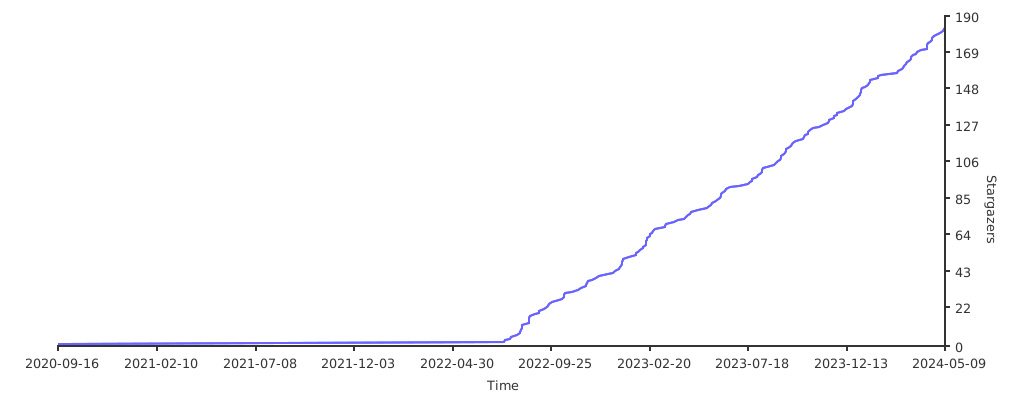](https://starchart.cc/DLTech21/ofd.js)