npm-woocommerce-api
Version:
Connects NodeJS to the WooCommerce API even though permalink doesnt in active state.
114 lines (80 loc) • 5.15 kB
Markdown
# npm-woocommerce-api
Connects NodeJS to the WooCommerce API even though permalink doesnt in active state.
## Speciality of this module
In this npm module we added an option "permalink". It will help you to mention and inform to the wordpress api to provide restfull api with endpoints or non restfull api with endpoints based on "permalink" option. If you set "permalink" as "plain" (that is inactive) in your wordpress website, existing npm modules for woocommerce api wont work. But, npm-woocommerce-api will work perfectly even though you set "permalink" as "plain" in your wordpress website.
## Installation
To install the module using NPM:
```
npm install npm-woocommerce-api --save
```
## Setup
You will need a consumer key and consumer secret to call your store's WooCommerce API. You can find instructions [here](http://docs.woothemes.com/document/woocommerce-rest-api/)
Include the 'npm-woocommerce-api' module within your script and instantiate it with a config:
```javascript
var NPMWooCommerceAPI = require('npm-woocommerce-api');
var NPMWooCommerceAPI = new NPMWooCommerceAPI({
url: 'https://yourstore.com',
ssl: true,
consumerKey: 'ck_xxxxxxxxxxxxxxxxxxxxxxxxxxxxx',
secret: 'cs_xxxxxxxxxxxxxxxxxxxxxxxxxxxxxxxxx'
});
```
**Instantiating a NPMWooCommerceAPI instance without a url, consumerKey or secret will result in an error being thrown**
## Options
When instantiating the NPMWooCommerceAPI object you have a choice of the following configuration options:
| option | type | required | description |
|-------------|---------|----------|-------------------------------------------------------------------------------------------------------------------------------------|
| url | string | yes | The url of your store including the protocol: http://yourstore.com, https://yoursecurestore.com |
| consumerKey | string | yes | The consumer key generated in the store admin |
| secret | string | yes | The consumer secret generated in the store admin |
| ssl | boolean | no | (default: based on protocol, https = true, http = false) this is automatically set by default, but can be forced by setting the ssl option |
| logLevel | number | no | (default: 0) 0 shows errors only, 1 shows info and errors for debugging |
| apiPath | string | no | (default: '/wc-api/v2') The path to your API, it should contain a leading slash and no trailing slash |
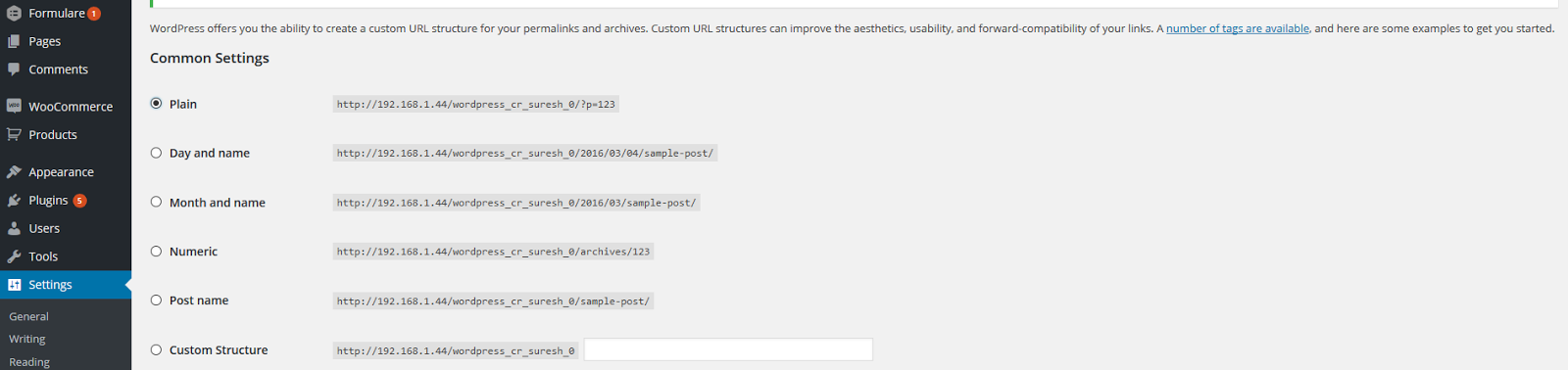
| permalink | number | no | (default: 1) 1: active, 0: inactive (default: 1). If your store is having permalink as "Plain", you should use this option with the value as 0. Then only, you can get valid response which consists the required data. Because, based on wordpress permalink active state, rest api will work. If wordpress permalink set as "Plain", rest api wont work and woocommerce api will give an error message.
**For your reference, kindly see the following screenshot.**
This screenshot depicts about "permalink" inactive state.
## Calling the API
Your WooCommerce API can be called once the NPMWooCommerceAPI object has been instantiated (see above).
### GET
```javascript
NPMWooCommerceAPI.get('/products', function(err, data, res){
// err will return any errors that occur
// data will contain the body content from the request
// res is the full response object, use this to get headers etc
});
```
### POST
For this example you have a [coupon object](http://woothemes.github.io/woocommerce-rest-api-docs/#create-a-coupon).
```javascript
NPMWooCommerceAPI.post('/coupons', couponObject, function(err, data, res){
// err will return any errors that occur
// data will contain the body content from the request
// res is the full response object, use this to get headers etc
});
```
### PUT
```javascript
var couponUpdate = {
amount: 5
};
NPMWooCommerceAPI.put('/coupons/1234', couponUpdate, function(err, data, res){
// err will return any errors that occur
// data will contain the body content from the request
// res is the full response object, use this to get headers etc
});
```
### DELETE
```javascript
NPMWooCommerceAPI.delete('/coupons/1234', function(err, data, res){
// err will return any errors that occur
// data will contain the body content from the request
// res is the full response object, use this to get headers etc
});
```
## Testing
```
npm test
```
# License
[GPL 3.0](http://www.gnu.org/licenses/gpl-3.0.en.html)