noshift.js
Version:
Joke language.
398 lines (284 loc) • 8.68 kB
Markdown
[](https://www.npmjs.com/package/noshift.js) [](./LICENSE)
# NoShift.js
<div align="center">
<img src="https://raw.githubusercontent.com/otoneko1102/NoShift.js/refs/heads/main/icon.png" alt="noshift.js" width="128" height="128">
</div>
<div align="center">
[English](./README.md) | **日本語**
</div>
> Shift キーを押さずに JavaScript を書ける Joke 言語
記号 (`!`, `"`, `(`, `)`, `{`, `}` …) を入力するときに Shift を押すのが面倒なので、Shift を押さずに JavaScript が書けるようにした Joke 言語です。
`^` プレフィックスのシーケンスで Shift が必要な記号を表現し、`.nsjs` ファイルは `nsc` CLI を使って JavaScript にコンパイルされます。
---
## インストール
### グローバルインストール
```bash
npm install -g noshift.js@latest
```
### ローカルインストール
```bash
npm install -D noshift.js@latest
```
---
## はじめに
```bash
# 新しいプロジェクトを作成
# グローバル
nsc create my-project
# ローカル
npx nsc create my-project
# または、現在のディレクトリに nsjsconfig.json だけを作成
# グローバル
nsc init
# ローカル
npx nsc init
```
---
## CLI リファレンス
`nsc` は NoShift.js のコンパイラ CLI です。
| コマンド | エイリアス | 説明 |
|---|---|---|
| `nsc` / `npx nsc` | | `nsjsconfig.json` を使って `.nsjs` → `.js` にコンパイル |
| `nsc watch` / `npx nsc watch` | `nsc -w` `nsc --watch` | 変更を監視して自動的に再コンパイル |
| `nsc init` / `npx nsc init` | `nsc --init` | 現在のディレクトリに `nsjsconfig.json` を作成 |
| `nsc clean` / `npx nsc clean` | `nsc --clean` | 出力ディレクトリ (`outdir`) を削除 |
| `nsc run <file>` / `npx nsc run <file>` | `nsc -r <file>` `nsc --run <file>` | `.nsjs` ファイルを直接実行 |
| `nsc create [name]` / `npx nsc create [name]` | `nsc --create [name]` | 新しいプロジェクトを作成(`--no-linter` / `--no-prettier` でスキップ) |
| `nsc version` / `npx nsc version` | `nsc -v` `nsc --version` | バージョンを表示 |
| `nsc help` / `npx nsc help` | `nsc -h` `nsc --help` | ヘルプを表示 |
**オプション:**
| オプション | 説明 |
|---|---|
| `--no-header` | 出力ファイルの `// Generated by NoShift.js` ヘッダーコメントを抑制 |
---
## nsjsconfig.json
プロジェクトルートに `nsjsconfig.json` を置くとコンパイル設定を行えます。
`nsc init` または `nsc create` で自動生成されます。
```json
{
"compileroptions": {
"rootdir": "src",
"outdir": "dist",
"warnuppercase": true,
"capitalizeinstrings": true,
"noheader": false
}
}
```
| オプション | デフォルト | 説明 |
|---|---|---|
| `compileroptions.rootdir` | `"src"` | ソースディレクトリ |
| `compileroptions.outdir` | `"dist"` | 出力ディレクトリ |
| `compileroptions.warnuppercase` | `true` | ソースコード内の大文字を警告 |
| `compileroptions.capitalizeinstrings` | `true` | 文字列リテラル内で `^6` 大文字化修飾子を有効にする |
| `compileroptions.noheader` | `false` | `// Generated by NoShift.js` ヘッダーコメントを抑制 |
---
## 記号マップ
> この変換表は NoShift.js 開発者のキーボード(JIS 配列)が基準です。
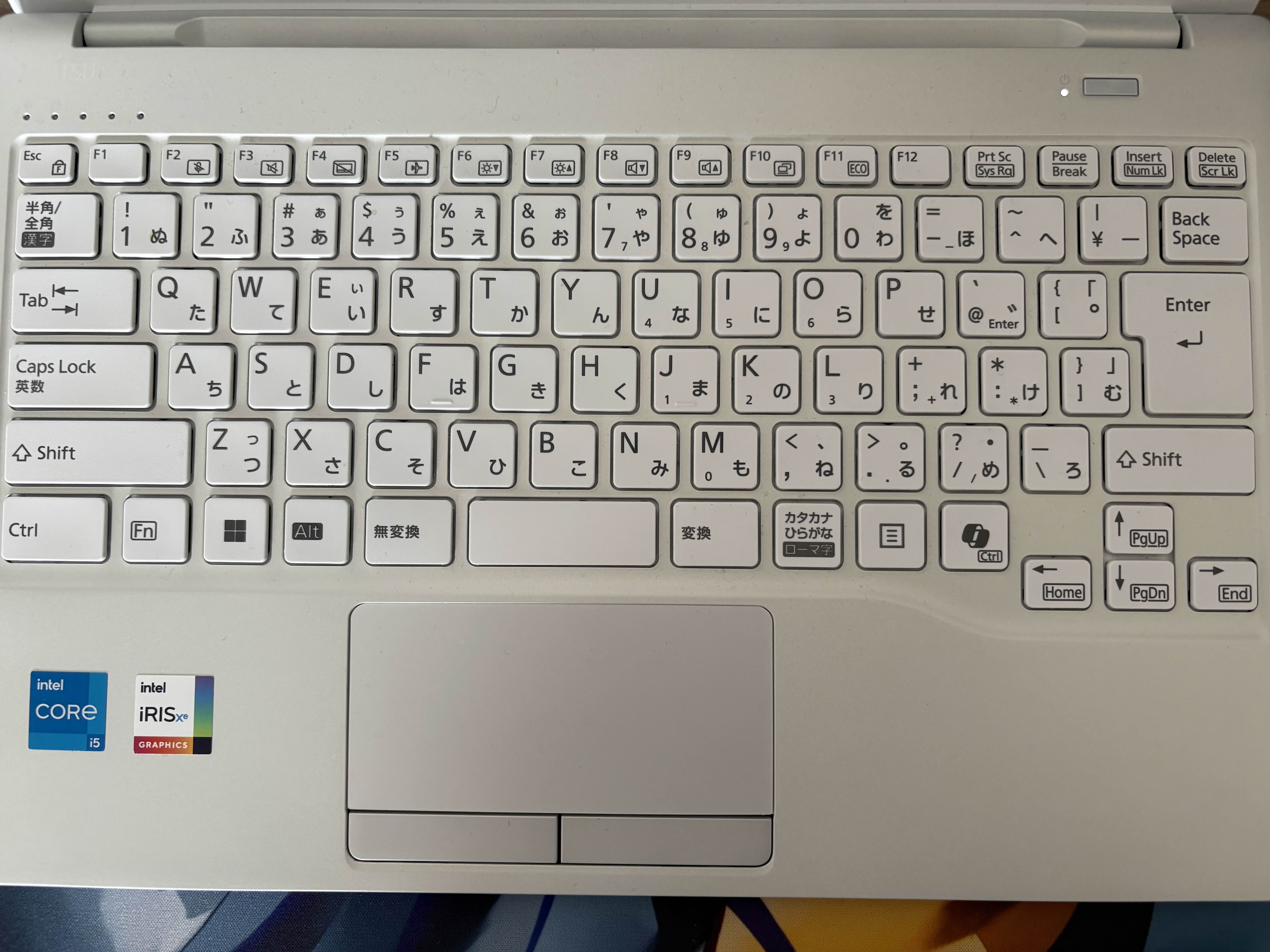
| NoShift | JS | | NoShift | JS |
|:-------:|:--:|---|:-------:|:--:|
| `^1` | `!` | | `^^` | `~` |
| `^2` | `"` | | `^\` | `_` |
| `^3` | `#` | | `^@` | `` ` `` |
| `^4` | `$` | | `^[` | `{` |
| `^5` | `%` | | `^]` | `}` |
| `^6x` | `X`(大文字化) | | `^;` | `+` |
| `^7` | `'` | | `^:` | `*` |
| `^8` | `(` | | `^,` | `<` |
| `^9` | `)` | | `^.` | `>` |
| `^-` | `=` | | `^/` | `?` |
| `^0` | `^` (XOR) | | | |
テンプレート式: `^4^[` → `${`
キーワード: `or` → `||`, `and` → `&&`, `@or` → `|`, `@and` → `&`
Shebang: `#^1` → `#!`(先頭行のみ)
```nsjs
#^1/usr/bin/env node
console.log^8^2^6hello^2^9;
```
```js
#!/usr/bin/env node
console.log("Hello");
```
---
## 構文サンプル
### Hello World
```nsjs
console.log^8^2^6hello, ^6world!^2^9;
```
```js
console.log("Hello, World!");
```
### 大文字化修飾子
`^6` は次の文字を大文字にします:
```nsjs
class ^6animal ^[
^]
```
```js
class Animal {
}
```
### コメント
```nsjs
// 行コメント
/^: ブロックコメント ^:/
/^:
複数行の
ブロックコメント
^:/
```
```js
// 行コメント
/* ブロックコメント */
/*
複数行の
ブロックコメント
*/
```
### 変数とアロー関数
```nsjs
const add ^- ^8a, b^9 ^-^. a ^; b;
const result ^- add^85, 3^9;
console.log^8result^9; // 8
```
```js
const add = (a, b) => a + b;
const result = add(5, 3);
console.log(result); // 8
```
### 文字列
```nsjs
// ダブルクォート文字列
const s1 ^- ^2^6hello^2;
// シングルクォート文字列
const s2 ^- ^7^6world^7;
// テンプレートリテラル
const s3 ^- ^@^4^[s1^] ^4^[s2^]^@;
// エスケープ: ^2...^2 内の \^2 はリテラルの ^2 に展開される
const s4 ^- ^2quote: \^2^2;
```
```js
const s1 = "Hello";
const s2 = 'World';
const s3 = `${s1} ${s2}`;
const s4 = "quote: ^2";
```
### オブジェクトと配列
```nsjs
const obj ^- ^[
name: ^2NoShift^2,
version: 1,
isJoke: true
^];
const arr ^- [1, 2, 3];
```
```js
const obj = {
name: "NoShift",
version: 1,
isJoke: true
};
const arr = [1, 2, 3];
```
### クラス
```nsjs
class ^6animal ^[
constructor^8name^9 ^[
this.name ^- name;
^]
speak^8^9 ^[
console.log^8^@^4^[this.name^] speaks.^@^9;
^]
^]
const dog ^- new ^6animal^8^2^6dog^2^9;
dog.speak^8^9;
```
```js
class Animal {
constructor(name) {
this.name = name;
}
speak() {
console.log(`${this.name} speaks.`);
}
}
const dog = new Animal("Dog");
dog.speak();
```
### 条件分岐とループ
```nsjs
const x ^- 10;
if ^8x ^. 5^9 ^[
console.log^8^2big^2^9;
^] else ^[
console.log^8^2small^2^9;
^]
for ^8let i ^- 0; i ^, 3; i^;^;^9 ^[
console.log^8i^9;
^]
```
```js
const x = 10;
if (x > 5) {
console.log("big");
} else {
console.log("small");
}
for (let i = 0; i < 3; i++) {
console.log(i);
}
```
---
## プログラマティック API
コード内からライブラリとして `.nsjs` コードをコンパイルできます。
### ESM
```js
import { compile } from "noshift.js";
const result = compile('console.log^8^2^6hello^2^9;');
console.log(result.outputText);
// => console.log("Hello");
```
### CJS
```js
const { compile } = require("noshift.js");
const result = compile('console.log^8^2^6hello^2^9;');
console.log(result.outputText);
// => console.log("Hello");
```
### オプション
```js
const result = compile(source, {
capitalizeInStrings: false, // 文字列内の ^6 を無効化
});
```
### 構文診断
`diagnose()` を使ってコンパイル前に構文エラーをチェックできます:
```js
import { diagnose } from "noshift.js";
const errors = diagnose(source);
if (errors.length > 0) {
for (const e of errors) {
console.error(`Line ${e.line}:${e.column} - ${e.message}`);
}
}
```
---
## ファイル名の規則
`_` で始まるファイルはコンパイル対象から除外されます(パーシャル・ユーティリティ用途に便利)。
```
src/
index.nsjs ← コンパイルされる
_helpers.nsjs ← スキップされる
```
---
## 関連リンク / エコシステム
- [noshift.js (npm)](https://www.npmjs.com/package/noshift.js) — コアコンパイラ CLI
- [@noshift.js/lint (npm)](https://www.npmjs.com/package/@noshift.js/lint) — 公式リンター
- [prettier-plugin-noshift.js (npm)](https://www.npmjs.com/package/prettier-plugin-noshift.js) — 公式 Prettier プラグイン
- [VS Code 拡張機能](https://marketplace.visualstudio.com/items?itemName=otoneko1102.noshift-vscode) — エディタサポート(シンタックスハイライト、スニペット等)
- [ウェブサイト・プレイグラウンド](https://noshift.js.org)
- [リポジトリ](https://github.com/otoneko1102/NoShift.js)
---
## ライセンス
MIT © otoneko.