northem-light
Version:
A north-bluish, light color palette.
102 lines (75 loc) • 8.21 kB
Markdown
<p align="center"><img src="https://cdn.rawgit.com/arcticicestudio/northem-light/develop/src/assets/northem-light-logo-banner.svg"/></p>
<p align="center"><img src="https://cdn.travis-ci.org/images/favicon-c566132d45ab1a9bcae64d8d90e4378a.svg" width=24 height=24/> <a href="https://travis-ci.org/arcticicestudio/northem-light"><img src="https://img.shields.io/travis/arcticicestudio/northem-light/develop.svg"/></a> <img src="https://circleci.com/favicon.ico" width=24 height=24/> <a href="https://circleci.com/gh/arcticicestudio/northem-light"><img src="https://circleci.com/gh/arcticicestudio/northem-light.svg?style=shield&circle-token=0552e1698e2c4fb79447a839fe3cc222c3d21e42"/></a> <img src="https://assets-cdn.github.com/favicon.ico" width=24 height=24/> <a href="https://github.com/arcticicestudio/northem-light/releases/latest"><img src="https://img.shields.io/github/release/arcticicestudio/northem-light.svg"/></a> <a href="https://github.com/arcticicestudio/northem-light/releases/latest"><img src="https://img.shields.io/badge/pre--release---_-blue.svg"/></a> <img src="https://www.npmjs.com/static/images/touch-icons/favicon-32x32.png" width=24 height=24/> <a href="https://www.npmjs.com/package/northem-light"><img src="https://img.shields.io/npm/v/northem-light.svg"/></a> <a href="https://www.npmjs.com/package/northem-light"><img src="https://img.shields.io/npm/dt/northem-light.svg"/></a> <a href="https://www.npmjs.com/package/northem-light"><img src="https://img.shields.io/npm/dm/northem-light.svg"/></a></p>
<p align="center">A north-bluish, light color palette.</p>
<p align="center">Created for the clean- and minimal flat design pattern to achieve a optimal focus and readability for code syntax highlighting and UI.
It consists of a total of sixteen, carefully selected, dimmed pastel colors for a eye-comfortable, but yet colorful ambiance.</p>
<p align="center">This project is a light, more color-intensive variation of the origin project <a href="https://github.com/arcticicestudio/northem">Northem</a>.</p>
---
The color palette it divided into four named components to represent the different color effects.
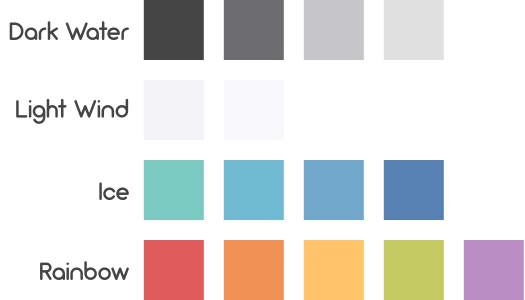
Northem Light colors are numbered from `northem-light0` to `northem-light15` where each component contains a different amount of colors:
1. **Dark Water** `northem-light0` - `northem-light3`
2. **Light Wind** `northem-light4` - `northem-light6`
3. **Ice** `northem-light7` - `northem-light10`
4. **Rainbow** `northem-light11` - `northem-light15`
This naming convention allows an uncomplicated use for terminals and preserves the compatibility to similar projects like [base16](http://chriskempson.com/projects/base16).
## Usage
To show a list of all available [Gulp][gulp] tasks run `gulp` or `gulp help`.
### CSS
The [CSS specification](https://www.w3.org/TR/css-variables) supports the usage of primitive value types to define custom properties which can be used to create e.g. color variables.
Northem provides the `template-css.scss` template file to compile a `northem-light.css` stylesheet.
The generated file contains all Northem Light color variables prefixed with `--` inside the `:root` pseudo-class.
The `:root` pseudo-class represents an element that is the root of the document.
This is always the HTML (`<html>`) element which allows to use the Northem Light color variables for the whole document.
The `northem-light.css` stylesheet can be compiled via [Gulp][gulp]:
```sh
npm install
gulp compile-css-template
```
### <img src="http://sass-lang.com/favicon.ico" width=16 height=16 /> Sass
Copy the `northem-light.scss` file into your project and import it in your [Sass](http://sass-lang.com) files:
```css
@import "northem-light";
```
The `.scss` file extension is optional.
#### <img src="http://sassdoc.com/favicon.png" width=16 height=16 /> SassDoc
Northem Light Sass sources are documented using the [SassDoc](http://sassdoc.com) documentation syntax which can be compiled to a HTML documentation via [Gulp][gulp]:
```sh
npm install
gulp sassdoc
```
The Sassdoc theme can be changed by editing the `.sassdocrc` configuration file.
### <img src="http://lesscss.org/public/ico/favicon.ico" width=16 height=16/> LESSCSS
Copy the `northem-light.less` file into your project and import it in your [LESSCSS](http://lesscss.org) files:
```css
@import "northem-light";
```
Information about how the `@import` statement handles imports with different file extensions can be found in the [official LESSCSS documentation](http://lesscss.org/features/#import-directives-feature).
#### KSS
Northem Light LESSCSS sources are documented using the [KSS](http://warpspire.com/kss) documentation syntax.
Information about the generation of a styleguide can be found in the [official KSS documentation](http://warpspire.com/kss/styleguides).
### <img src="https://cdn.rawgit.com/arcticicestudio/northem-light/develop/src/assets/icon-color-swatch.svg"/> Color Swatches
Northem Light is available in various native formats:
- `.aco` Adobe Photoshop Palette
- `.ase` Adobe Swatch Exchange
- `.gpa` Gpick Palette
- `.gpl` GIMP/Inkscape/CinePaint/Krita Palette
- `.mtl` Alias/WaveFront Material
A list of detailed information about each file format can be found [here](http://www.selapa.net/swatches/colors/fileformats.php).
## Projects
[](https://atom.io/themes/northem-light-atom-syntax)
[](https://atom.io/themes/northem-light-atom-ui)
[](https://github.com/arcticicestudio/northem-light-eclipse-syntax)
[](https://github.com/arcticicestudio/northem-light-intellij-idea-syntax)
[](https://github.com/arcticicestudio/northem-light-java)
[](https://github.com/arcticicestudio/northem-light-notepadplusplus)
[](https://github.com/arcticicestudio/northem-light-terminix)
[](https://github.com/arcticicestudio/northem-light-vim)
## Development
[](https://github.com/arcticicestudio/northem-light/blob/v2.0.1/CHANGELOG.md) [](http://nvie.com/posts/a-successful-git-branching-model) [](https://github.com/arcticicestudio/arcver)
### Contribution
Please report issues/bugs, feature requests and suggestions for improvements to the [issue tracker](https://github.com/arcticicestudio/northem-light/issues).
<p align="center"><img src="https://cdn.rawgit.com/arcticicestudio/nord/develop/src/assets/banner-footer-mountains.svg" /></p>
<p align="center"> <img src="http://arcticicestudio.com/favicon.ico" width=16 height=16/> Copyright © 2016 Arctic Ice Studio</p>
<p align="center"><a href="http://www.apache.org/licenses/LICENSE-2.0"><img src="https://img.shields.io/badge/License-Apache_2.0-blue.svg"/></a> <a href="https://creativecommons.org/licenses/by-sa/4.0"><img src="https://img.shields.io/badge/License-CC_BY--SA_4.0-blue.svg"/></a></p>
[gulp]: http://gulpjs.com