nodeplotlib
Version:
NodeJS frontend-less plotting lib using plotly.js inspired by matplotlib
207 lines (157 loc) • 6.17 kB
Markdown
# <img src="https://raw.githubusercontent.com/ngfelixl/nodeplotlib/master/img/nodeplotlib_64x64.png" width="28px" height="28px"> NodePlotLib
[](https://github.com/ngfelixl/nodeplotlib/actions?query=workflow%3A%22Node.js+CI%22)
[](https://npmjs.com/package/nodeplotlib)
[](https://npmjs.com/package/nodeplotlib)
[](https://github.com/prettier/prettier)
[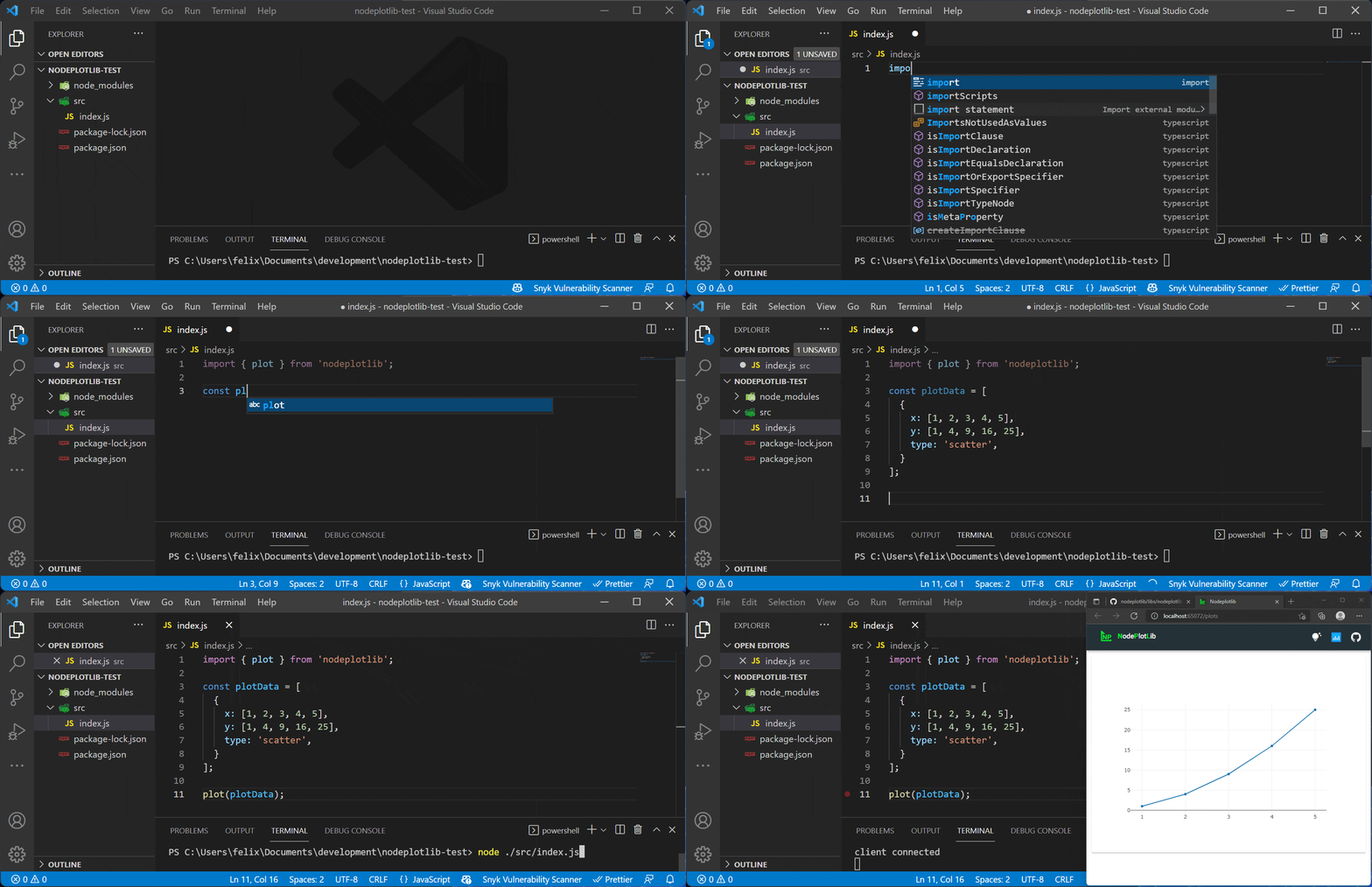](https://raw.githubusercontent.com/ngfelixl/nodeplotlib/master/img/animation-next.gif)
Library to create plots directly in TypeScript or JavaScript in NodeJS on top of [plotly.js](https://plot.ly/javascript/)
without any front-end preparations. Inspired by matplotlib.
## Installation
```sh
npm install nodeplotlib
# or
yarn add nodeplotlib
```
## Usage
### Creating a simple plot
Use with TypeScript/JavaScript:
```typescript
import { plot, Plot } from 'nodeplotlib';
const data: Plot[] = [
{
x: [1, 3, 4, 5],
y: [3, 12, 1, 4],
type: 'scatter',
},
];
plot(data);
```
### Creating a stream that plots data in realtime
NodePlotLib makes use of the popular [RxJS](https://rxjs.dev) library,
which provides functionality for streams, stream creator functions (e.g. from interval or from event),
and tons of operators to modify your stream.
In this example we create a stream based on an interval which triggers every 100ms. Then we modify
the output of the interval (which is just a counter) to be an actual `Plot` using RxJS' `map` operator.
The output will be a `sin` function.
```typescript
import { plot, Plot } from 'nodeplotlib';
import { interval, map } from 'rxjs';
const stream$: Observable<Plot[]> = interval(100).pipe(
map(createSinusPlotFromNumber)
);
function createSinusPlotFromNumber(num: number): Plot[] {
const data: Plot[] = [
{
x: [0, 1, 2, 3, 4, 5, 6, 7, 8, 9],
y: Array(10)
.fill(0)
.map((_, i) => Math.sin(num + i)),
type: 'scatter',
},
];
return data;
}
```
As you can see, providing a function for a dynamic plot seems to be a good idea.
The functions content looks almost the same as the "non-stream" version. Simple as
that, you can just put the created Observable as an argument in the plot function:
```typescript
plot(stream$);
```
### API overview
There are three exports. The `plot` function and types for the Plot and for the Layout.
```typescript
import { plot, Plot, Layout, Config } from 'nodeplotlib';
```
The `plot` function has the following structure
```typescript
function plot(
data: Plot[] | Observable<Plot[]>,
layout?: Layout,
config?: Config
): void;
```
It does not return a Subscription for the Observables because you just need to close
the listening browser window to unsubscribe from all Obserables.
## Examples
In this section there are some examples to getting started. See the full plotly
[cheatsheet](https://images.plot.ly/plotly-documentation/images/plotly_js_cheat_sheet.pdf?_ga=2.2676214.711017137.1550402185-1513144731.1549064935).
#### Line Plots
```typescript
const trace1: Plot = { x: [1, 2], y: [1, 2], type: 'scatter' };
const trace2: Plot = { x: [3, 4], y: [9, 16], type: 'scatter' };
plot([trace1, trace2]);
```
#### Bar Charts
```typescript
const trace: Plot = { x: [1, 2], y: [1, 2], type: 'bar' };
plot([trace]);
```
#### 3D Line Plots
```typescript
const trace: Plot = {
x: [9, 8, 5, 1],
y: [1, 2, 4, 8],
z: [11, 8, 15, 3],
type: 'scatter3d',
};
plot([trace]);
```
#### 3D Surface Plots
```typescript
const trace: Plot = {
colorscale: 'Viridis',
z: [
[3, 5, 7, 9],
[21, 13, 8, 5],
],
};
plot([trace]);
```
#### Radial Plots
In order to style the plot, one is able to pass in the `layout` parameter, which internally
is typeof `Partial<Layout>` from plotly's `Layout`. See the full layout documentation
[here](https://plot.ly/javascript/#layout-options).
With this parameter one is able to define styles like _title_, _axis labels_,
_subplots_ and many more.
```typescript
const data: Plot[] = [
{
type: 'scatterpolar',
r: [1.5, 10, 39, 31, 15, 1.5],
theta: ['A', 'B', 'C', 'D', 'E', 'A'],
fill: 'toself',
name: 'Group B',
},
];
const layout: Layout = {
polar: {
radialaxis: {
visible: true,
range: [0, 50],
},
},
};
plot(data, layout);
```
## Plot types
| Simple charts | Advanced charts | 3D Plots |
| --------------- | ---------------- | -------- |
| Scatter | 2d density plots | Scatter |
| Line | Histograms | Surface |
| Bar | Box-plots | Lines |
| Pie charts | Contour plots | |
| Sankey diagrams | Heatmaps | |
| Tables | Radar charts | |
## Contributing
Contributions in all forms are welcome.
## Developers guide
You can find the developers guide in the repositories root
[README.md](https://github.com/ngfelixl/nodeplotlib).
## Contributors
<a href="https://github.com/ngfelixl"><img src="https://avatars2.githubusercontent.com/u/24190530" title="ngfelixl" width="100" height="100"></a>
<a href="https://github.com/mitsos1os"><img src="https://avatars3.githubusercontent.com/u/8208733" title="mitsos1os" width="100" height="100"></a>
<a href="https://github.com/medved-nsk"><img src="https://avatars1.githubusercontent.com/u/6310906" title="medved-nsk" width="100" height="100"></a>
<a href="https://github.com/Moumouls"><img src="https://avatars.githubusercontent.com/u/27959372" title="Moumouls" width="100" height="100"></a>
<a href="https://github.com/grgr-dkrk"><img src="https://avatars.githubusercontent.com/u/40130327" title="guruguru-dekiruko" width="100" height="100"></a>
<a href="https://github.com/nathanbabcock"><img src="https://avatars.githubusercontent.com/u/9583103" title="nathanbabcock" width="100" height="100"></a>