nodejs-google-adwords
Version:
Google Ads API Client Library for Node.js
161 lines (122 loc) • 6.27 kB
Markdown
# nodejs google adwords
[![NPM Downloads][downloads-image]][downloads-url]
![LICENSE][license-image]
[](https://travis-ci.org/mrdulin/nodejs-google-adwords)
[](https://coveralls.io/github/mrdulin/nodejs-google-adwords?branch=master)
[](https://david-dm.org/mrdulin/nodejs-google-adwords)
[](https://david-dm.org/mrdulin/nodejs-google-adwords?type=dev)
[](https://stackshare.io/mrdulin/nodejs-google-adwords)
[](https://github.com/facebook/jest)
Google Ads API Client Library for Node.js. This library is developed for Google Adwords SOAP + WSDL API (v201809).
## OAuth
Replace your GCP OAuth 2.0 client ID and open this link in browser,
```bash
https://accounts.google.com/o/oauth2/auth?client_id={Your Client ID}&response_type=code&scope=https%3A%2F%2Fwww.googleapis.com%2Fauth%2Fadwords&redirect_uri=urn:ietf:wg:oauth:2.0:oob&access_type=offline&approval_prompt=auto
```
The OAuth2.0 Client type should be `other`, not web application
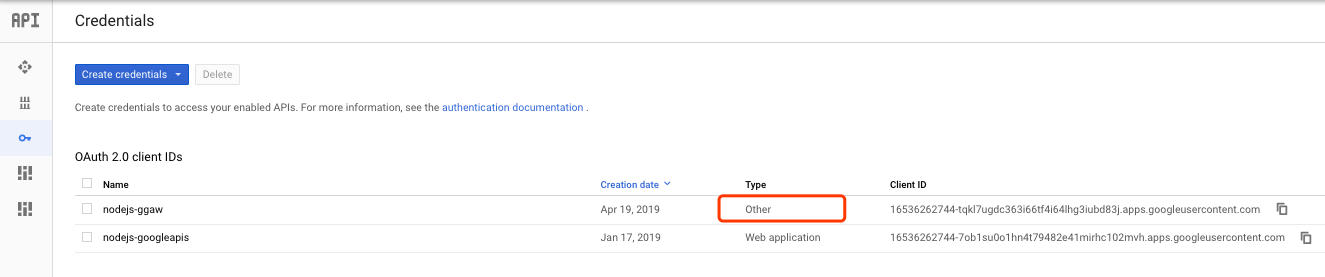
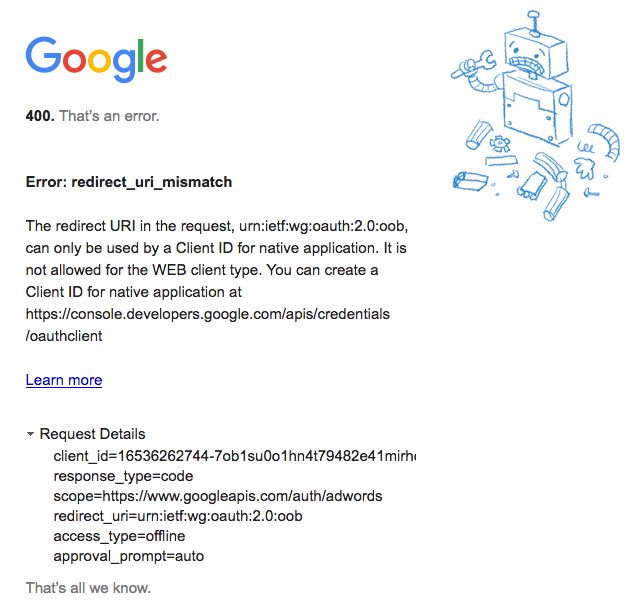
If you use client id which client type is `web application`, you will get below error:
After finish the oauth workflow, you will get authorization code, for example: `4/0wA_JBMyfVH1ZEqZlAr0sOn_XmdzUrBgCjrpi9fVs9TudrjZUDzuUmU`
Using authorization code exchange credentials:
```bash
curl \
-d code=4/MgGqR_qEUkzq95LlP_Am8clUbX8t733PvtoMuZ_xsmAA8NHdjK07xXo \
-d client_id=<client id> \
-d client_secret=<client secret> \
-d redirect_uri=urn:ietf:wg:oauth:2.0:oob \
-d grant_type=authorization_code https://accounts.google.com/o/oauth2/token
```
Credentials response:
```bash
{
"access_token": "<Access token>",
"expires_in": 3600,
"refresh_token": "<Refresh token>",
"scope": "https://www.googleapis.com/auth/adwords",
"token_type": "Bearer"
}
```
You can revoke your access token from: https://myaccount.google.com/u/0/permissions
Above workflow is only for server-side local development without a front-end(client-side), after you make a front-end application, then you can create a OAuth2.0 Client on GCP with `web application` type and set up your `Authorized JavaScript origins` and `Authorized redirect URIs` like below:
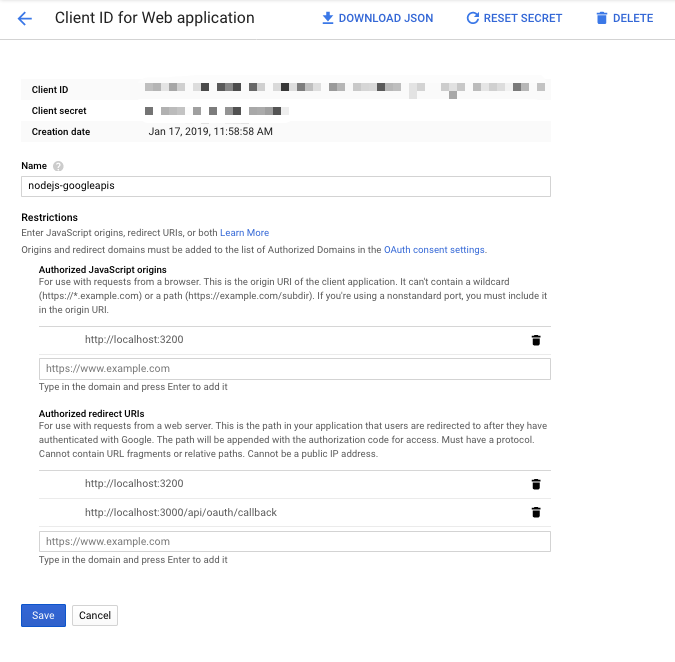
Then, when user perform the oauth workflow, you can confirm the oauth workflow on server-side, and store the `refresh_token`, `access_token` and other informations in your database. When user click `create campaign` button on your front-end application, it will send a HTTP request to your server-side, then, you can get the user's `access_token` from database, can call google adwords api using this `access_token`.
## Environment variables
```txt
ADWORDS_CLIENT_ID=<GCP OAuth 2.0 client ID>
ADWORDS_SECRET=<GCP OAuth 2.0 client secret>
ADWORDS_DEVELOPER_TOKEN=<Google Adwords Developer Token>
ADWORDS_CLIENT_CUSTOMER_ID=153-935-9847
ADWORDS_USER_AGENT=Google Ads API Client Library for Node.js
ADWORDS_REFRESH_TOKEN=<OAuth Refresh Token>
```
Put above environment variables into `.env` file for local development.
## Usage
Initialize `AdwordsService` with above environment variables
```ts
const adwordsService = new AdWordsService({
clientCustomerId: credentials.ADWORDS_CLIENT_CUSTOMER_ID,
developerToken: credentials.ADWORDS_DEVELOPER_TOKEN,
userAgent: credentials.ADWORDS_USER_AGENT,
clientId: credentials.ADWORDS_CLIENT_ID,
clientSecret: credentials.ADWORDS_SECRET,
credentials: {
refresh_token: credentials.ADWORDS_REFRESH_TOKEN,
},
});
```
Get budgets by page:
```ts
async function getByPage() {
const budgetService = adwordsService.getService('BudgetService');
const paging: IPaging = {
startIndex: 0,
numberResults: 2,
};
const actualValue = await budgetService.getByPage(paging);
}
```
Create a budget:
```ts
async function createBudget() {
const budgetService = adwordsService.getService('BudgetService');
const budget: IBudget = {
name: faker.lorem.word(),
amount: {
microAmount: BudgetService.UNIT,
},
deliveryMethod: Budget.BudgetDeliveryMethod.STANDARD,
isExplicitlyShared: false,
status: Budget.BudgetStatus.ENABLED,
};
const actualValue = await budgetService.add(budget);
}
```
Get campaigns by page:
```ts
async function getCampaignsByPages() {
const paging: IPaging = {
startIndex: 0,
numberResults: 1,
};
const actualValue = await campaignService.getByPage(paging);
}
```
Same usage for other Google Adwords resources
## TODO
- [ ] <https://developers.google.com/adwords/api/docs/guides/batch-jobs>
- [ ] <http://adwordsapi.blogspot.in/2011/03/concurrency-management-in-adwords-api.html>
- [ ] Add model layer and object schema validation
## References
- <https://developers.google.com/adwords/api/docs/reference/release-notes/v201809?refresh=1>
- <https://github.com/googleads/googleads-python-lib/wiki>
- <https://developers.google.com/adwords/api/docs/guides/authentication>
- <https://developers.google.com/adwords/api/docs/guides/objects-methods>
- <https://developers.google.com/adwords/api/docs/samples/php/basic-operations#add-expanded-text-ads-to-an-ad-group>
- <https://developers.google.com/adwords/api/docs/guides/bestpractices>
- <https://developers.google.com/adwords/api/docs/guides/authentication#optimizing_oauth2_requests>
- <https://developers.google.com/adwords/api/docs/appendix/geotargeting#dma>
- <https://developers.google.com/adwords/api/docs/guides/reporting>
[downloads-image]: https://img.shields.io/npm/dt/nodejs-google-adwords.svg
[downloads-url]: https://npmjs.org/package/nodejs-google-adwords
[license-image]: https://img.shields.io/npm/l/nodejs-google-adwords.svg