nodejs-celery
Version:
Celery written in NodeJS
191 lines (135 loc) • 5.43 kB
Markdown
<div align="center">
<br/>
<img src="https://celery-node.js.org/assets/images/logo-word-long.png"/>
<br/>
<br/>
<p>
<a href="https://gitter.im/celery-node/community">
<img src="https://badges.gitter.im/Join%20Chat.svg"/>
</a>
<a href="https://github.com/giacaglia/celery.node/blob/master/LICENSE">
<img src="https://img.shields.io/badge/license-MIT-blue.svg"/>
</a>
<a href="https://github.com/giacaglia/celery.node/actions">
<img src="https://github.com/actumn/celery.node/workflows/build/badge.svg"/>
</a>
<a href="https://www.npmjs.com/package/nodejs-celery">
<img src="https://badge.fury.io/js/celery-node.svg"/>
</a>
<a href="https://www.npmjs.com/package/nodejs-celery">
<img src="https://img.shields.io/npm/dm/celery-node.svg"/>
</a>
</p>
</div>
Celery client / worker for in node.js
This project focuses on implementing task queue using celery protocol in node.js influenced by [node-celery](https://github.com/actumn/celery.node)
Task queue is a mechanism to distribute or dispatch "tasks" or "jobs" across "workers" or "machines" for executing them asynchronously.
Common use cases of task queue:
- Video Encoding & Decoding
- Resizing Pictures
- Processing Bulk Updates
- Any task which can be executed asynchronously
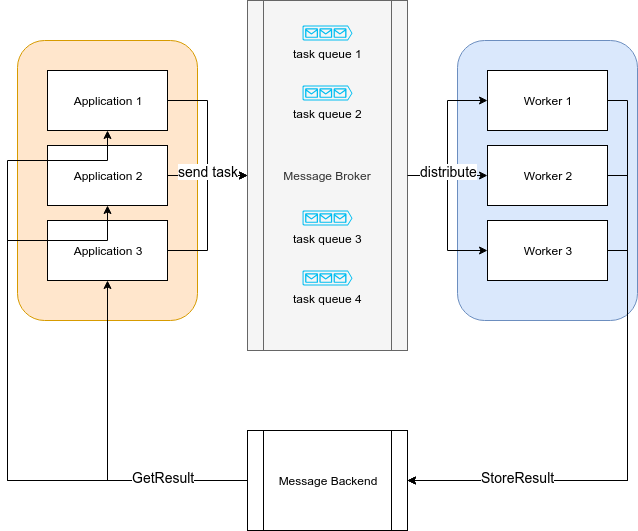
Applications, also called as "Producers", "Publishers" register logical blocks of code as "tasks".
Workers, also called "Consumers" consume these "task" and optionally store any results to a "message backend".
The broker (task queue) receives tasks encapsulated as messages from "producers" and routes them to "consumers".
But managing messages is not as simple as storing them in a data sotre as aqueue.
Suppose that a number of messages sent and dispatched by large number of producers and workers.
We have to consider below.
- Detecting poison messages
- Ensuring reliability of the messaging sysstem
- Scaling the messaging system
### Celery

[Celery](https://github.com/celery/celery) is a one of most famous task queue open source software. A Celery system can consist of multiple workers and brokers, giving way to high availability and horizontal scaling.
The features of celery is
- simple
- highly available
- fast
- flexible
Celery is written in Python, but the protocol can be implemneted in any languages. There's [gocelery](https://github.com/gocelery/gocelery) for Go and like gocelery, here's celery.node.
## Why celery.node?
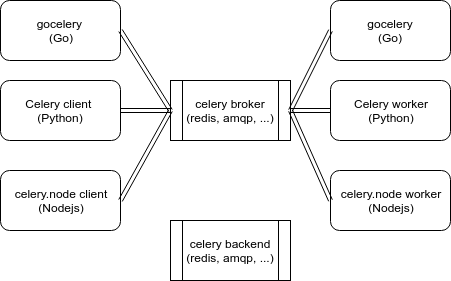
We usually make programs using different languages because of the specific features of each language and sometimes the programs should be communicated with each others by task-queueing, such as python web application with go worker or nodejs worker for better performance.
We can make the programs distribute the tasks to processes written in different languages super easily by using celery, gocelery, and celery.node.
Also, you can use celery.node as pure nodejs task queue.
### Protocol
[celery protocol reference](https://docs.celeryproject.org/en/latest/internals/protocol.html)
Celery.node now supports Celery Message Protocol Version 1 and Version 2.
```
client.conf.TASK_PROTOCOL = 1; // 1 or 2. default is 2.
```
```sh
$ npm install nodejs-celery
```
```javascript
const celery = require("nodejs-celery");
const client = celery.createClient("amqp://", "amqp://");
const task = client.createTask("tasks.add");
const result = task.applyAsync([1, 2]);
result.get().then((data) => {
console.log(data);
client.disconnect();
});
```
```python
from celery import Celery
app = Celery('tasks',
broker='amqp://',
backend='amqp://'
)
@app.task
def add(x, y):
return x + y
if __name__ == '__main__':
result = add.apply_async((1, 2), serializer='json')
print(result.get())
```
```javascript
const celery = require("nodejs-celery");
const worker = celery.createWorker("amqp://", "amqp://");
worker.register("tasks.add", (a, b) => a + b);
worker.start();
```
```python
from celery import Celery
app = Celery('tasks',
broker='amqp://',
backend='amqp://'
)
@app.task
def add(x, y):
return x + y
```
```shellscript
$ celery worker -A tasks --loglevel=INFO
```
Ensure you already installed nodejs, npm, and docker-compose
```sh
$ npm run dist
$ docker-compose -f examples/docker-compose.yml up -d rabbit
$ node examples/tutorial/client.js
$ node examples/tutorial/worker.js
$ docker-compose -f examples/docker-compose.yml down
```
Before contributing, please read [contributing.md](./contributing.md)
- MIT