node-sword-interface
Version:
Javascript (N-API) interface to SWORD library
135 lines (95 loc) • 5.45 kB
Markdown
# node-sword-interface
node-sword-interface is a [nodejs](https://nodejs.org) module that wraps the [SWORD library](http://www.crosswire.org/sword/)
which gives access to Bible text modules and related ressources. It has been created for use within the
[Ezra Bible App](https://github.com/ezra-bible-app/ezra-bible-app) Bible study software, but it can also be used
for any other nodejs-based software that needs to interface with the SWORD library. node-sword-interface supports
Bible modules and dictionary modules that are keyed with Strong's numbers. node-sword-interface works on Windows,
macOS, Linux and Android (via [nodejs-mobile](https://code.janeasystems.com/nodejs-mobile)).
The currently used SWORD version is SVN Rev. 3894 (1.9.x / sword trunk from November 2023).
## Features
node-sword-interface focusses on discovery, installation/removal and text loading of SWORD modules. It currently covers the following usecases:
- Update SWORD repository configuration
- List SWORD repositories
- List remote modules (Bible modules or dictionary modules)
- List local modules (Bible modules or dictionary modules)
- Get a list of updated modules
- Install a module
- Uninstall a module
- Get information about a module
- Get the text of a Bible book
- Get the text of the whole Bible
- Search within a Bible module
- Retrieve info based on Strong's number
## Example: Installing the KJV module
The following example can be executed (after building node-sword-interface) using the following command:
node examples/install_kjv.js
```javascript
const NodeSwordInterface = require('node-sword-interface');
var interface = new NodeSwordInterface();
async function installKJV() {
console.log("Updating repository configuration ...");
await interface.updateRepositoryConfig();
console.log("Installing King James module");
// Install the King James Version (Uses the internet connection to download and install the module)
await interface.installModule('KJV');
}
installKJV().then(() => {
console.log("Installation of KJV successfully completed!");
});
```
## Example: Printing module info and the Gospel of Matthew (KJV)
The following example can be executed (after building node-sword-interface) using the following command:
node examples/print_kjv_matthew.js
```javascript
const NodeSwordInterface = require('node-sword-interface');
var interface = new NodeSwordInterface();
function printKjvInfo() {
// Print some module information
var kjv = interface.getLocalModule('KJV');
console.log(kjv.description);
console.log(kjv.about);
}
function printMatthew() {
// Get the verses of the Gospel of Matthew
var verses = interface.getBookText('KJV', 'Mat');
// Do something with the verses
for (var i = 0; i < verses.length; i++) {
var currentVerse = verses[i];
var verseReference = currentVerse.chapter + ':' + currentVerse.verseNr;
console.log(verseReference + ' ' + currentVerse.content);
}
}
printKjvInfo();
printMatthew();
```
## API Docs
The Javascript API of node-sword-interface is documented [here](API.md).
## Installation
### Dependencies
Before installing node-sword-interface you need to make sure that the following dependencies are installed:
- C++11 compiler toolchain
- nodejs (A version that supports N-API version >= 4, like 8.16.0, 10.16.0 or 12.0.0 (see [N-API Version Matrix](https://nodejs.org/api/n-api.html#n_api_n_api_version_matrix)))
- Git
- Mac/Linux dependencies:
- CURL library with development headers
- CMake (for building the SWORD library)
Below you find the OS-specific instructions for installing the dependencies.
#### Install dependencies on Linux
These installation instructions are working on Debian/Ubuntu based Linux distributions.
To install the dependencies issue the following command on a Debian/Ubuntu based distribution:
sudo apt-get install build-essential nodejs npm libcurl4-gnutls-dev zlib1g-dev pkg-config cmake subversion
#### Install dependencies on macOS
1. Install XCode from the App Store
2. Install Command Line Developer Tools (contains Compiler toolchain, git, etc.) by running this command:<br/> `xcode-select --install`
3. Install the homebrew package manager by running this command:<br/> `/usr/bin/ruby -e "$(curl -fsSL https://raw.githubusercontent.com/Homebrew/install/master/install)"`
4. Install some packages with homebrew by running this command:<br/> `brew install pkg-config cmake npm`
#### Install dependencies on Windows
1. Install [git](https://git-scm.com/download/win).
2. Install [nodejs](https://nodejs.org). Important note: Ensure to install the *x86 version* (32-bit) of nodejs 14.x.
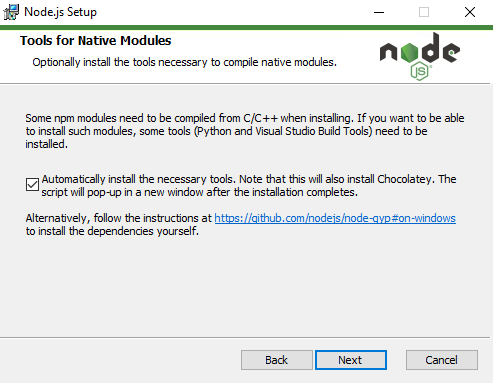
Furthermore, when the setup assistant asks about *Tools for native modules*, make sure to tick the checkbox *Automatically install the necessary tools*. This will then install the windows build tools required to build node-sword-interface.
### Install from npmjs
Once the dependencies are available you can install and build the latest node-sword-interface release from [npmjs.com](https://www.npmjs.com/package/node-sword-interface) by issuing the following command:
npm install node-sword-interface
On Windows, you need to add `--arch=ia32` at the end of the command:
npm install node-sword-interface --arch=ia32