node-resque
Version:
an opinionated implementation of resque in node
467 lines (370 loc) • 21.7 kB
Markdown
# node-resque
**Distributed delayed jobs in nodejs**. Resque is a background job system based on [Redis](http://redis.io) (version 2.0.0 and up required). It includes priority queues, plugins, locking, delayed jobs, and more! This project is a very opinionated but API-compatible with [Resque](https://github.com/resque/resque) and [Sidekiq](http://sidekiq.org/). We also implement some of the popular Resque plugins, including [resque-scheduler](https://github.com/resque/resque-scheduler) and [resque-retry](https://github.com/lantins/resque-retry)
[](https://npmjs.org/package/node-resque)
[](https://gitter.im/taskrabbit/node-resque?utm_source=badge&utm_medium=badge&utm_campaign=pr-badge&utm_content=badge) [](http://travis-ci.org/taskrabbit/node-resque)
## Usage
I learn best by examples:
```javascript
/////////////////////////
// REQUIRE THE PACKAGE //
/////////////////////////
var NR = require("node-resque");
///////////////////////////
// SET UP THE CONNECTION //
///////////////////////////
var connectionDetails = {
pkg: 'ioredis',
host: '127.0.0.1',
password: null,
port: 6379,
database: 0,
// namespace: 'resque',
// looping: true,
// options: {password: 'abc'},
};
//////////////////////////////
// DEFINE YOUR WORKER TASKS //
//////////////////////////////
var jobs = {
"add": {
plugins: [ 'jobLock', 'retry' ],
pluginOptions: {
jobLock: {},
retry: {
retryLimit: 3,
retryDelay: (1000 * 5),
}
},
perform: function(a,b,callback){
var answer = a + b;
callback(null, answer);
},
},
"subtract": {
perform: function(a,b,callback){
var answer = a - b;
callback(null, answer);
},
},
};
////////////////////
// START A WORKER //
////////////////////
var worker = new NR.worker({connection: connectionDetails, queues: ['math', 'otherQueue']}, jobs);
worker.connect(function(){
worker.workerCleanup(); // optional: cleanup any previous improperly shutdown workers on this host
worker.start();
});
///////////////////////
// START A SCHEDULER //
///////////////////////
var scheduler = new NR.scheduler({connection: connectionDetails});
scheduler.connect(function(){
scheduler.start();
});
/////////////////////////
// REGESTER FOR EVENTS //
/////////////////////////
worker.on('start', function(){ console.log("worker started"); });
worker.on('end', function(){ console.log("worker ended"); });
worker.on('cleaning_worker', function(worker, pid){ console.log("cleaning old worker " + worker); });
worker.on('poll', function(queue){ console.log("worker polling " + queue); });
worker.on('job', function(queue, job){ console.log("working job " + queue + " " + JSON.stringify(job)); });
worker.on('reEnqueue', function(queue, job, plugin){ console.log("reEnqueue job (" + plugin + ") " + queue + " " + JSON.stringify(job)); });
worker.on('success', function(queue, job, result){ console.log("job success " + queue + " " + JSON.stringify(job) + " >> " + result); });
worker.on('failure', function(queue, job, failure){ console.log("job failure " + queue + " " + JSON.stringify(job) + " >> " + failure); });
worker.on('error', function(queue, job, error){ console.log("error " + queue + " " + JSON.stringify(job) + " >> " + error); });
worker.on('pause', function(){ console.log("worker paused"); });
scheduler.on('start', function(){ console.log("scheduler started"); });
scheduler.on('end', function(){ console.log("scheduler ended"); });
scheduler.on('poll', function(){ console.log("scheduler polling"); });
scheduler.on('master', function(state){ console.log("scheduler became master"); });
scheduler.on('error', function(error){ console.log("scheduler error >> " + error); });
scheduler.on('working_timestamp', function(timestamp){ console.log("scheduler working timestamp " + timestamp); });
scheduler.on('transferred_job', function(timestamp, job){ console.log("scheduler enquing job " + timestamp + " >> " + JSON.stringify(job)); });
////////////////////////
// CONNECT TO A QUEUE //
////////////////////////
var queue = new NR.queue({connection: connectionDetails}, jobs);
queue.on('error', function(error){ console.log(error); });
queue.connect(function(){
queue.enqueue('math', "add", [1,2]);
queue.enqueue('math', "add", [1,2]);
queue.enqueue('math', "add", [2,3]);
queue.enqueueIn(3000, 'math', "subtract", [2,1]);
});
```
## Configuration Options:
`new queue` requires only the "queue" variable to be set. You can also pass the `jobs` hash to it.
`new worker` has some additonal options:
```javascript
options = {
looping: true,
timeout: 5000,
queues: "*",
name: os.hostname() + ":" + process.pid
}
```
The configuration hash passed to `new worker`, `new scheduler` or `new queue` can also take a `connection` option.
```javascript
var connectionDetails = {
pkg: "ioredis",
host: "127.0.0.1",
password: "",
port: 6379,
database: 0,
namespace: "resque",
}
var worker = new NR.worker({connection: connectionDetails, queues: 'math'}, jobs);
worker.on('error', function(){
// handler errors
});
worker.connect(function(){
worker.start();
});
```
You can also pass redis client directly.
```javascript
// assume you already initialize redis client before
var redisClient = new Redis();
var connectionDetails = { redis: redisClient }
var worker = new NR.worker({connection: connectionDetails, queues: 'math'}, jobs);
worker.on('error', function(){
// handler errors
});
worker.connect(function(){
worker.start();
});
```
## Notes
- Be sure to call `worker.end()`, `queue.end()` and `scheduler.end()` before shutting down your application if you want to properly clear your worker status from resque
- When ending your application, be sure to allow your workers time to finish what they are working on
- This project implements the "scheduler" part of rescue-scheduler (the daemon which can promote enqueued delayed jobs into the work queues when it is time), but not the CRON scheduler proxy. To learn more about how to use a CRON-like scheduler, read the [Job Schedules](#job-schedules) section of this document.
- If you are using any plugins which effect `beforeEnqueue` or `afterEnqueue`, be sure to pass the `jobs` argument to the `new Queue` constructor
- If a job fails, it will be added to a special `failed` queue. You can then inspect these jobs, write a plugin to manage them, move them back to the normal queues, etc. Failure behavior by default is just to enter the `failed` queue, but there are many options. Check out these examples from the ruby ecosystem for inspiration:
- https://github.com/lantins/resque-retry
- https://github.com/resque/resque/wiki/Failure-Backends
- If you plan to run more than one worker per nodejs process, be sure to name them something distinct. Names **must** follow the pattern `hostname:pid+unique_id`. For example:
```javascript
var name = os.hostname() + ":" + process.pid + "+" + counter;
var worker = new NR.worker({connection: connectionDetails, queues: 'math', 'name' : name}, jobs);
```
### worker#performInline
**DO NOT USE THIS IN PRODUCTION**. In tests or special cases, you may want to process/work a job in-line. To do so, you can use `worker.performInline(jobName, arguments, callback)`. If you are planning on running a job via #performInline, this worker should also not be started, nor should be using event emitters to monitor this worker. This method will also not write to redis at all, including logging errors, modify resque's stats, etc.
## Queue Management
Additional methods provided on the `queue` object:
- **queue.stats** = function(callback)
- callback(error, stats_from_your_cluster)
- **queue.queues** = function(callback)
- callback(error, array_of_queues)
- **queue.delQueue** = function(q, callback)
- callback(error)
- **queue.queued** = function(q, start, stop, callback)
- callback(error, jobs_in_queue)
- **queue.length** = function(q, callback)
- callback(error, number_of_elements_in_queue)
- **queue.locks** = function(callback)
- callback(error, list_of_locks)
- **queue.delLock** = function(lockName, callback)
- callback(error, number_of_items_deleted)
- **queue.del** = function(q, func, args, count, callback)
- callback(error, number_of_items_deleted)
- **queue.delDelayed** = function(q, func, args, callback)
- callback(error, timestamps_the_job_was_removed_from)
- **queue.scheduledAt** = function(q, func, args, callback)
- callback(error, timestamps_the_job_is_scheduled_for)
## Delayed Status
- **queue.timestamps** = function(callback)
- callback(error, timestamps)
- **queue.delayedAt** = function(timestamp, callback)
- callback(error, jobs_enqueued_at_this_timestamp)
- **queue.allDelayed** = function(timestamp)
- callback(error, jobsHash)
- jobsHash is an object with its keys being timestamps, and the vales are arrays of jobs at each time.
- note that this operation can be very slow and very ram-heavy
## Worker Status
You can use the queue object to check on your workers:
- **queue.workers** = function(callback)`
- returns: `{ 'host:pid': 'queue1, queue2', 'host:pid': 'queue1, queue2' }`
- **queue.workingOn** = function(workerName, queues, callback)`
- returns: `{"run_at":"Fri Dec 12 2014 14:01:16 GMT-0800 (PST)","queue":"test_queue","payload":{"class":"slowJob","queue":"test_queue","args":[null]},"worker":"workerA"}`
- **queue.allWorkingOn** = function(callback)`
- returns a hash of the results of `queue.workingOn` with the worker names as keys.
## Failed Job Management
From time to time, your jobs/workers may fail. Resque workers will move failed jobs to a special `failed` queue which will store the original arguments of your job, the failing stack trace, and additional metadata.
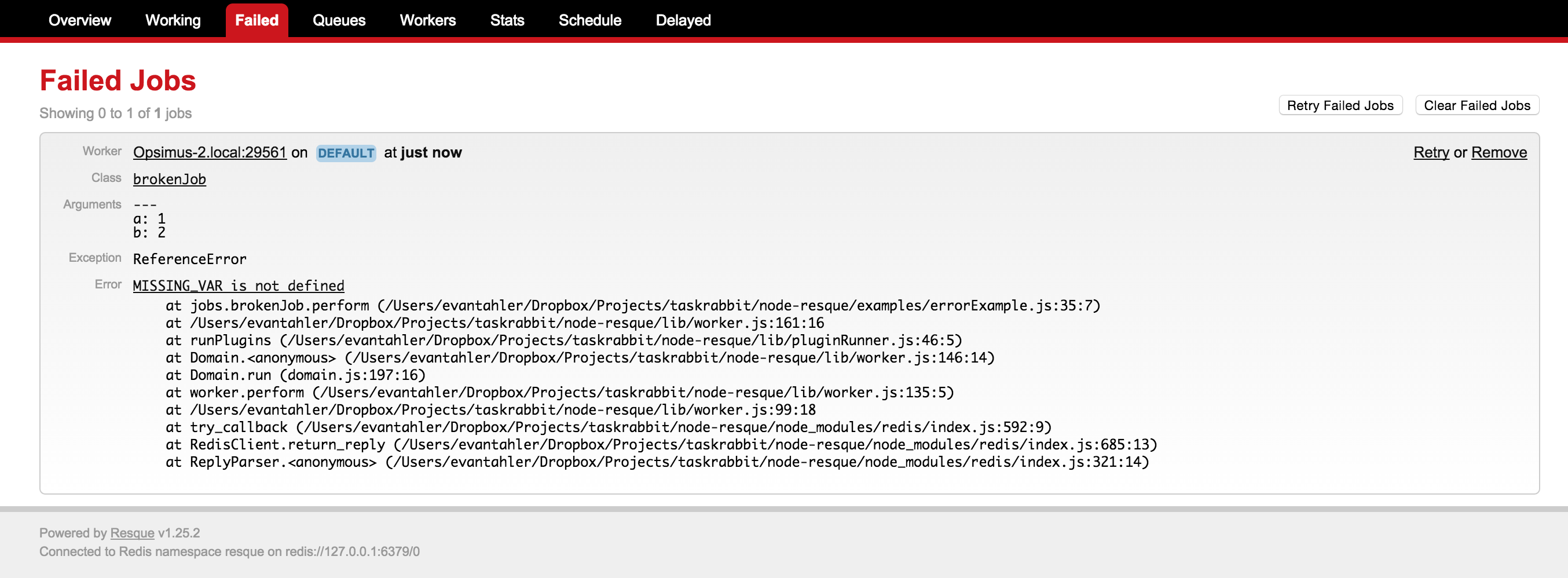
You can work with these failed jobs with the following methods:
- **queue.failedCount** = function(callback)
- callback(error, failedCount)
- `failedCount` is the number of jobs in the failed queue
- **queue.failed** = function(start, stop, callback)
- callback(error, failedJobs)
- `failedJobs` is an array listing the data of the failed jobs. Each element looks like:
```javascript
{ worker: 'busted-worker-3',
queue: 'busted-queue',
payload: { class: 'busted_job', queue: 'busted-queue', args: [ 1, 2, 3 ] },
exception: 'ERROR_NAME',
error: 'I broke',
failed_at: 'Sun Apr 26 2015 14:00:44 GMT+0100 (BST)' }
```
- **queue.removeFailed** = function(failedJob, callback)
- callback(error)
- the input `failedJob` is an expanded node object representing the failed job, retrieved via `queue.failed`
- **queue.retryAndRemoveFailed** = function(failedJob, callback)
- callback(error)
- the input `failedJob` is an expanded node object representing the failed job, retrieved via `queue.failed`
- this method will instantly re-enqueue a failed job back to its original queue, and delete the failed entry for that job
## Failed Worker Management
Sometimes a worker crashes is a *severe* way, and it doesn't get the time/chance to notify redis that it is leaving the pool (this happens all the time on PAAS providers like Heroku). When this happens, you will not only need to extract the job from the now-zombie worker's "working on" status, but also remove the stuck worker. To aid you in these edge cases, ``queue.cleanOldWorkers(age, callback)` is available.
Because there are no 'heartbeats' in resque, it is imposable for the application to know if a worker has been working on a long job or it is dead. You are required to provide an "age" for how long a worker has been "working", and all those older than that age will be removed, and the job they are working on moved to the error queue (where you can then use `queue.retryAndRemoveFailed`) to re-enqueue the job.
If you know the name of a worker that should be removed, you can also call `queue.forceCleanWorker(workerName, callback)` directly, and that will also remove the worker and move any job it was working on into the error queue.
## Job Schedules
You may want to use node-resque to schedule jobs every minute/hour/day, like a distributed CRON system. There are a number of excellent node packages to help you with this, like [node-schedule](https://github.com/tejasmanohar/node-schedule) and [node-cron](https://github.com/ncb000gt/node-cron). Node-resque makes it possible for you to use the package of your choice to schedule jobs with.
Assuming you are running node-resque across multiple machines, you will need to ensure that only one of your processes is actually scheduling the jobs. To help you with this, you can inspect which of the scheduler processes is currently acting as master, and flag only the master scheduler process to run the schedule. A full example can be found at [/examples/scheduledJobs.js](https://github.com/taskrabbit/node-resque/blob/master/examples/scheduledJobs.js), but the relevant section is:
``` javascript
var schedule = require('node-schedule');
var scheduler = new NR.scheduler({connection: connectionDetails});
scheduler.connect(function(){
scheduler.start();
});
var queue = new NR.queue({connection: connectionDetails}, jobs, function(){
schedule.scheduleJob('10,20,30,40,50 * * * * *', function(){ // do this job every 10 seconds, CRON style
// we want to ensure that only one instance of this job is scheduled in our environment at once,
// no matter how many schedulers we have running
if(scheduler.master){
console.log(">>> enquing a job");
queue.enqueue('time', "ticktock", new Date().toString() );
}
});
});
```
## Plugins
Just like ruby's resque, you can write worker plugins. They look look like this. The 4 hooks you have are `before_enqueue`, `after_enqueue`, `before_perform`, and `after_perform`
```javascript
var myPlugin = function(worker, func, queue, job, args, options){
var self = this;
self.name = 'myPlugin';
self.worker = worker;
self.queue = queue;
self.func = func;
self.job = job;
self.args = args;
self.options = options;
if(self.worker.queueObject){
self.queueObject = self.worker.queueObject;
}else{
self.queueObject = self.worker;
}
}
////////////////////
// PLUGIN METHODS //
////////////////////
myPlugin.prototype.before_enqueue = function(callback){
// console.log("** before_enqueue")
callback(null, true);
}
myPlugin.prototype.after_enqueue = function(callback){
// console.log("** after_enqueue")
callback(null, true);
}
myPlugin.prototype.before_perform = function(callback){
// console.log("** before_perform")
callback(null, true);
}
myPlugin.prototype.after_perform = function(callback){
// console.log("** after_perform")
callback(null, true);
}
```
And then your plugin can be invoked within a job like this:
```javascript
var jobs = {
"add": {
plugins: [ 'myPlugin' ],
pluginOptions: {
myPlugin: { thing: 'stuff' },
},
perform: function(a,b,callback){
var answer = a + b;
callback(null, answer);
},
},
}
```
**notes**
- All plugins which return `(error, toRun)`. if `toRun = false` on `beforeEnqueue`, the job begin enqueued will be thrown away, and if `toRun = false` on `beforePerfporm`, the job will be reEnqued and not run at this time. However, it doesn't really matter what `toRun` returns on the `after` hooks.
- If you are writing a plugin to deal with errors which may occur during your resque job, you can inspect and modify `worker.error` in your plugin. If `worker.error` is null, no error will be logged in the resque error queue.
- There are a few included plugins, all in the lib/plugins/* directory. You can rewrite you own and include it like this:
```javascript
var jobs = {
"add": {
plugins: [ require('myplugin') ],
pluginOptions: {
myPlugin: { thing: 'stuff' },
},
perform: function(a,b,callback){
var answer = a + b;
callback(null, answer);
},
},
}
```
The plugins which are included with this package are:
- `delayQueueLock`
- If a job with the same name, queue, and args is already in the delayed queue(s), do not enqueue it again
- `jobLock`
- If a job with the same name, queue, and args is already running, put this job back in the queue and try later
- `queueLock`
- If a job with the same name, queue, and args is already in the queue, do not enqueue it again
- `retry`
- If a job fails, retry it N times before finally placing it into the failed queue
## Multi Worker
node-resque provides a wrapper around the `worker` object which will auto-scale the number of resque workers. This will process more than one job at a time as long as there is idle CPU within the event loop. For example, if you have a slow job that sends email via SMTP (with low rendering overhead), we can process many jobs at a time, but if you have a math-heavy operation, we'll stick to 1. The `multiWorker` handles this by spawning more and more node-resque workers and managing the pool.
```javascript
var NR = require(__dirname + "/../index.js");
var connectionDetails = {
pkg: "ioredis",
host: "127.0.0.1",
password: ""
}
var multiWorker = new NR.multiWorker({
connection: connectionDetails,
queues: ['slowQueue'],
minTaskProcessors: 1,
maxTaskProcessors: 100,
checkTimeout: 1000,
maxEventLoopDelay: 10,
toDisconnectProcessors: true,
}, jobs);
// normal worker emitters
multiWorker.on('start', function(workerId){ console.log("worker["+workerId+"] started"); })
multiWorker.on('end', function(workerId){ console.log("worker["+workerId+"] ended"); })
multiWorker.on('cleaning_worker', function(workerId, worker, pid){ console.log("cleaning old worker " + worker); })
multiWorker.on('poll', function(workerId, queue){ console.log("worker["+workerId+"] polling " + queue); })
multiWorker.on('job', function(workerId, queue, job){ console.log("worker["+workerId+"] working job " + queue + " " + JSON.stringify(job)); })
multiWorker.on('reEnqueue', function(workerId, queue, job, plugin){ console.log("worker["+workerId+"] reEnqueue job (" + plugin + ") " + queue + " " + JSON.stringify(job)); })
multiWorker.on('success', function(workerId, queue, job, result){ console.log("worker["+workerId+"] job success " + queue + " " + JSON.stringify(job) + " >> " + result); })
multiWorker.on('failure', function(workerId, queue, job, failure){ console.log("worker["+workerId+"] job failure " + queue + " " + JSON.stringify(job) + " >> " + failure); })
multiWorker.on('error', function(workerId, queue, job, error){ console.log("worker["+workerId+"] error " + queue + " " + JSON.stringify(job) + " >> " + error); })
multiWorker.on('pause', function(workerId){ console.log("worker["+workerId+"] paused"); })
// multiWorker emitters
multiWorker.on('internalError', function(error){ console.log(error); })
multiWorker.on('multiWorkerAction', function(verb, delay){ console.log("*** checked for worker status: " + verb + " (event loop delay: " + delay + "ms)"); });
multiWorker.start();
```
### MultiWorker Options
The Options available for the multiWorker are:
- `connection`: The redis configuration options (same as worker)
- `queues`: Array of ordred queue names (or `*`) (same as worker)
- `minTaskProcessors`: The minimum number of workers to spawn under this multiWorker, even if there is no work to do. You need at least one, or no work will ever be processed or checked
- `maxTaskProcessors`: The maximum number of workers to spawn under this multiWorker, even if the queues are long and there is available CPU (the event loop isn't entierly blocked) to this node process.
- `checkTimeout`: How often to check if the event loop is blocked (in ms) (for adding or removing multiWorker children),
- `maxEventLoopDelay`: How long the event loop has to be delayed before considering it blocked (in ms),
- `toDisconnectProcessors`: If false, all multiWorker children will share a single redis connection. If false, each child will connect and disconnect seperatly. This will lead to more redis connections, but faster retrival of events.
## Presentation
This package was featured heavily in [this presentation I gave](https://blog.evantahler.com/background-tasks-in-node-js-a-survey-with-redis-971d3575d9d2#.rzph5ofgy) about background jobs + node.js. It contains more examples!
## Acknowledgments
- Most of this code was inspired by / stolen from [coffee-resque](https://npmjs.org/package/coffee-resque) and [coffee-resque-scheduler](https://github.com/leeadkins/coffee-resque-scheduler). Thanks!
- This Resque package aims to be fully compatible with [Ruby's Resque](https://github.com/resque/resque) and implamentations of [Resque Scheduler](https://github.com/resque/resque-scheduler). Other packages from other langauges may conflict.
- If you are looking for a UI to manage your Resque instances in nodejs, check out [ActionHero's Resque UI](https://github.com/evantahler/ah-resque-ui)