node-resque
Version:
an opinionated implementation of resque in node
361 lines (287 loc) • 14.6 kB
Markdown
# node-resque
Delayed Tasks in nodejs. A very opinionated but compatible API with [resque](https://github.com/resque/resque) and [resque scheduler](https://github.com/resque/resque-scheduler)
[](https://npmjs.org/package/node-resque)
[](http://travis-ci.org/taskrabbit/node-resque)
## Usage
I learn best by examples:
```javascript
/////////////////////////
// REQUIRE THE PACKAGE //
/////////////////////////
var NR = require("node-resque");
///////////////////////////
// SET UP THE CONNECTION //
///////////////////////////
var connectionDetails = {
host: "127.0.0.1",
password: "",
port: 6379,
database: 0,
}
//////////////////////////////
// DEFINE YOUR WORKER TASKS //
//////////////////////////////
var jobs = {
"add": {
perform: function(a,b,callback){
var answer = a + b;
callback(null, answer);
},
},
"subtract": {
perform: function(a,b,callback){
var answer = a - b;
callback(null, answer);
},
},
"multiply": function(a,b,callback) {
callback(null, a * b);
},
};
////////////////////
// START A WORKER //
////////////////////
var worker = new NR.worker({connection: connectionDetails, queues: ['math']}, jobs, function(){
worker.workerCleanup(); // optional: cleanup any previous improperly shutdown workers on this host
worker.start();
});
///////////////////////
// START A SCHEDULER //
///////////////////////
var scheduler = new NR.scheduler({connection: connectionDetails}, function(){
scheduler.start();
});
/////////////////////////
// REGISTER FOR EVENTS //
/////////////////////////
worker.on('start', function(){ console.log("worker started"); })
worker.on('end', function(){ console.log("worker ended"); })
worker.on('cleaning_worker', function(worker, pid){ console.log("cleaning old worker " + worker); })
worker.on('poll', function(queue){ console.log("worker polling " + queue); })
worker.on('job', function(queue, job){ console.log("working job " + queue + " " + JSON.stringify(job)); })
worker.on('reEnqueue', function(queue, job, plugin){ console.log("reEnqueue job (" + plugin + ") " + queue + " " + JSON.stringify(job)); })
worker.on('success', function(queue, job, result){ console.log("job success " + queue + " " + JSON.stringify(job) + " >> " + result); })
worker.on('failure', function(queue, job, failure){ console.log("job failure " + queue + " " + JSON.stringify(job) + " >> " + failure); })
worker.on('error', function(queue, job, error){ console.log("error " + queue + " " + JSON.stringify(job) + " >> " + error); })
worker.on('pause', function(){ console.log("worker paused"); })
scheduler.on('start', function(){ console.log("scheduler started"); })
scheduler.on('end', function(){ console.log("scheduler ended"); })
scheduler.on('error', function(error){ console.log("scheduler error >> " + error); })
scheduler.on('poll', function(){ console.log("scheduler polling"); })
scheduler.on('working_timestamp', function(timestamp){ console.log("scheduler working timestamp " + timestamp); })
scheduler.on('transferred_job', function(timestamp, job){ console.log("scheduler enquing job " + timestamp + " >> " + JSON.stringify(job)); })
////////////////////////
// CONNECT TO A QUEUE //
////////////////////////
var queue = new NR.queue({connection: connectionDetails}, jobs, function(){
queue.enqueue('math', "add", [1,2]);
queue.enqueue('math', "add", [2,3]);
queue.enqueueIn(3000, 'math', "subtract", [2,1]);
});
```
## Configuration Options:
`new queue` requires only the "queue" variable to be set. You can also pass the `jobs` hash to it.
`new worker` has some additonal options:
```javascript
options = {
looping: true,
timeout: 5000,
queues: "*",
name: os.hostname() + ":" + process.pid
}
```
The configuration hash passed to `new worker`, `new scheduler` or `new queue` can also take a `connection` option.
```javascript
var connectionDetails = {
package: "redis",
host: "127.0.0.1",
password: "",
port: 6379,
database: 0,
namespace: "resque",
}
var worker = new NR.worker({connection: connectionDetails, queues: 'math'}, jobs, function(){
worker.start();
});
```
You can also pass redis client directly.
```javascript
// assume you already initialize redis client before
var connectionDetails = { redis: redisClient }
var worker = new NR.worker({connection: connectionDetails, queues: 'math'}, jobs, function(){
worker.start();
});
```
## Notes
- Be sure to call `worker.end()` before shutting down your application if you want to properly clear your worker status from resque
- When ending your application, be sure to allow your workers time to finish what they are working on
- If you are using any plugins which effect `beforeEnqueue` or `afterEnqueue`, be sure to pass the `jobs` argument to the `new Queue` constructor
- If a job fails, it will be added to a special `failed` queue. You can then inspect these jobs, write a plugin to manage them, move them back to the normal queues, etc. Failure behavior by default is just to enter the `failed` queue, but there are many options. Check out these examples from the ruby ecosystem for insperation:
- https://github.com/lantins/resque-retry
- https://github.com/resque/resque/wiki/Failure-Backends
- If you plan to run more than one worker per nodejs process, be sure to name them something distinct. Names **must** follow the patern `hostname:pid+unique_id`. For example:
```javascript
var name = os.hostname() + ":" + process.pid + "+" + counter;
var worker = new NR.worker({connection: connectionDetails, queues: 'math', 'name' : name}, jobs);
```
## Queue Managment
Additonal methods provided on the `queue` object:
- **queue.prototype.queues** = function(callback)
- callback(error, array_of_queues)
- **queue.prototype.delQueue** = function(q, callback)
- callback(error)
- **queue.prototype.length** = function(q, callback)
- callback(error, number_of_elements_in_queue)
- **queue.prototype.del** = function(q, func, args, count, callback)
- callback(error, number_of_items_deleted)
- **queue.prototype.delDelayed** = function(q, func, args, callback)
- callback(error, timestamps_the_job_was_removed_from)
- **queue.prototype.scheduledAt** = function(q, func, args, callback)
- callback(error, timestamps_the_job_is_scheduled_for)
## Delayed Status
- **queue.timestamps** = function(callback)
- callback(error, timestamps)
- **queue.delayedAt** = function(timestamp, callback)
- callback(error, jobs_enqueued_at_this_timestamp)
- **queue.allDelayed** = function(timestamp)
- callback(error, jobsHash)
- jobsHash is an object with its keys being timestamps, and the vales are arrays of jobs at each time.
- note that this operation can be very slow and very ram-heavy
## Worker Status
You can use the queue object to check on your wokrers:
- **queue.workers** = function(callback)`
- returns: `{ 'host:pid': 'queue1, queue2', 'host:pid': 'queue1, queue2' }`
- **queue.workingOn** = function(workerName, queues, callback)`
- returns: `{"run_at":"Fri Dec 12 2014 14:01:16 GMT-0800 (PST)","queue":"test_queue","payload":{"class":"slowJob","queue":"test_queue","args":[null]},"worker":"workerA"}`
- **queue.allWorkingOn** = function(callback)`
- returns a hash of the results of `queue.workingOn` with the worker names as keys.
## Failed Job Managment
From time to time, your jobs/workers may fail. Resque workers will move failed jobs to a special `failed` queue which will store the original arguments of your job, the failing stack trace, and additional medatadata.
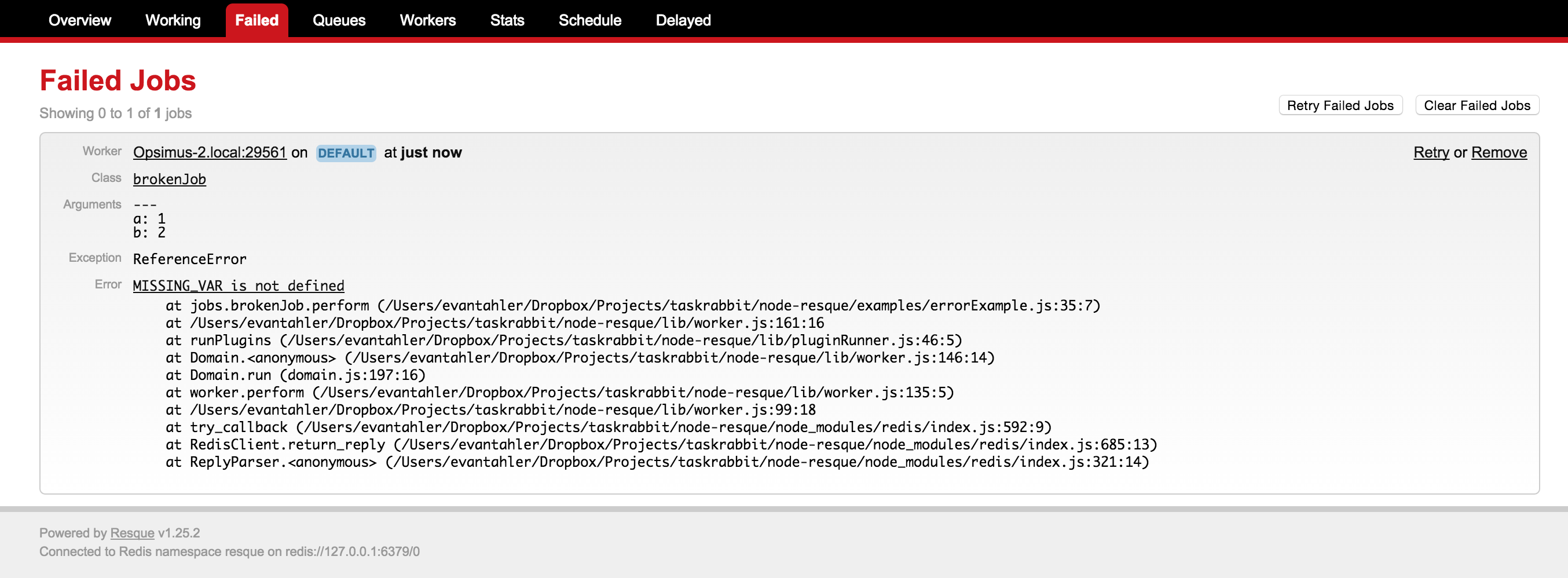
You can work with these failed jobs with the following methods:
- **queue.failedCount** = function(callback)
- callback(error, failedCount)
- `failedCount` is the number of jobs in the failed queue
- **queue.failed** = function(start, stop, callback)
- callback(error, failedJobs)
- `failedJobs` is an array listing the data of the failed jobs. Each element looks like:
```javascript
{ worker: 'busted-worker-3',
queue: 'busted-queue',
payload: { class: 'busted_job', queue: 'busted-queue', args: [ 1, 2, 3 ] },
exception: 'ERROR_NAME',
error: 'I broke',
failed_at: 'Sun Apr 26 2015 14:00:44 GMT+0100 (BST)' }
```
- **queue.removeFailed** = function(failedJob, callback)
- callback(error)
- the input `failedJob` is an expanded node object representing the failed job, retrieved via `queue.failed`
- **queue.retryAndRemoveFailed** = function(failedJob, callback)
- callback(error)
- the input `failedJob` is an expanded node object representing the failed job, retrieved via `queue.failed`
- this method will instantly re-enqueue a failed job back to its original queue, and delete the failed entry for that job
## Plugins
Just like ruby's resque, you can write worker plugins. They look look like this. The 4 hooks you have are `before_enqueue`, `after_enqueue`, `before_perform`, and `after_perform`
```javascript
var myPlugin = function(worker, func, queue, job, args, options){
var self = this;
self.name = 'myPlugin';
self.worker = worker;
self.queue = queue;
self.func = func;
self.job = job;
self.args = args;
self.options = options;
}
////////////////////
// PLUGIN METHODS //
////////////////////
myPlugin.prototype.before_enqueue = function(callback){
// console.log("** before_enqueue")
callback(null, true);
}
myPlugin.prototype.after_enqueue = function(callback){
// console.log("** after_enqueue")
callback(null, true);
}
myPlugin.prototype.before_perform = function(callback){
// console.log("** before_perform")
callback(null, true);
}
myPlugin.prototype.after_perform = function(callback){
// console.log("** after_perform")
callback(null, true);
}
```
And then your plugin can be invoked within a job like this:
```javascript
var jobs = {
"add": {
plugins: [ 'myPlugin' ],
pluginOptions: {
myPlugin: { thing: 'stuff' },
},
perform: function(a,b,callback){
var answer = a + b;
callback(null, answer);
},
},
}
```
**notes**
- All plugins which return `(error, toRun)`. if `toRun = false` on `beforeEnqueue`, the job beign inqueued will be thrown away, and if `toRun = false` on `beforePerfporm`, the job will be reEnqued and not run at this time. However, it doesn't really matter what `toRun` returns on the `after` hooks.
- If you are writing a plugin to deal with errors which may occur during your resque job, you can inspect and modify `worker.error` in your plugin. If `worker.error` is null, no error will be logged in the resque error queue.
- There are a few included plugins, all in the lib/plugins/* directory. You can rewrite you own and include it like this:
```javascript
var jobs = {
"add": {
plugins: [ require('myplugin') ],
pluginOptions: {
myPlugin: { thing: 'stuff' },
},
perform: function(a,b,callback){
var answer = a + b;
callback(null, answer);
},
},
}
```
## Multi Worker
node-resque provides a wrapper around the `worker` object which will auto-scale the number of resque workers. This will process more than one job at a time as long as there is idle CPU within the event loop. For example, if you have a slow job that sends email via SMTP (with low rendering overhead), we can process many jobs at a time, but if you have a math-heavy operation, we'll stick to 1. The `multiWorker` handles this by spawngning more and more node-resque workers and managing the pool.
```javascript
var NR = require(__dirname + "/../index.js");
var connectionDetails = {
package: "redis",
host: "127.0.0.1",
password: ""
}
var multiWorker = new NR.multiWorker({
connection: connectionDetails,
queues: ['slowQueue'],
minTaskProcessors: 1,
maxTaskProcessors: 100,
checkTimeout: 1000,
maxEventLoopDelay: 10,
toDisconnectProcessors: true,
}, jobs, function(){
// normal worker emitters
multiWorker.on('start', function(workerId){ console.log("worker["+workerId+"] started"); })
multiWorker.on('end', function(workerId){ console.log("worker["+workerId+"] ended"); })
multiWorker.on('cleaning_worker', function(workerId, worker, pid){ console.log("cleaning old worker " + worker); })
multiWorker.on('poll', function(workerId, queue){ console.log("worker["+workerId+"] polling " + queue); })
multiWorker.on('job', function(workerId, queue, job){ console.log("worker["+workerId+"] working job " + queue + " " + JSON.stringify(job)); })
multiWorker.on('reEnqueue', function(workerId, queue, job, plugin){ console.log("worker["+workerId+"] reEnqueue job (" + plugin + ") " + queue + " " + JSON.stringify(job)); })
multiWorker.on('success', function(workerId, queue, job, result){ console.log("worker["+workerId+"] job success " + queue + " " + JSON.stringify(job) + " >> " + result); })
multiWorker.on('failure', function(workerId, queue, job, failure){ console.log("worker["+workerId+"] job failure " + queue + " " + JSON.stringify(job) + " >> " + failure); })
multiWorker.on('error', function(workerId, queue, job, error){ console.log("worker["+workerId+"] error " + queue + " " + JSON.stringify(job) + " >> " + error); })
multiWorker.on('pause', function(workerId){ console.log("worker["+workerId+"] paused"); })
// multiWorker emitters
multiWorker.on('internalError', function(error){ console.log(error); })
multiWorker.on('multiWorkerAction', function(verb, delay){ console.log("*** checked for worker status: " + verb + " (event loop delay: " + delay + "ms)"); })
multiWorker.start();
});
```
## Presentation
This package was featued heavily in [this presentation I gave](http://blog.evantahler.com/blog/background-tasks-for-node.html) about background jobs + node.js. It contains more examples!
## Acknowledgments
Most of this code was inspired by / stolen from [coffee-resque](https://npmjs.org/package/coffee-resque) and [coffee-resque-scheduler](https://github.com/leeadkins/coffee-resque-scheduler). Thanks!